
ChatGPT: Is It Free, What Each Plan Costs and Who Gets GPT-6 Astra
OpenAI · 18 min read
- Free with limits
- Personal assistant
- Web · Android · iOS · Windows · Mac
- Free $0 GPT-6 Luna · no account needed
- Go $8/mo Free with more room · may show ads
Checked on · before tax
Open ChatGPT
My verdict
In IT since 2002: systems, engineering, web development and SEO. I have been doing business with AI since February 2023, when ChatGPT could first be bought in Spain.
Yes, ChatGPT is free, and you don't even need an account to start: I typed a question on chatgpt.com without signing in and got a sourced answer. Since OpenAI's October update, the free plan runs on GPT-6 Luna, so GPT-6 is free too. For everyday questions, that may be all you need. You pay when you want more: Go at $8 a month gives you more room on the same model (and may show you ads), Plus at $20 moves you up to GPT-6 Sol and adds GPT-6 Astra in ChatGPT Work and Codex, and Pro starts at $100 for people who live in it all day. If you're unsure, stay on Free for a week, then decide whether you need more room (Go) or a stronger model (Plus).
What is ChatGPT
- Company
- OpenAI
- Type
- Personal assistant
- Platforms
- Web · Android · iOS · Windows · Mac
- Free plan
- Free with limits
- Updated on
- Oct 23, 2026
ChatGPT is OpenAI's AI assistant: you type (or talk), it answers, writes and searches the web, and since October it runs on GPT-6 models on every plan. Is ChatGPT free? Yes. The free plan gives you unlimited text chats with GPT-6 Luna, subject to abuse guardrails, and you can even start without an account. Paying starts at $8 a month for Go, which may show ads and stays on the same GPT-6 Luna. Plus ($20 a month) moves you up to GPT-6 Sol, and Pro ($100, $200 or $500 a month, depending on the usage tier) adds Pro reasoning with GPT-6 Astra, OpenAI's top model, right in the chat. For teams, Business starts at $20 per user a month billed yearly. All prices are for the US, in dollars and before sales tax.
How much is ChatGPT? The short version (Tip)
$0 if you just want answers: Free covers everyday chats, even without an account. $8 (Go) if the free limits on uploads, images and voice get in your way. $20 (Plus) if you want the stronger GPT-6 Sol model; if you pay, this is the plan I'd look at first. $100 and up (Pro) only if you live in ChatGPT all day and Plus keeps stopping you.
Here's what the free version did for me without an account, what each plan really adds, and which GPT-6 you actually get on each one.
ChatGPT pricing in 2026, plan by plan
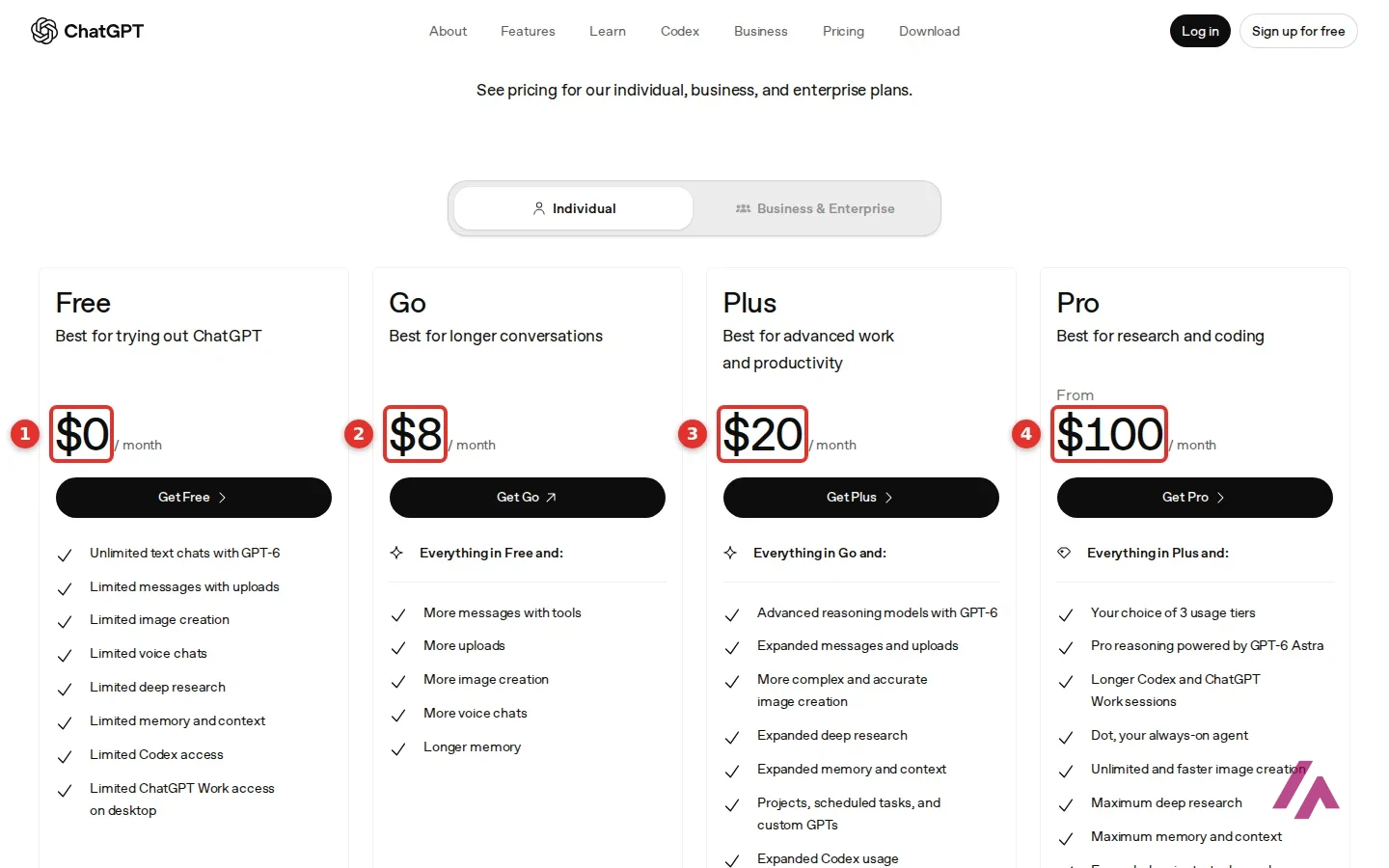
OpenAI sells 4 plans for individuals and 2 for companies. Here they are side by side, with what actually separates them:
| Plan | Price (US, before tax) | GPT-6 models | What it adds |
|---|---|---|---|
| Free | $0 | GPT-6 Luna | Unlimited text chats; limited uploads, images, voice, deep research and memory |
| Go | $8 a month | GPT-6 Luna | More tool messages, uploads, images and voice chats; longer memory; may include ads |
| Plus | $20 a month | GPT-6 Sol in chat; Astra in Work and Codex (limits apply) | More thinking in chat; expanded deep research; Projects, scheduled tasks and custom GPTs; ChatGPT Work on desktop, web and mobile |
| Pro | $100, $200 or $500 a month | Expanded, plus Pro reasoning with Astra in chat | A choice of 3 usage tiers, longer Codex and Work sessions, unlimited and faster image creation |
| Business | Standard seat: $20 per user a month billed yearly, $25 billed monthly. Premium seat: $100 per user a month billed yearly, $125 billed monthly | Flexible | For teams of 2 to 200: mix Standard and Premium seats, connectors to tools like Google Workspace, Slack, GitHub and Microsoft 365, SSO, no training on your business data by default |
| Enterprise | Custom pricing | Flexible | Longer context, enterprise security controls, data residency in 10 regions, volume discounts |
"Unlimited" on these plans always comes with an asterisk: the page says unlimited is "subject to abuse guardrails." The FAQ adds that Go and Plus are billed monthly, Enterprise yearly, and Business either way.
These prices don't include tax (Important)
OpenAI's US prices are before sales tax, and the pricing page doesn't say so next to the numbers. Depending on where you live, sales tax may be added on top of the $20 for Plus.
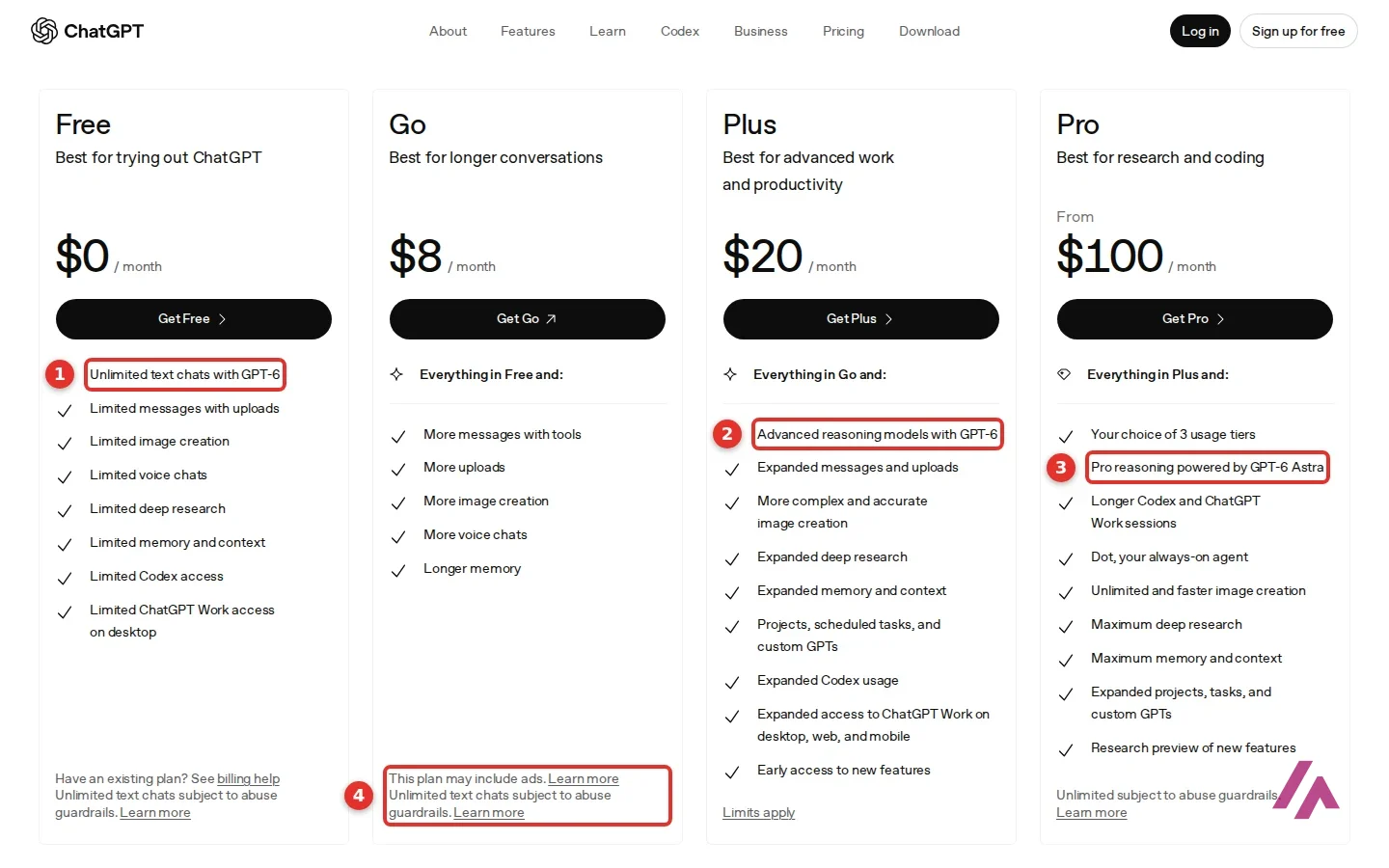
One thing the cards don't show: Pro is listed "from $100" with "Your choice of 3 usage tiers," and the other 2 prices aren't there. OpenAI's release notes and Help Center fill in the gap: the tiers are $100, $200 and $500 a month, and only the $500 tier gets Astra Ultrafast, a faster way to run Astra in ChatGPT Work and Codex. If you're weighing Pro, start with the $100 tier.
If you're a developer looking for API prices, that's a separate product priced per token. This page is about the ChatGPT app.
Is ChatGPT free? What you get without paying
Yes, and I mean actually free. When I opened chatgpt.com without logging in, I got a chat box ("Ask ChatGPT"), the line "Where should we begin?", and a side menu with New chat, Images, Plugins, Deep research and a link to plans and pricing. I typed my question and the answer came back in a few seconds.
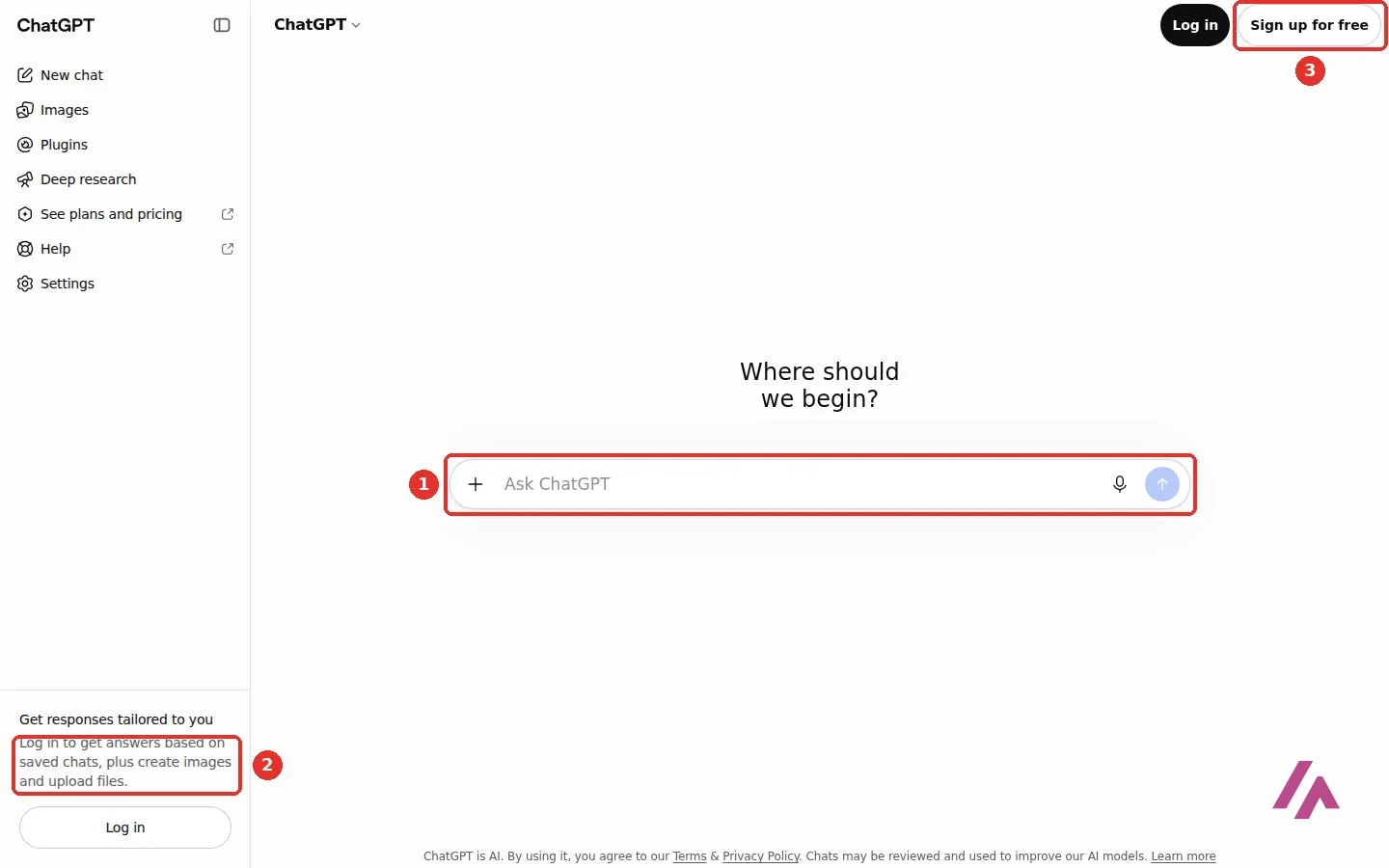
There's a catch, and the sidebar says it plainly: "Log in to get answers based on saved chats, plus create images and upload files." Without an account, your chat isn't saved, and you can't make images or send it a file. The footer also reminds you that "Chats may be reviewed and used to improve our AI models." The pricing table says every individual plan lets you opt out of training on your content, which is worth knowing before you paste anything personal.
So I asked it the obvious questions: is it free, which model was I talking to without an account, and what happens when I hit the free limit? On that first visit, it said I was talking to GPT-5.6 Luna, which it said OpenAI listed as the default model for free users, logged-out users included. The Free card on the pricing page said the same. It also cited OpenAI's Help Center for each point, so it had searched the web, even without an account. That answer didn't age well: OpenAI brought GPT-6 to the free plan right after, and when I asked again 3 days later, the answer was GPT-6 (more on that below).
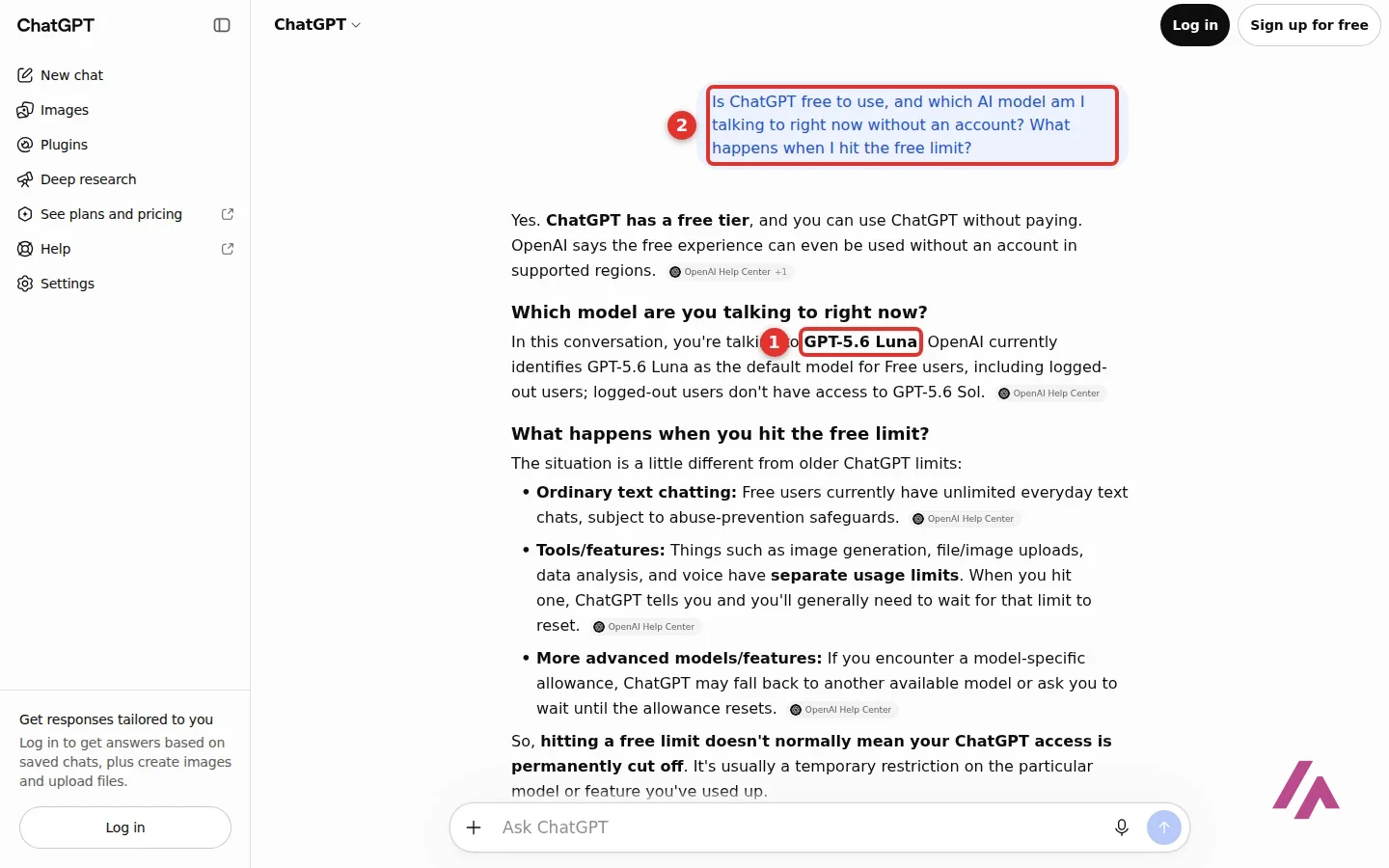
On limits, its answer was more relaxed than you might expect. Everyday text chats are unlimited, within those abuse guardrails. Image creation, uploads, data analysis and voice each have their own limits; when you hit one, ChatGPT tells you and you wait for it to reset. If it's a model's allowance you run out of, it may switch you to another model. With only a handful of questions, I never hit a limit myself. That's how ChatGPT explained it, citing OpenAI's Help Center, and it's worth checking on your own account.
Sign up for a free account and you get saved chats, plus the free plan's allowances for image creation and file uploads. It's the same $0 with or without an account; what changes is what you can do. On my latest visit, logged out again, it still let me chat without signing up, and when I asked whether it's free, it said yes, "in supported locations," and that you need an account to save your chat history.
Start without an account (Tip)
To see whether ChatGPT is for you, you don't need to give it an email. Ask it two or three real questions from your week without logging in. If you want your chats saved, or need to send it a file or make an image, that's when the free account is worth creating.
If what you mostly need is help with math homework, there's also Solvely, built for that: it shows every step and offers practice questions afterward, but you need an account to see any answer, and its free plan stops after a couple of problems a day.
What I asked it, and how it did
A "what model are you" question tells you about the product. To see whether it's useful, I gave it something from real life: "I'm moving from Chicago to Austin, Texas in January. Give me a short checklist of the official paperwork and deadlines: driver's license, car registration, voter registration and USPS change of address."
It assumed I meant January 2027 and gave me 4 items, each with a deadline and a source chip (Texas.gov, TxDMV, USPS FAQs): get a Texas driver's license within 90 days of moving, register the car within 30 days (with the Texas vehicle inspection first), register to vote at least 30 days before an election, and file the USPS change of address up to 90 days before the move, or up to 30 days after. It finished with a sensible order to do them in.
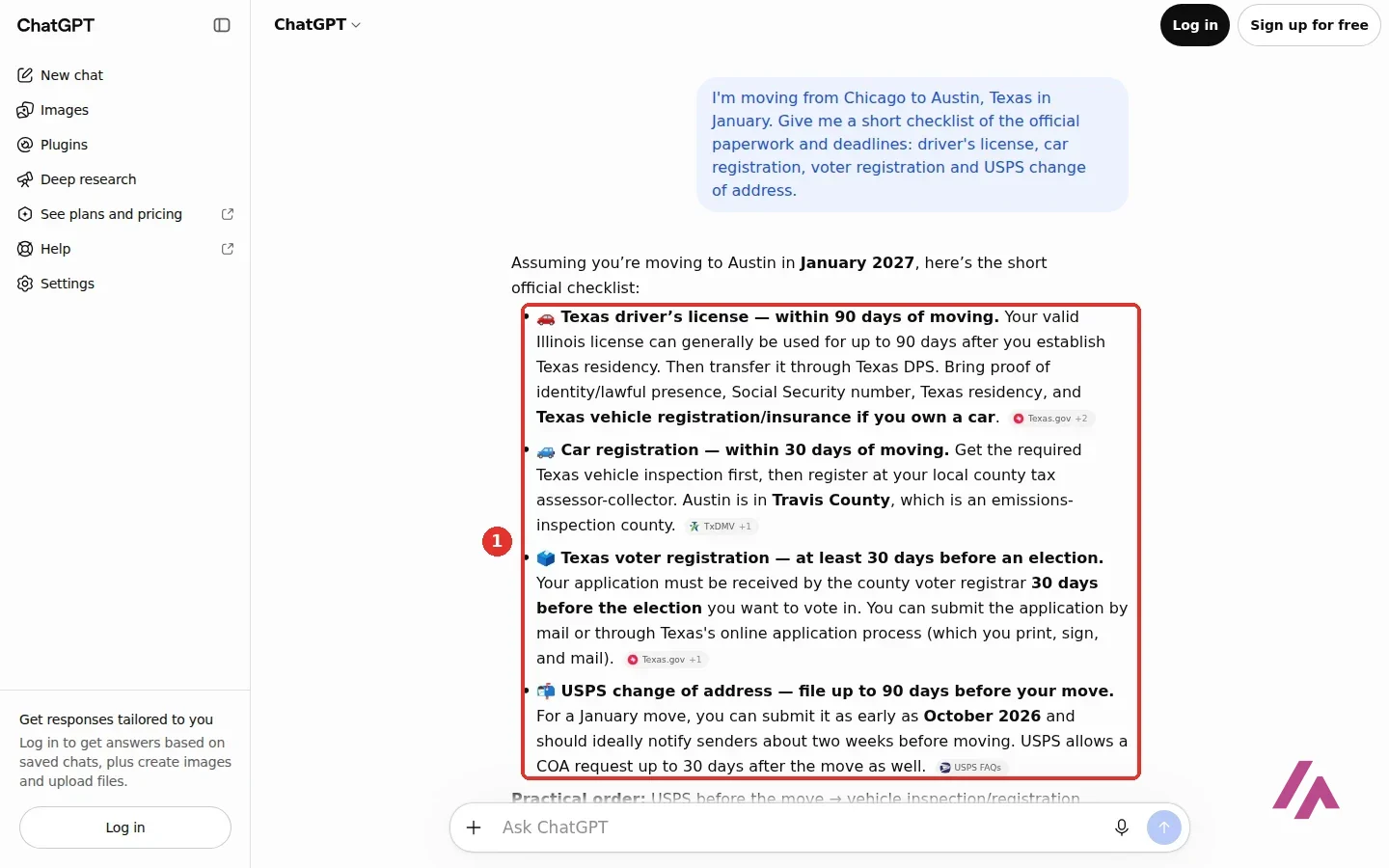
I checked those deadlines against the official sites. The Texas DMV says new residents have 30 days to register their vehicle and must get a Texas driver's license within 90 days of moving. VoteTexas.gov says you must register by the 30th day before Election Day. USPS says a change of address can be submitted 90 days before the move and up to 30 days after. 4 for 4.
My one quibble: I asked it twice, worded slightly differently, and one answer came as a table with a calendar, the other as this list. Same deadlines, different shape. Not a big deal, but don't expect the exact same answer twice.
Is GPT-6 free? Which GPT-6 you get on each plan
Yes, GPT-6 is free now, just not the same GPT-6 on every plan. On October 7, 2026, OpenAI made GPT-6 the default in ChatGPT's chat, starting with paid plans, and began rolling it out to Free and Go the next day. Its release notes spell out the split: "Plus, Pro, Business, and Enterprise use GPT-6 Sol; Free and Go use GPT-6 Luna." They replace GPT-5.6 Sol and Luna as the default chat models. So GPT-6 itself costs nothing; what you pay for is a stronger model and more thinking:
| Plan | GPT-6 in the chat | GPT-6 Astra |
|---|---|---|
| Free ($0) and Go ($8) | GPT-6 Luna | No |
| Plus ($20) | GPT-6 Sol, up to High thinking | In ChatGPT Work and Codex |
| Pro (from $100) | GPT-6 Sol, up to Extra High thinking | Also in the chat, as Pro reasoning |
| Business and Enterprise | GPT-6 Sol, up to Extra High thinking | Pro reasoning included; admins can limit models |
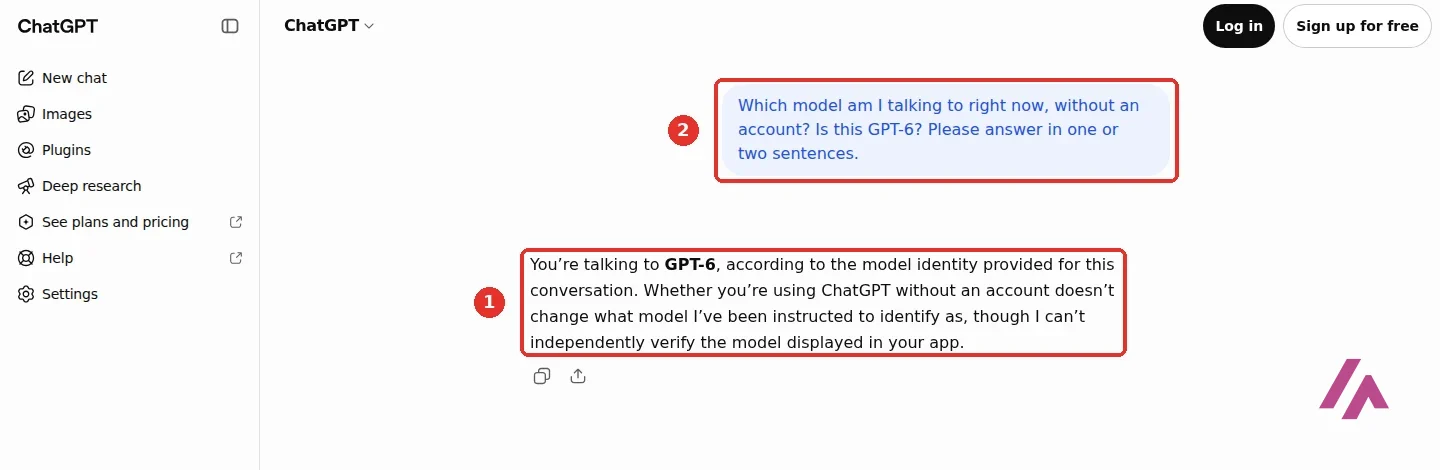
The thinking levels and the Astra column come from OpenAI's Help Center. Without an account there's no model name on screen, so I asked: "Which model am I talking to right now, without an account? Is this GPT-6?" It answered "You're talking to GPT-6," and added, fairly, that it couldn't independently verify the model shown in my app. Put that together with OpenAI's release notes, and it's GPT-6 Luna.
The headline feature of this update is what OpenAI calls Intelligent UI: answers that can mix text with visuals, buttons, forms, charts and small tools, like a bill splitter, right in the chat. OpenAI says it works with GPT-6 from Instant through Extra High, but not with Pro reasoning. So I gave the logged-out chat a bill to split: $186 among 4 friends with a 20% tip, one of whom only had a $14 salad. The math was right ($16.80 for the friend with the salad, $68.80 each for the other 3), but it came back as a plain list, with no interactive splitter. OpenAI says ChatGPT picks the format itself and still uses plain text when that works best, and the rollout is gradual, so you may see something fancier.
GPT-6 Astra is still OpenAI's top model. OpenAI introduced it on September 3, 2026 as "our most intelligent and aligned model yet, with state-of-the-art capabilities across computer use, coding, cybersecurity, and science." OpenAI's safety write-up also calls Astra its first model to reach the "Critical" level of cybersecurity capability under its Preparedness Framework. Since then, OpenAI has added cheaper and faster siblings: GPT-6 Sol and Luna on September 22, and GPT-6.1 Sol on September 29, which OpenAI pitches as "near-Astra intelligence" at a fifth of Astra's API price.
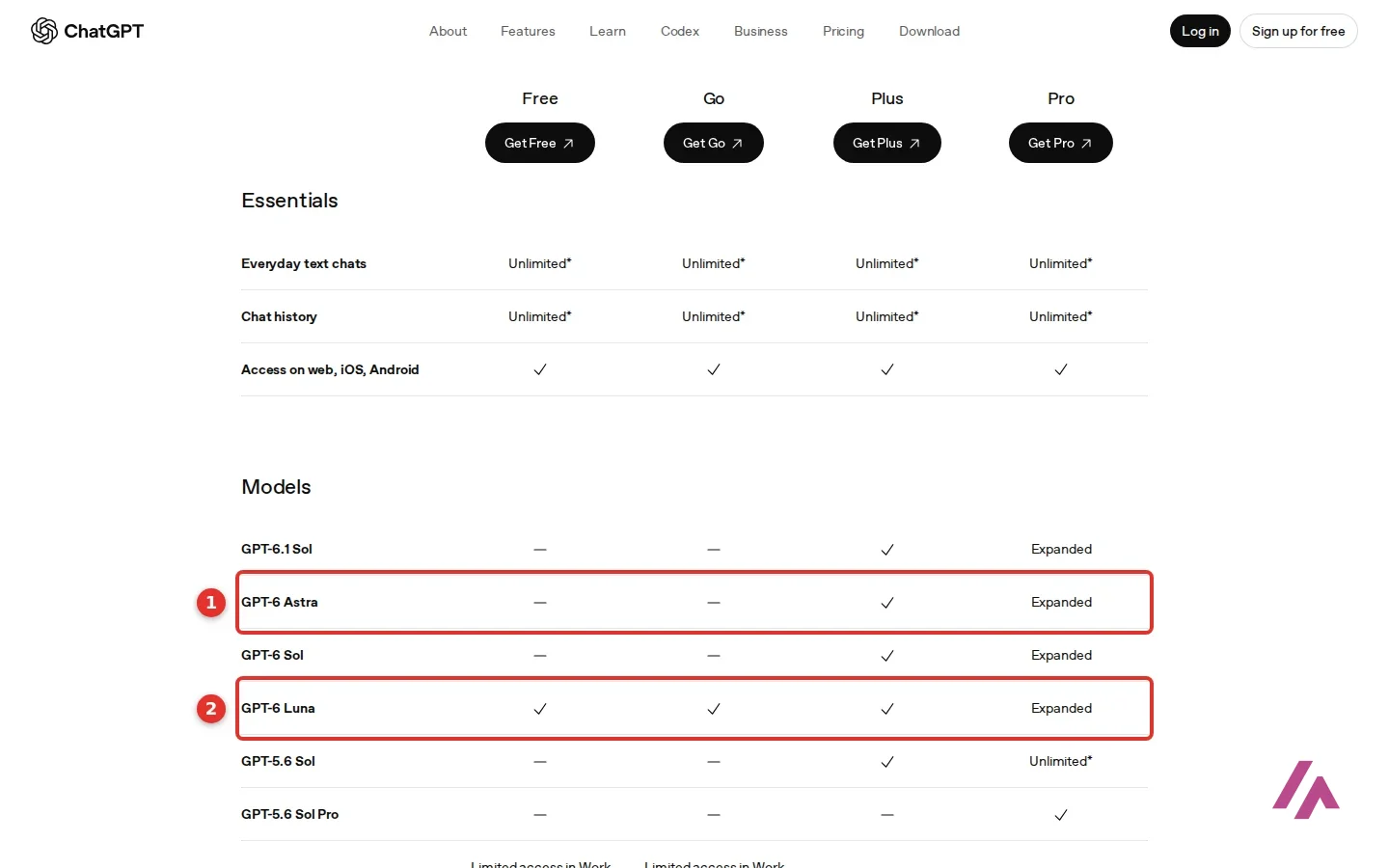
In the pricing page's model table, GPT-6 Astra has a dash for Free and Go, a check for Plus and "Expanded" for Pro. The Plus card says "Advanced reasoning models with GPT-6," with a "Limits apply" link at the bottom, and the Pro card says "Pro reasoning powered by GPT-6 Astra." OpenAI's Help Center spells out where you get Astra on each: Plus gets it in ChatGPT Work and Codex, while Pro gets it in the chat too, as the Pro reasoning option. For Business and Enterprise the table says "Flexible," with credits you can buy for more access.
Go is not the cheap way to Astra (Heads-up)
Go costs $8 and sounds like a lighter Plus, but it runs on the same GPT-6 Luna as Free, just with more room. The cheapest individual plan with GPT-6 Sol is Plus at $20, and for Astra right in the chat you need Pro (or a Business workspace).
OpenAI also suggests the ChatGPT desktop app "to experience Astra at its best," and part of Astra's pitch is ChatGPT Work, the mode that, with your permission, can use your desktop apps and browser for you. OpenAI's two videos further down the page present Astra and ChatGPT Work.
Go, Plus or Pro: which one is worth paying for
My take on each:
Go ($8) is for people who are happy with the free model and keep running into the limits on tools: more messages with tools, more uploads, more images, more voice chats, longer memory. It also takes more at once: the pricing table puts GPT Instant's input at about 40 pages of text, compared with about 12 on Free. But it's the same GPT-6 Luna as Free, and the card says "This plan may include ads." Paying to maybe see ads is a choice I'd make only if the free plan's tool limits really bother you.
Plus ($20) is the one most people should look at if they pay at all. You move up to GPT-6 Sol in the chat, with more thinking, and get GPT-6 Astra in ChatGPT Work and Codex. You also get expanded deep research, Projects, scheduled tasks and custom GPTs, and ChatGPT Work on desktop, web and mobile. One caveat on custom GPTs: OpenAI says it plans to retire custom GPTs and offer a way to move them to plugins, so I wouldn't pay for Plus just to build GPTs. It's about the same price as Claude's and Google's main paid plans, so the choice there is about which assistant you like, not the money.
Pro (from $100) is for people who use ChatGPT all day for research or code and keep hitting Plus's limits: 3 usage tiers, Pro reasoning with Astra, longer Codex and Work sessions, unlimited and faster images, maximum deep research and memory, plus "Dot, your always-on agent." GPT Instant's input goes up to about 250 pages of text. In mid-October, OpenAI's release notes announced faster Pro reasoning in the chat that can split a task among several agents working in parallel; it's rolling out to eligible Pro users. If you aren't sure you need Pro, you don't yet.
ChatGPT for teams: Business and Enterprise
Business now comes with 2 kinds of seats, and you can mix them in the same workspace. A Standard seat is $20 per user a month billed yearly, or $25 billed monthly. A Premium seat is $100 a month billed yearly, or $125 monthly, with 5x the usage of a Standard seat, no 5-hour limit, and access to dots, OpenAI's always-on agents, as they roll out. Business is for teams of 2 to 200 people. Every seat gets ChatGPT, ChatGPT Work and Codex on desktop, web and mobile, plus connectors to tools like Google Workspace, Slack, GitHub and Microsoft 365, and the workspace comes with centralized billing, SAML SSO and MFA. Most importantly for a lot of companies, the card says "No training on your business data by default."
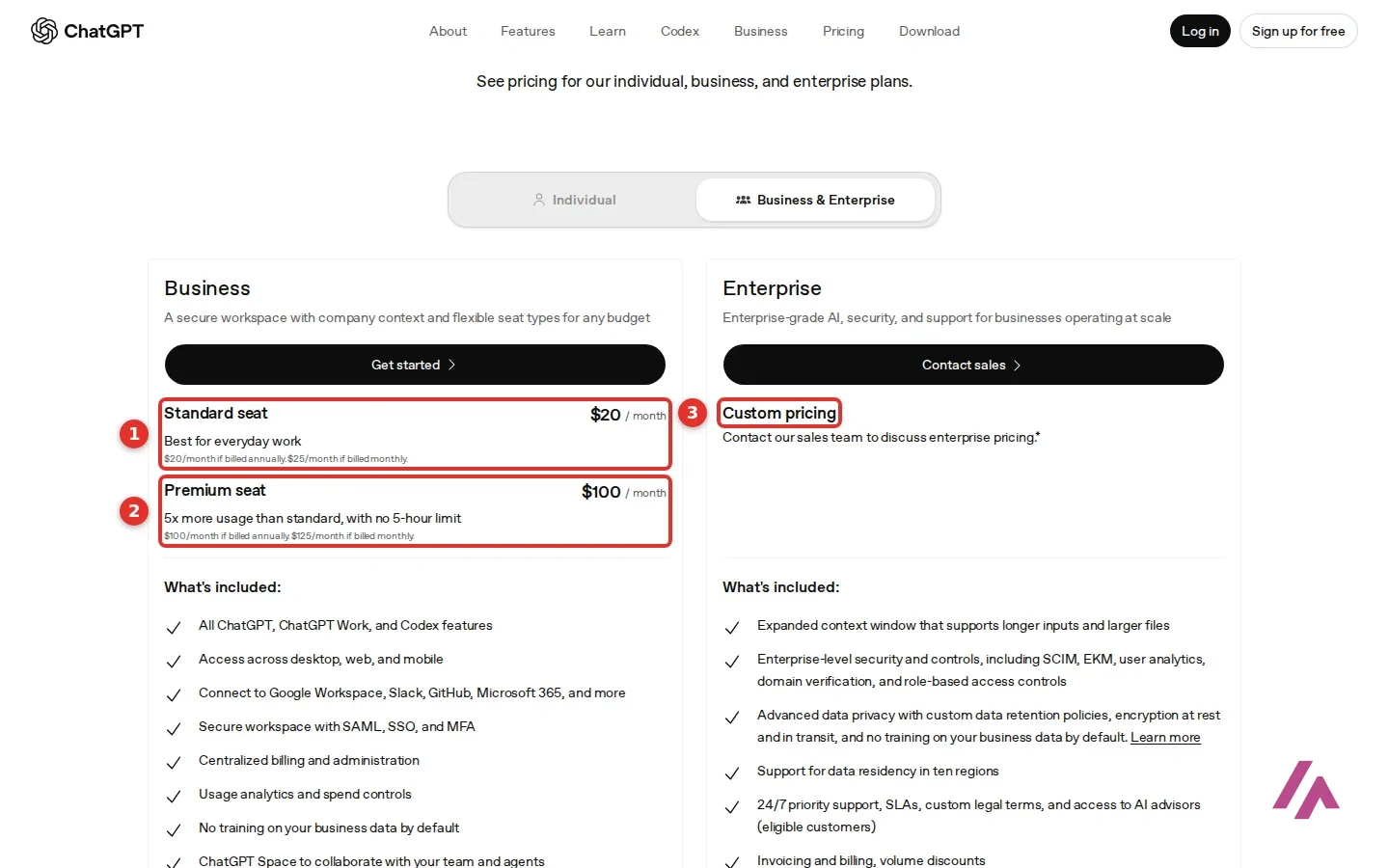
My advice for a small team: put everyone on Standard seats and upgrade only the people who keep hitting the limit to Premium. That's exactly what mixing seats is for, and a whole team on Premium costs 5 times as much.
Enterprise has custom pricing through sales, with a longer context window, controls like SCIM and role-based access, custom data retention, data residency in 10 regions and 24/7 priority support for eligible customers. A few special plans and discounts are worth knowing about: ChatGPT for Teachers is free for verified US K–12 educators through June 2027, nonprofits can get up to 75% off Business or Enterprise, and life sciences labs at US universities can apply for the Rosalind Academic Plan, under which approved labs can receive up to 30 Business Standard seats at no cost for up to 12 months.
ChatGPT, Claude or Gemini?

If you're choosing a $20 assistant, my honest advice is the same as in my Claude review: use the free plans for a week on your real work and pay for the one you keep opening. ChatGPT is the all-rounder: chat, search, images, voice, and GPT-6 on every plan, free included. Claude suits long documents, careful writing and code, and its $20 plan includes Claude Code. If you live in Gmail and Google Docs, Gemini's paid plans plug into your Google account, and its cheapest paid plan costs less than Go. And if what you mostly do is search, Perplexity is built to answer with its sources. And if your questions are about your own PDFs and notes, NotebookLM answers only from the sources you give it and cites each claim. And if what you want is a task done rather than an answer, like research turned into a report or a set of slides, Manus is an agent built to carry the job out on its own, from $20 a month in credits. Curious about open-weight models? Kimi from Moonshot AI is free with an account, but on the free plan its flagship K3.1 Pro kept saying it was too busy, and only the fast Instant model answered. Plus is $19 a month.
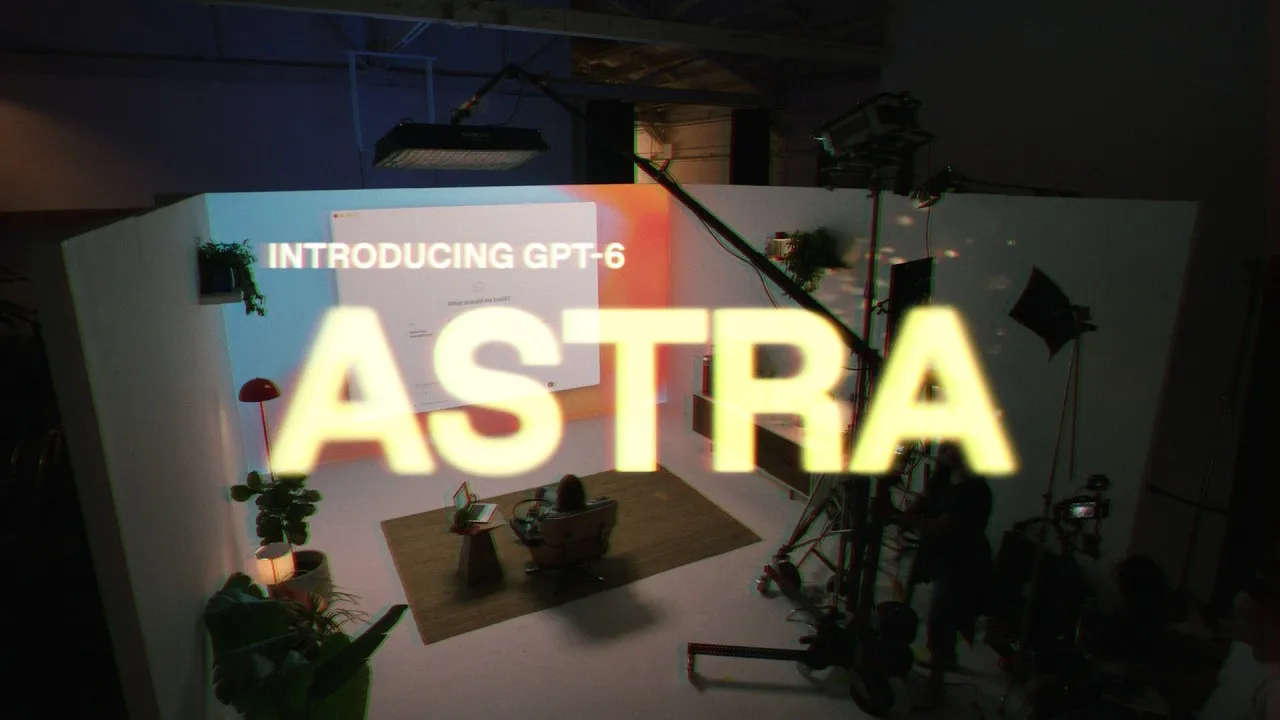
OpenAI's own launch video for GPT-6 Astra, which the pricing table lists on Plus and Pro. According to its description, it covers what OpenAI says Astra does on a computer and in software engineering, and which plans it was rolling out to. It's OpenAI pitching its own model, so take it for what it is.
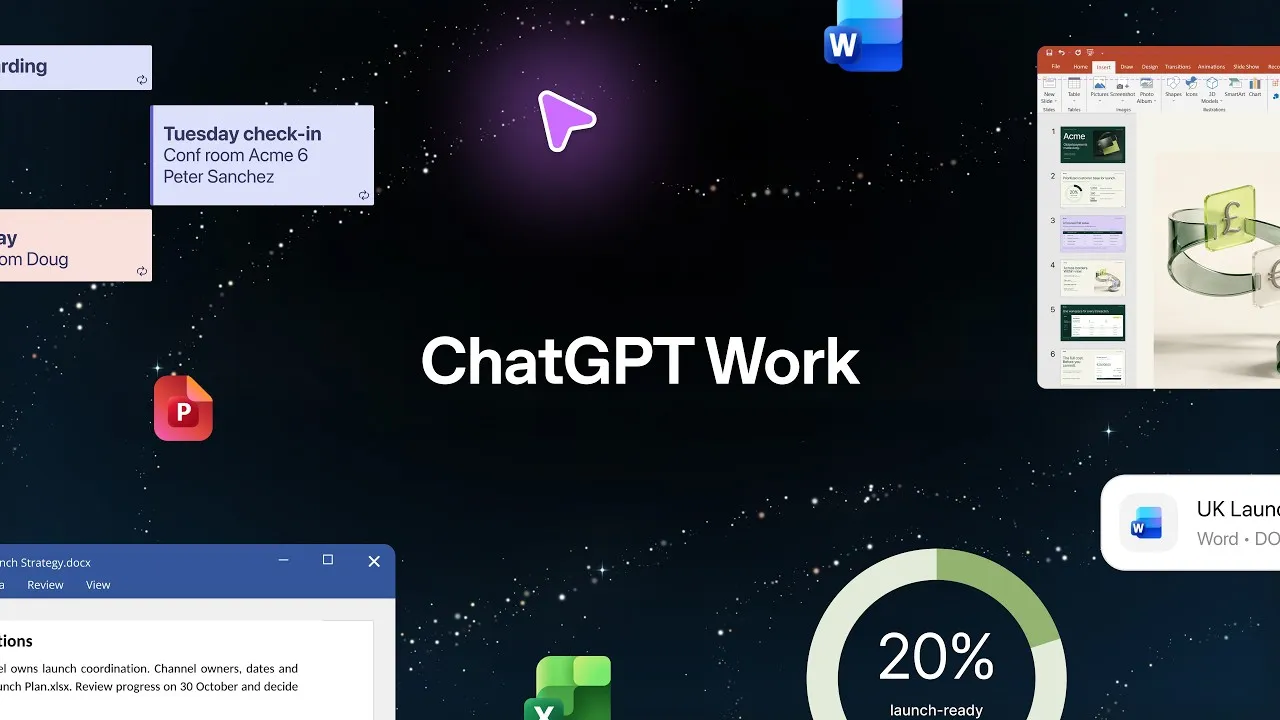
A one-minute clip from OpenAI on ChatGPT Work with GPT-6 Astra. Its description says that, with your permission, Work can use your desktop apps and browser to fill out forms, update trackers and schedule meetings. The pricing page limits Work on Free and Go to the desktop app.
Who is it for? For anyone who wants one assistant for questions, writing, research and a bit of everything, from students to small teams. If your days are mostly long documents or code, or you'd rather have a cheaper plan inside your Google account, look at the alternatives below.
What I like and what I don’t
What I like
- You can use it without an account: I opened chatgpt.com, typed a question and got an answer with sources, no sign-up.
- The free plan runs on GPT-6 Luna with unlimited text chats, subject to abuse guardrails, so everyday use doesn't run into a message wall.
- My practical question about moving from Chicago to Austin came back short and useful, with official Texas and USPS sources, and the deadlines held up when I checked them.
What I don’t
- Without an account there are no saved chats, no image creation and no file uploads; you have to log in for those.
- Go, the $8 plan, runs on the same GPT-6 Luna as Free, not Sol or Astra, and its card says it may include ads.
- Prices are before sales tax, and Pro's "from $100" covers 3 usage tiers; the pricing page doesn't show the higher ones, which OpenAI's own release notes and Help Center list at $200 and $500 a month.
Have you used ChatGPT? Tell me how it went
What worked for you and what didn’t. Your experience helps the next person who lands here unsure more than any review page. I read every one before publishing.
Write my review
ChatGPT pricing
Prices checked on the official site on · before tax
-
Free
Free
Unlimited text chats with GPT-6 Luna, and you can start without an account; limited images, voice, uploads and memory
- Cheapest paid plan
Go
$8/mo
More tool messages, uploads, images and voice chats than Free, on the same GPT-6 Luna; may include ads
-
Plus
$20/mo
GPT-6 Sol in the chat, with more thinking, GPT-6 Astra in ChatGPT Work and Codex (limits apply), deep research, Projects, scheduled tasks and custom GPTs
-
Pro
from $100/mo
A choice of 3 usage tiers ($100, $200 or $500 a month), Pro reasoning powered by GPT-6 Astra, unlimited and faster images (subject to abuse guardrails)
-
Business
$25/mo
Standard seat per user, for teams of 2 to 200; $20 per user a month billed yearly; Premium seats with 5x the usage at $100 per user a month billed yearly ($125 billed monthly); no training on your business data by default
All prices are for the US, in dollars and before sales tax. Free costs nothing, works even without an account and runs on GPT-6 Luna. Go is $8 a month, on the same model, and may show ads. Plus is $20 a month and moves you up to GPT-6 Sol, with GPT-6 Astra in ChatGPT Work and Codex (limits apply). Pro starts at $100 a month, with a choice of 3 usage tiers ($100, $200 or $500) and Pro reasoning powered by GPT-6 Astra. For teams of 2 to 200, a Business Standard seat is $20 per user a month billed yearly or $25 billed monthly, a Premium seat with 5x the usage is $100 per user a month billed yearly or $125 billed monthly, and Enterprise has custom pricing. My advice: Free first, Plus if you want the stronger GPT-6 models, and Pro only when Plus's limits are actually in your way.
Alternatives to ChatGPT
-

Claude
Free with limits · from $20/mo
When to pick it: If your days are full of long documents, careful writing or code, and you'd actually use Claude Code, which comes with Claude's $20 plan.
See details → -

Gemini
Free with limits · from $4.99/mo
When to pick it: If your life runs through your Google account: Gemini plugs into Gmail on its paid plans (and into Docs and Sheets starting with Google AI Pro), and its cheapest paid plan costs less than Go.
See details → -
Perplexity AI
Free with limits · from $20/mo
When to pick it: If most of what you ask is really a search and you want an assistant built to answer with its sources.
See details →
Guides about ChatGPT
-
Research and development
GPT-4.5: What It Was, When OpenAI Retired It and What Replaced It
GPT-4.5 was OpenAI's biggest chat model of early 2025, and you can't pick it anymore. Here's when it went away, what made it different, and what…
-

Business applications
Discover artificial intelligence agents and their functioning in the new digital era
Artificial intelligence is changing rapidly, and it is no longer just about chatbots that answer questions. Since the arrival of ChatGPT at the end of…
-
Startups and companies
OpenAI develops a new social network to compete with X and improve AI
In a surprising move, OpenAI has begun developing its own social network in the style of X. According to reports from The Verge, this project is still…
-

Essentials
Discover how to create your own custom AI applications for specific tasks
Tired of writing bibles in ChatGPT just to get it to understand what you want? Well, there’s good news: creating your own AI app is easier than you…
-

Business applications
Create awesome WhatsApp stickers with ChatGPT and surprise your friends
The trend of Studio Ghibli has captured the attention of many, but ChatGPT has something more to offer than just nostalgic images. Its native image…
-

Business applications
Create Ghibli-style images for free with these AI tools
Artificial intelligence has made an impressive leap with the arrival of the image generation feature in ChatGPT, which has captured the attention of…
-
Business applications
Discover the 5 surprising ways to take advantage of ChatGPT’s voice mode
Would you like to experience the new dimension of ChatGPT’s voice mode? With the recent launch of three new voice models by OpenAI, the virtual…
-
Business applications
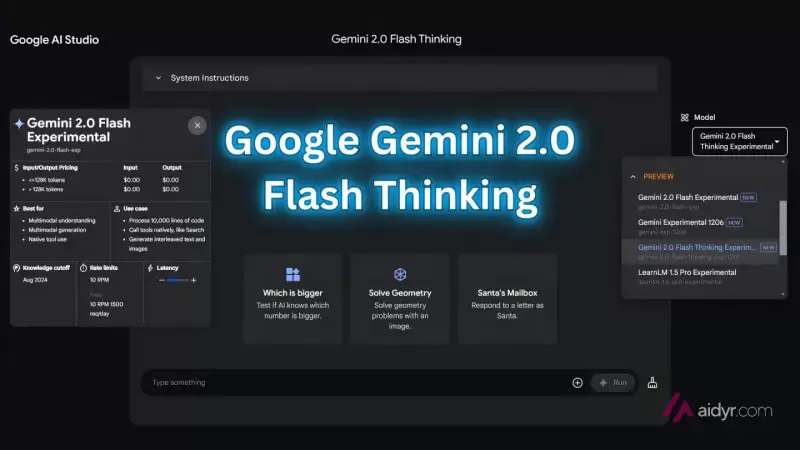
Gemini 2.0 revolutionizes AI image generation and editing with its new native feature.
For over a year, the term natively multimodal has resonated in the world of artificial intelligence, but few have managed to fully leverage these…


How I tested it
On October 6, 2026, I opened chatgpt.com in a browser set to US English, without logging in, and asked it two things: whether it's free and which model I was talking to, and for a practical checklist for a move from Chicago to Austin. I asked each one twice, in slightly different words, and later checked the deadlines it gave me on the official Texas and USPS websites. I also went through the full pricing page with its US prices, in dollars, for individuals and for businesses, and read OpenAI's own announcements of the GPT-6 models. I went back on October 9, after OpenAI brought GPT-6 to the free plan: I asked the logged-out chat again which model it was, gave it a dinner bill to split, and rechecked the pricing page, OpenAI's release notes and its Help Center. On October 23, I read the US pricing page and the release notes again to see what had changed (Business now has 2 kinds of seats), and asked the logged-out chat once more whether it's free. The screenshots are from those 3 sessions, and the image marked "Image: OpenAI" is OpenAI's own.
A full 21-minute tour of the app from September 2026, if you'd rather watch than read. According to its description and chapters, after a look at what changed it covers free versus paid and the model picker, then memory, Projects, ChatGPT Work, deep research and more. The description opens with a link to a free guide on HubSpot's site.

Written by Miguel Ángel, with the help of an LLM to fact-check. In IT since 2002 (systems, engineering, web development and SEO), doing business with AI since February 2023, when ChatGPT could first be bought in Spain. I build, write and maintain this site myself.

Got a question? Ask me
About ChatGPT, its plans or whether it fits what you need. I’m Miguel Ángel, and I’ll answer you myself, right here.