Otter.ai Review: Is It Free, and How Good Is the Transcript?
Otter.ai Inc. · also called Otter · 10 min read
- Free with limits
- Personal assistant
- Web · iOS · Android · Windows · Mac
- Free $0 300 min/month · 3 file imports for life
- Pro $16.99/mo 1,200 min/month · $8.33/mo billed yearly
Checked on
Open Otter.ai
My verdict
In IT since 2002: systems, engineering, web development and SEO. I have been doing business with AI since February 2023, when ChatGPT could first be bought in Spain.
Otter.ai is an AI meeting notetaker: it joins Zoom, Microsoft Teams and Google Meet calls, writes the transcript and a summary, and lets you ask questions about what was said. The free Basic plan is real and needs no card, but it's tight: 300 minutes a month, 30 minutes per conversation and only 3 uploaded files for the whole life of your account. Pro costs $16.99 a month, or $8.33 a month billed yearly. In my test it did a good job on a 1962 speech recorded in front of a crowd, though a few misheard words changed the meaning, and its AI Chat caught most of them but also suggested "fixing" 2 lines that were already right. Worth it if you live in English-language meetings; read the transcript before you quote it.
What is Otter.ai
- Company
- Otter.ai Inc.
- Type
- Personal assistant
- Platforms
- Web · iOS · Android · Windows · Mac
- Free plan
- Free with limits
- Also called
- Otter
- Updated on
- Oct 31, 2026
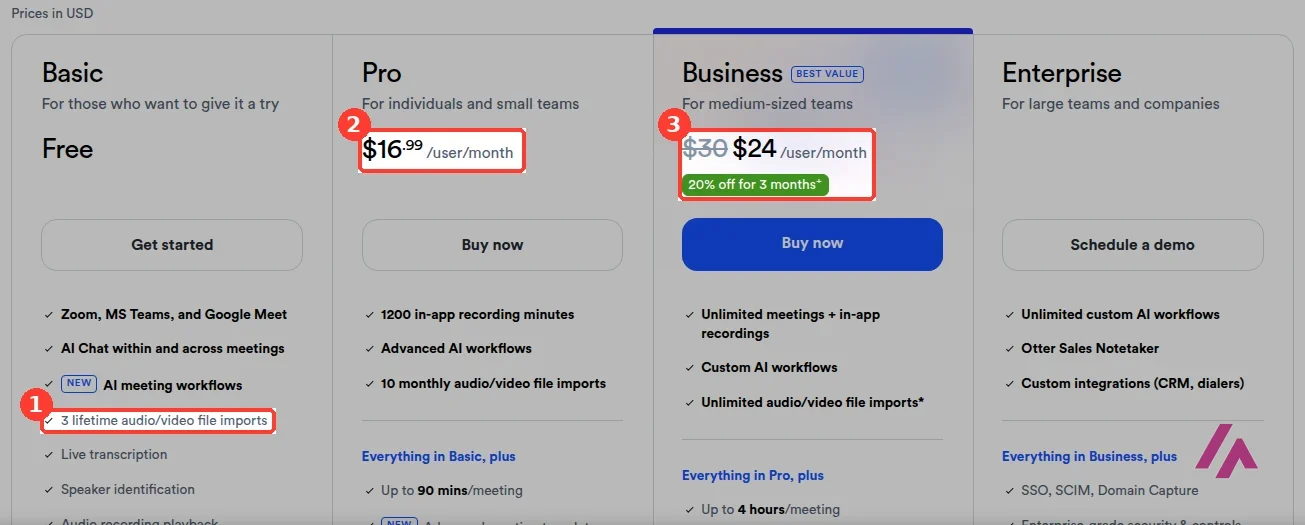
Otter.ai is an AI notetaker for meetings: it joins your Zoom, Microsoft Teams and Google Meet calls, transcribes them live, writes a summary and lets you ask its AI Chat about what was said. Is Otter.ai free? Yes, there's a free Basic plan with no card, but it's tight: 300 transcription minutes a month, 30 minutes per conversation, 3 uploaded audio or video files for the life of your account and 20 AI Chat questions a month. Pro costs $16.99 a month, or $8.33 a month if you pay for the year, and Business costs $30 a month per user, or $19.99 a month billed yearly.
Otter.ai pricing, the short version (Important)
- Basic, free: 300 minutes a month, up to 30 minutes per conversation, 3 file imports for life, the 25 most recent conversations, 20 AI Chat questions a month.
- Pro: $16.99 a month per user, or $8.33 a month billed yearly. 1,200 minutes a month, up to 90 minutes per meeting, 10 file imports a month.
- Business: $30 a month per user, or $19.99 a month billed yearly. Unlimited meetings, up to 4 hours per meeting, 6,000 minutes of imported files a month.
- Enterprise: through a demo with sales.
- Prices are in US dollars, and the pricing page doesn't mention tax.
What Otter.ai does
The idea is simple: you stop typing notes. Once you connect your Zoom account (the home screen asks for it), Otter's Notetaker can join your Zoom, Teams or Google Meet meetings, write the transcript as people talk, label who's speaking and, at the end, give you a summary with action items. Everything ends up in your account, where you can search it, share it or ask questions in AI Chat, including questions across several meetings.
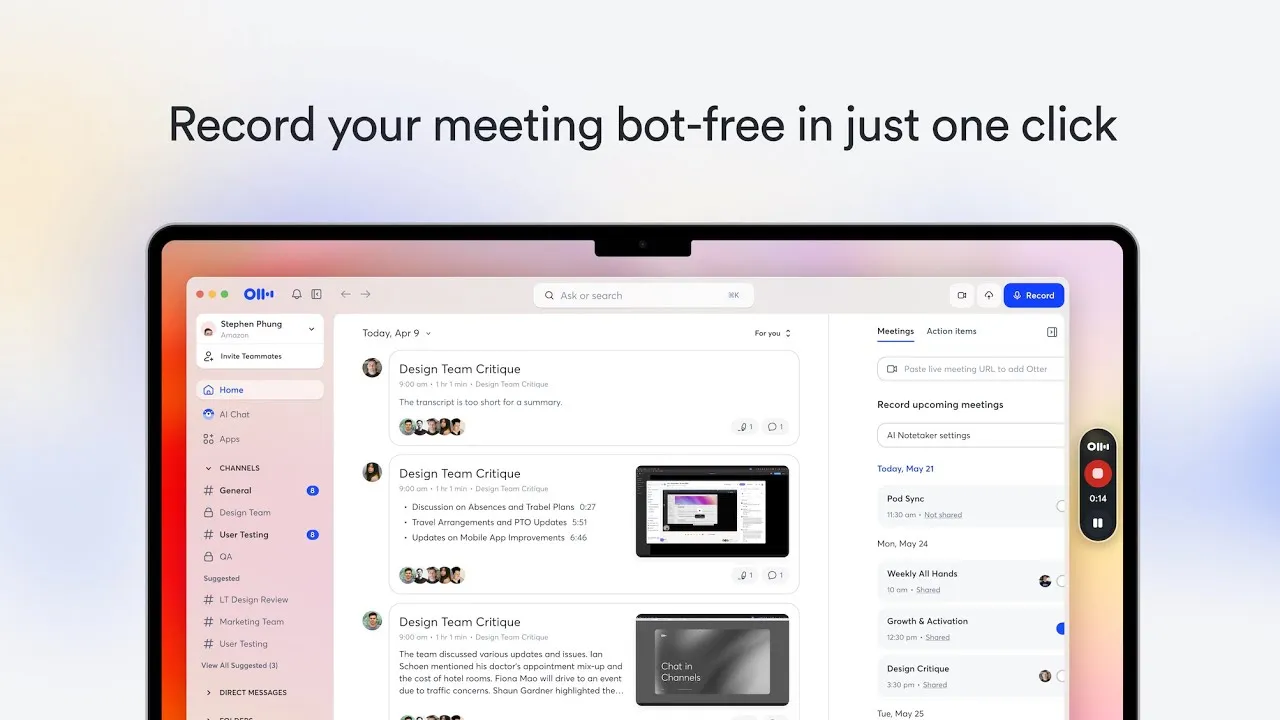
You can also record with the Record button in the web app or with the iOS and Android apps, and upload recordings you already have (AAC, MP3, M4A, WAV, WMA, MOV, MPEG, MP4 and WMV). Otter also has a desktop app that, according to Otter, records without a bot joining the call; that's what its short official video in this review is about. One for the techies, and sorry for the jargon: even the free plan lists an "Otter MCP server," a way to connect your Otter meetings to other AI assistants.
How I tested it
I signed in with a Google account on the free plan, in a browser set to US English. Before letting me in, Otter asked 2 quick questions (my department and my role), with no way to skip them. Then I went to the home screen, which shows how many of the 300 monthly minutes you've used.
Meetings in English are what Otter is built for, so I wanted a recording in English that's hard to transcribe. I picked a 3-minute clip of John F. Kennedy's 1962 speech at Rice University, the "We choose to go to the moon" one: it's in the public domain, it was recorded in front of a crowd that interrupts with applause, and the full text is published, so I could check every word.
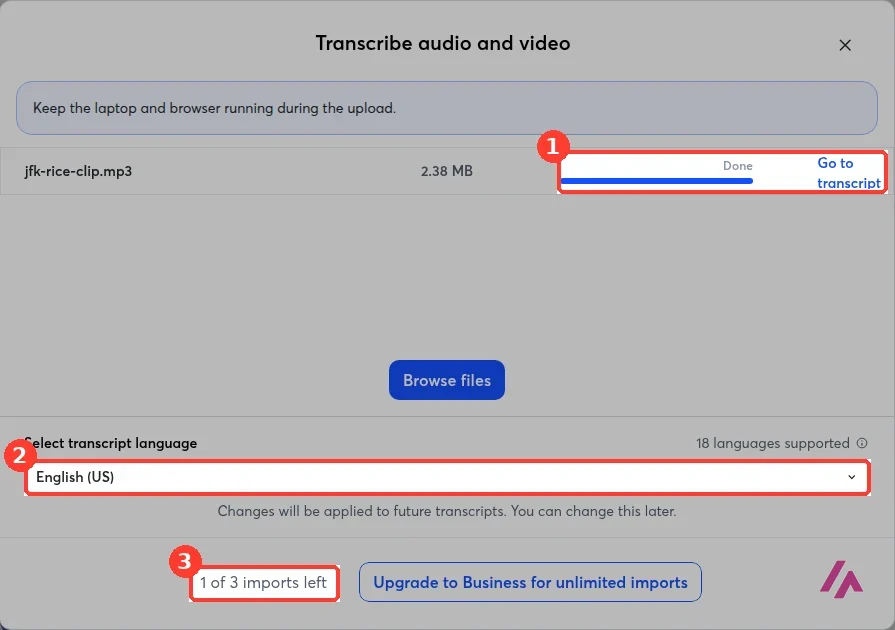
The upload window asks for the transcript language. It lists 18 languages, many of them marked as beta, and you pick one right there before uploading. The transcript was ready in less than a minute. The counter at the bottom is the one to watch on the free plan: it said "1 of 3 imports left" after my upload (this account had used one before), and those 3 imports are for the life of the account, not per month.
How accurate is Otter's transcript?
Pretty good, and with a recording from 1962 that's not a given. Otter got the famous passage exactly right, all 3 "We choose to go to the moon" lines (he really does say it 3 times, with applause in between), plus "not because they are easy, but because they are hard." It also got names and numbers like "Saturn C-1," "Cape Canaveral" and "10,000 automobiles."
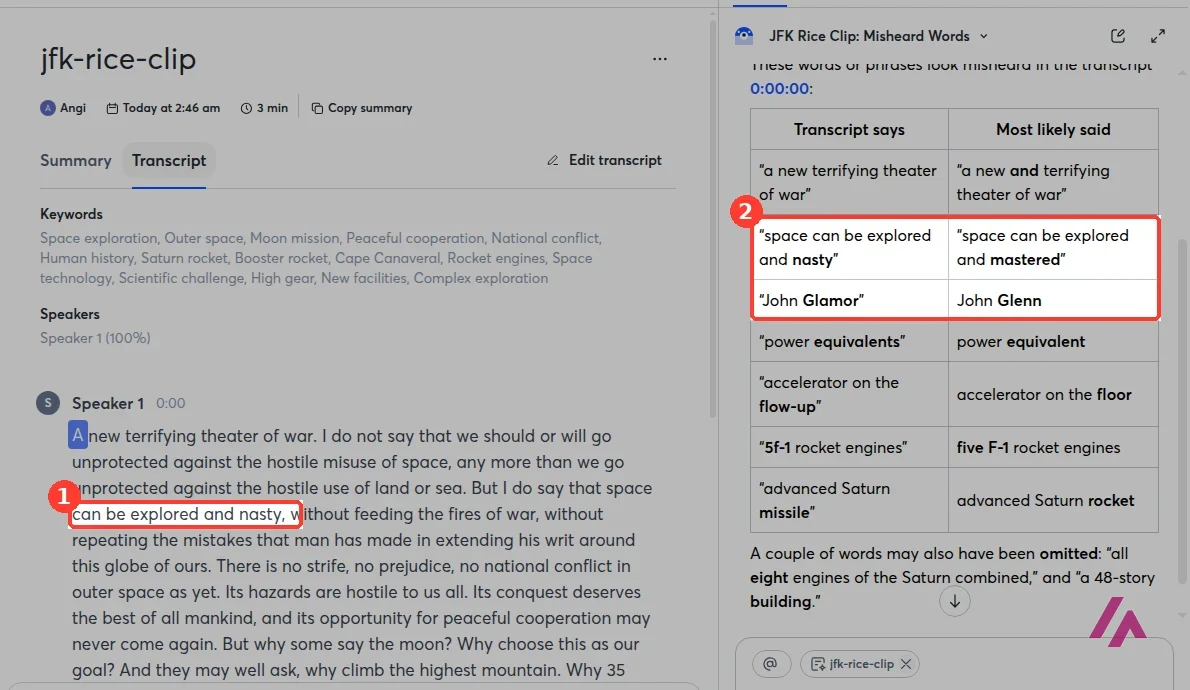
But it made 3 mistakes that change the meaning. Space "can be explored and mastered" became "explored and nasty," astronaut John Glenn became "John Glamor," and "with their accelerators on the floor" turned into "accelerator on the flow-up." There were also a few smaller ones: a missing "which," "5f-1" for "five F-1" and a missing "eight" in "all eight engines."
The summary and AI Chat: useful, but check them
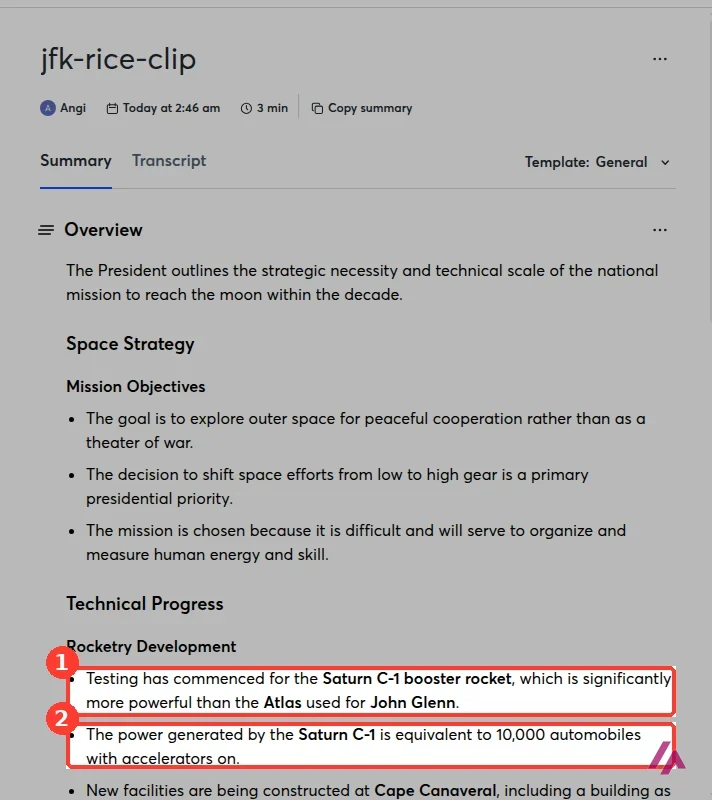
The automatic summary, with the "General" template, was tidy: an overview, the goals of the space program and the technical progress in short bullets. It even fixed 1 mistake by itself, writing "John Glenn" where the transcript had "Glamor." It kept others, though: it treats "5F-1" as if it were the name of the engine model and ends a line with "automobiles with accelerators on," which doesn't say much.
Then I asked AI Chat which words looked misheard. It answered with a neat table and got 6 of them right: "nasty" should be "mastered," "Glamor" should be "Glenn," "flow-up" should be "floor," "5f-1" should be "five F-1," "equivalents" should be "equivalent," plus the missing "eight." Nice work. But it also suggested 2 "corrections" that would have made the text worse: it wanted "a new terrifying theater of war" to read "a new and terrifying," and "advanced Saturn missile" to read "advanced Saturn rocket." Kennedy said exactly what the transcript says in both places.
Don't let AI Chat edit your quotes (Heads-up)
AI Chat is great for finding the lines worth checking, but it guesses, and its wrong guesses sit in the same neat table as the right ones. If you're quoting someone, play that part of the audio again before you trust either the transcript or the chat. Otter itself warns under the chat box that it "can make mistakes."
Otter.ai pricing: Basic vs. Pro vs. Business
The pricing page opens on yearly billing, which is why you often see $8.33. Here are the three plans you can buy without talking to sales, in US dollars:
| Feature | Basic | Pro | Business |
|---|---|---|---|
| Price per user | Free | $16.99 a month, or $8.33 a month billed yearly | $30 a month, or $19.99 a month billed yearly |
| Transcription minutes per month | 300 | 1,200 | Unlimited meetings and recordings |
| Longest conversation | 30 minutes | 90 minutes | 4 hours |
| Uploaded files | 3 for life | 10 a month | Unlimited (6,000 minutes a month) |
| AI Chat questions per month | 20 (3 per conversation) | 50 | 200 |
| Conversation history | 25 most recent | Unlimited | Unlimited |
| Export | txt, mp3 | txt, mp3, pdf, docx, srt | The same, plus bulk export |
| Meetings at once | 1 | 2 | 3 |
A few details from the FAQ and the small print. First-time subscribers on monthly billing get 20% off Business for the first 3 months, which is why the page shows $30 crossed out next to $24. Students and teachers with a .edu email get 20% off Pro: $13.59 a month, or $6.67 a month billed yearly ($79.99 a year). You pay by credit or debit card on the website, or through the App Store or Google Play in the apps; PayPal isn't available ("Not yet"). Enterprise adds SSO, HIPAA compliance as an add-on, and the Otter API, through a demo.
The free plan's limits, in real life
For meetings, the free plan works: the notetaker, live transcription, summaries and AI Chat are all in Basic. The catch is the 30-minute cap per conversation, which a normal team meeting can pass, and the history, which only keeps your 25 most recent conversations.
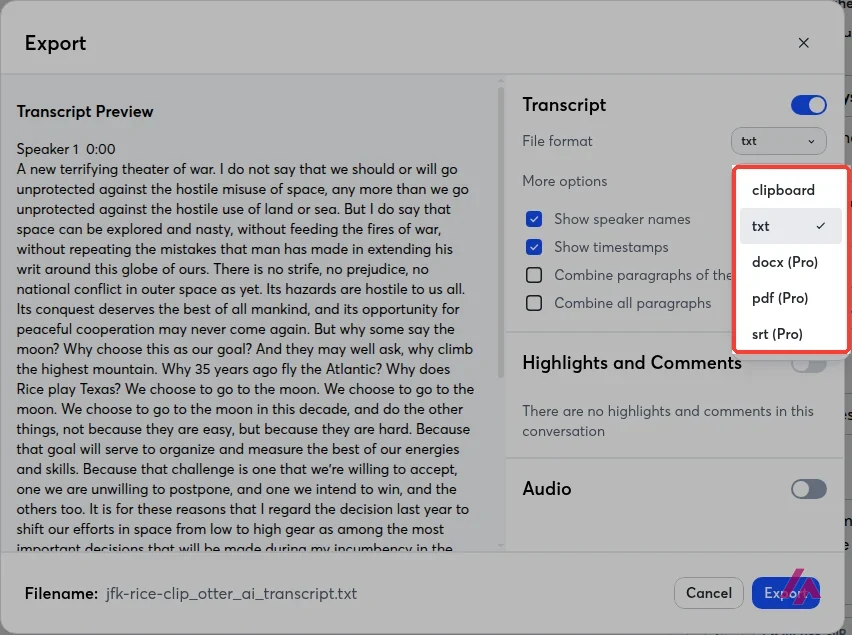
For files, it's another story. 3 uploads for the life of the account is a sample, not a plan. If you want to transcribe interviews, classes or podcasts you already have, you'll hit the wall on day one. The export window tells the same story: on Basic you get the text as txt or on the clipboard, and Word, PDF and subtitle files are for Pro. Playback is also stuck at normal speed, while Pro lets you go from 0.5x to 3x and skip silences.
Is Otter.ai worth paying for?
If your work is a calendar full of video calls in English, Pro at $8.33 a month on the yearly plan is a fair price for never typing meeting notes again, and the free plan is enough to find out whether you like having a bot in your calls. Business only makes sense when meetings run past 90 minutes or when a team needs shared admin tools. In both cases, treat the transcript as a very good draft: in my test, the mistakes were few, but they were the kind that changes what someone said.
If you mostly have recordings to transcribe, I wouldn't start with Otter. The free plan stops you after 3 files, and even Pro caps uploads at 10 a month.
Otter.ai or something else?

Buzz
Free
Free, open-source transcription that runs on your own Windows, Mac or Linux computer, with no monthly minutes.
For a pile of recordings, Buzz is free, open source and runs on your own computer, so there are no minutes or uploads to count; you lose the meeting bot and the summaries. And if what you actually want is to edit a podcast or a video by editing its transcript, Descript is built for that.
Written by Miguel Ángel, with help from an LLM to verify facts.
Otter's own short video for its desktop app, which it pitches as a way to record your meetings without sending a bot into the call.
Who is it for? For people who spend their week in Zoom, Teams or Google Meet calls in English and want notes without typing. Less so if you mainly need to transcribe a pile of recordings: the free plan only lets you upload 3 files, ever.
What I like and what I don’t
What I like
- A free plan with no card: the notetaker for Zoom, Teams and Google Meet, live transcription, summaries and AI Chat are all in it.
- Good transcript of a hard recording: in my test it got the famous passage of the speech word for word.
- Clear US-dollar pricing, with Pro at $8.33 a month on the yearly plan and a 20% discount for students and teachers with a .edu email.
What I don’t
- The free plan only allows 3 uploaded files for the life of the account, and each conversation stops at 30 minutes.
- AI Chat can suggest corrections that are wrong: it suggested changing 2 lines of my transcript that were already correct.
- On the free plan you only keep the 25 most recent conversations, play them back at 1x and export to txt or mp3.
Have you used Otter.ai? Tell me how it went
What worked for you and what didn’t. Your experience helps the next person who lands here unsure more than any review page. I read every one before publishing.
Write my review
Otter.ai pricing
Prices checked on the official site on
-
Free
Free
Basic plan, no card; 300 transcription minutes a month, up to 30 minutes per conversation and 3 file imports for the life of the account
- Cheapest paid plan
Pro
$16.99/mo
Per user; 1,200 minutes a month, up to 90 minutes per meeting and 10 file imports a month; $8.33 a month billed yearly
-
Business
$30/mo
Per user; unlimited meetings, up to 4 hours per meeting and unlimited file imports (6,000 minutes a month); $19.99 a month billed yearly
Alternatives to Otter.ai
-

Buzz
Free
When to pick it: If you have many recordings to transcribe and want it free and on your own computer, with no monthly minutes to count.
See details → -

Descript
Free with limits · from $24/mo
When to pick it: If you want to edit audio or video by editing its transcript, not just take notes from a meeting.
See details →
How I tested it
On October 31, 2026, I signed in to Otter.ai with a Google account on the free Basic plan, in a browser set to US English. I uploaded a 3-minute clip of John F. Kennedy's 1962 speech at Rice University (public domain), compared Otter's transcript with the published text of the speech, read the automatic summary, asked AI Chat which words looked misheard, and opened the export options. I read the prices on the pricing page that same day, in US dollars, and I didn't pay for anything. The screenshots are from that session.
A step-by-step walkthrough: signing up, the settings to check before your first call, Otter joining a meeting, reviewing the notes and the transcript, AI Chat and the plans. It shows the notetaker joining a live call step by step, which complements my upload test.

Written by Miguel Ángel, with the help of an LLM to fact-check. In IT since 2002 (systems, engineering, web development and SEO), doing business with AI since February 2023, when ChatGPT could first be bought in Spain. I build, write and maintain this site myself.

Got a question? Ask me
About Otter.ai, its plans or whether it fits what you need. I’m Miguel Ángel, and I’ll answer you myself, right here.