Fireflies AI Review: Is It Free, What It Costs and How Well Its Notetaker Handled My Recording
also called Fireflies, Fireflies.ai, Fireflies IA · 10 min read
- Free with limits
- Audio
- Web · iOS · Android
- Free $0 400 min of storage · no downloads
- Pro $18/mo Downloads · $10/mo billed yearly
Checked on
Open Fireflies AI
My verdict
In IT since 2002: systems, engineering, web development and SEO. I have been doing business with AI since February 2023, when ChatGPT could first be bought in Spain.
Fireflies AI does the core job well: it transcribed my recording almost word for word and wrote tidy notes with timestamps without being asked. The free plan is a real way to try it, with no card. The catches: you can't sign in with Google without handing over your calendar, the "unlimited" transcripts on the free plan depend on letting the bot into all your meetings, and you can't download anything until you pay.
What is Fireflies AI
- Type
- Audio
- Platforms
- Web · iOS · Android
- Free plan
- Free with limits
- Also called
- Fireflies, Fireflies.ai, Fireflies IA
- Updated on
- Nov 25, 2026
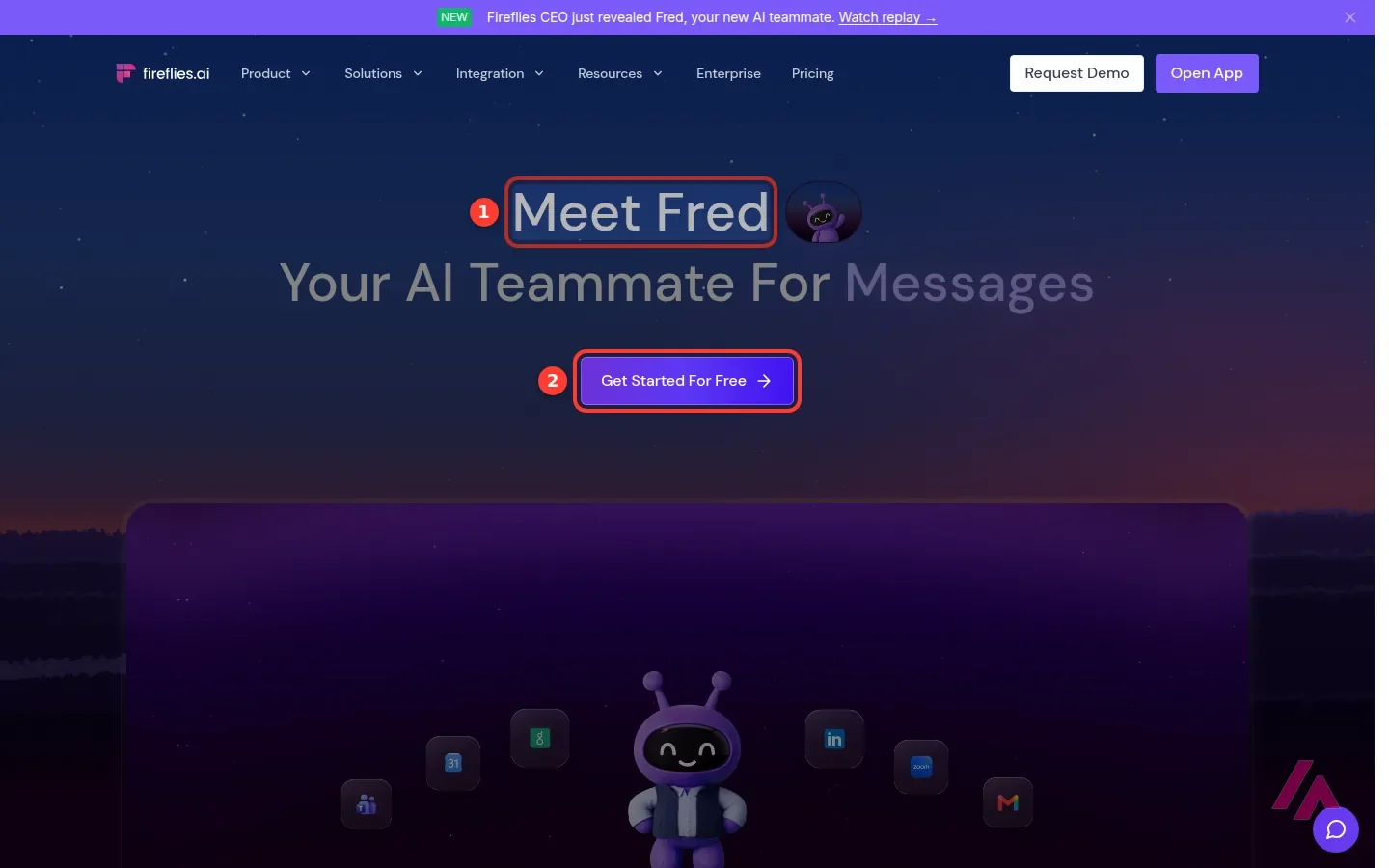
Fireflies AI is an AI notetaker: according to Fireflies, a bot called Fred joins your Zoom, Google Meet or Microsoft Teams calls, records them, transcribes them and writes up a summary with action items, and you can also upload audio or video files. Is Fireflies AI free? Yes, there's a free plan with no card, but its AI summaries are limited and you can't download anything. How much does it cost? Pro is $18 a month per user, or $10 a month billed yearly; Business is $29, or $19 yearly.
I signed up for a free account and fed it a recording. Here's what it got right, what it asks of you, and where the free plan stops.
What is Fireflies AI?
Fireflies started as a meeting recorder and now presents itself as an "AI teammate" named Fred. You invite fred@fireflies.ai to a call, or let it join the meetings on your calendar, and Fireflies says you then get the recording, the full transcript and AI notes with topics, decisions and action items. AskFred is a chat box where you ask questions about your meetings.
Around that core, the home page lists an email assistant, a Slack assistant, voice agents, Live Assist during calls and Fireflies Talk, which turns your voice into text. It works with Zoom, Google Meet, Microsoft Teams and Webex, and there's a desktop app that records without a bot, apps for iPhone and Android, and a Chrome extension. Fireflies says Talk, its dictation, is free and unlimited in the desktop app on every plan. Fireflies says English is its main language and that Spanish, French, Portuguese, Italian and more than 100 others are supported in beta.
Tell people the bot is there (Important)
Fred joins as a visible participant, and Fireflies' own tour reminds you to follow local recording laws and let people know. In some US states everyone on the call has to agree to be recorded, so say so at the start of the meeting.
Signing up: no card, but your calendar is the entry fee
There's no email-and-password sign-up: you get in with Google, Microsoft or single sign-on. I used a Google account. Google then showed a second screen asking to let Fireflies "see and download any calendar you can access", with the box unticked. I left it unticked, and Fireflies sent me back to the login page with a message: it needs your calendar to know which meetings to join, so tick the box and click Allow. With Google, the calendar is not optional.
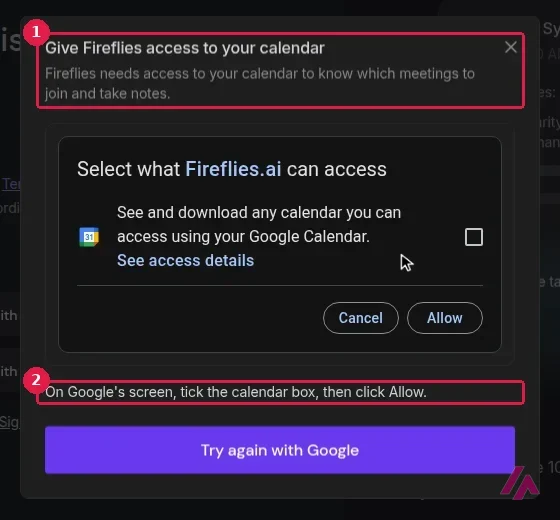
I granted it, since it's read-only, and removed the permission from that Google account when I was done.
The setup that follows matters more than it looks. Fireflies' default is to join all meetings with a web-conference link and send the recap to everyone on the invite. The small print explains why: users on those settings get unlimited free meeting transcripts. I changed both, so the bot only joins when I invite it and recaps go only to me. Then came a 7-day trial of the Business plan, "credit card required", which I closed. No phone number and no date of birth were asked for at any point.
Check two settings before your next meeting (Tip)
During setup, look at which meetings Fred joins and who gets the recap. The defaults send it into every call with a link and email the summary to every guest, which you may not want for a call with a client or your doctor.
My test: a one-minute poem, transcribed and summarized
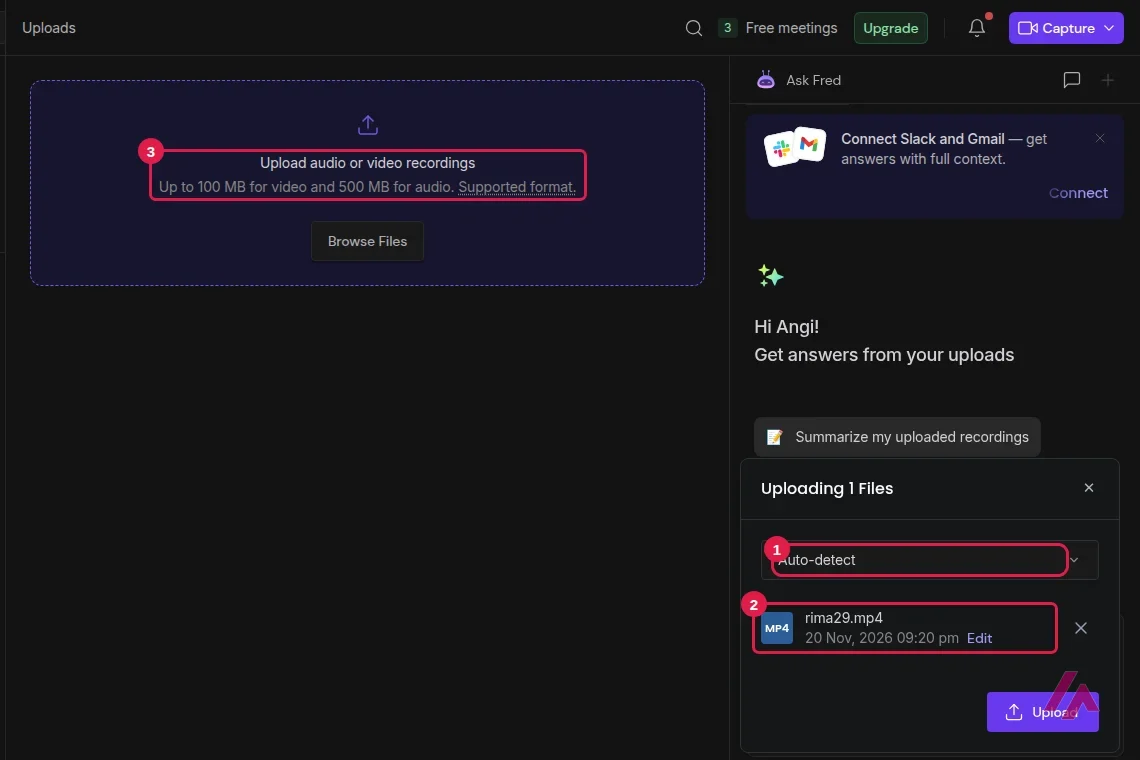
I tested it with the Upload recording option: a one-minute video of a 19th-century Spanish poem read aloud. Uploads go up to 100 MB for video and 500 MB for audio, in MP3, M4A, WAV, MP4 or WEBM. The language defaults to English (Global); I switched it to Auto-detect. After a couple of minutes of processing, the recording was ready.
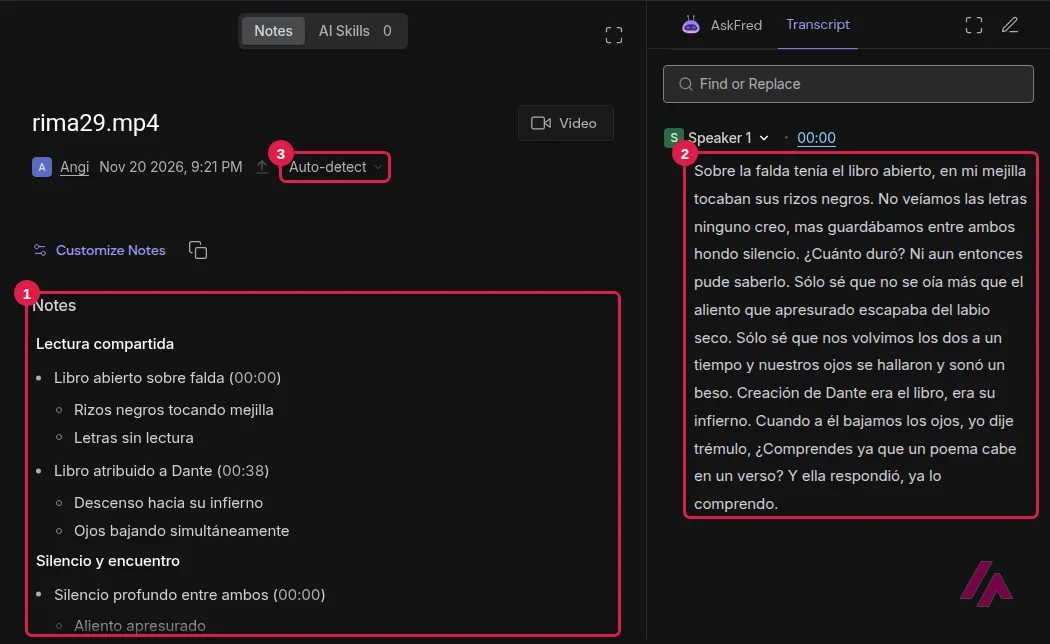
The transcript was complete, start to finish, under a single "Speaker 1". It made one mistake: it dropped one word near the end. Everything else was right, including accents, the old-fashioned spellings and the question marks Spanish puts at both ends of a question.
The notes were there without my asking, written in Spanish, the language of the recording: three topics, each with short bullet points and a timestamp. They read like a telegram, and a few timestamps repeated 00:00, but they followed the poem's story from beginning to end. AskFred suggested follow-up questions, also in Spanish. One limit showed up in the side panel: topic trackers only work for meetings in English.
My free account showed "3 Free meetings" at the top of the screen, and the counter was still at 3 after the upload. Fireflies' help center explains the number: free accounts created since September 1, 2026 get 3 meeting transcripts, and they become unlimited only with auto-join turned on, the setting that sends Fred into your meetings by itself.
Downloading: that's where the free plan stops
The download button offers the transcript, the summary, the video or the audio, in PDF, DOCX, SRT, CSV, JSON or MD. I picked DOCX and got "Upgrade to download meeting". On the free plan you can read, search and share your meetings by link inside Fireflies, but you can't take anything out. Downloads start with Pro.
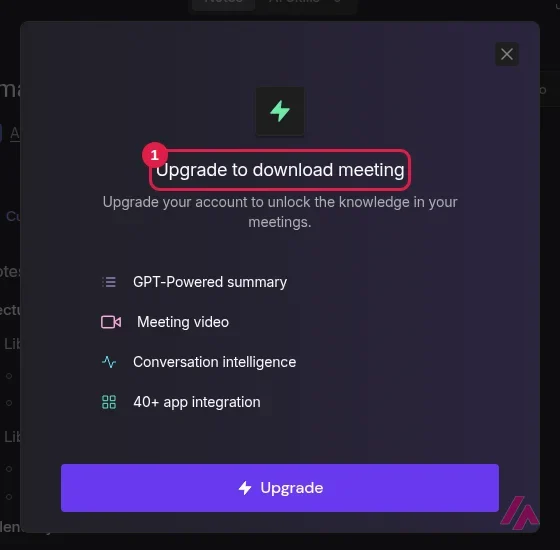
Free means read-only (Heads-up)
If you need the transcript as a file, for subtitles or to paste into a report, the free plan won't do it. You can still share a link to the meeting, and according to Fireflies, sharing is free.
How to try Fireflies AI on a recording
- Go to fireflies.ai and click the button to get started for free.
- Sign in with Google or Microsoft, and allow calendar access when Google asks.
- In setup, choose which meetings Fred joins and who receives the recaps.
- Close the Business trial offer if you don't want to add a card.
- Click Upload recording and choose your audio or video file.
- Set the language, or leave it on Auto-detect, and click Upload.
- Open the meeting when it's processed to read the notes and the transcript, or ask AskFred a question.
How much does Fireflies AI cost?
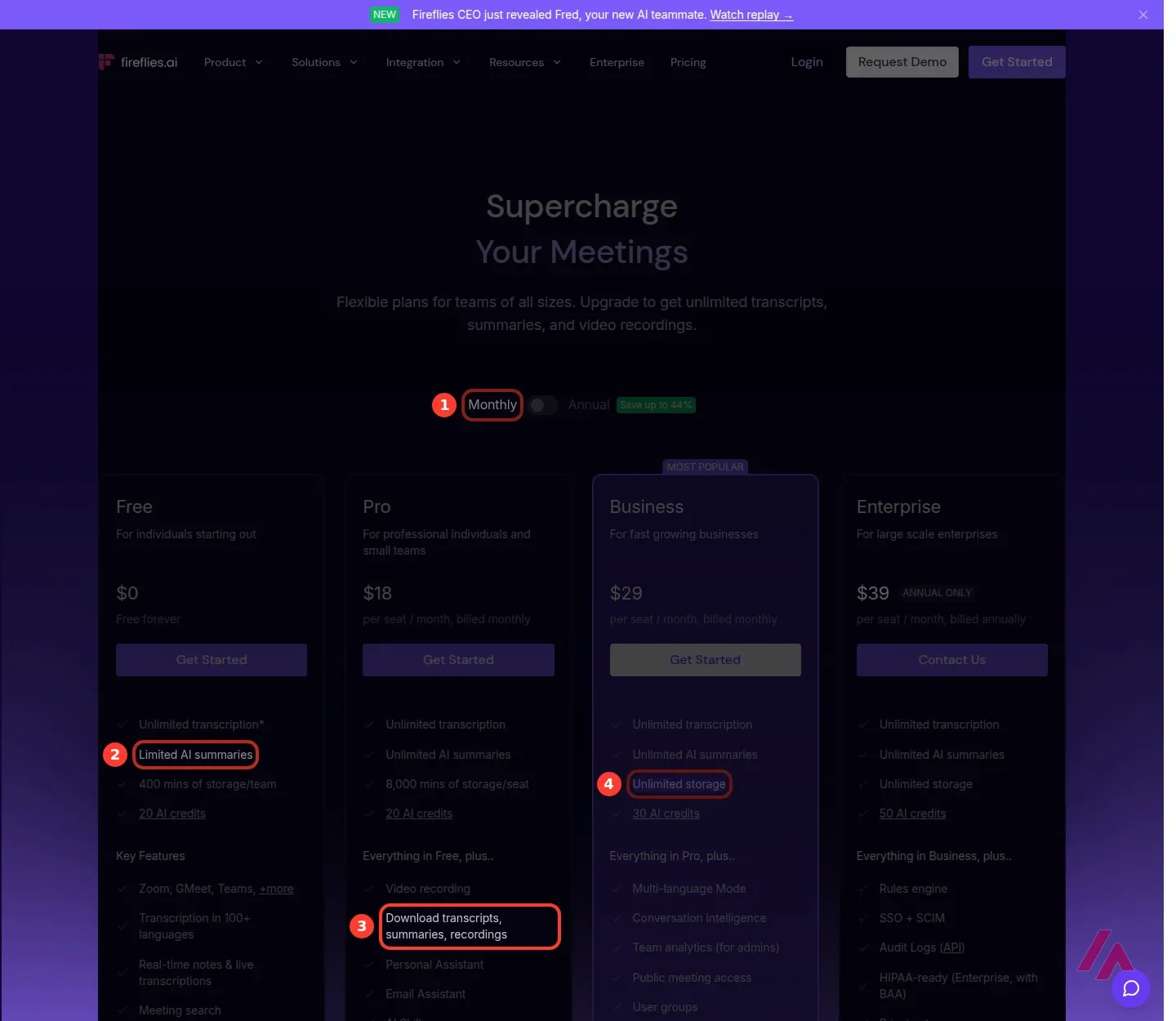
Fireflies lists its prices in US dollars, per user, and the pricing page doesn't mention tax. The page opens on yearly billing, with savings of up to 44%. These are the prices I saw when I re-read the page.
| Plan | Monthly billing | Billed yearly (per month) | What you get |
|---|---|---|---|
| Free | $0 | $0 | 3 meeting transcripts (unlimited with auto-join), limited AI summaries, 400 minutes of storage per team, recordings up to 2 hours, file uploads; no downloads |
| Pro | $18 per user | $10 per user | Unlimited transcripts and summaries, 8,000 minutes of storage per seat, video recording, downloads, 20 AI credits, recordings up to 2 hours |
| Business | $29 per user | $19 per user | Unlimited storage, multi-language mode, conversation intelligence, team analytics, 30 AI credits, recordings up to 3 hours |
| Enterprise | Yearly only | $39 per user | Single sign-on, SCIM, HIPAA with a BAA, private storage, 50 AI credits, recordings up to 4 hours |
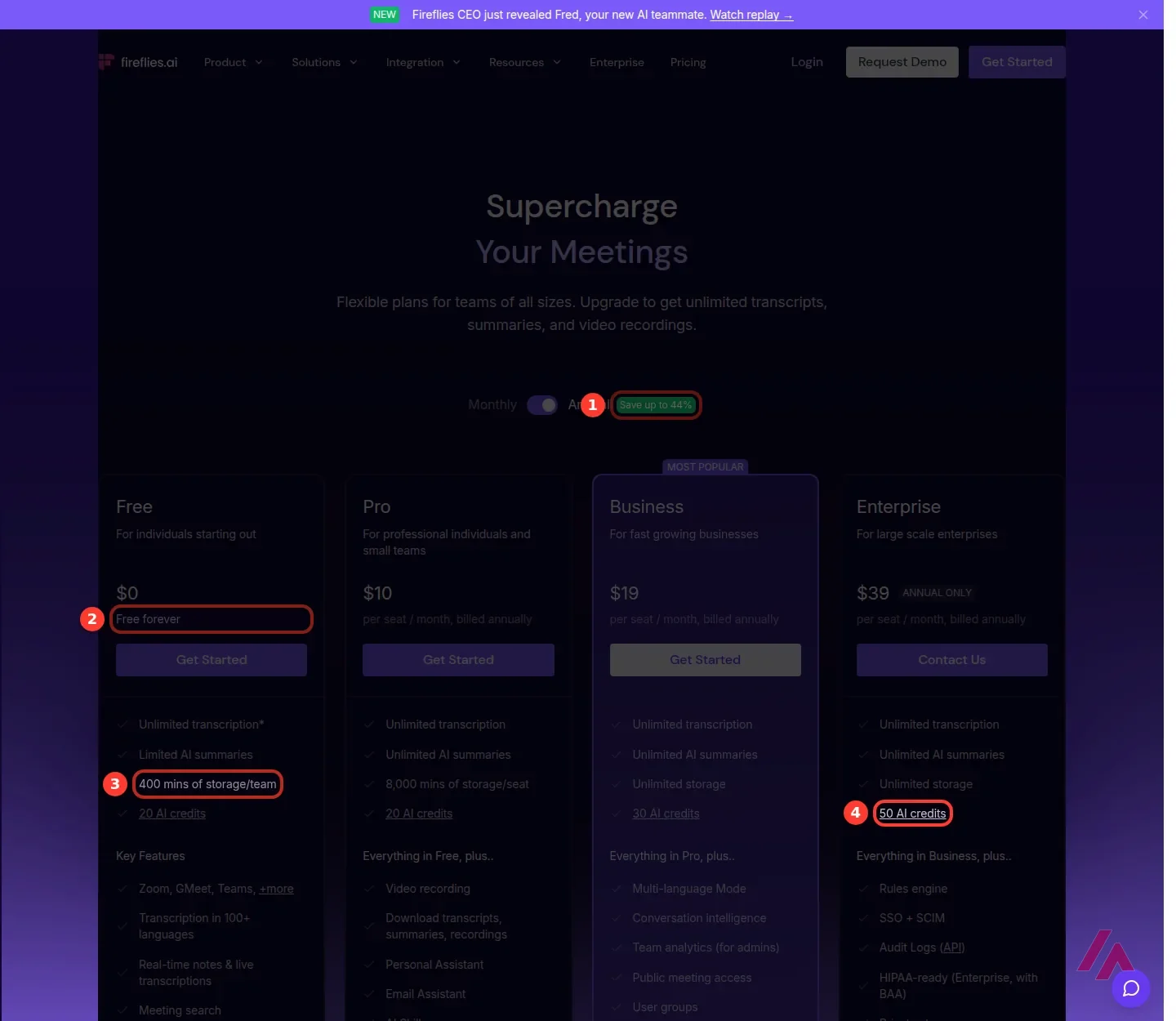
The free plan's "unlimited transcription" comes with an asterisk: the pricing page ties it to meetings where the shared bot joins, the Chrome extension and the mobile app, and, as the help center and setup both made clear, it depends on letting Fred into your meetings automatically. For a team, every person you add to the workspace is a paid seat, though sharing a meeting link with someone outside it is free.
Fireflies AI, Otter.ai, Happy Scribe or Buzz?
Fireflies is at its best when your work happens in calls. Depending on what you need, I'd also look at these.
Otter.ai is the closest rival: another notetaker for Zoom, Meet and Teams, with live transcription and a free plan with no card.
Happy Scribe is especially good for files: transcripts and subtitles you can download in many formats, with a few free minutes to try it.
And if you'd rather keep your recordings on your own computer, Buzz is a free desktop app that transcribes them offline, with no bot and no account.

My take: Fireflies AI is worth it if you live in video calls. The transcript was nearly perfect and the notes appeared on their own, which is the whole point. Just go through setup with your eyes open: it wants your calendar, it would happily join every meeting you have, and the free plan keeps your transcripts inside the app. If you need the files, Pro at $10 a month billed yearly is the first plan that lets you take them with you.
Tested and written by Miguel Ángel, with help from an LLM to verify the facts.
Fireflies' own short demo of Fred: AskFred, Live Assist, the desktop app that records without a bot, and Voice Agents, in under five minutes.
Who is it for? For people who spend their week in video calls and want notes, action items and a searchable record without typing a line, and for teams that want those notes shared automatically. If you mostly transcribe files you already have, a tool built for uploads is a better fit.
What I like and what I don’t
What I like
- The transcript of my one-minute recording was complete, with a single word missing and the punctuation in place.
- It wrote the meeting notes on its own, grouped by topic and with timestamps, in the language of the recording.
- Sign-up asks for no card, no phone number and no date of birth.
What I don’t
- With Google, you can't get in unless you let Fireflies read your calendar.
- The free plan won't let you download the transcript, the summary or the recording.
- Onboarding pushes a 7-day Business trial that requires a credit card.
Have you used Fireflies AI? Tell me how it went
What worked for you and what didn’t. Your experience helps the next person who lands here unsure more than any review page. I read every one before publishing.
Write my review
Fireflies AI pricing
Prices checked on the official site on
-
Free
Free
3 meeting transcripts (unlimited with auto-join), limited AI summaries, 400 minutes of storage per team, recordings up to 2 hours and file uploads; no downloads
- Cheapest paid plan
Pro
$18/mo
Per seat; unlimited transcripts and summaries, 8,000 minutes of storage, video recording, downloads of transcripts, summaries and recordings; $10 a month billed yearly
-
Business
$29/mo
Per seat; unlimited storage, multi-language mode, conversation intelligence, team analytics, recordings up to 3 hours; $19 a month billed yearly
-
Enterprise
$39/mo
Per seat, billed yearly only; single sign-on, SCIM, HIPAA with a BAA, private storage and recordings up to 4 hours
The free plan is $0, with limited AI summaries, 400 minutes of storage per team and no downloads. Paying month to month, Pro is $18 per user and Business $29; billed yearly they work out to $10 and $19 a month. Enterprise is $39 per user a month, billed yearly only. Prices are in dollars, and the pricing page doesn't mention tax.
Alternatives to Fireflies AI
-
Otter.ai
Free with limits · from $16.99/mo
When to pick it: If you want the same kind of meeting notetaker with live transcription and a free plan of its own.
See details → -
Happy Scribe
Free with limits · from $17/mo
When to pick it: If you mostly transcribe or subtitle recordings you already have, with downloads in many formats.
See details → -

Buzz
Free
When to pick it: If you'd rather transcribe on your own computer, for free, without a bot joining anything.
See details → -
Notta
Free with limits
-
TurboScribe AI
Free with limits · from $20/mo
How I tested it
I signed up for Fireflies AI on the free plan with a Google account on November 20, 2026, with no card. I uploaded a one-minute recording of a poem read in Spanish, read the transcript and the notes it wrote, and tried to download them. On November 25 I re-read the home page and the pricing page in US English.
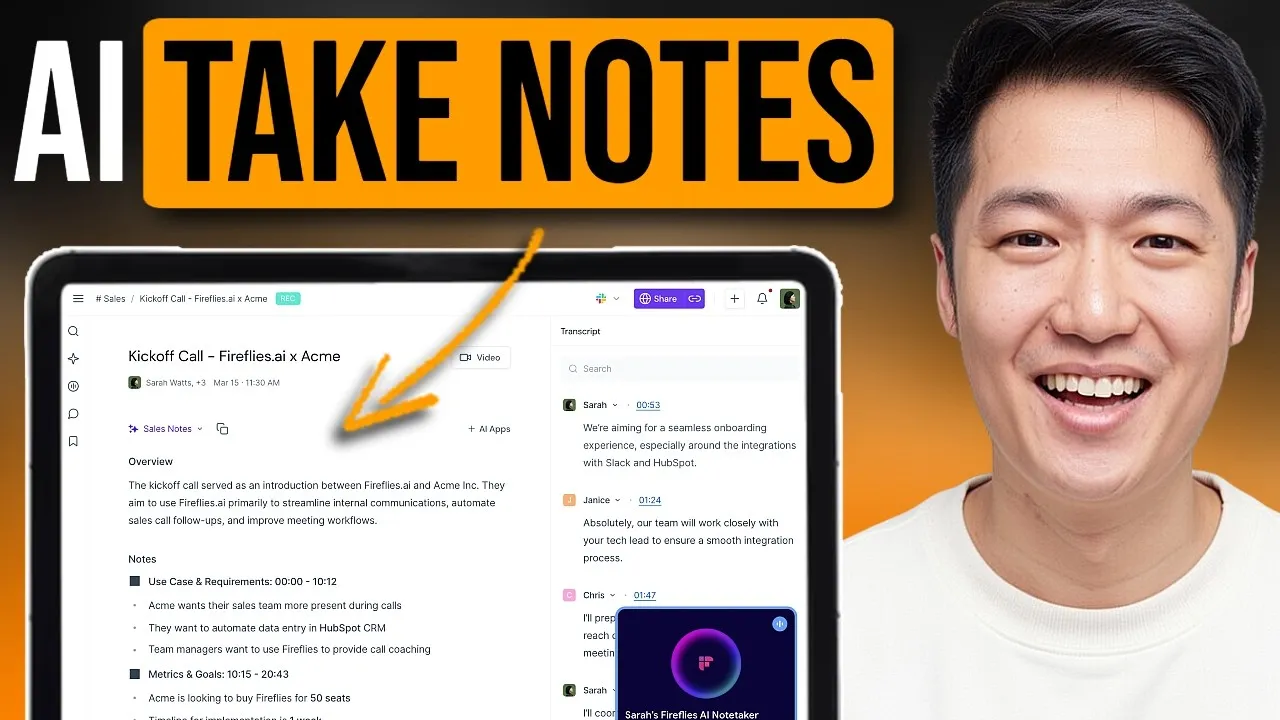
An English walkthrough of Fireflies' meeting notes, recorded in early 2026, so a few menus may look different now.

Written by Miguel Ángel, with the help of an LLM to fact-check. In IT since 2002 (systems, engineering, web development and SEO), doing business with AI since February 2023, when ChatGPT could first be bought in Spain. I build, write and maintain this site myself.

Got a question? Ask me
About Fireflies AI, its plans or whether it fits what you need. I’m Miguel Ángel, and I’ll answer you myself, right here.