Craiyon Review: The Old DALL·E Mini, Free With No Account, and What It Costs Now
Craiyon LLC · also called Craiyon AI, Craiyon IA, DALL·E Mini, DALL-E mini · 9 min read
- Free with limits
- Image
- Web
- Free $0 no account · public, watermarked
- Supporter $12/mo unlimited · 100 credits/mo
Checked on
Open Craiyon
My verdict
In IT since 2002: systems, engineering, web development and SEO. I have been doing business with AI since February 2023, when ChatGPT could first be bought in Spain.
Craiyon is the image generator that launched as DALL·E mini in 2021 and renamed itself in 2022. Is Craiyon free? Yes, and without an account: I typed a prompt, got a realistic image, opened the download options and removed its background, all without signing up. The catch is in the small print of the free plan: your images are public, they carry Craiyon's pencil watermark, and if you use one you have to credit Craiyon. Paid plans start at $12 a month and take all of that away.
What is Craiyon
- Company
- Craiyon LLC
- Type
- Image
- Platforms
- Web
- Free plan
- Free with limits
- Also called
- Craiyon AI, Craiyon IA, DALL·E Mini, DALL-E mini
- Updated on
- Nov 18, 2026
Craiyon is a free AI image generator that runs in your browser, and it's the same project that launched in 2021 as DALL·E mini. Is Craiyon free? Yes, and you don't need an account: I typed a prompt, got an image, opened the download options and removed its background without signing up for anything. Free images are public, carry a watermark and need a credit to Craiyon if you use them. Paid plans cost $12, $24 or $84 a month ($10, $20 or $70 a month billed yearly), and they remove the watermark and make your images private.
Craiyon pricing, the short version (Important)
- Free: no account needed. A limited number of images, free daily credits for edits, Craiyon's watermark, public images, and you have to credit Craiyon when you use them.
- Supporter: $12 a month, or $120 a year. Unlimited images and 100 edit credits a month.
- Professional: $24 a month, or $240 a year. 300 edit credits a month, top priority and early access to new features.
- Ultra: $84 a month, or $840 a year. 1,200 edit credits a month.
- Every paid plan removes the watermark and the credit line, and adds private images and HD downloads. Craiyon's pricing page doesn't mention sales tax, and sales are non-refundable.
What happened to DALL·E mini?
It became Craiyon. Craiyon says it released DALL·E mini in June 2021, when it won a Hugging Face and Google hackathon, and that its CEO, Boris Dayma, and the core team have kept improving it ever since; the name changed to Craiyon in 2022. If you remember the blurry image grids of the DALL·E mini days, today's Craiyon is a different animal: it gave me one image, and mine looked like a photo.
Craiyon also says it builds its own image models (its about page shows versions 3, 4 and 5) and that subscribers get "our highest quality models." It doesn't say which model the free plan uses.
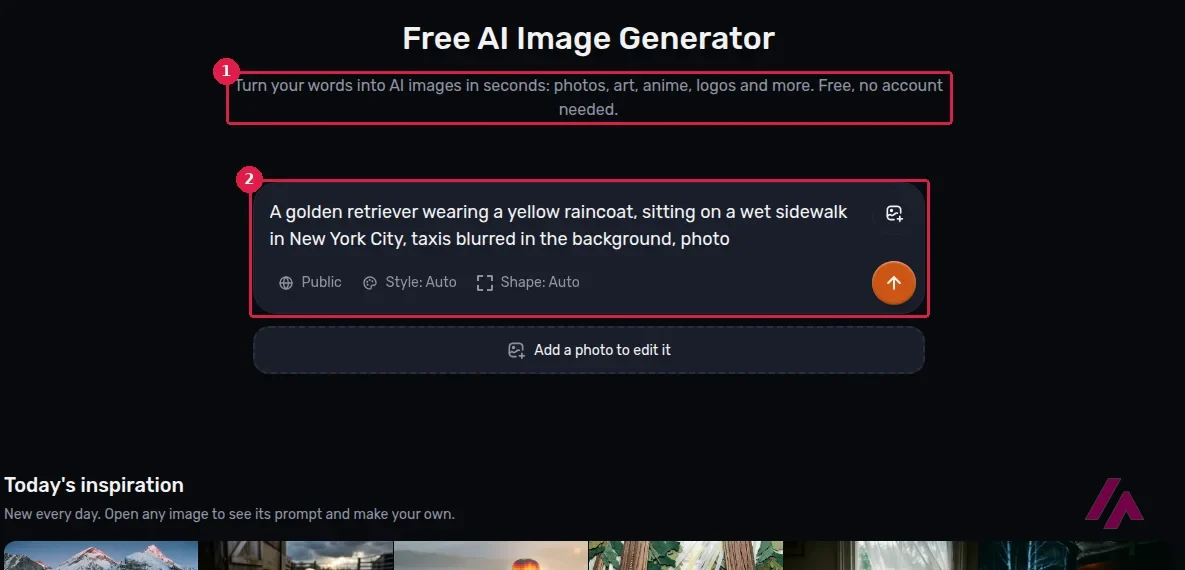
The home page is one prompt box with three settings: Public (on the free plan there's no other option), Style and Shape, both on Auto. Styles include Artistic, Photo, Illustration, Anime, Vector and Raw, and shapes go from square to portrait or landscape. A menu groups the rest: generators for photos, anime, logos, coloring pages, posters and more, plus editing tools like a photo editor, image to video, a background remover, an upscaler and image to SVG. The walkthrough below covers the free plan from start to finish if you'd rather watch first.
My test: a golden retriever in New York
My prompt: "A golden retriever wearing a yellow raincoat, sitting on a wet sidewalk in New York City, taxis blurred in the background, photo." I left Style and Shape on Auto and pressed Draw. There was a short wait with a progress bar, and then one landscape image appeared under the box.
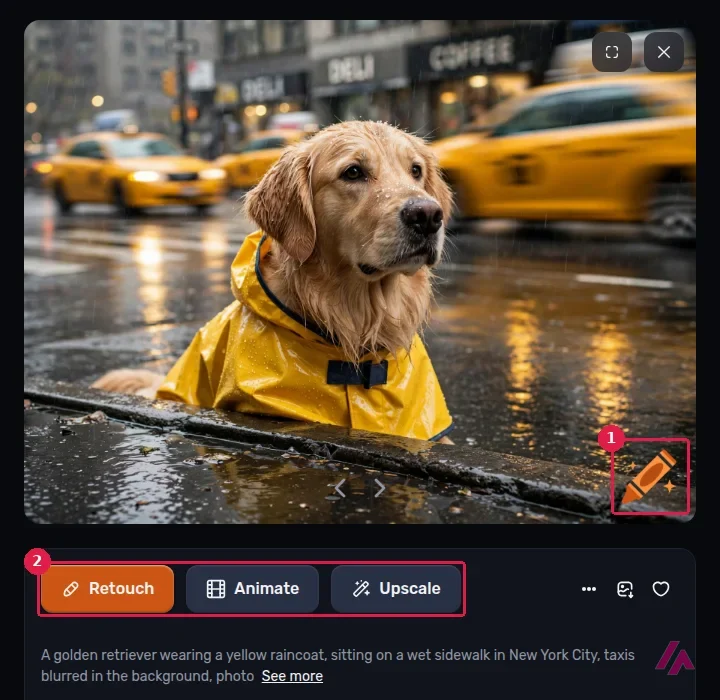
It's a good image. The dog is soaked, the raincoat is the right shade of yellow, the street shines with reflections, the taxis are blurred as I asked, and the DELI and COFFEE signs in the background are actually readable. What it didn't do is put the dog on the sidewalk: it's down in the street, cut off by the curb, as if it were peeking out of a hole. Close, but not what I wrote.
Two more things showed up that are worth knowing. The image got its own public page, with a title Craiyon wrote for it, and below it the site suggests similar images from other people. And in the bottom-right corner sits Craiyon's orange pencil, the watermark of the free plan.
Free images are public (Heads-up)
On the free plan, everything you create is public: Craiyon's own FAQ says anyone with the link can see it, and your image gets a page of its own. Don't put anything personal in a free prompt or a photo you upload.
Downloading and removing the background
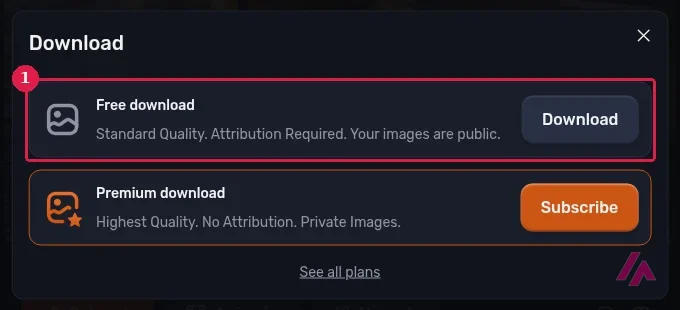
The download menu gives you two options. The free one is "Standard Quality. Attribution Required. Your images are public." The premium one, "Highest Quality. No Attribution. Private Images.", sends you to the plans. The free download option doesn't ask for an account.
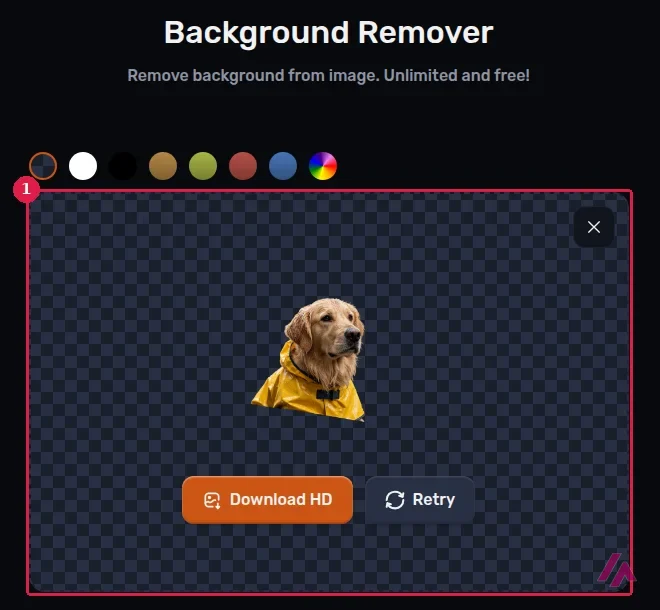
Then I tried the background remover, which Craiyon advertises as "Unlimited and free!" I sent it my image from the menu, pressed the button, and got the dog in its raincoat cut out on a transparent background, with a clean edge around the fur and the ears. Along the bottom the cut is straight, because that's where the curb chopped the dog in the original. There's a Download HD button and a row of background colors to swap in. No account, and I saw no credit counter.
Generating doesn't cost credits (Tip)
Craiyon's pricing FAQ says credits are only spent on edits, like retouching, upscaling, vectorizing, animating or starting from an image. Generating from text alone doesn't use them, so the edit credits are what you're really paying for.
There's more you can try: Retouch changes an image by text (you describe what to swap), Animate turns an image into a short video, Upscale enlarges it, and Vectorize turns it into an SVG.
Craiyon pricing: Free vs. Supporter, Professional and Ultra
These are the US prices on Craiyon's pricing page. The yearly switch is labeled "2 months free," and that's exactly the math.
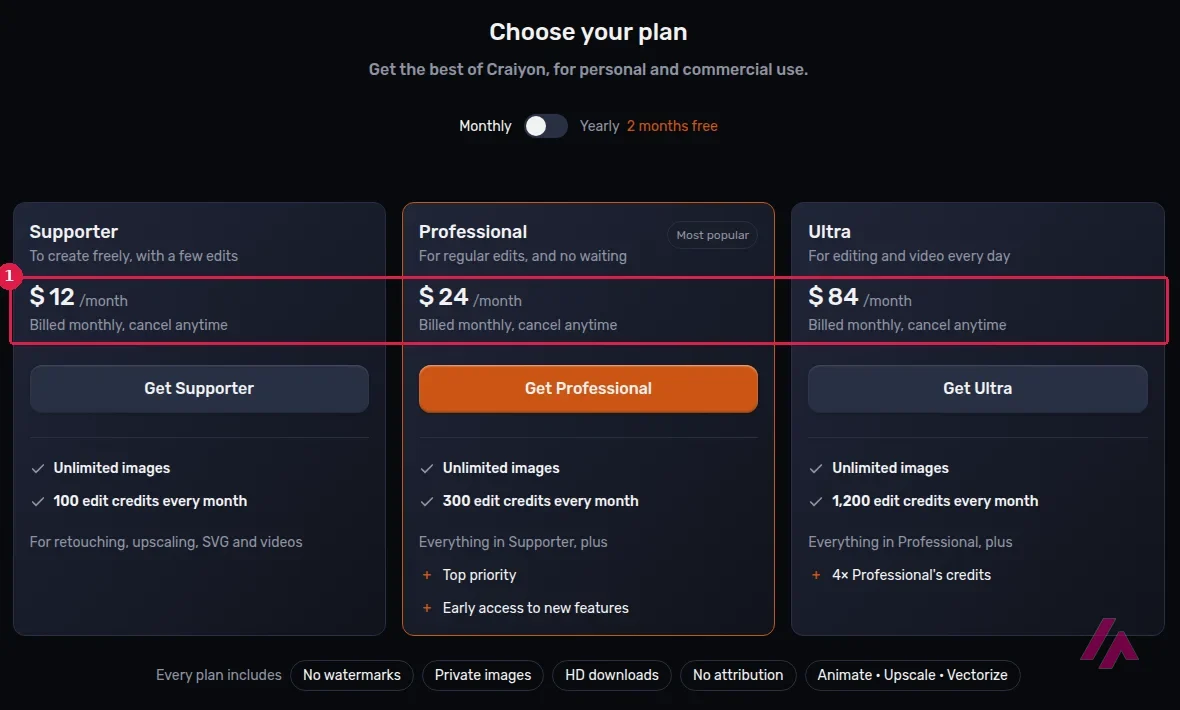
| What you get | Free | Supporter | Professional | Ultra |
|---|---|---|---|---|
| Monthly price | $0 | $12 | $24 | $84 |
| Billed yearly | — | $10 a month ($120 a year) | $20 a month ($240 a year) | $70 a month ($840 a year) |
| Images | Limited | Unlimited | Unlimited | Unlimited |
| Edit credits | Free daily credits | 100 a month | 300 a month | 1,200 a month |
| Watermark and credit to Craiyon | Yes | No | No | No |
| Private images and HD downloads | No | Yes | Yes | Yes |
| Top priority and early access | No | No | Yes | Yes |
Credits don't roll over: they reset on your billing date, even on a yearly plan, and you can buy extra credit packs if you run out. Canceling takes one click and there's no contract, but Craiyon says its sales are non-refundable, so try the free plan properly before paying. Commercial use is allowed on any account; the difference is that free users have to credit Craiyon and subscribers don't. There's no public API yet, and the mobile app is listed as coming soon.
Is Craiyon safe and legit?
It's a real company, Craiyon LLC, running the same project since 2021, and in my test it didn't ask for an email or a card to make an image, edit it or open the download options. I didn't see any ads either. The thing to keep in mind is privacy rather than safety: on the free plan your images are public, so don't upload a photo of your kids to edit. If you're going to use an image for work, read the credit rule above, or pay for a month.
Who it's for, and who should skip it
Craiyon makes sense if you want a quick, decent AI image without creating another account, or a free background remover that just works. If you only need the odd picture and don't mind the pencil in the corner, the free plan is enough.
DeepAI · Deep AI, Inc.
Free with limits · from $9.99/mo
Chat, images, music and video in one website, also with no account.
Skip it, or pick something else, if your images need to stay private, if you need the result to follow every detail of your prompt, or if you want to chat and make images in one place, where DeepAI is the closer match. For more control over styles, Leonardo AI is the next step, and if quality comes first and you're paying anyway, Midjourney. ✏️
Written by Miguel Ángel, with help from an LLM to verify facts.
A recent, full walkthrough of the free plan with no account: making images, the watermark, the public gallery and the free editing tools.

Who is it for? For anyone who wants a quick AI picture for a slide, a post or a laugh without creating an account, and for people who like the bundled extras, like the free background remover. Less so if your images need to stay private, follow your prompt to the letter, or go into client work without a credit line.
What I like and what I don’t
What I like
- No account, no email, no card: you open the site, type and get an image.
- My test image came out realistic, with blurred yellow taxis and street signs you could actually read.
- The background remover took my image and cut out the dog cleanly, for free.
- I didn't see a single ad on the site.
What I don’t
- Free images are public, watermarked, and need a credit to Craiyon if you use them.
- It got the scene right but missed part of my prompt: the dog wasn't sitting on the sidewalk.
- The free plan only promises "Limited" images and possible waits at busy times, with no number.
- Paid plans are non-refundable, and there's no public API yet.
Have you used Craiyon? Tell me how it went
What worked for you and what didn’t. Your experience helps the next person who lands here unsure more than any review page. I read every one before publishing.
Write my review
Craiyon pricing
Prices checked on the official site on
-
Free
Free
No account needed; limited images and free daily edit credits; images are public, carry Craiyon's watermark, download in standard quality and need a credit to Craiyon when you use them
- Cheapest paid plan
Supporter
$12/mo
Unlimited images, 100 edit credits a month, no watermark, private images, HD downloads, no attribution; $10 a month billed yearly ($120 a year)
-
Professional
$24/mo
Everything in Supporter, 300 edit credits a month, top priority and early access to new features; $20 a month billed yearly ($240 a year)
-
Ultra
$84/mo
Everything in Professional and 1,200 edit credits a month; $70 a month billed yearly ($840 a year)
Alternatives to Craiyon
-
DeepAI
Free with limits · from $9.99/mo
When to pick it: If you also want a chatbot, AI music and video in the same no-account website.
See details → -
Leonardo.Ai
Free with limits · from $12/mo
When to pick it: If you want more control over models and styles and don't mind signing up.
See details → -
Midjourney
Paid · from $10/mo
When to pick it: If image quality comes first and you'll pay for it from day one.
See details → -
Microsoft Designer
Free with limits
How I tested it
On November 18, 2026, I opened Craiyon in a clean browser set to US English, with no account: I generated an image from my own prompt, opened the download options, ran the background remover on my image and read the pricing page. I didn't sign up or pay for anything.

Written by Miguel Ángel, with the help of an LLM to fact-check. In IT since 2002 (systems, engineering, web development and SEO), doing business with AI since February 2023, when ChatGPT could first be bought in Spain. I build, write and maintain this site myself.

Got a question? Ask me
About Craiyon, its plans or whether it fits what you need. I’m Miguel Ángel, and I’ll answer you myself, right here.