
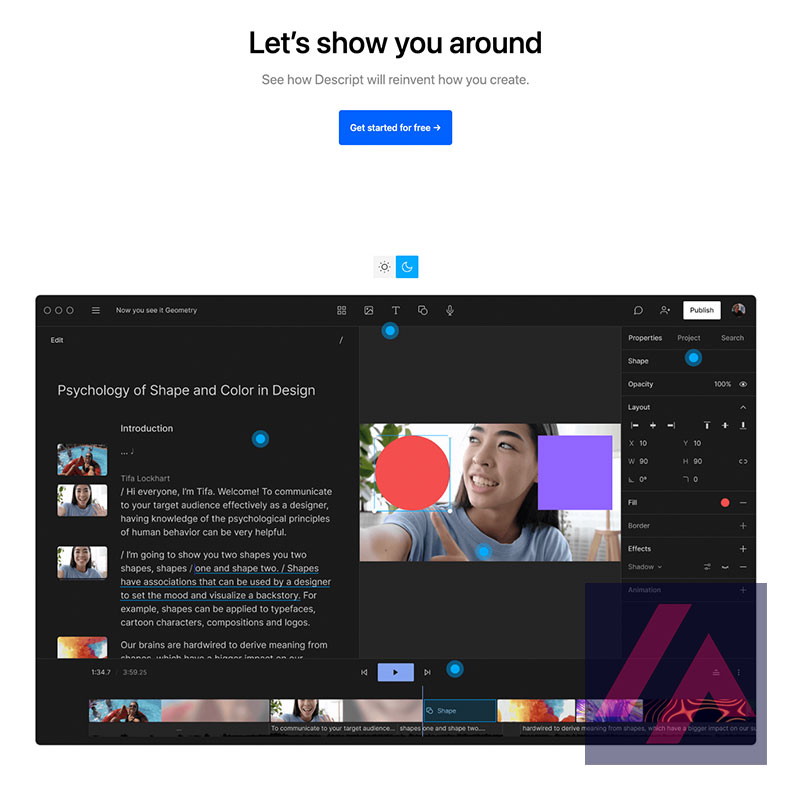
Descript is an online platform that allows you to make changes and add elements to your audio and video files. In addition, it also offers you the option to transcribe these files to text, which can be very useful if you want to create written content from audio and video material.
How does Descript work?
To start using Descript, all you have to do is create an account and upload your audio and video files. The interface is very easy to understand, so you won’t have any problems to start working with the program right away.
One of the most interesting things about Descript is that it allows you to edit your files directly in the text transcript. This means that you can make changes to the content of your files by simply modifying the text. In addition, you can also add images, graphics and other visual elements to make your files more attractive and easier to understand.
What are the features of Descript?
Descript has a number of features that make it a very complete tool. Some of the most outstanding ones are:
- Automatic transcription: Descript can transcribe your audio and video files to text automatically, which saves you a lot of time and effort. The quality of the transcription is very high, so you will be able to understand everything that is said in your files without any problems.
- Audio and video editing in transcription: AI allows you to edit your files directly in the text transcript. This is very useful if you want to make quick and easy changes to the content of your files.
- Add visual elements: If you want to make your audio and video files more attractive and easier to understand, you can add images, graphics and other visual elements directly into the text transcript. This is very useful to make your files more attractive and easier to follow.
- Share your files with other users: Descript allows you to share your audio and video files with other users of the platform in a simple way. This is useful if you want to work on a project with other people and need an easy way to do so.
How has our experience with Descript been?
Overall, our experience with Descript has been very positive. The tool is very easy to use and has allowed us to edit our audio and video files quickly and easily. In addition, the option to transcribe our files to text has been very useful for creating written content from audio and video material. Comfortable to use, without too many complications… we think it has a promising future, although it will probably have to fight with strong competitors.




0 Comments