
Palette.fm
11 min read
- Free with limits
- Image
- Web

My verdict
In IT since 2002: systems, engineering, web development and SEO. I have been doing business with AI since February 2023, when ChatGPT could first be bought in Spain.
Palette.fm still works, and it's still one of the easiest ways to put color into an old black-and-white photo: you upload it, no account, and a few moments later you're looking at a believable color version. The free part is a preview, though, not a file you'd print. What you download for free is a small JPEG with a big Palette logo in the corner. If you want the photo in full size and without the logo, you pay per photo ($1.99 for one, less in packs) or subscribe from $9 a month. For a one-off batch of family photos, a pack or a single month of the cheapest plan makes more sense than a standing subscription.
What is Palette.fm
- Type
- Image
- Platforms
- Web
- Free plan
- Free with limits
- Updated on
- Oct 22, 2026
Yes, Palette.fm is still around, and yes, you can use it for free, with a catch. You upload a black-and-white photo, no account needed, and it hands you back a color version you can download. That free download is a small preview with a Palette logo in the corner. The full-size photo without the logo costs 1 credit, which means $1.99 for a single photo, less if you buy a pack, or a subscription from $9 a month.
Is Palette.fm free? The short version (Important)
- Free, no account: unlimited previews, every filter and a download, but small (about 0.5 megapixels) and with the logo stamped on it.
- Free account: 1 trial credit, so one photo in full size with no logo.
- After that: $1.99 for one photo, $9 for 10, or $9 a month for 40. Palette takes cards, PayPal, Apple Pay and Google Pay.
Here's what it actually looks like when you use it.
What happened when I colorized a photo
I didn't want to feed it anyone's face, so I picked a classic: a public-domain black-and-white landscape by Ansel Adams, with jagged snowy peaks, a stormy sky, a forest and a river winding through the middle. It's a good test, because a colorizer has to tell sky from snow, water from rock and pine from shrub.
The upload is the whole onboarding. You drop the photo on the home page, it opens the editor and colorizes it with the default filter, Classic Palette. The result was convincing: blue storm sky with white clouds, snow on the peaks, dark green forest, a silvery river. If anything it leaned a bit cold and blue in the shadows, which suits a storm, to be fair. Nobody would guess at a glance that it started out in gray.
In the bottom-right corner of the preview sits a large black-and-white badge that says PALETTE.FM. More on that below, because that badge is the business model.
The filters are the real product
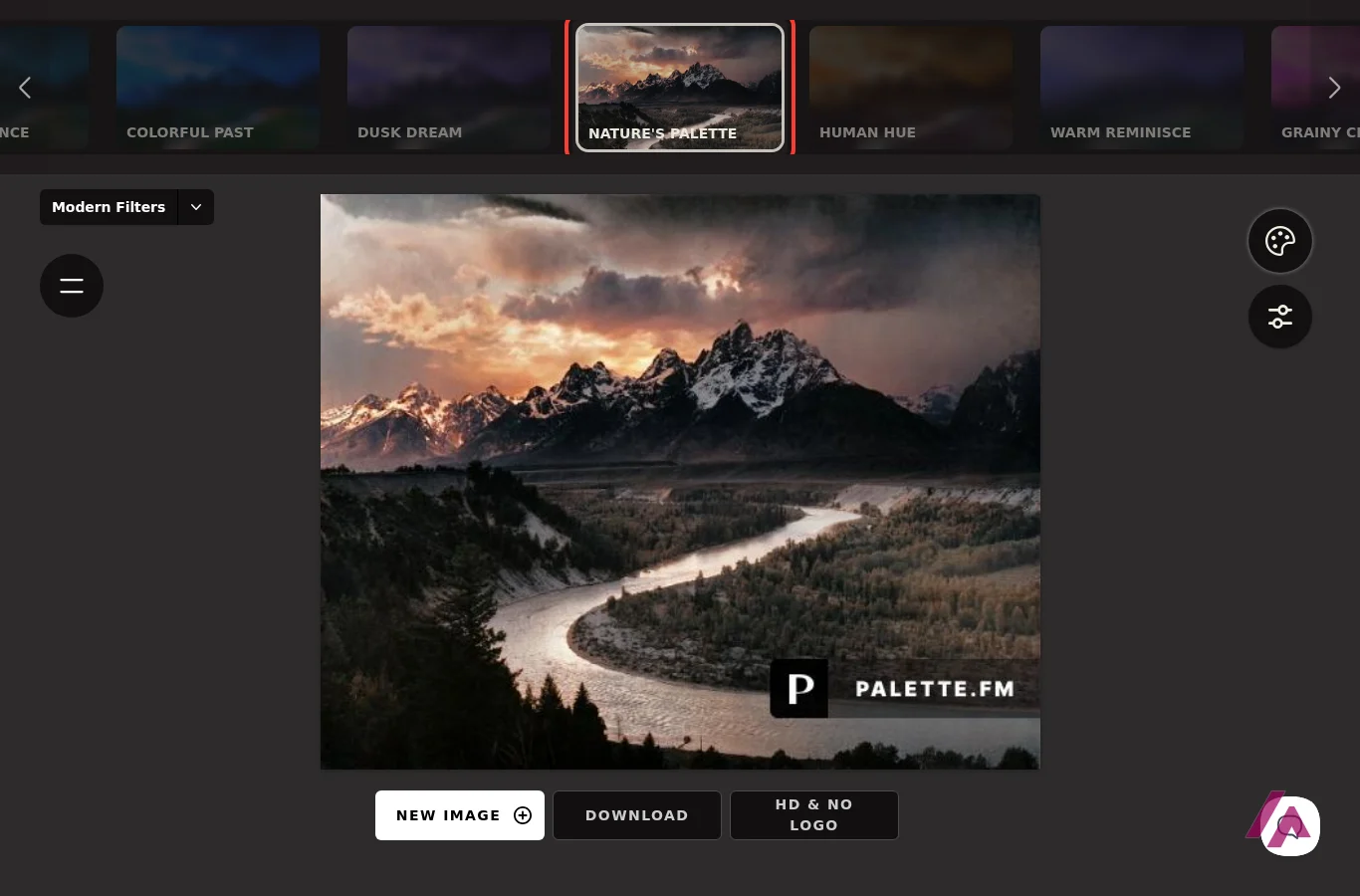
Along the top of the editor there's a strip of about 20 filters with names that sound like nail polish colors: Bright Essence, Dusk Dream, Nature's Palette, Retro Citrus, Polar Luster, Nostalgia Pop, and so on. Each one colorizes the same photo in a different style. The ones you haven't picked stay blurry until you click them, and each takes a little while to render.
This is where it gets interesting. Colorful Past gave me livelier greens and yellows in the forest and a bluer sky. Nature's Palette went the other way entirely: it turned the storm into a sunset, with orange and pink clouds, warm light on the peaks and a forest in autumn browns. It's a beautiful picture. It's also a different day from the one Ansel Adams photographed.
And that's the honest way to think about Palette. It isn't recovering the "real" colors (nothing can, the information isn't in a black-and-white photo). It's making an educated, good-looking guess, and the filters let you choose which guess you like. For a family photo that's often exactly what you want.
Which filter to start with (Tip)
If you want the photo to look like it was simply shot in color, start with Classic Palette, the default, and try Colorful Past if you want livelier greens. Save filters like Nature's Palette for when you want a different picture: on mine it changed the light, the season and even the time of day.
The colors are a guess, not history (Heads-up)
No colorizer can know what color a dress, a car or a front door really was. If the photo is going into a family tree, a school project or a caption, say the colors are a reconstruction, stick to the most neutral filter, and check what you can (a uniform, a flag, a car model) against a real source.
The color prompt (and the tourist who wasn't there)
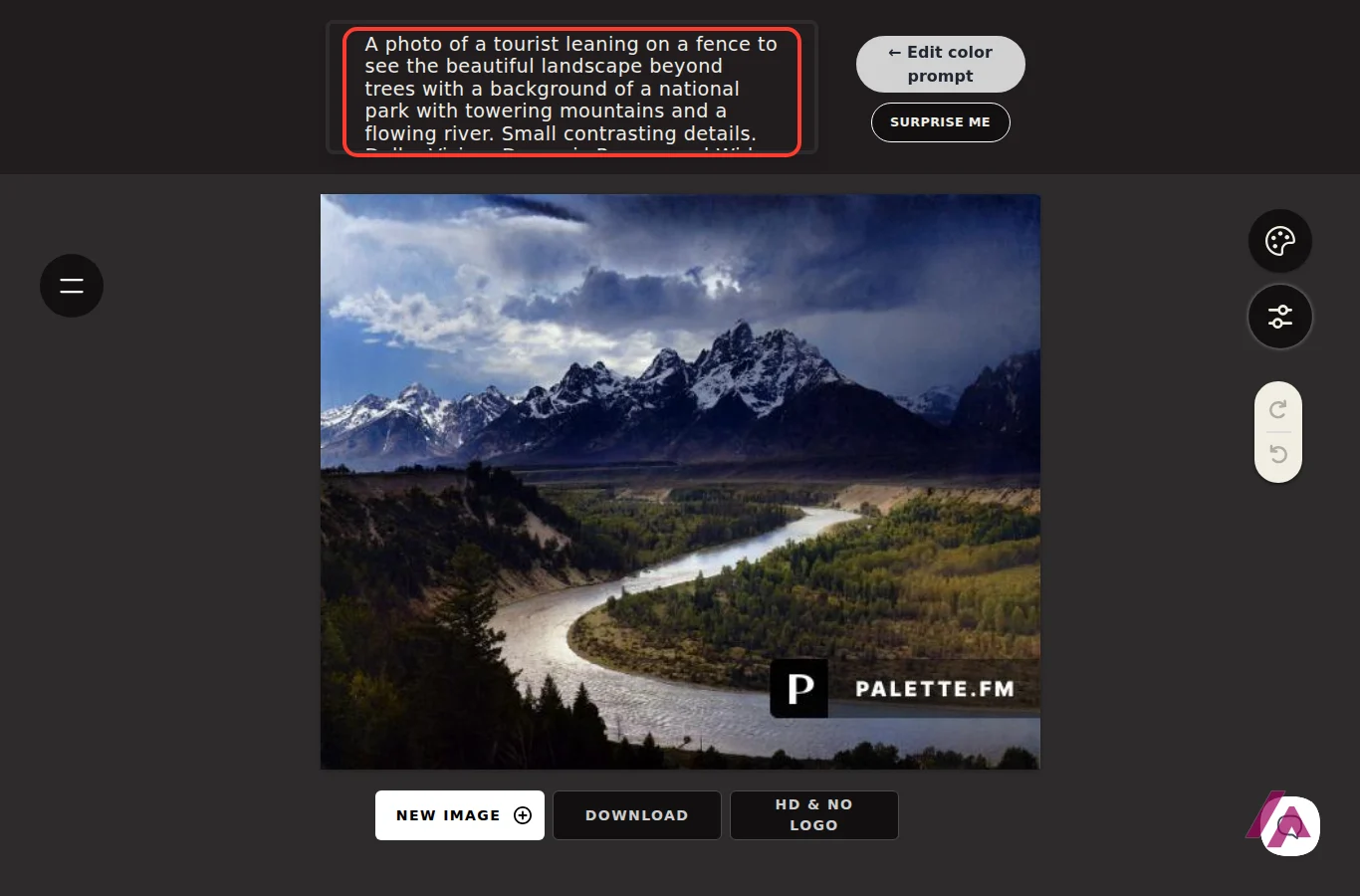
Behind the adjust icon there's a text box called Edit color prompt. Palette writes a description of your photo there by itself, and that description steers the colors. With Classic Palette, mine read like a camera spec sheet: a mountain view from a river, "Portra 400," "Nikon FE." With Colorful Past it got creative and described a tourist leaning on a fence, looking at the national park. There is no tourist. There is no fence. It's mountains and a river. 😅
The useful part is that you can rewrite that text and colorize again, so a sky or a dress that came out wrong isn't the final word. There's also a Surprise me button next to it, if you're feeling lucky.
What you get for free, and where the paywall starts
Here's the exact line between free and paid, as I found it:
- Free, no account: upload, all the filters, the prompt editor and a Download button. What you get is a JPEG a bit over 500 pixels wide (my original was more than twice that) with the logo baked in. Palette's pricing section describes the free plan as lower resolution, with ads.
- Free, with an account: 1 trial credit, which is one photo downloaded without the logo and at full resolution. Sign-in is by an emailed link or a Google account, no password.
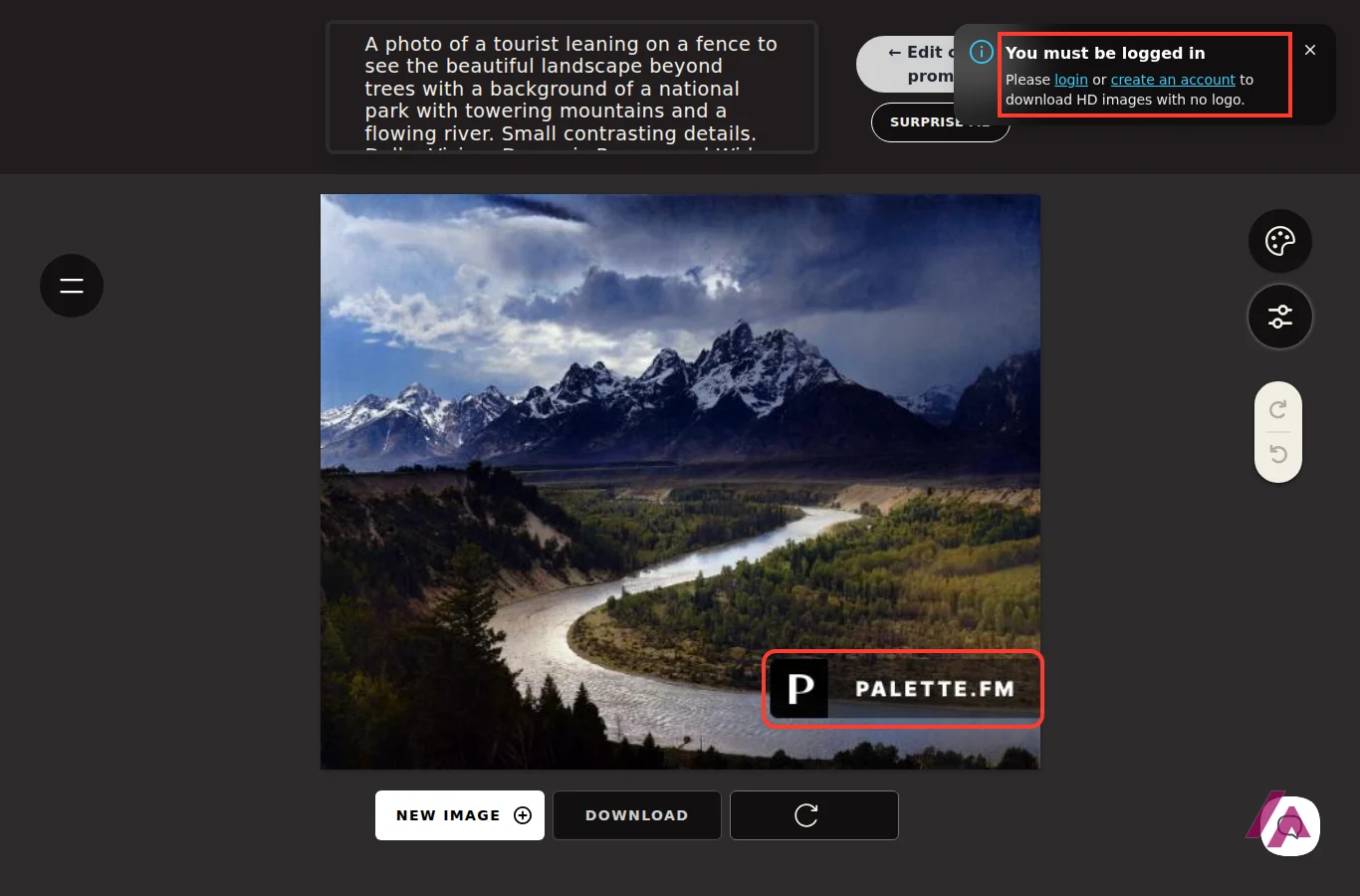
- Paid: everything else in HD. The HD & NO LOGO button, without an account, just shows a "You must be logged in" notice.
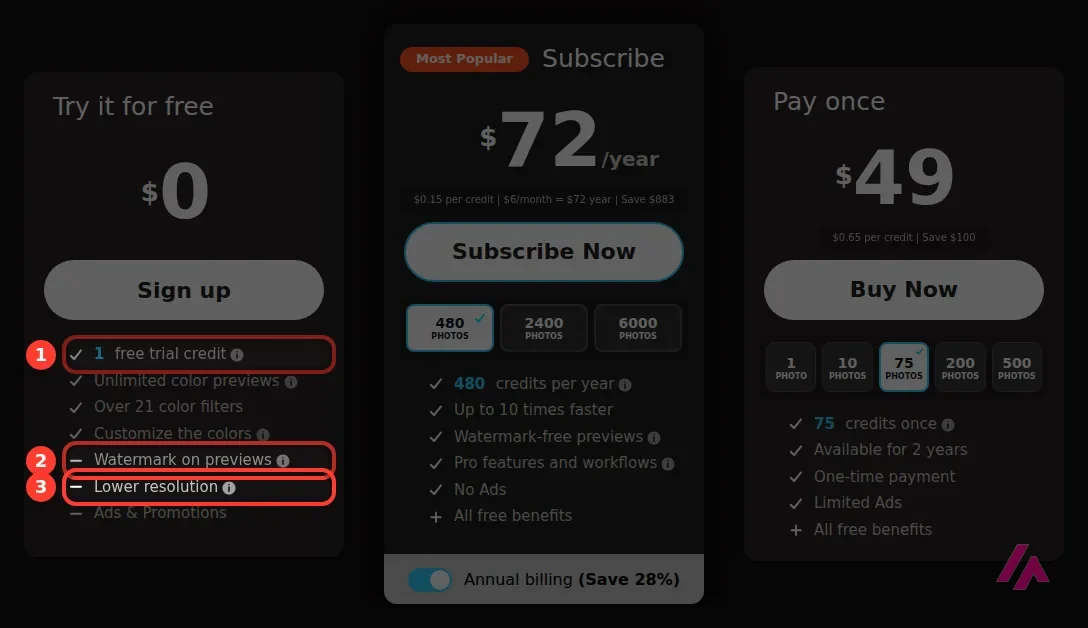
In HD, Palette lists up to 5000×5000 pixels on its plans and, in its help section, up to 25 megapixels on a computer and 9 megapixels on a phone. For a scanned 4×6 print, that's plenty.
Which plan makes sense
Sorry for the arithmetic, but credits are one of those things that look cheap until you do the math. Every option below buys the same thing: 1 credit = 1 photo without the logo, at full resolution.
| Option | Price | Photos | Roughly per photo |
|---|---|---|---|
| Pay once, single | $1.99 | 1 | $1.99 |
| Pay once, small pack | $9 | 10 | $0.90 |
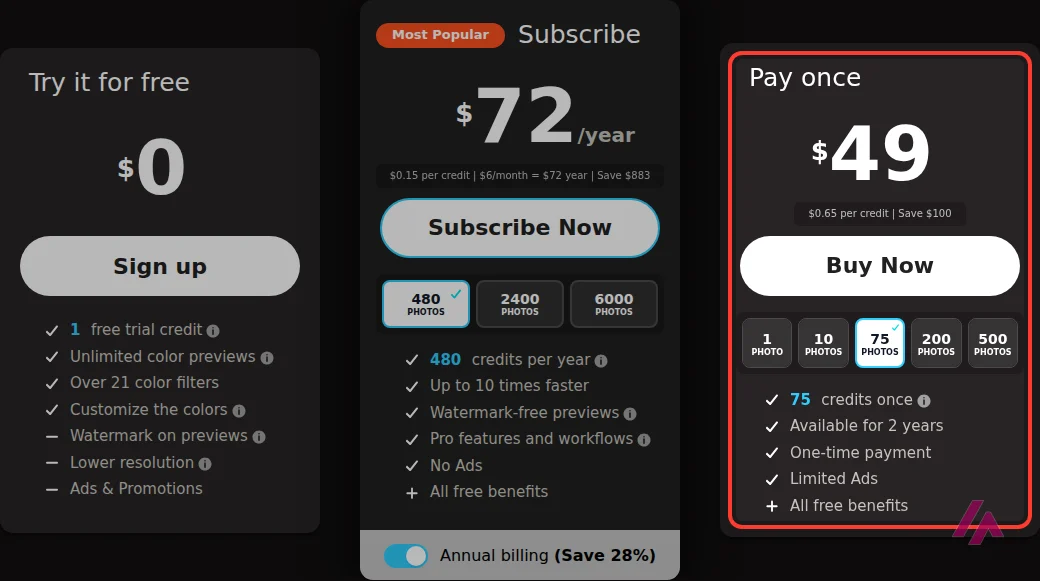
| Pay once, 75 | $49 | 75 | $0.65 |
| Pay once, 500 | $189 | 500 | $0.38 |
| Subscribe, monthly | $9/month | 40 a month | $0.23 |
| Subscribe, yearly | $72/year | 480 a year | $0.15 |
There's also a 200-photo pack for $89, plus bigger subscriptions at $39 and $79 a month or $336 and $672 a year. One-time credits are valid for 2 years. Subscription credits roll over up to 5 times your monthly amount, but only while you keep paying. The page also lists faster processing and watermark-free previews for subscribers.
My take: the subscription is the cheapest per photo only if you actually use the credits. For the typical case, a shoebox of 30 or 40 family prints, colorize them all for free and pick your favorites first. If that's 10 or fewer, a pack does it with no subscription to remember and 2 years to use it. If it's closer to 40, one month of the $9 plan buys four times as many photos for the same money, as long as you use the credits while you're subscribed and then cancel.
Things worth knowing before you upload
- Browsers: Palette only supports Chrome and Safari on a computer, Safari on iPhone and iPad, and Chrome on Android. On anything else, it may work, it may not.
- Formats: PNG and JPEG.
- Commercial use: allowed, according to Palette's help section. Crediting Palette is optional.
- Your photos: Palette's help section says images are encrypted and deleted once you've received them. Still, if a photo is private, think twice before uploading it anywhere.
Who it's for
If you have old prints and want to see them in color tonight, Palette is one of the quickest ways to get there, and you can judge the result before paying a cent. I'd use the free previews generously, treat the filters as moods rather than facts, and pay only for the photos you'd actually frame or send to the family.
If your scans are small or soft, sharpen them first with Upscayl, and if there's something in the picture you'd rather lose, Photofix takes care of that. Palette handles the color.

Upscayl
from $9.99/mo
Free, open source and runs on your own computer: enlarge a small scan before you colorize it, so Palette has more detail to work with.
Written by Miguel Ángel, with help from an LLM to verify facts.
Who is it for? For anyone with a box of old family prints who wants them in color without learning Photoshop, and for people who like to play with a photo's mood (sunset, vintage film, pastel). If you just need a quick look at how a photo might look in color, the free preview is enough. If you need historically accurate colors, no colorizer can promise you that, and this one doesn't either.
What I like and what I don’t
What I like
- You can try it on your own photo without signing up: upload, wait a moment, and you have a color preview you can download.
- The filters are the fun part. The same photo can come out as a stormy afternoon or a warm sunset, and switching between them takes one click.
- You can edit the text description Palette writes for each photo and colorize again, which is how you fix a sky, a dress or a wall that came out wrong.
What I don’t
- The free download is small (a bit over 500 pixels wide in my case) and has a large logo stamped in the corner. Fine for sharing in a group chat, not for printing.
- The descriptions it writes for your photo can be pure fiction: mine mentioned a tourist leaning on a fence who simply isn't there.
- Officially it only supports Chrome and Safari (Safari on iPhone and iPad, Chrome on Android). On other browsers it may work, or it may not.
Have you used Palette.fm? Tell me how it went
What worked for you and what didn’t. Your experience helps the next person who lands here unsure more than any review page. I read every one before publishing.
Write my review
Palette.fm pricing
Prices checked on the official site on
-
Free
Free
—
- Cheapest paid plan
Pay once · 1 photo
$1.99
—
-
Subscribe · monthly
from $9/mo
—
-
Subscribe · annual
from $72/yr
—
Palette charges by credits: 1 credit is 1 photo downloaded without the logo and at full resolution. You can buy them once ($1.99 for 1, $9 for 10, $49 for 75, $89 for 200, $189 for 500, valid for 2 years) or subscribe ($9 a month for 40, $39 for 200, $79 for 500; or yearly, from $72 for 480). My advice: colorize everything for free first and pick the photos that are really worth it. Up to 10, a pack does it with no subscription to cancel; for a batch closer to 40, one month of the $9 plan is cheaper, as long as you use the credits while you're subscribed. A standing subscription only pays off if you colorize photos every month, for a project or a client.
Alternatives to Palette.fm
-

Upscayl
from $9.99/mo
When to pick it: If your scan is small or blurry, enlarging it first with Upscayl (free, open source and on your own computer) gives the colorizer more detail to work with.
See details → -
PhotoFix
When to pick it: If there's something in the old photo you'd rather not keep, like a stranger in the background or an object in the way, Photofix erases it before or after you add color.
See details →
How I tested it
On September 26, 2026 I went to palette.fm in English, without an account, and uploaded a public-domain black-and-white landscape: Ansel Adams' "The Tetons and the Snake River," which has no people in it. I tried several filters, opened the color prompt editor, downloaded the free preview to check its size and watermark, and pressed the HD button to see where the paywall starts. The prices come from the pricing section of Palette's home page, clicking through every plan option. On October 22 I went back, re-read every price and repeated the free download with the same photo: same prices, same small preview with the logo. The screenshots are from those two sessions.
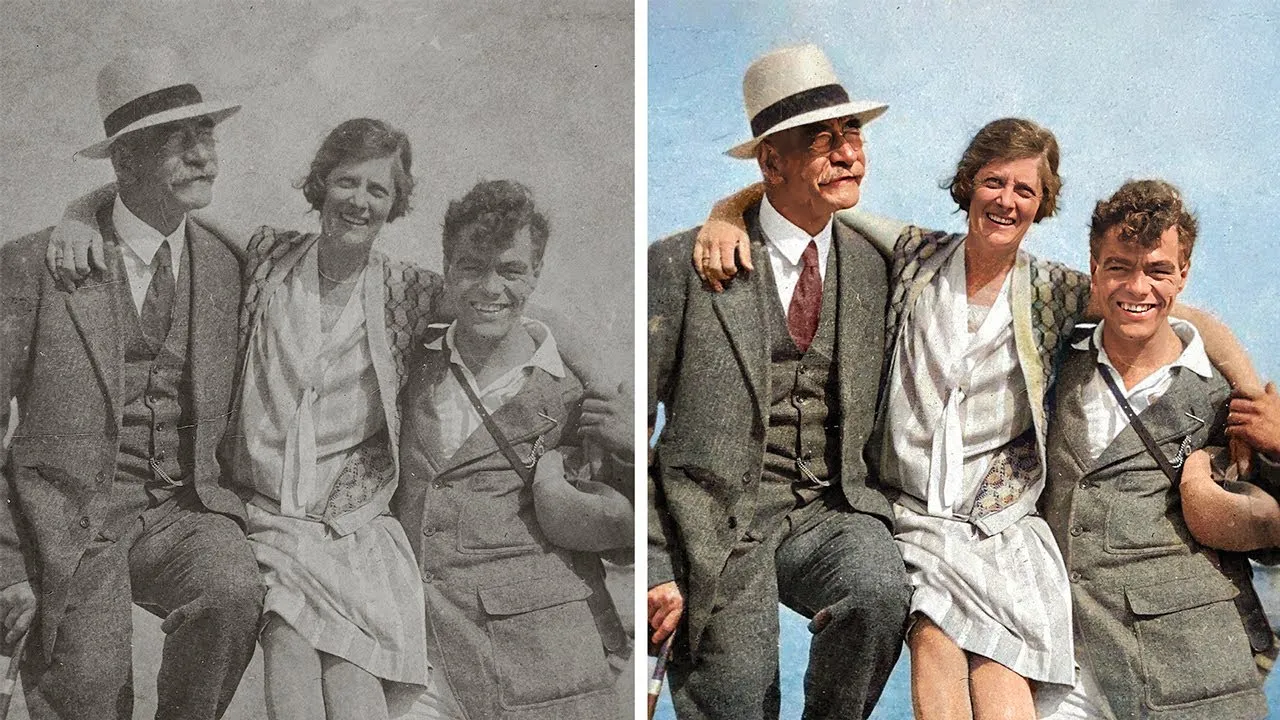
A walkthrough by PiXimperfect, the Photoshop teacher, of the filters and the color prompt you see in Palette's editor. It's from January 2023, so what he says about using it for free and about prices is from back then; the prices in this review are today's.

Written by Miguel Ángel, with the help of an LLM to fact-check. In IT since 2002 (systems, engineering, web development and SEO), doing business with AI since February 2023, when ChatGPT could first be bought in Spain. I build, write and maintain this site myself.

Got a question? Ask me
About Palette.fm, its plans or whether it fits what you need. I’m Miguel Ángel, and I’ll answer you myself, right here.