Clipchamp Review: Microsoft's Free Video Editor, Its Watermark Rules and What Premium Costs
Microsoft · also called Microsoft Clipchamp · 9 min read
- Free with limits
- Video
- Web · Windows
- Free $0 Up to 1080p · Microsoft account
- Microsoft 365 Personal $9.99/mo Clipchamp Premium · $99.99/year
Checked on
Open Clipchamp
My verdict
In IT since 2002: systems, engineering, web development and SEO. I have been doing business with AI since February 2023, when ChatGPT could first be bought in Spain.
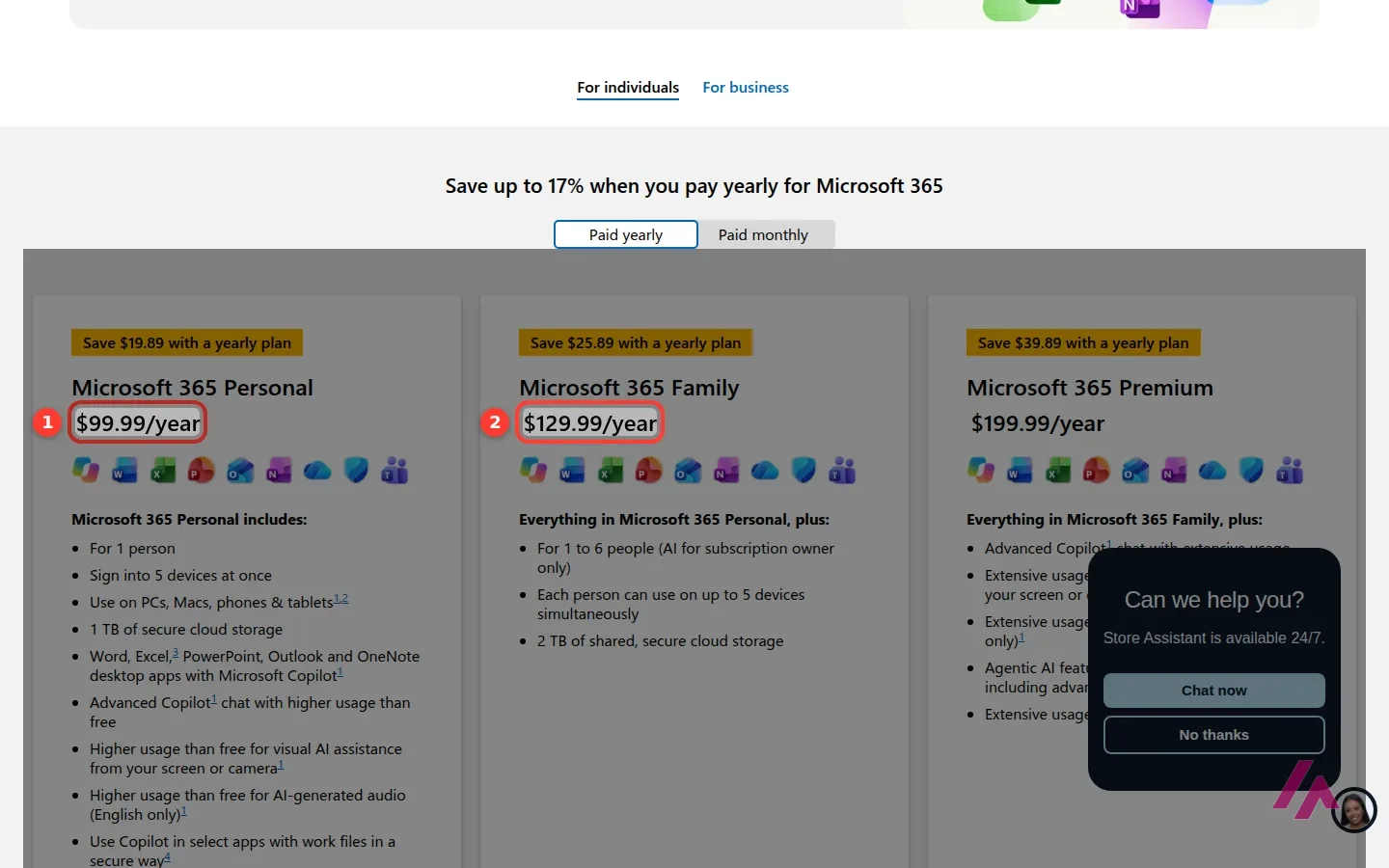
Clipchamp is Microsoft's timeline video editor, with AI captions and AI voiceovers on top. Is it free? Yes, and generously: exports up to 1080p with no watermark, as long as you stay away from premium features and premium stock. You don't have to download it either: it runs in the browser, and Windows 11 already has it in the Start menu. The catch is at the door: new accounts need a Microsoft account. Premium isn't sold on its own; it comes with Microsoft 365 Personal ($99.99 a year) or Family ($129.99 a year).
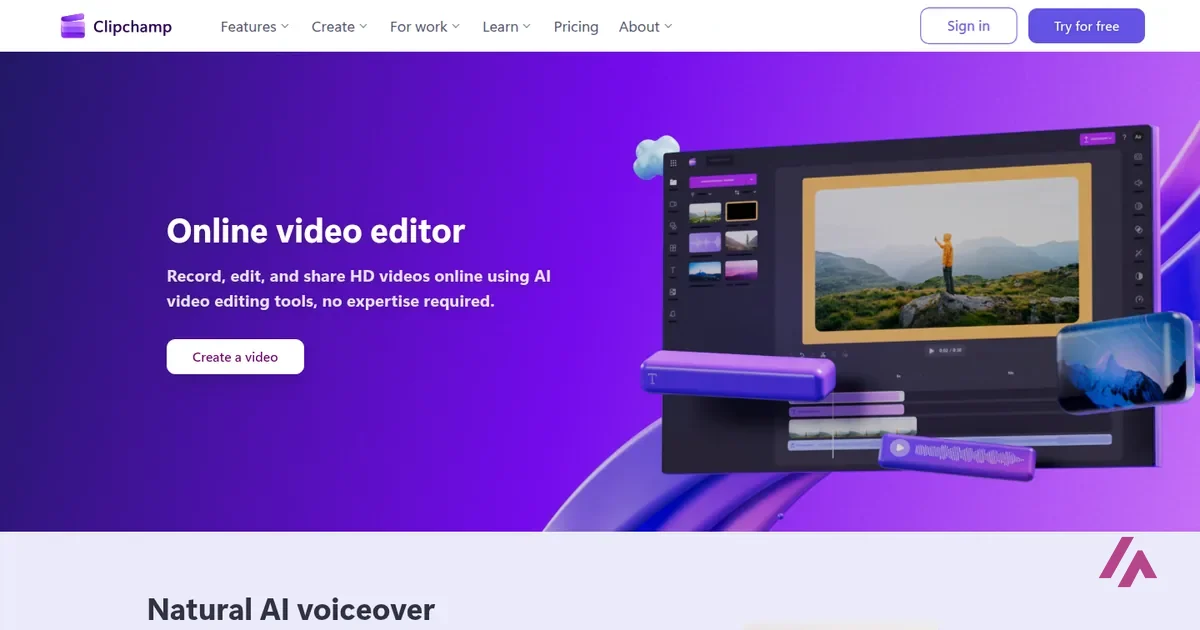
What is Clipchamp
- Company
- Microsoft
- Type
- Video
- Platforms
- Web · Windows
- Free plan
- Free with limits
- Also called
- Microsoft Clipchamp
- Updated on
- Nov 9, 2026
Clipchamp is Microsoft's video editor: you drop clips, photos and music on a timeline, and Clipchamp says its AI can write captions for you or turn a script into a voiceover. Is Clipchamp free? Yes, and its free plan promises something not every editor gives away: 1080p exports with no watermark, as long as you don't use premium features or premium stock. Do you have to download it? No: it runs in the browser, and on Windows 11 it's already in the Start menu. The catch is the sign-up: new accounts need a Microsoft account. And Premium isn't sold on its own: it comes with Microsoft 365, from $9.99 a month or $99.99 a year.
Clipchamp pricing, the short version (Important)
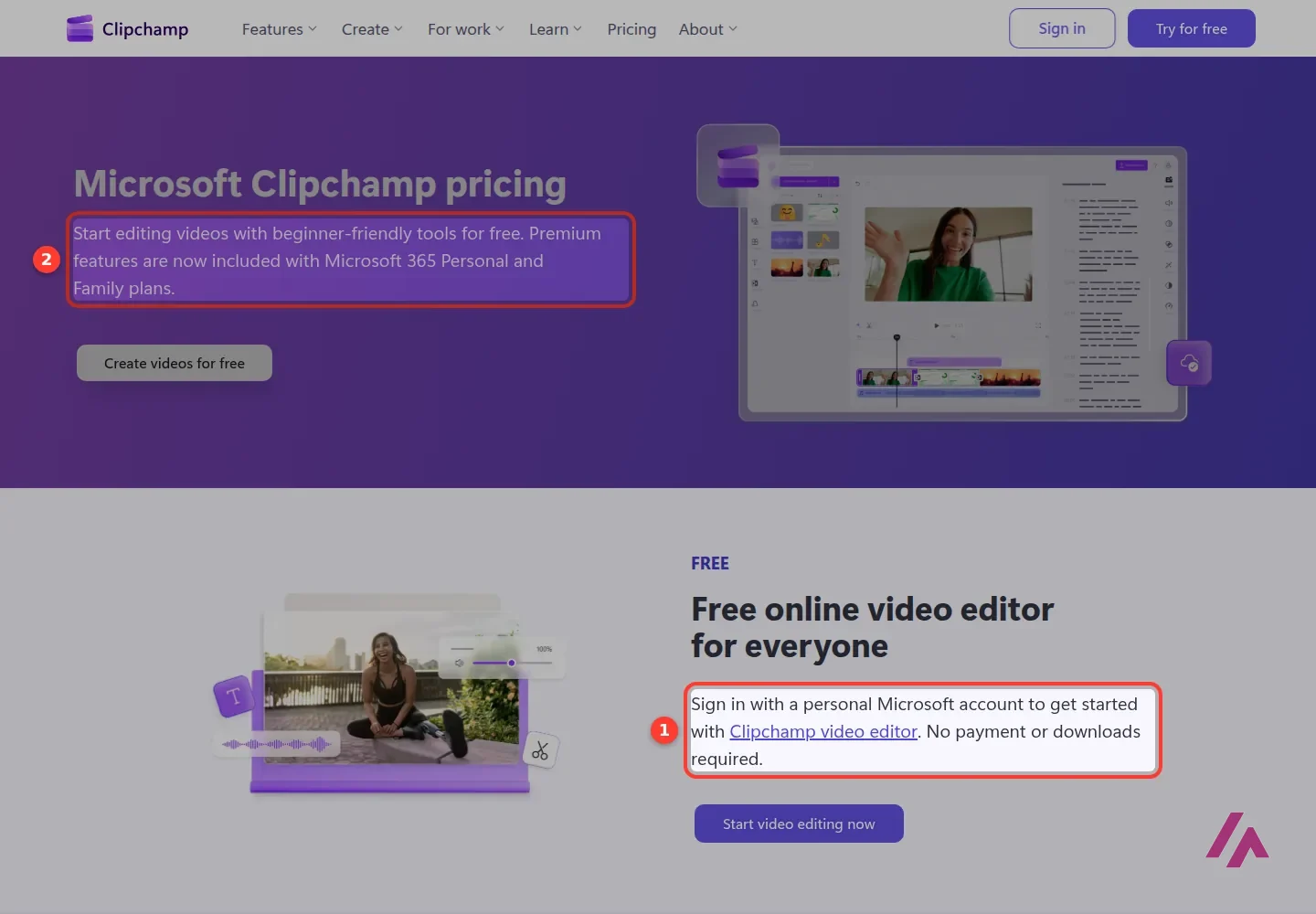
- Free: sign in with a personal Microsoft account. Exports up to 1080p, no watermark, AI editing and audio tools included, free stock and free filters.
- Premium: comes with Microsoft 365 Personal ($9.99 a month or $99.99 a year, 1 person) or Microsoft 365 Family ($12.99 a month or $129.99 a year, 1 to 6 people). Adds 4K exports, premium stock, premium filters and effects, and a brand kit.
- Both Microsoft 365 plans offer a 1-month free trial that renews at the regular price unless you cancel it.
- There's no Clipchamp-only price, and Microsoft's page doesn't mention sales tax.
What Clipchamp is (and why it's on your PC already)
Clipchamp belongs to Microsoft (its team is headquartered in Brisbane, Australia), and it's a regular timeline editor: trim, crop, resize and rotate, add text and animated titles, filters and effects, music, and a stock library of videos, images, stickers, GIFs and sound effects. On top of that, its website lists a handful of AI tools: an AI voiceover generator that turns text into speech in a wide range of languages (you can adjust pitch and pace), automatic captions in over 80 languages, and audio cleanup that removes background noise, silences and filler words. There's also a camera, screen and voice recorder.
If you'd rather watch it than read about it, Clipchamp's own beginner tutorial below walks through a full edit.
You get it two ways, and the home page spells them out side by side:
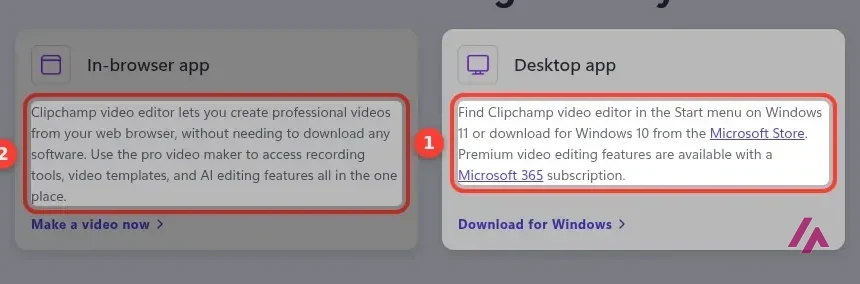
So, no, you don't need to download Clipchamp. On Windows 11 it's already there; on Windows 10 it's a free install from the Microsoft Store; and on a Mac you just open it in the browser. When you open the editor in a browser it doesn't support, it asks you to switch to Microsoft Edge or Google Chrome, so keep one of those around.
Is Clipchamp free? Yes, with two pieces of fine print
The pricing page puts it plainly: start editing "for free," and premium features "are now included with Microsoft 365 Personal and Family plans." Its plan table is generous for a free plan:
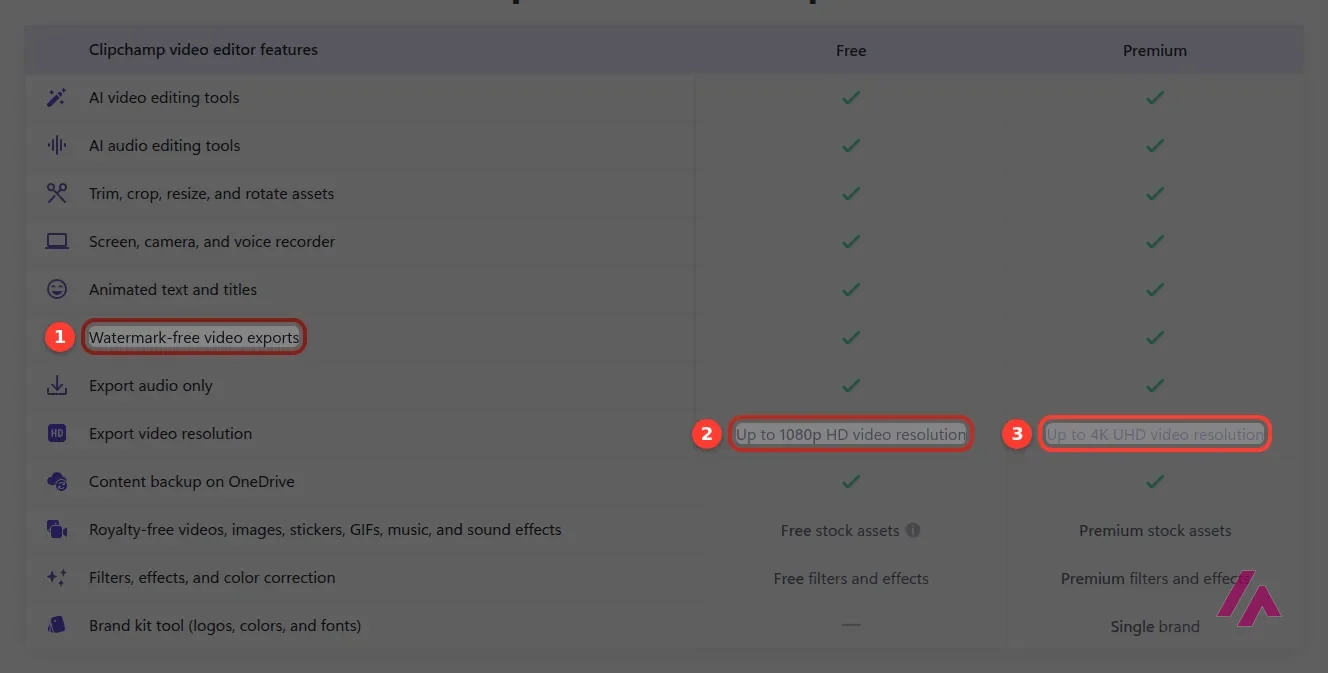
The AI video and audio tools, the recorder, text and titles, audio-only export and OneDrive backup all get a checkmark on both plans. The differences are export resolution (1080p vs. 4K), stock (free vs. premium), filters and effects (free vs. premium) and the brand kit for your logos, colors and fonts, which is Premium only.
Now the fine print. First, the stock library mixes free and premium items, and a note on the pricing page says you can't export a video that includes premium assets on the free plan. Second, Clipchamp also warns that videos using features outside your plan get a watermark. In practice: if you want a clean 1080p file for free, build it with your own footage, the free stock and the free effects, and swap out anything premium before you export.
How to keep a free export clean (Tip)
Use your own clips, music you have the rights to, and the free stock and filters. If something in your project is premium, replace it before exporting. That's the difference between a clean 1080p file and a watermark (or a blocked export).
The sign-up: you'll need a Microsoft account
Here's the part that surprised me. Clipchamp's sign-in page offers Microsoft, Google, email and a separate link for work or school accounts, so I went with Google. Google asked me to confirm, sent me back to Clipchamp, and Clipchamp told me no account existed and that sign-up is only available with a Microsoft account. The Google button, it turns out, is for people who already have an older Clipchamp account. Email is the same story: it's there to sign in to an existing Clipchamp account and link it to a Microsoft one.
So I went to create a Microsoft account with my Gmail address. It didn't ask for a password: it emailed me a code, I typed it in, and the next screen asked for my country and a date of birth, both required. That's where I stopped; I don't make up birthdays for test accounts. Signing up is quick, but it's an account with Microsoft, not just with Clipchamp. If you already have a personal Microsoft account, you can skip all of this and sign in with that.
Have a Microsoft account ready (Heads-up)
New Clipchamp accounts are Microsoft accounts. Google and email only work if you already had a Clipchamp account. Creating the Microsoft account takes a code sent to your inbox plus your country and date of birth.
Work and school accounts go a different route. Clipchamp's pricing page has a separate question about Microsoft 365 commercial and education customers, and its sign-in page has a separate link for work or school accounts.
Clipchamp pricing: what Premium really costs
There is no Clipchamp Premium checkout. You get Premium by subscribing to Microsoft 365 Personal or Family, which means you're paying for Word, Excel, PowerPoint, Outlook and OneDrive storage too. If you already pay for one of those plans, Premium is a free bonus. If you don't, 4K is a pricey reason to start. These are the US prices as Microsoft lists them:
| What you get | Clipchamp Free | Microsoft 365 Personal | Microsoft 365 Family |
|---|---|---|---|
| Price | $0 | $9.99 a month, or $99.99 a year | $12.99 a month, or $129.99 a year |
| People | 1 | 1 | 1 to 6 (AI for the subscription owner only) |
| Clipchamp export resolution | Up to 1080p | Up to 4K | Up to 4K |
| Watermark-free exports | Yes, if you skip premium features and stock | Yes | Yes |
| Stock, filters and effects | Free ones | Premium | Premium |
| Brand kit | No | Yes, one brand | Yes, one brand |
| OneDrive storage | Clipchamp backup on OneDrive | 1 TB | 2 TB shared |
| Free trial | Not needed | 1 month | 1 month |
Paying yearly works out about 17% cheaper, Microsoft says. Microsoft also sells Microsoft 365 Premium at $199.99 a year, but Clipchamp's pricing page only names Personal and Family, so there's no reason to buy Microsoft 365 Premium just for Clipchamp.
The free month renews by itself (Important)
Microsoft's page says the subscription renews automatically at the regular price unless you cancel it in your Microsoft account. If you're only trying 4K for a project, set a reminder before the month is up.
Is Clipchamp worth it?
As a free editor, it's one of the easiest recommendations out there: a proper timeline, AI captions and voiceovers listed among the free tools, and 1080p with no watermark if you stay on the free side of the stock library. If you're on Windows 11, you'll find it in the Start menu, which is hard to beat.
Paying is a different question. If your household already has Microsoft 365 Personal or Family, you have Premium and don't need to think about it. If not, ask yourself whether you need 4K or premium stock. For most YouTube, school and social videos, 1080p does the job, and you can keep the $99.99.
For a longer, independent tour of the editor, the Primal Video walkthrough below is a good next step.
Clipchamp or something else?

Descript
Free with limits · from $24/mo
Edit talking-head videos through the transcript; free plan exports at 720p with a watermark.
If most of your videos are people talking, Descript lets you edit the recording by editing the transcript, which is faster than hunting for pauses on a timeline; its free plan is tighter, though. If you'd rather type an idea and get a finished video back, InVideo builds one from a prompt. And for generating new footage from scratch rather than editing your own, Runway is the place to look.
Written by Miguel Ángel, with help from an LLM to verify facts.
Clipchamp's official tutorial for personal accounts: how to make and edit a video in the editor, step by step. It's from 2024, so a menu or two may have moved since.
Who is it for? For anyone who needs to cut a school project, a family video, a quick social clip or a screen recording without paying, especially on a Windows PC. Less so if you make talking-head videos every week and want to edit by transcript, or if you'd rather not have a Microsoft account.
What I like and what I don’t
What I like
- The free plan exports up to 1080p with no watermark, something plenty of editors only offer on paid plans.
- Nothing to install: it runs in the browser, and on Windows 11 it's already in the Start menu.
- AI captions and AI voiceovers are part of the free editor, according to Clipchamp.
- If you already pay for Microsoft 365 Personal or Family, Premium costs you nothing extra.
What I don’t
- New accounts need a Microsoft account: when I tried signing up with Google, it wouldn't let me in.
- The stock library mixes free and premium items, and Clipchamp says the free plan won't export a video that uses premium assets.
- No standalone Premium plan: you pay for the whole Microsoft 365 bundle, even if all you want is 4K.
- Creating the Microsoft account asks for your date of birth.
Have you used Clipchamp? Tell me how it went
What worked for you and what didn’t. Your experience helps the next person who lands here unsure more than any review page. I read every one before publishing.
Write my review
Clipchamp pricing
Prices checked on the official site on
-
Free
Free
Needs a personal Microsoft account; exports up to 1080p with no watermark as long as you don't use premium features or stock
- Cheapest paid plan
Microsoft 365 Personal
$9.99/mo
$9.99 a month or $99.99 a year for 1 person; unlocks Clipchamp Premium (4K exports, premium stock, brand kit) plus Word, Excel, PowerPoint, Outlook and 1 TB of OneDrive; 1-month free trial
-
Microsoft 365 Family
$12.99/mo
$12.99 a month or $129.99 a year for 1 to 6 people (AI features for the subscription owner only), 2 TB of shared storage; includes Clipchamp Premium; 1-month free trial
Alternatives to Clipchamp
-

Descript
Free with limits · from $24/mo
When to pick it: If you mostly record people talking and would rather edit the transcript than a timeline.
See details → -

InVideo
from $20/mo
When to pick it: If you'd rather type a prompt and get a finished video than build one clip by clip.
See details → -

Opus Clip
Free with limits
How I tested it
On November 9, 2026, I went through Clipchamp's website and pricing page, tried to sign up with Google and with email, and started creating the Microsoft account it asks for, up to the date-of-birth step. The prices come from Clipchamp's pricing page and Microsoft's plan comparison for Microsoft 365, read in a browser set to US English that same day. I didn't pay for anything.
A longer, independent walkthrough of Clipchamp for beginners by Primal Video, from the basics to exporting on the free version.

Written by Miguel Ángel, with the help of an LLM to fact-check. In IT since 2002 (systems, engineering, web development and SEO), doing business with AI since February 2023, when ChatGPT could first be bought in Spain. I build, write and maintain this site myself.

Got a question? Ask me
About Clipchamp, its plans or whether it fits what you need. I’m Miguel Ángel, and I’ll answer you myself, right here.