
Ultimate Vocal Remover UVR
10 min read
- Free
- Audio
- Windows · Mac · Linux

My verdict
In IT since 2002: systems, engineering, web development and SEO. I have been doing business with AI since February 2023, when ChatGPT could first be bought in Spain.
Ultimate Vocal Remover is the free, open-source desktop app I'd point anyone to when they want to pull the vocals out of a song, or the song out of the vocals. It runs on your own computer (Windows, Mac or Linux), there's no account, no subscription and nothing gets uploaded, and the official download lives on its GitHub page. The price you pay is in hardware and patience: it wants a decent graphics card, and its menus look like a sound engineer's control room. If you want a one-click website instead, this isn't it.
What is Ultimate Vocal Remover UVR
- Type
- Audio
- Platforms
- Windows · Mac · Linux
- Free plan
- Free
- Updated on
- Oct 8, 2026
Ultimate Vocal Remover (UVR) is a free, open-source desktop app that uses AI models to split a song into its vocals and its instrumental, or into separate stems like drums and bass. It runs on Windows, Mac and Linux, it processes everything on your own computer, and the official download lives on the developers' GitHub page (the "Download" button on this page takes you straight there). No account, no subscription, no online version. Is it worth it? If you have a reasonably modern computer, on paper it's the most complete free option for making a karaoke track or an a cappella: free, local and full of models.
What UVR is, and what it isn't
UVR is a graphical front end for several families of source separation models, the kind of AI that learns to tell a voice apart from a guitar in a mixed track. It's built by two core developers, Anjok07 and aufr33, who say they trained all of the models in the package themselves, except the Demucs v3 and v4 4-stem models. The code is under the MIT license, which means free to use and modify, for anyone.
What it isn't: a website. The official project doesn't offer an online version or a mobile app: just installers for Windows and macOS and instructions for Linux. Anything with the same name on an app store or behind a login page isn't part of the official project.
How to remove vocals with UVR, step by step
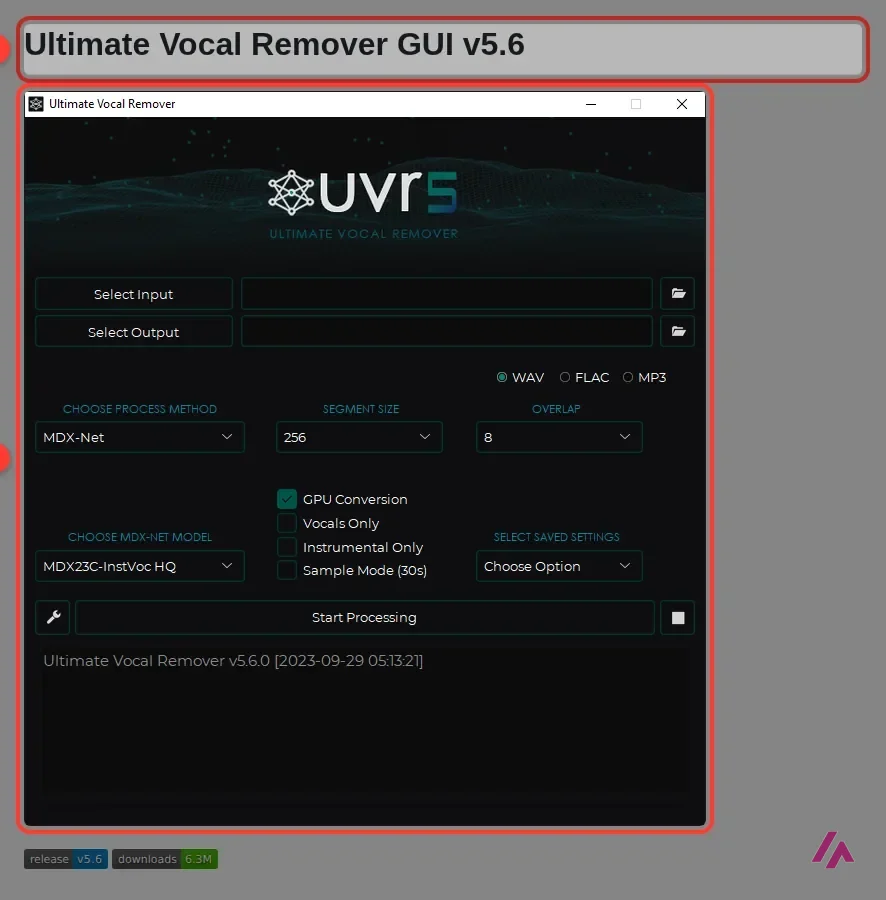
Once it's installed, the main window is one screen. It looks busy, but for a first run you only need a handful of controls. These are the real names you'll see:
- Click Select Input and pick your song. The Windows and Mac installers bundle everything it needs; if you run it from the source code, you'll need FFmpeg for anything that isn't a WAV file.
- Click Select Output and choose the folder for the results.
- Choose the output format: WAV, FLAC or MP3.
- Under Choose Process Method, pick the model family. MDX-Net is the one shown in the official screenshot, and a good place to start.
- Pick the specific model in the drop-down below it (in the official screenshot, MDX23C-InstVoc HQ).
- Check GPU Conversion if you have a supported graphics card (the README sets the bar at an Nvidia GTX 1060 with 6 GB).
- If you only want one part, check Vocals Only or Instrumental Only.
- Press Start Processing and let it work.
Two more things worth knowing. Sample Mode (30s) processes just a 30-second slice, which is handy for comparing models before you commit a whole album. There's also a Select Saved Settings menu, and the README notes that the app remembers your settings when you close it. If you run into memory errors, the README's advice is to lower the Segment or Window size.
Which model to choose: MDX-Net, Demucs or VR Architecture
This is where UVR stops being a vocal remover and turns into a bit of a lab. The official documentation doesn't crown a "best model"; it credits where each family comes from, and that already tells you a lot:
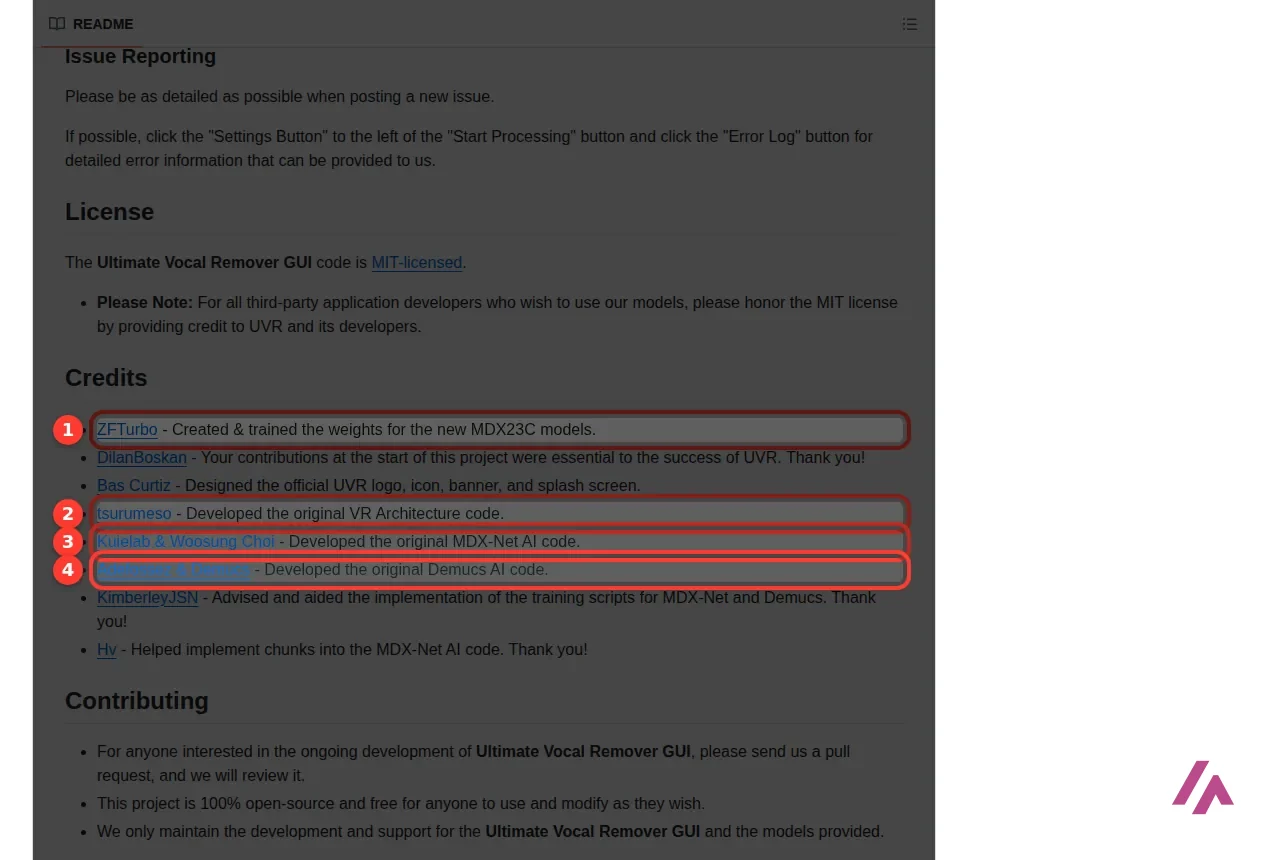
- MDX-Net: built on the original code by Kuielab and Woosung Choi, and home to the newer MDX23C models trained by ZFTurbo. It's the method selected in the official screenshot, paired with the MDX23C-InstVoc HQ model, which is built for the vocals-versus-instrumental split. On a Mac, it's also one of the families with GPU acceleration.
- Demucs: the models from the Demucs project (facebookresearch/demucs). UVR supports versions 1 to 4, and the 4-stem models split a song into more than two parts, so it's the one to try when you want drums, bass and the rest as separate tracks.
- VR Architecture: based on the original VR Architecture code by tsurumeso. It's the third option in the menu, and one more to compare in Sample Mode.
Beyond those, you can download more models from inside the app, through the Settings menu (the wrench button next to Start Processing) and its Download Center. There's also a Roformer beta build that adds Roformer, SCnet and Bandit models; the official page offers it for Windows and for both kinds of Mac. My advice: pick one song you know well, run it through Sample Mode with two or three models, and trust your ears. Every song is different, which is exactly why Sample Mode exists.
Compare models on a 30-second sample first (Tip)
Turn on Sample Mode (30s) and run the same slice through two or three models before you process the whole song. If the app throws a memory error, lower the Segment or Window size, as the README suggests.
Requirements: GPU, Windows and Linux
UVR runs its models on your computer, and these models are heavy. The README is honest about it:
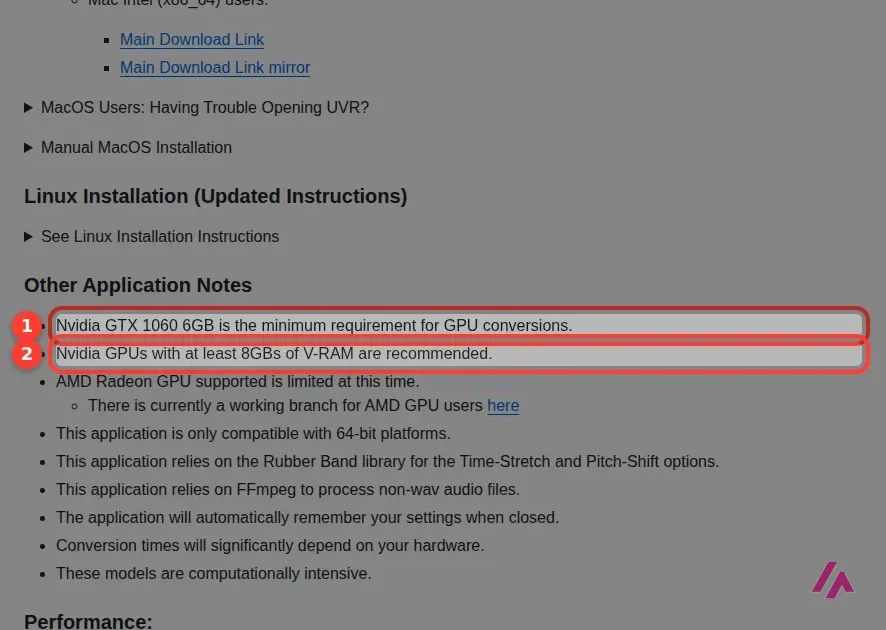
- Nvidia GTX 1060 with 6 GB is the minimum for GPU processing, and 8 GB of video memory is recommended.
- AMD Radeon support is limited. If you have an AMD Radeon or Intel Arc card on Windows, the project points you to the beta build with DirectML.
- 64-bit only. Windows 10 or later is the target; Windows 7, and Intel Pentium or Celeron processors, aren't guaranteed to work.
- On Windows, install it on your main C: drive. The developers warn that a secondary drive causes instability.
Without a supported GPU, conversion runs on the processor, and the README warns that conversion times depend heavily on your hardware. The Windows installer is big (well over 1 GB), because it bundles Python, PyTorch and everything else, so you don't have to install anything first.
On Linux there's no installer: you download the code and run it with Python, following the official instructions for Debian and Arch-based systems. Fair warning: if "virtual environment" means nothing to you, stick to Windows or Mac.
Ultimate Vocal Remover on Mac
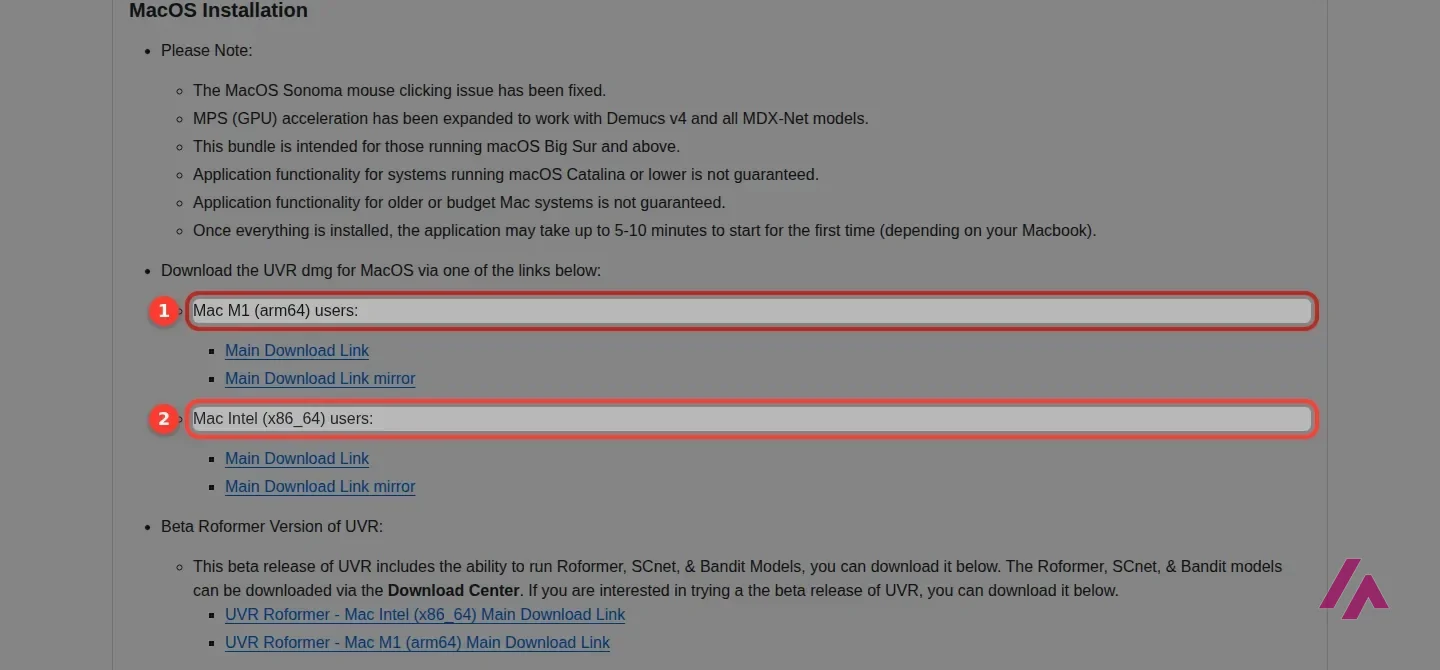
There are two Mac downloads, and picking the right one matters: one for Apple Silicon (listed as M1, arm64) and one for Intel (x86_64). The Mac version needs macOS Big Sur or later, and on Apple Silicon it can use the GPU (MPS) with Demucs v4 and all the MDX-Net models.
Two warnings from the official page, so they don't catch you off guard. The first launch can take 5 to 10 minutes, so don't assume it's frozen. And because of Apple's strict app security, macOS may refuse to open it; the README gives two Terminal commands to bypass that check (notarization), and recommends switching the security setting back on once UVR opens. If typing sudo makes you nervous, that's a perfectly sane reaction, and a sign an online tool may suit you better.
Is Ultimate Vocal Remover safe? Where to download it
The name is popular, so there are plenty of lookalikes. The safe rule is simple: download it only from the official GitHub repository by Anjok07, from its Releases page (the README also lists a Mediafire mirror for the same files). That's the page the button on this review opens. The source code is public and MIT-licensed, the installers are published on the project's own Releases page, and it doesn't ask for an account.
Only from the official GitHub (Important)
The official project has no online version and no mobile app, it's free, and it doesn't ask for an account. So a "UVR" in an app store, behind a login page or with a price tag isn't the real thing. Get the installer from the Releases page of Anjok07's repository (or the Mediafire mirror the README itself links to), and nowhere else.
A note on dates: the latest stable release is v5.6, from 2023, and the Roformer beta builds were last updated in early 2025. The app works, but don't expect frequent updates.
When to use something else
UVR is the right call when you want quality, control and privacy for free, and you have the hardware. Look elsewhere if:
- You're on a phone or a Chromebook. UVR is desktop only.
- Your computer is old or has no dedicated graphics card and you have many songs to process. Conversion times depend heavily on your hardware.
- You want zero setup. A paid online stem splitter will get you a result in a browser tab, at the cost of uploading your music, and often a subscription.
- Your problem is noise, not music. If you want to clean up a voice recording or a podcast, a tool like AudioCleaner AI is built for that job.
- You need a voice, not a stem. If you're after narration for a video rather than vocals pulled out of a song, a text-to-speech tool like Fish Audio reads your script out loud in the browser, once you sign up.
For everything else, from a karaoke night to sampling a drum break, UVR is free, runs on your own machine, and gives you more models than you'll ever need. Not bad for an app that costs nothing. 🎤
A walkthrough from soundlearn, a music production channel: installing UVR, how vocal separation works, the processing settings and picking a model, then a full run with the result. It's from 2023, so the menus may look a little different from today's build. The description also promotes the channel's Patreon and links to the music featured in the video.
Who is it for? For musicians, DJs, karaoke fans, video editors and producers who want clean vocal or instrumental tracks for free and don't mind installing a big desktop app. It's built for a PC with an Nvidia card (8 GB of video memory recommended) or an Apple Silicon Mac, where it can use the GPU. If you only need one song done on your phone, or your computer is old and slow, an online tool will be less hassle.
What I like and what I don’t
What I like
- Completely free and open source under the MIT license: no account, no subscription, and the processing happens on your own computer.
- Several families of AI models in one app (MDX-Net, Demucs and VR Architecture), with more downloadable from inside the app.
- The installers for Windows and Mac bundle everything it needs, and the project publishes separate Mac builds for Apple Silicon and Intel.
What I don’t
- It asks a lot of your hardware: the official minimum for GPU processing is an Nvidia GTX 1060 with 6 GB, and 8 GB of video memory is recommended.
- The Windows installer is well over 1 GB, and on a Mac the first launch can take 5 to 10 minutes and may need a couple of Terminal commands.
- The last stable version dates from 2023; the newer Roformer models live in a beta build.
Have you used Ultimate Vocal Remover UVR? Tell me how it went
What worked for you and what didn’t. Your experience helps the next person who lands here unsure more than any review page. I read every one before publishing.
Write my review
Ultimate Vocal Remover UVR pricing
Prices checked on the official site on · VAT included
-
Free
Free
—
UVR costs nothing: the code is MIT-licensed and the installers are free on its GitHub. The developers accept donations, and that's the only money involved. Anyone asking you to pay for "Ultimate Vocal Remover" is selling you something else.
Other audio AI tools on the site
Same kind of tool as Ultimate Vocal Remover UVR, for similar jobs.
-

Buzz
Free
Buzz is a tool that allows you to transcribe and translate audio offline on your personal computer . It is powered by OpenAI’s Whisper.
See details → -

Voice AI
Free with limits · from $8/mo
Real-time AI voice changer for Windows and Mac, for Discord, games and calls. The app is free; paid plans ($8 a month and up) add voice clones, downloadable text to speech and longer audio tools.
See details → -

Voicemod
VoiceMod is a PC software application that allows users to change their voice in real time during voice calls or online voice chats .
See details →
How I tested it
On September 29, 2026 I went through the official Ultimate Vocal Remover repository on GitHub: the README with its installation notes for Windows, Mac and Linux, the requirements and troubleshooting sections, and the release page with every installer and its date. UVR is a desktop app, so the interface you see here is the official screenshot published on that page. The screenshots in this review come from that repository.
A shorter, more recent step-by-step from The Budget Guitarist, a guitar and music production channel: what stem files are, installing UVR, the settings, then processing a song and listening to the separated parts. Handy if you want drums, bass and the rest as separate tracks for your DAW. The description also links to another of the channel's videos.

Written by Miguel Ángel, with the help of an LLM to fact-check. In IT since 2002 (systems, engineering, web development and SEO), doing business with AI since February 2023, when ChatGPT could first be bought in Spain. I build, write and maintain this site myself.

Got a question? Ask me
About Ultimate Vocal Remover UVR, its plans or whether it fits what you need. I’m Miguel Ángel, and I’ll answer you myself, right here.