Fish Audio: Is It Free, What It Costs and What You Get
Hanabi AI Inc. · 9 min read
- Free with limits
- Audio
- Web · API
- Free $0 ~7 min/month · non-commercial
- Plus $15/mo ~200 min/month · commercial use
Checked on · before tax
Open Fish Audio
My verdict
In IT since 2002: systems, engineering, web development and SEO. I have been doing business with AI since February 2023, when ChatGPT could first be bought in Spain.
Fish Audio is a text-to-speech studio with a big voice library, emotion tags you type right into your script, voice cloning and a pay-as-you-go API. The free plan is real but small: about 7 minutes of speech a month, 500 characters at a time, and no commercial use. You also need an account before the app will read anything out loud. The Plus plan, at $15 a month, is where it becomes a working tool: enhanced cloning, Voice Design, commercial use and about 200 minutes a month.
What is Fish Audio
- Company
- Hanabi AI Inc.
- Type
- Audio
- Platforms
- Web · API
- Free plan
- Free with limits
- Updated on
- Oct 22, 2026
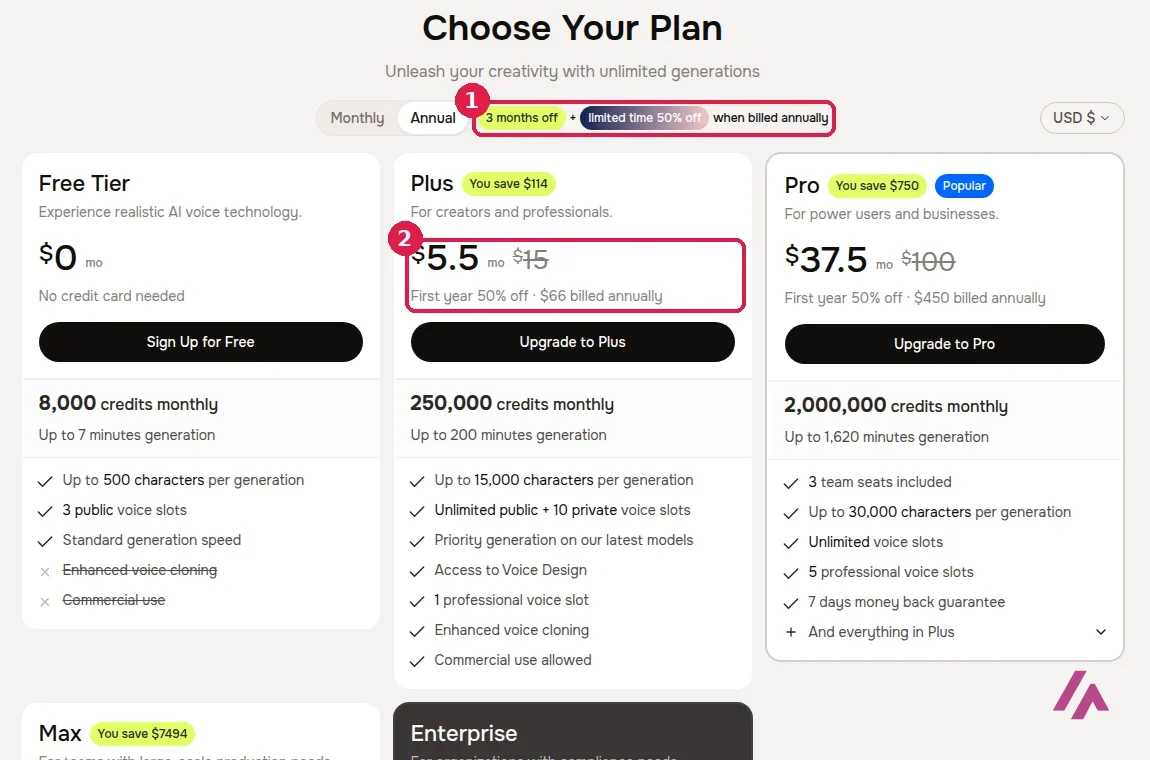
Fish Audio is an AI voice platform: you type a script, pick a voice and it reads it out, with emotion tags like [whispering] or [sighing] typed right into the text. It also clones voices, transcribes audio and has an API for developers. Is Fish Audio free? Yes, with an account: the Free plan costs $0 and gives you 8,000 credits a month, about 7 minutes of speech, for personal, non-commercial use only. Paid plans start at $15 a month with Plus, which adds enhanced voice cloning and commercial use; Pro is $100 and Max $999.
What Fish Audio is
Fish Audio is a web app at fish.audio, plus an API. The main tool is text-to-speech, and around it sit voice cloning, speech-to-text, Story Studio for multi-speaker stories, sound effects, audio separation and, more recently, image and video tools with lip-sync. The company behind it is Hanabi AI, and its models, published as Fish Speech under its own community license, are on GitHub.
Its newest model is Drama 3, which Fish Audio pitches as its most expressive one so far. You'll see the same idea all over the site: you don't just pick a voice, you direct it. The tag menu on the home page includes emotions like [angry], [sad], [excited] or [whispering], and special tags like [laughing], [sighing], [clear throat] or [long pause].
What you can do without an account
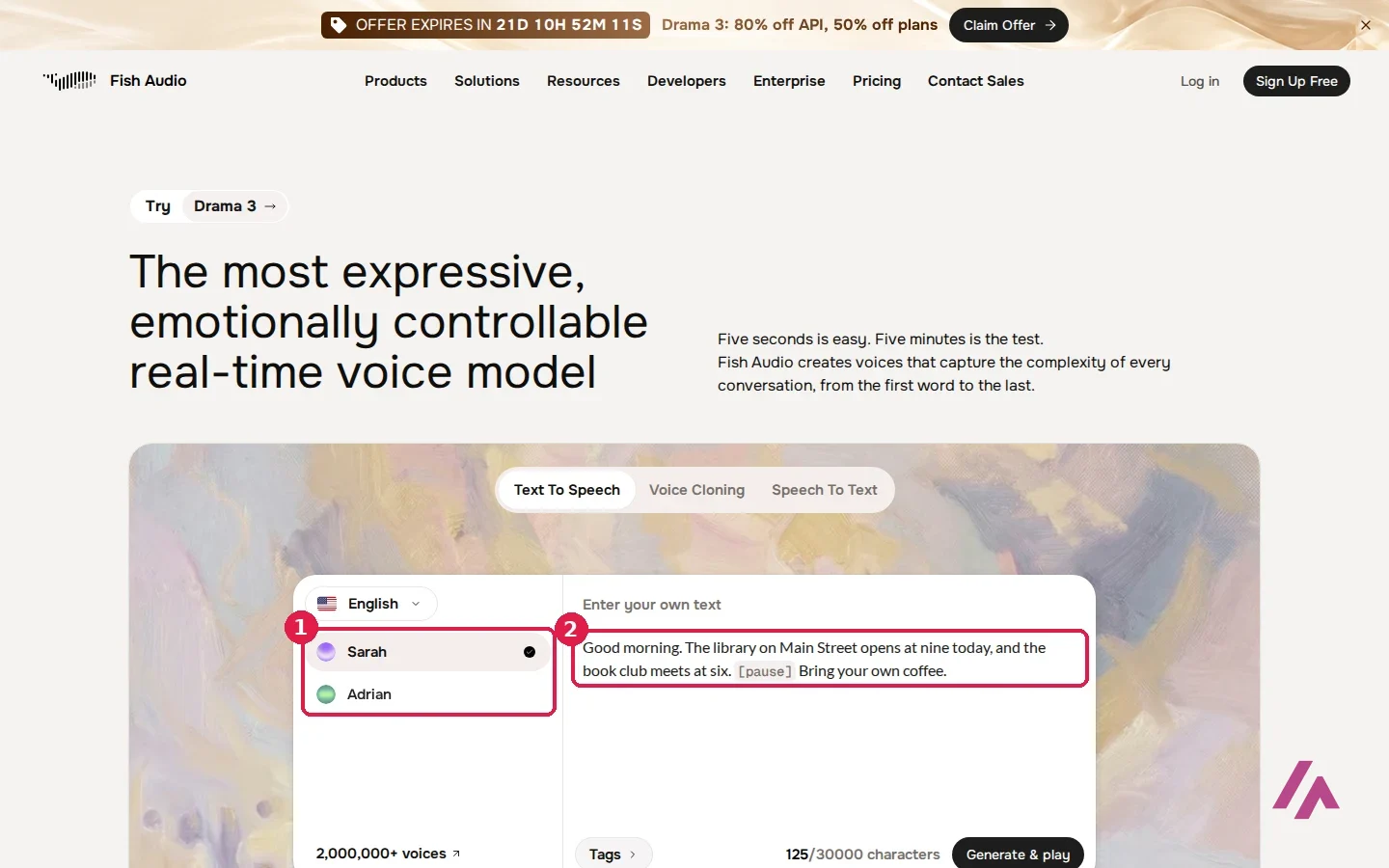
You can look around and type without an account. The home page has a demo with two voices, Sarah and Adrian, a box for your own text and a "Generate & play" button, and the home page says it supports more than 30 languages. I typed a short, boring script about a library's opening hours there, with a [pause] tag in the middle, to see how the tags sit in the text.
The web app, at fish.audio/app, opens without an account too. You can browse the menu, choose a model (Drama 3 was selected by default) and pick a voice. Under Default Voices there's a short list of voices with a "Fish Official" badge: Hannah, Adrian, Sarah, Ethan, Laura, Jordan and Selene. I picked Sarah, typed my script and pressed Generate Speech. That's where it stopped: a window titled "Unlock the Full Potential" asked me to sign in or sign up with email, Google or Apple. In the app, nothing plays until you sign up.
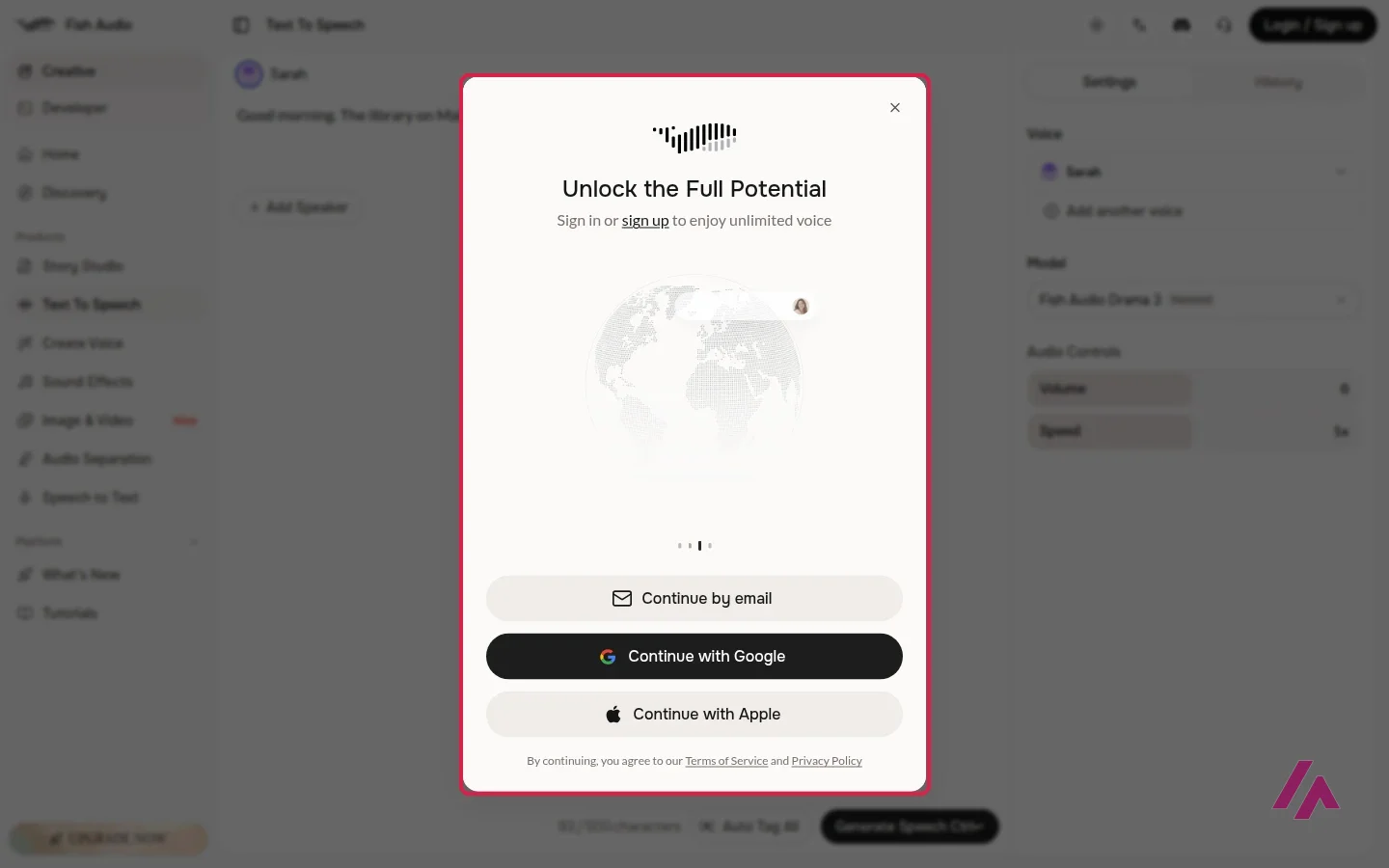
Free, but only once you sign up (Heads-up)
The Free plan needs an account, though not a credit card. And what you make on it is for personal projects only: Fish Audio's FAQ says free users can't use the audio commercially, so a monetized YouTube channel needs Plus or higher.
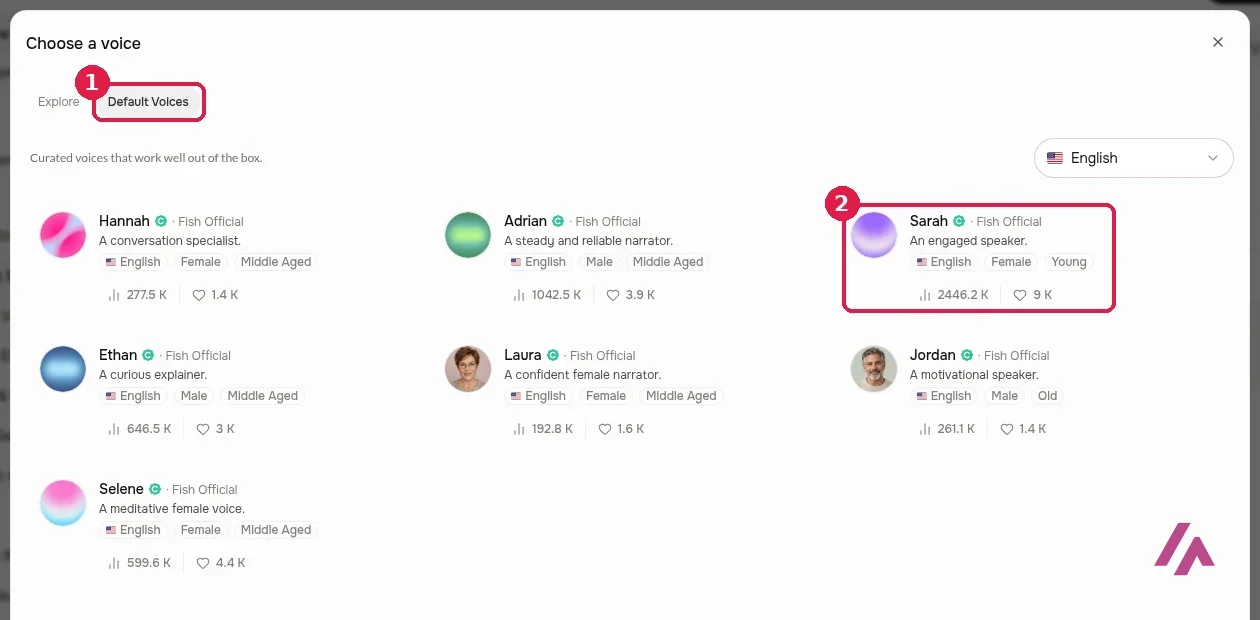
The other tab, Explore, is the community library: voices uploaded by users, which Fish Audio puts at more than 2 million. It's huge and very mixed, so if you're making something you'll publish, stick to a voice you own, or check a voice's license first (the voice library has a "Licensed" filter). The FAQ ties commercial use to "verified voices (that you own)."
Fish Audio pricing
These are the prices on fish.audio/plan as seen from the US, in US dollars. Outside the US, the page may show your local currency instead.
| Plan | Monthly | Billed yearly | What you get |
|---|---|---|---|
| Free | $0 | $0 | 8,000 credits a month (about 7 minutes), 500 characters per generation, 3 public voice slots; no enhanced cloning, no commercial use |
| Plus | $15 a month | $132 a year | 250,000 credits (about 200 minutes), 15,000 characters per generation, enhanced voice cloning, Voice Design, commercial use |
| Pro | $100 a month | $900 a year | 2,000,000 credits (about 1,620 minutes), 3 team seats, 5 professional voice slots, 7-day money-back guarantee (shown with annual billing) |
| Max | $999 a month | $8,988 a year | 25,000,000 credits (about 6,250 minutes), 10 team seats, 15 professional voice slots |
| Enterprise | Custom | Custom | Zero data retention, on-premise deployment, SOC 2 compliance |
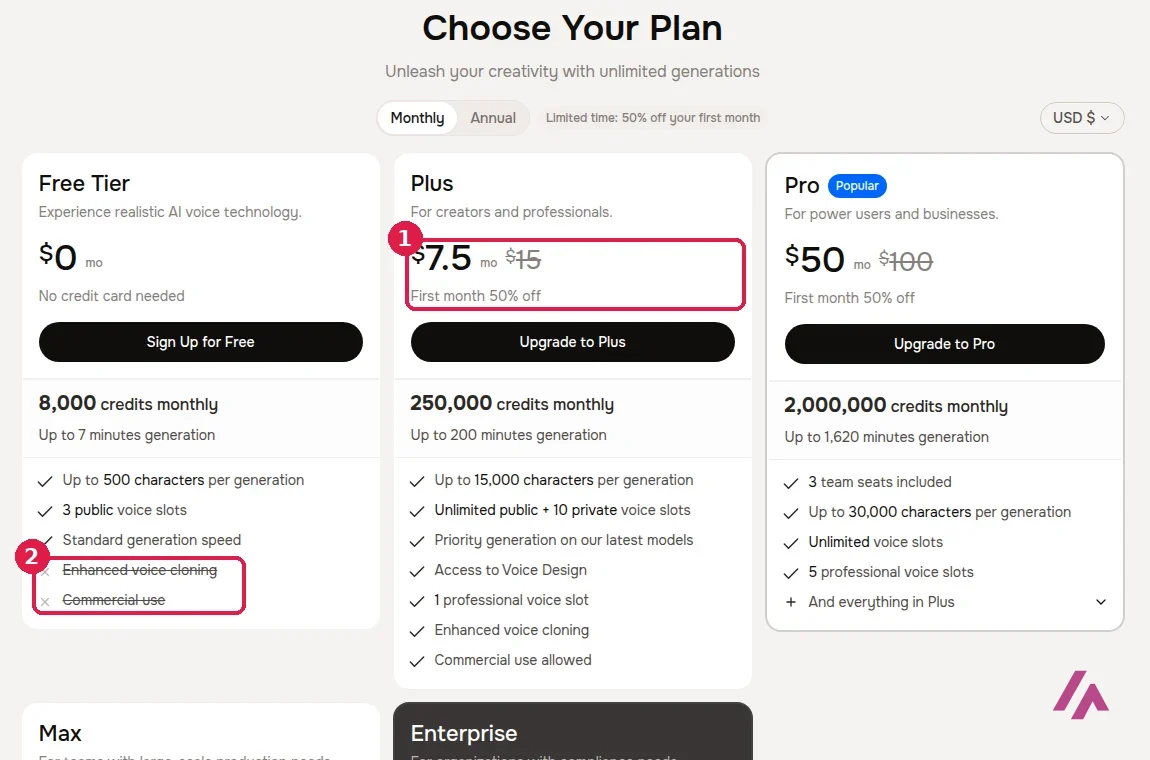
Fish Audio's FAQ puts a minute of speech at roughly 600 to 625 credits, but the plan cards promise fewer minutes than that math gives, so go by the minutes on each card. Credits reset every month, and unused minutes don't roll over.
When I checked, there was a launch offer for Drama 3: 50% off the first month on monthly plans, or 50% off the first year on annual ones, until November 12. That put Plus at $66 for the first year instead of $132. Offers like that come and go, so check the page before you pay.
Which plan I'd pick (Tip)
Make an account and spend your free minutes (up to 7, 500 characters at a time) on a real chunk of your script, not a test sentence. If the voice works for you and you'll publish the result, Plus at $15 a month is the plan that makes sense: it's the first one with commercial use and enhanced cloning. Pro at $100 is a team plan in practice, and with annual billing the Pro card promises a 7-day money-back guarantee.
The API, for developers
Fair warning: this part gets a bit technical. The API is billed separately from the monthly plans: it's pay as you go, with no subscription or minimum, and text-to-speech is billed by the size of your text, per million bytes. The paid S2 models cost $15 per million bytes and Drama 3 $50, and the docs say a million bytes is roughly 180,000 English words, or about 12 hours of speech. Until November 12, Drama 3 is billed at a launch price of $10. Speech-to-text costs $0.36 per hour of audio, and Voice Design, which creates a voice from a written description, is $0.01 per request.
One date to note if you already use it: the older S1 model is being retired on December 31, 2026, and requests that ask for it will then be served by an S2 model at the same price.
Voice cloning, Story Studio and the rest
Voice cloning gets top billing on Fish Audio's own site. The home page's title promises "free voice cloning," but the pricing page leaves enhanced voice cloning out of Free and puts it in Plus, and the professional voice slots grow with each plan. Fish Audio's home page promises cloning "in 15 seconds." Clone your own voice, or one you have permission to use.
Story Studio is for longer pieces with more than one speaker, like an audiobook chapter or a two-host podcast. Fish Audio's official tutorial on this page shows the whole workflow, from tags to cloning to a multi-speaker conversation.
The web app also has an Audio Separation tool for pulling voices and music apart. If you'd rather do that on your own computer for free, Ultimate Vocal Remover is the desktop app I'd use.
Who Fish Audio is for, and who should skip it
Fish Audio makes sense if you write scripts and want to direct how they're read: YouTube narration, audiobooks, game characters or a podcast with two voices. Developers get a simple pay-as-you-go API, and the Fish Speech models on GitHub are an extra if you like to tinker.
Skip it if you want to try your own script in the app without signing up, or if you need commercial audio for free. Neither is on offer here.
Fish Audio or something else?

If you want another text-to-speech studio to compare voices with, Murf is an online platform with a wide range of voices and languages. If what you really want is to change your own voice live, while gaming or streaming, Voice AI is built for that. And if your problem is a song rather than a script, Ultimate Vocal Remover splits vocals and instruments on your own machine, free.
Fish Audio's own quick tour of its text-to-speech screen: how to pick a voice, paste your text and generate, with a few voices it recommends.
Who is it for? For YouTubers, audiobook and podcast makers, and developers who want expressive narration without a recording booth, and who don't mind signing up before the app reads their script. If you'd rather compare it with another text-to-speech studio, Murf is the one to look at.
What I like and what I don’t
What I like
- Tags like [whispering], [sighing] or [pause] go straight into your text: Fish Audio's pitch is that you direct the read instead of hoping for it.
- A curated set of Fish Official voices sits next to a community library that Fish Audio puts at more than 2 million voices.
- Developers pay as they go, with no subscription: $15 per million bytes of text on the paid S2 models.
What I don’t
- No account, no audio in the app: it asks you to sign in as soon as you hit Generate.
- The free plan is personal use only, without enhanced voice cloning, and caps you at 500 characters per generation.
- Plus at $15 a month is the floor for commercial use, and the next step up is Pro at $100.
Have you used Fish Audio? Tell me how it went
What worked for you and what didn’t. Your experience helps the next person who lands here unsure more than any review page. I read every one before publishing.
Write my review
Fish Audio pricing
Prices checked on the official site on · before tax
-
Free
Free
8,000 credits a month (up to about 7 minutes of speech), 500 characters per generation, 3 public voice slots; no enhanced voice cloning, no commercial use
- Cheapest paid plan
Plus
$15/mo
250,000 credits a month (up to about 200 minutes), 15,000 characters per generation, enhanced voice cloning, Voice Design and commercial use; $132 a year billed annually
-
Pro
$100/mo
2,000,000 credits a month (up to about 1,620 minutes), 3 team seats, 5 professional voice slots; $900 a year billed annually
-
Max
$999/mo
25,000,000 credits a month (up to about 6,250 minutes), 10 team seats, 15 professional voice slots; $8,988 a year billed annually
Free is $0 with 8,000 credits a month, about 7 minutes of speech. Plus is $15 a month, Pro $100 and Max $999, or $132, $900 and $8,988 a year if you pay annually. Enterprise is custom. Prices are in US dollars, and the pricing page doesn't say whether tax is included. The API is billed separately, pay as you go.
Alternatives to Fish Audio
-

Murf
When to pick it: If you want another text-to-speech studio to compare voices with: Murf is an online platform with a wide range of voices and languages.
See details → -

Voice AI
When to pick it: If what you want is to change your own voice live, while gaming, on a call or streaming, rather than turn a script into speech.
See details →
How I tested it
On October 22, 2026, I went through fish.audio without an account, in a browser set to US English: I typed my own text into the demo on the home page, opened the web app, picked one of the Fish Official voices and hit Generate. I also read the pricing page as seen from the US, the API pricing docs, the FAQ and the terms. Everything here is what you get before signing up; for cloning and Story Studio, Fish Audio's own tutorial on this page shows the steps. The screenshots are mine.
A longer official tutorial: emotion tags, voice cloning and multi-speaker conversations in Story Studio, the way you'd build a podcast episode. It was recorded before Drama 3, the newest model.

Written by Miguel Ángel, with the help of an LLM to fact-check. In IT since 2002 (systems, engineering, web development and SEO), doing business with AI since February 2023, when ChatGPT could first be bought in Spain. I build, write and maintain this site myself.

Got a question? Ask me
About Fish Audio, its plans or whether it fits what you need. I’m Miguel Ángel, and I’ll answer you myself, right here.