Gamma AI Review: Is It Free, What a Deck Really Costs in Credits, and Its Plans
10 min read
- Free with limits
- Design
- Web · API
Price Pricing on their site

My verdict
In IT since 2002: systems, engineering, web development and SEO. I have been doing business with AI since February 2023, when ChatGPT could first be bought in Spain.
Gamma is the fastest way I know to go from "I need a deck" to a decent, well-designed one: you describe it, an AI agent shows you an outline, and a couple of minutes later you have editable slides with illustrations. Is it free? To try, yes: no credit card, and you can export to PowerPoint, PDF or Google Slides on the free plan. But the free plan runs on 400 credits you get once, and my 8-slide deck with AI images used 173 of them, so you're looking at two or three presentations before you have to pay. Every free export also carries a "Made with Gamma" badge.

What is Gamma AI
- Type
- Design
- Platforms
- Web · API
- Free plan
- Free with limits
- Updated on
- Nov 12, 2026
Gamma, or Gamma AI, is an AI tool that builds presentations, documents, websites and social posts from a prompt: you describe what you need, an AI agent drafts an outline, and Gamma designs the slides, illustrations included. Is Gamma free? To try it, yes: no credit card, and the free plan exports to PowerPoint and PDF. But it runs on 400 credits you get once, and my 8-slide deck used 173 of them. How much does Gamma cost? Paid plans start with Plus, which adds 1,500 credits a month and removes the Gamma badge; Gamma lists Business at $40 per member a month, billed annually, and paying annually saves up to 25%.
Gamma pricing, the short version (Important)
- Free: $0, 400 credits once (they don't refill), up to 10 slides per prompt, exports to PDF, PowerPoint, PNG and Google Slides with a "Made with Gamma" badge. No credit card.
- Plus: 1,500 credits a month, up to 100 slides per prompt, no Gamma badge, better image models.
- Pro: 4,000 credits a month, premium image models, custom branding, detailed analytics, up to 10 custom domains.
- Ultra: 20,000 credits a month and Gamma's most advanced text, image and video models.
- Business: $40 per member a month, billed annually, with 10,000 credits per seat.
- Plus, Pro and Ultra show their price in your local currency on Gamma's pricing page. Paying annually saves up to 25%, and Gamma says taxes may apply based on your location.
What Gamma is (and what the agent changes)
Gamma's core job is still "make me slides," but now you do it by talking to an agent: a chat on the left that plans the deck with you, designs it, then checks every slide before handing it over. You can keep asking it for changes ("warmer," "more graphic," "more detail on step three") instead of editing by hand.
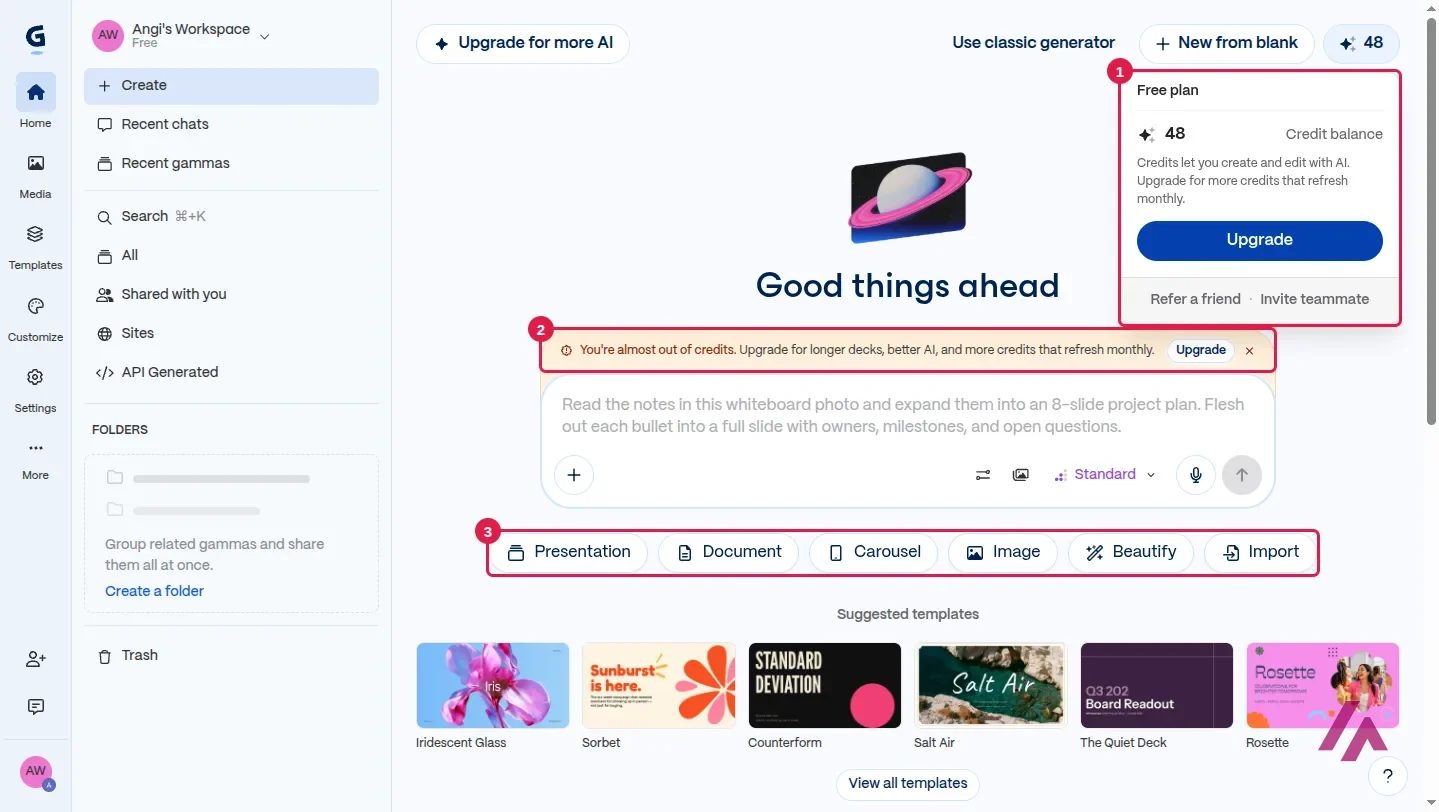
The home screen offers more than slides: Presentation, Document, Carousel, Image, Beautify and Import, for bringing in your PDFs and PowerPoints. Gamma's plans also cover websites and social posts (there's a Sites section in the menu), and Gamma says its API works on every plan and spends credits. Gamma calls each slide a "card," and the editor treats your deck as a stack of them.
Behind the scenes, Gamma says it uses models from several AI companies for text and images, and the paid plans unlock what it calls "advanced" and "premium" image models.
What happened when I asked for a balcony garden deck
My test topic: how to start a vegetable garden on a small apartment balcony. I chose Presentation and asked for 8 slides covering sun and space, containers and soil, what to grow first, watering and a weekly routine.
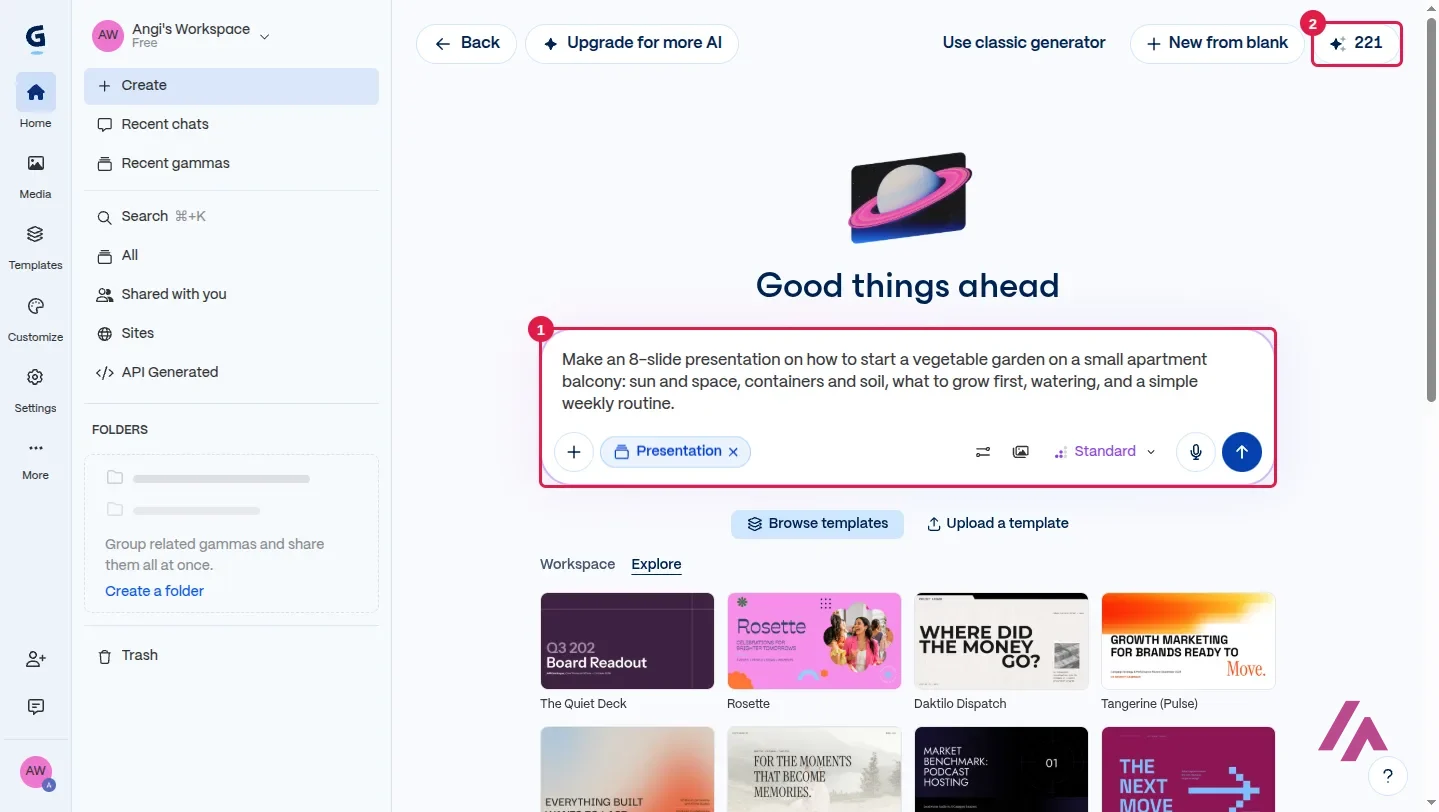
The agent replied with a short summary of what it understood and, in less than a minute, an outline of 8 editable cards: count your sun before you buy a seed, use every layer of a small space, pick pots that drain, start with crops that forgive beginners, water deeply, a 10-minute weekly routine, and a "start small this weekend" close it added on its own, and told me so. Nothing is designed yet at this point: you can edit or merge cards before anything gets designed. I like that approach: you fix the story first.
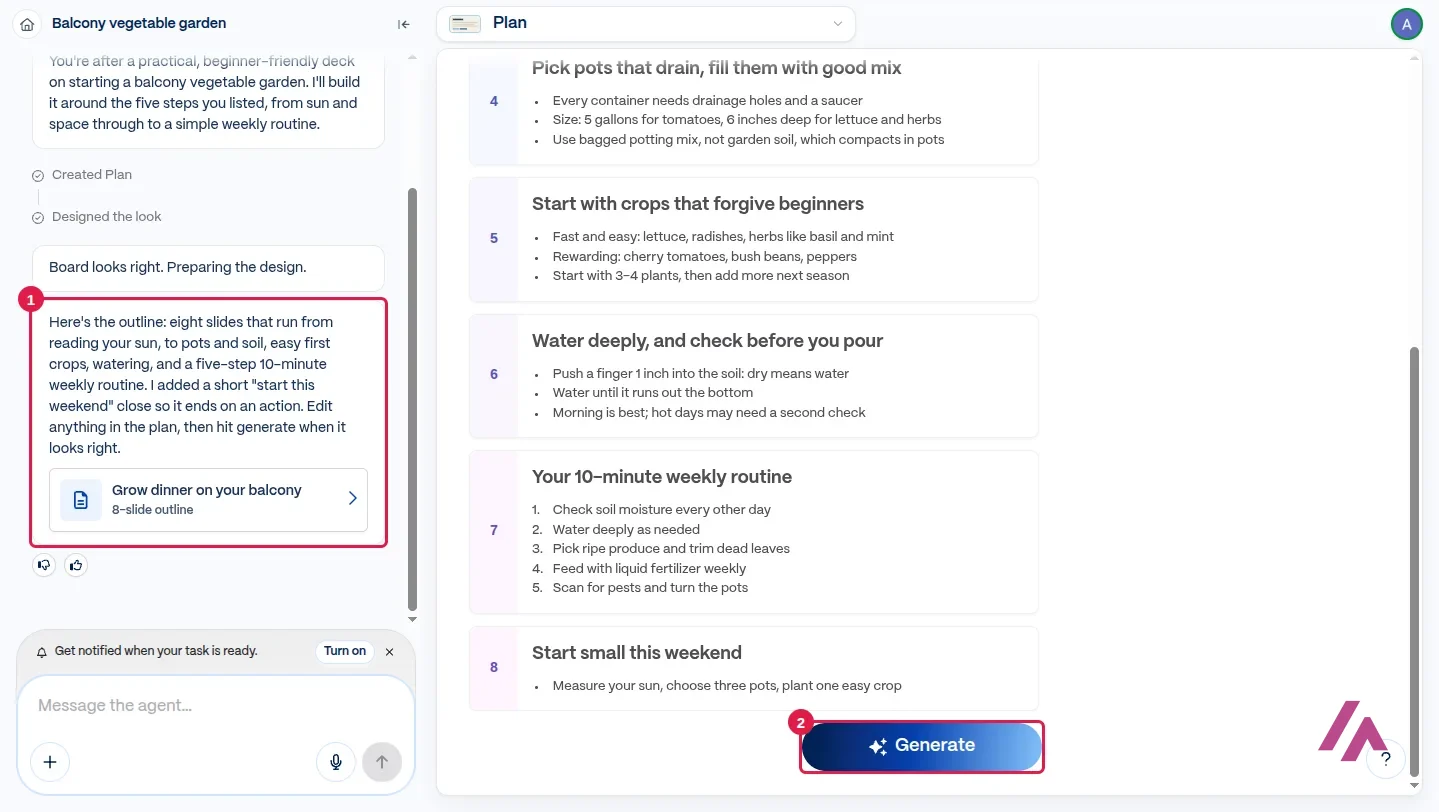
The content was sensible and, a nice touch for a US reader, in US units without my asking: 6+ hours of direct sun for tomatoes and peppers, 5-gallon pots for tomatoes, 6 inches deep for lettuce and herbs, bagged potting mix rather than garden soil. I'm no gardening expert, but nothing in there struck me as wrong.
Then I pressed Generate. In under two minutes, including the agent checking every slide, I had the deck: a cover with a watercolor-style illustration of terracotta pots and a tomato plant on a balcony railing, AI illustrations on most of the other slides, and the weekly routine turned into a row of five numbered steps you can take in at a glance. The agent's sign-off: "I led with sun because it decides everything else." Fair enough.
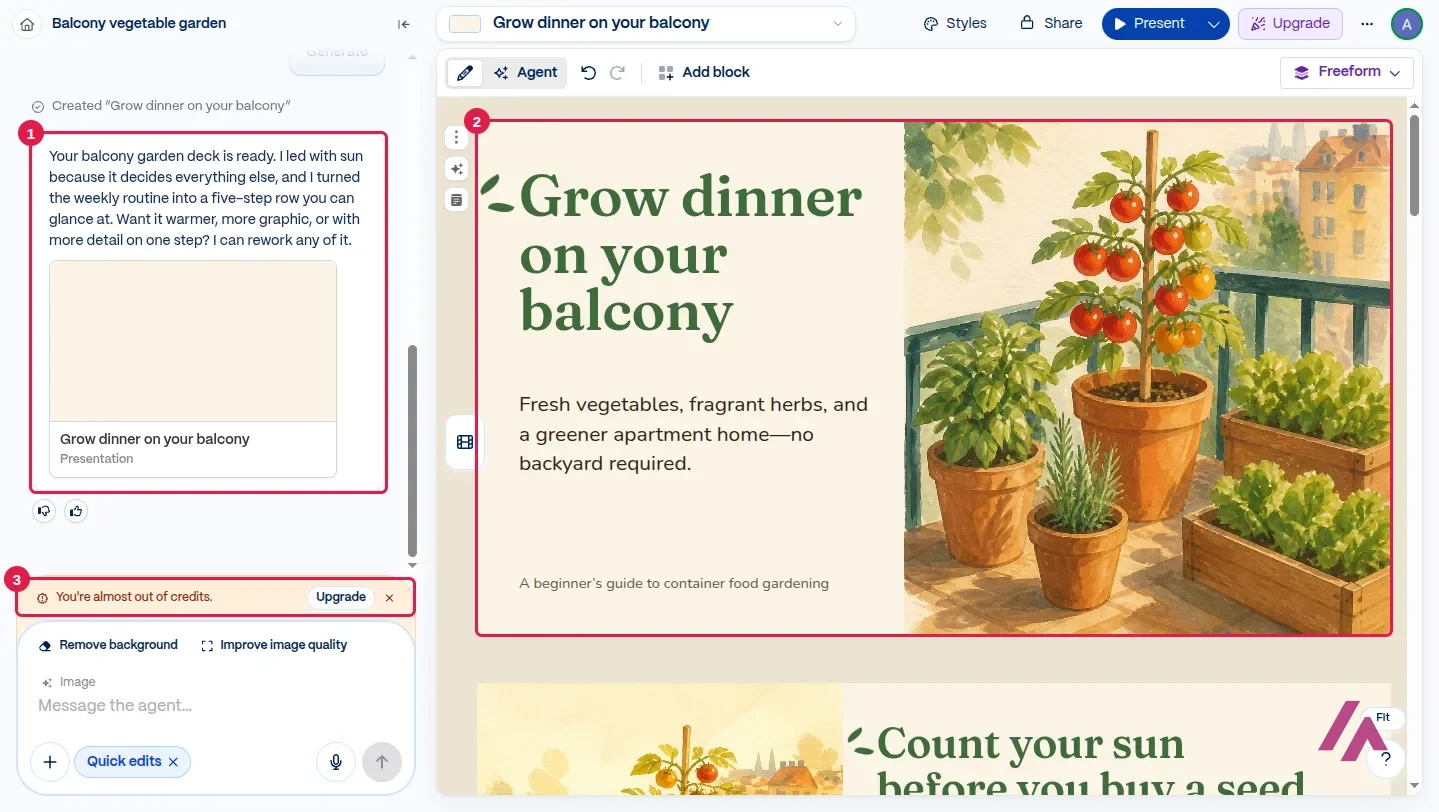
That third box is the catch. Right under the finished deck: "You're almost out of credits."
What the free plan really gives you
The free plan is generous with features and stingy with fuel. Here's what I could do without paying:
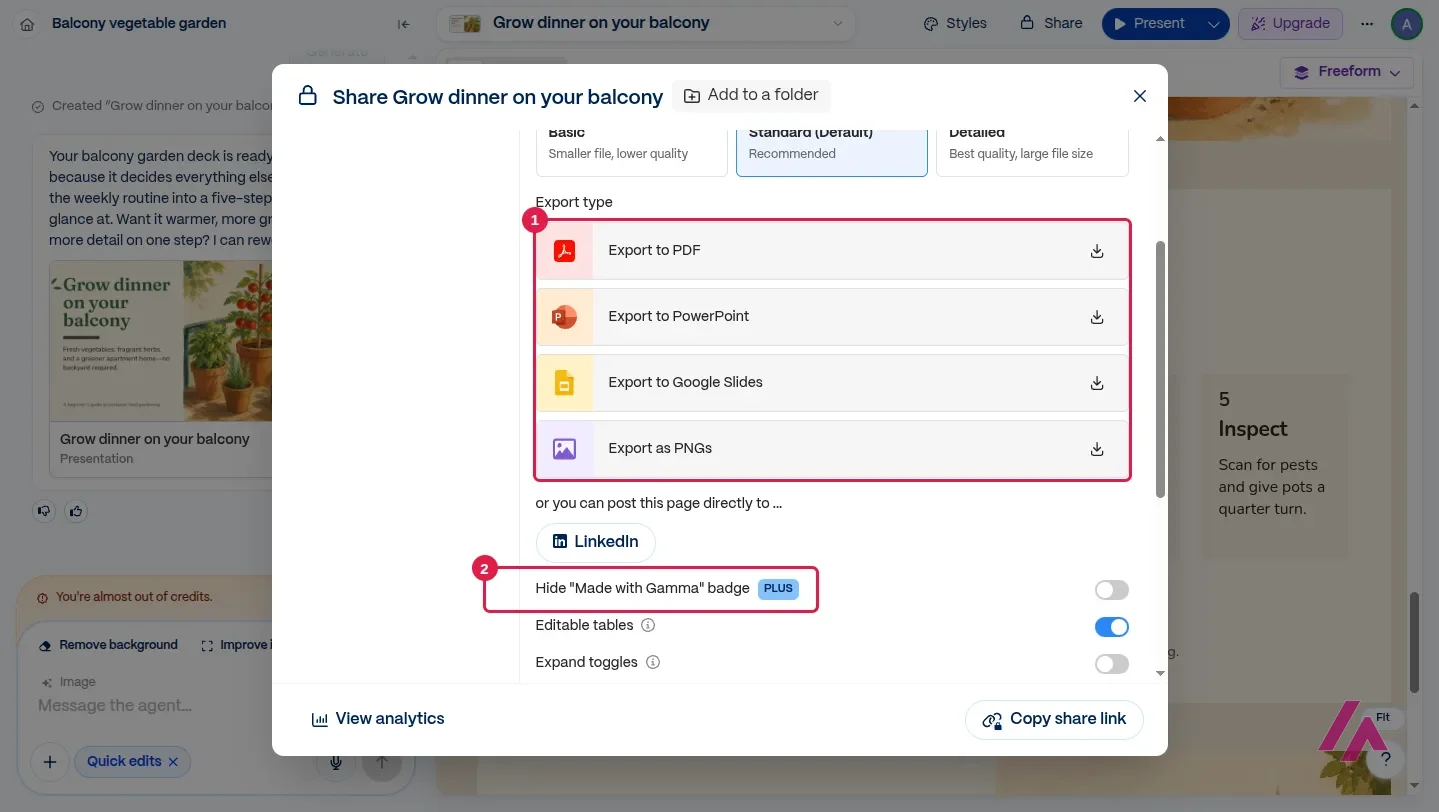
- Export to PDF, PowerPoint, Google Slides or PNGs, in three quality levels. I downloaded the PowerPoint: 8 slides, with the text in editable boxes rather than flattened into images, and the illustrations as separate pictures.
- Keep working on it in the editor, or ask the agent for changes, as long as you have credits.
What you can't do on Free is hide the badge. The export window has a "Hide 'Made with Gamma' badge" switch marked PLUS, and the PowerPoint I downloaded includes the "Made with GAMMA" button image.
Now the credits. The free plan gives you 400 credits at signup, and they don't refill. You can earn more by inviting friends, and that's it. My 8-slide deck with AI images used 173 credits. Gamma says the cost depends on what you do, which model it uses and how long the result is, so your number will vary, but the math is simple: at that rate, 400 credits is two or three presentations like mine, not a tool you can keep using for free.
How to make 400 credits last (Tip)
Fix the outline before you press Generate: it's the cheapest moment to change your mind, because regenerating means running the design again. Since Gamma says length affects the cost, ask for the slides you actually need rather than a round number, and try one small test before you spend credits on the deck that matters.
Gamma pricing: Free vs. Plus vs. Pro vs. Ultra
Gamma sells individual plans (Free, Plus, Pro, Ultra) and team plans on a separate Business tab. Paid plans are billed per member: on the individual plans, each person you invite to your workspace adds a seat once they accept. The pricing page shows Plus, Pro and Ultra in your local currency, and it opens on annual billing, which saves up to 25%. Here's what each one includes:
| What you get | Free | Plus | Pro | Ultra |
|---|---|---|---|---|
| Price | $0 | On the pricing page, in your currency | On the pricing page, in your currency | On the pricing page, in your currency |
| AI credits | 400, once | 1,500 a month | 4,000 a month | 20,000 a month |
| Slides per prompt | Up to 10 | Up to 100 | Up to 100 | Up to 100 |
| "Made with Gamma" badge | Yes | Removable | Removable | Removable |
| AI image models | — | Advanced | Premium | Most advanced (text, image, video) |
| Custom domains for sites | — | — | Up to 10 | Up to 100 |
Business is the team plan: $40 per member a month, billed annually, with 10,000 credits per seat. Credits on paid plans roll over up to twice the monthly amount (Plus can hold up to 3,000), and paid users can buy extra credits. You can upgrade, downgrade or cancel from "Settings & members"; if you cancel, you keep your paid features until the end of the period and then drop to Free, and your gammas stay yours. Gamma accepts credit and debit cards and payment from US or EU bank accounts, and says taxes may apply based on your location.
Do the credit math, not the feature math (Heads-up)
At the rate of my test deck, Plus's 1,500 monthly credits would cover roughly eight similar decks a month, and Pro's 4,000 a little over twenty. If you make one presentation a week, Plus is enough; if you redo every deck three times, count that too. And if three people share the workspace, you're paying for three seats.
Who Gamma is for, and who should skip it
Gamma is for you if you need a presentable deck fast and care more about the story than about every pixel: students, teachers, freelancers pitching a client, a team lead who has to explain a plan on Monday. The outline-first agent is the best part: it makes you think about the structure, then takes care of the design.
It's not for you if your company has strict PowerPoint templates you have to follow to the letter (the PowerPoint file I downloaded has editable text boxes, but Gamma warns that gradient text and frosted backgrounds may use fallback styles), or if you make many decks a week and don't want to watch a credit counter. And if all you need is one diagram for slides you already have, Gamma is more tool than you need.
Gamma or something else?

Beautiful.ai
from $14.50/mo
Slides that keep arranging themselves as you edit; no free plan, only a trial.

Napkin AI · Napkin AI
Free with limits · from $12/mo
Turns text you paste into editable diagrams and visuals for your slides.
If you make client decks every week and want each slide to stay tidy as you edit, Beautiful.ai is built for that, though it has no free plan. If your slides already exist and you only need visuals, Napkin AI turns a paragraph into a diagram you can edit. And if you already design everything in Canva, Canva AI keeps your slides next to the rest of your work.
Written by Miguel Ángel, with help from an LLM to verify facts.
Gamma's official channel presents its new version in a couple of minutes, built around the AI agent I used in my test.

Who is it for? For students, teachers, freelancers and anyone who has to present something next week and doesn't want to fight with templates. Less so if you need pixel-level control of every slide, or if you make several decks a week on a tight budget: that's when the credits, not the features, decide the plan.
What I like and what I don’t
What I like
- The agent writes an editable outline first and only then designs the slides, so you fix the story before any visuals happen.
- It wrote in natural US English and used US units (gallons, inches) without being asked.
- Free exports include PowerPoint with editable text, PDF, Google Slides and PNG images.
- No credit card to start, and the free plan lets you try the whole flow, from outline to download.
What I don’t
- The 400 free credits are a one-time allowance that doesn't refill, and one 8-slide deck with AI images used 173 of them.
- On the free plan every export carries a "Made with Gamma" badge; removing it starts at Plus.
- Free caps you at 10 slides per prompt, and paid plans are billed per member, so a team multiplies the bill.
Have you used Gamma AI? Tell me how it went
What worked for you and what didn’t. Your experience helps the next person who lands here unsure more than any review page. I read every one before publishing.
Write my review
Alternatives to Gamma AI
-

Beautiful.ai
from $14.50/mo
When to pick it: If you make client decks every week and want slides that keep arranging themselves as you edit. It has no free plan, only a trial.
See details → -

Napkin AI
Free with limits · from $12/mo
When to pick it: If you already have the text and only need diagrams or visuals to drop into your slides.
See details → -
Canva AI
from $18/mo
When to pick it: If you already design in Canva and want AI slides next to everything else you make there.
See details →
How I tested it
On November 12, 2026, I used Gamma with a free account (signed in with Google) and the interface in US English. I asked its agent for an 8-slide presentation on starting a vegetable garden on an apartment balcony, reviewed the outline, generated the deck, checked how many credits it used and downloaded it as a PowerPoint file. That same day I read the pricing page and Gamma's Help Center. I didn't pay for anything. Written by Miguel Ángel, with help from an LLM to verify facts.
A seven-minute review that walks through the generator, Gamma's card-based editor and the AI agent, and asks whether it beats PowerPoint or Google Slides. It's from February, so some screens look different today.


Written by Miguel Ángel, with the help of an LLM to fact-check. In IT since 2002 (systems, engineering, web development and SEO), doing business with AI since February 2023, when ChatGPT could first be bought in Spain. I build, write and maintain this site myself.

Got a question? Ask me
About Gamma AI, its plans or whether it fits what you need. I’m Miguel Ángel, and I’ll answer you myself, right here.