Manus
Manus AI · also called Manus AI · 10 min read
- Personal assistant
- Web · API
- Standard $20/mo 4,000 credits/mo · $17/mo billed yearly
Checked on · before tax
Open Manus
My verdict
In IT since 2002: systems, engineering, web development and SEO. I have been doing business with AI since February 2023, when ChatGPT could first be bought in Spain.
Manus is the agent to try when you want the AI to do the job, not describe it: it's built so you hand it a task and it researches, builds a website or puts together slides on its own. The catch is the bill. There's no free plan on the pricing page, and every task spends credits, so the plan you need depends on how often you delegate, not on which features you want, because the three plans list almost the same features. Start with the $20 plan, pay monthly, and only move up once you've watched your credits run out.
What is Manus
- Company
- Manus AI
- Type
- Personal assistant
- Platforms
- Web · API
- Free plan
- Paid
- Also called
- Manus AI
- Updated on
- Oct 3, 2026
Manus is an AI agent: instead of just answering a question, it's built to take a task and carry it out, from researching a topic to building a website or a slide deck. Is Manus AI free? Not on its pricing page. The plans start at $20 a month ($17 if you pay yearly), and everything you ask it to do is paid for in credits. It's worth it if you regularly hand off research, reports or simple websites and would rather review a finished draft than build it yourself. If you just want answers, a chatbot is cheaper.
That's the short version. Here's what I found when I went through it, and how to pick a plan without overpaying.
What Manus is, in plain English
Most AI chat apps are conversations: you ask, they answer, you copy and paste. Manus is built around a different idea. The home page greets you with "What can I do for you?" and a box that says "Assign a task or ask anything", and that word, assign, is the whole point. You describe the job, and the idea is that Manus works through it on its own until there's something to hand back.
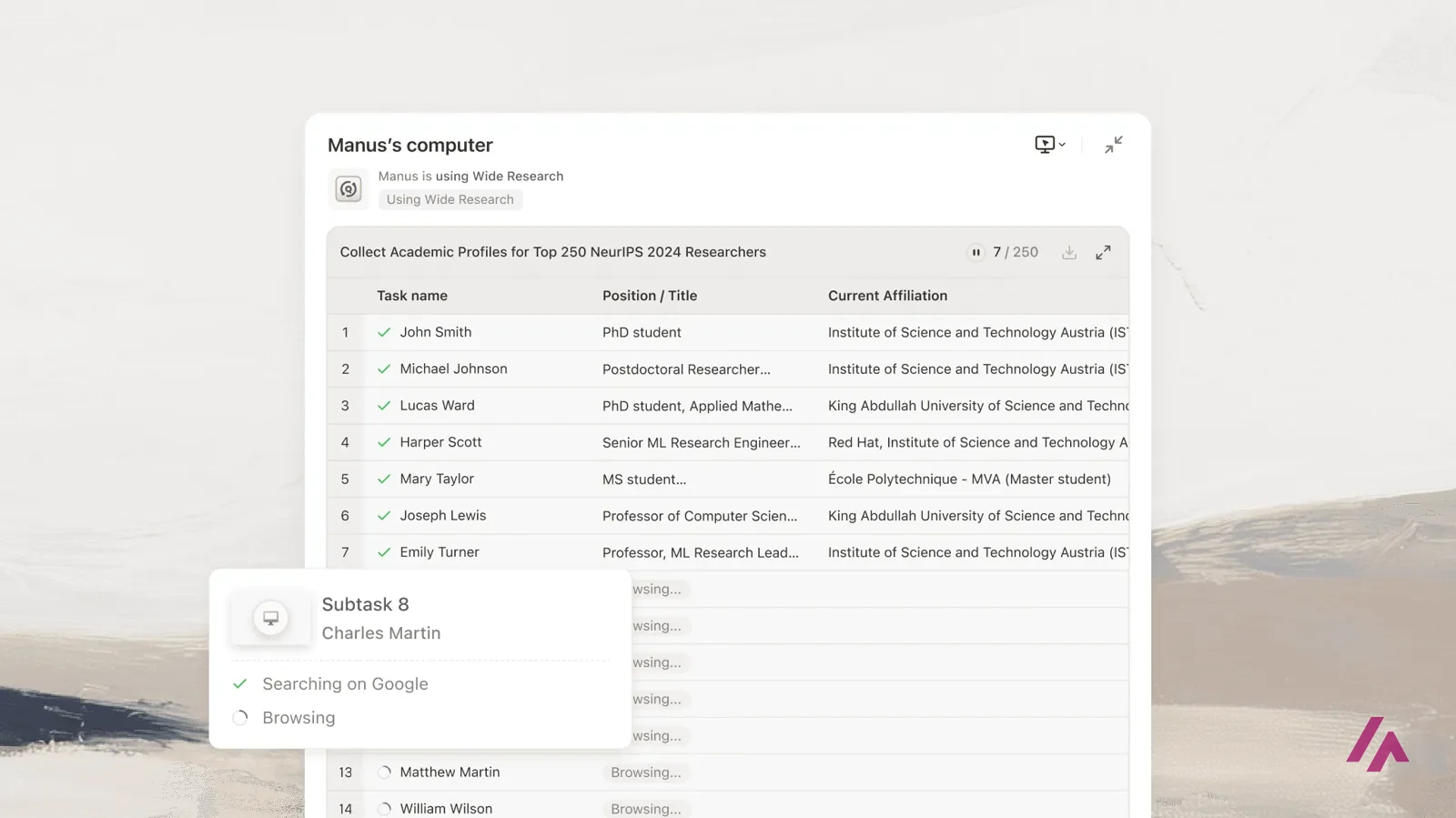
Right under the box there are shortcuts that show what kind of jobs it expects: Create slides, Build website, Create games and Video, the last two marked as new, plus a More button. Down in the site's footer there's a longer list: an AI design tool, AI slides, an image generator, a music generator, a browser operator, Wide Research (which the pricing page ties to scaling up bigger tasks), Mail Manus and a Slack integration. There are mobile and desktop apps and an API for developers too.
One thing you'll notice at the top of the site right now: a link introducing Manus 2.0, which Manus's own launch video calls a rebuild from the ground up. The plans and prices didn't change with it: I went back to the pricing page to check, and they're the ones below.
What I could see without an account
The home page, the task box and the shortcuts are all there to look at, and so is the full pricing page. What you can't do without signing up is actually run a task: that takes an account, and tasks spend credits. So everything I tell you about how a task behaves comes from Manus's own plan descriptions, and you can check it yourself on your first task.
Looking is free, doing isn't (Heads-up)
The pricing page lists no free plan, so the cheapest way to try Manus on real work is the $20 plan.
Credits: the part that decides your bill
Sorry, this bit is a little technical, but it's the one that matters. Everything Manus does runs on credits, and the three plans are basically three sizes of the same credit bucket.
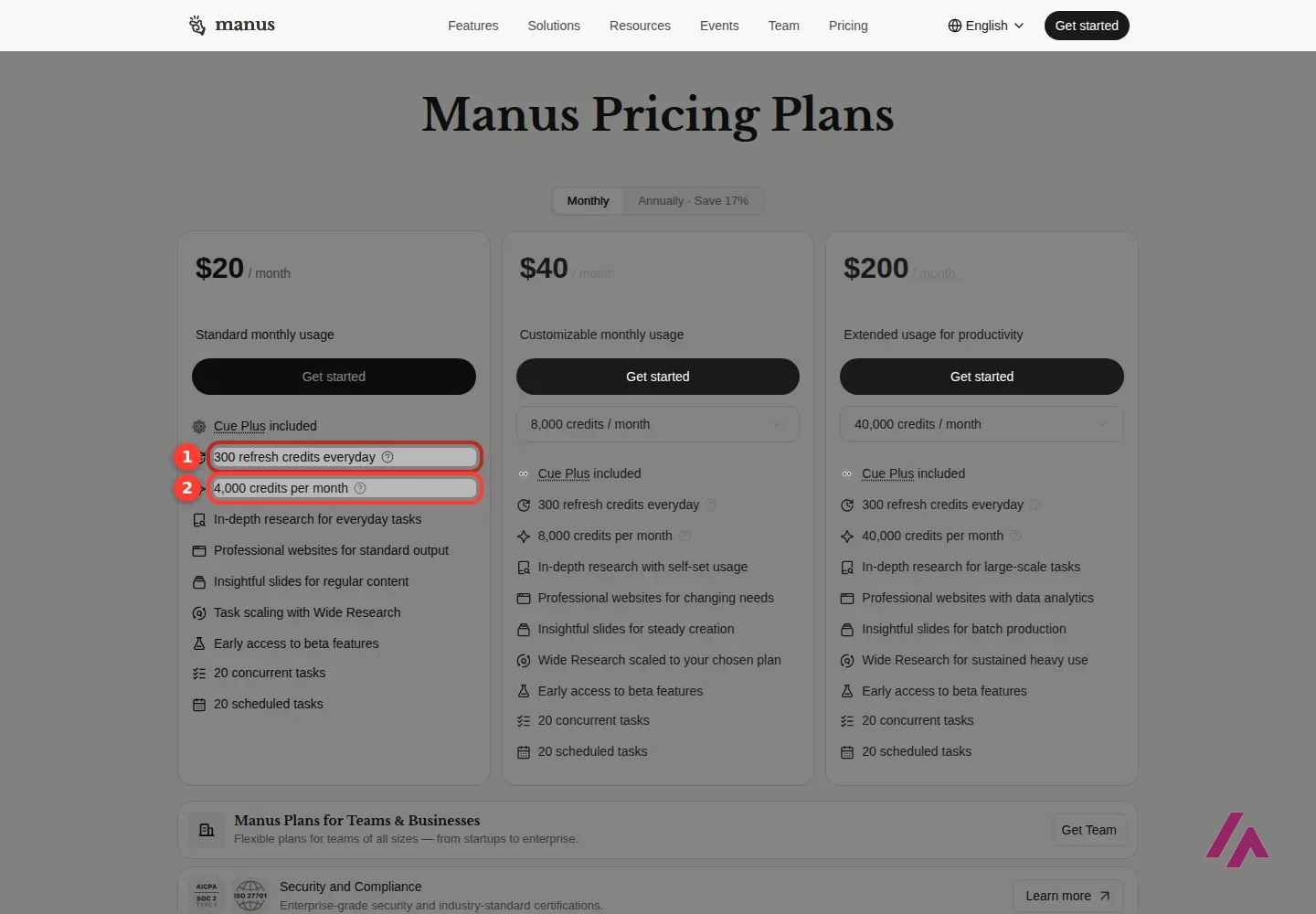
Each plan comes with a monthly pot of credits: 4,000, 8,000 or 40,000. On top of that, every plan lists "300 refresh credits everyday", a smaller daily allowance on top of the monthly one. The pricing page tucks the details behind a little help icon, so once you're in, keep an eye on how the two pots go down as you work.
What the pricing page doesn't tell you is how many credits a typical task costs, and that's the number that decides everything. A quick question and a multi-page research report are very different jobs, and an agent that browses, writes and builds for a long time will likely spend more than one that finishes in a couple of steps. My advice is simple: on your first few tasks, look at how many credits each one used. That tells you more about the right plan than any comparison table.
Manus pricing, plan by plan
The plans don't have names on the pricing page, just a short description each ("Standard monthly usage" and so on), so I've borrowed those.
| Plan | Monthly | Billed yearly | Credits a month | What stands out |
|---|---|---|---|---|
| Standard usage | $20 | $17 a month | 4,000 | Nearly the same features as the others, with the smallest pot |
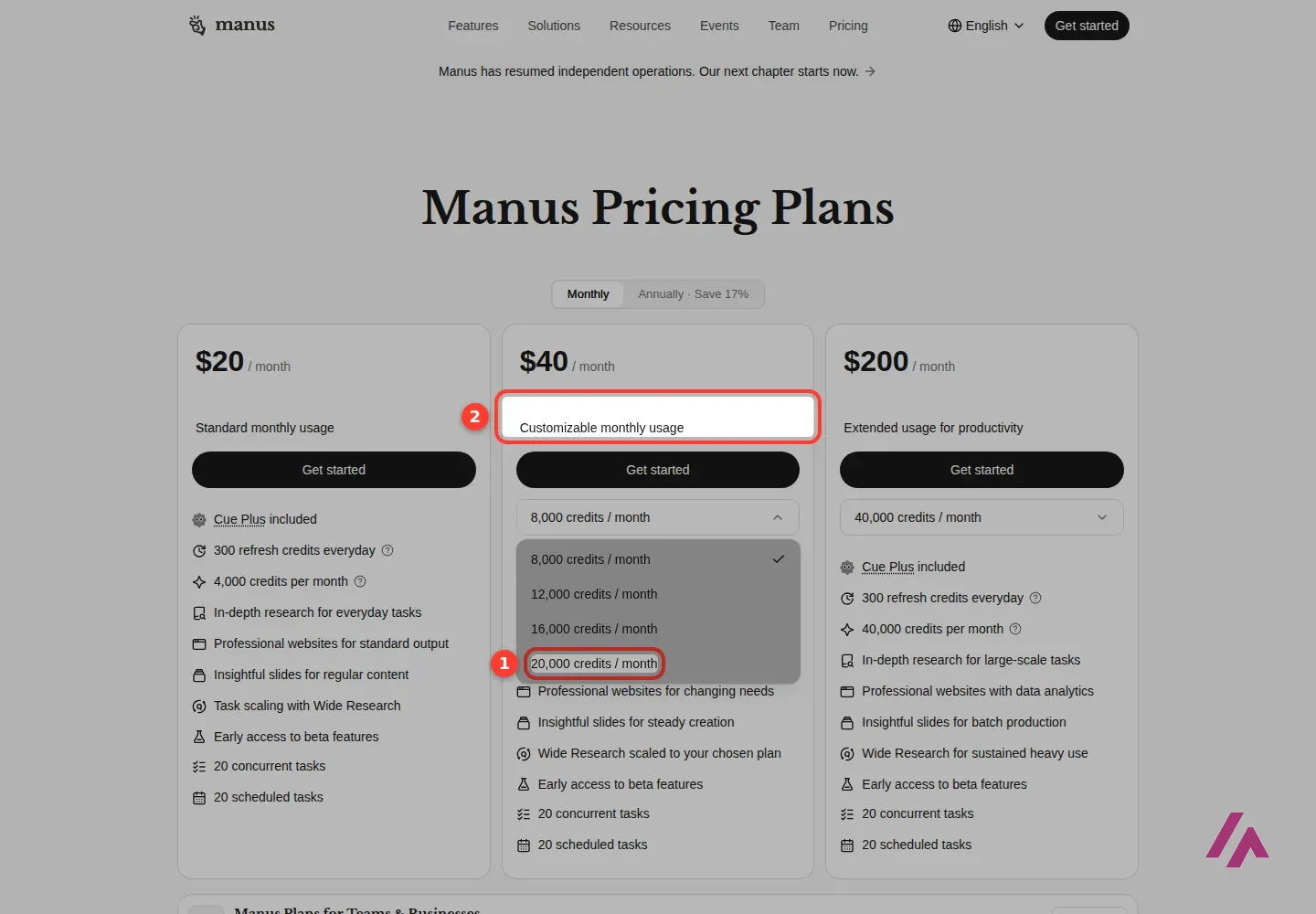
| Customizable usage | $40 | $34 a month | 8,000 (up to 20,000) | $40 is for 8,000 credits; a menu lets you pick more |
| Extended usage | $200 | $167 a month | 40,000 | Adds websites with data analytics, for heavy use |
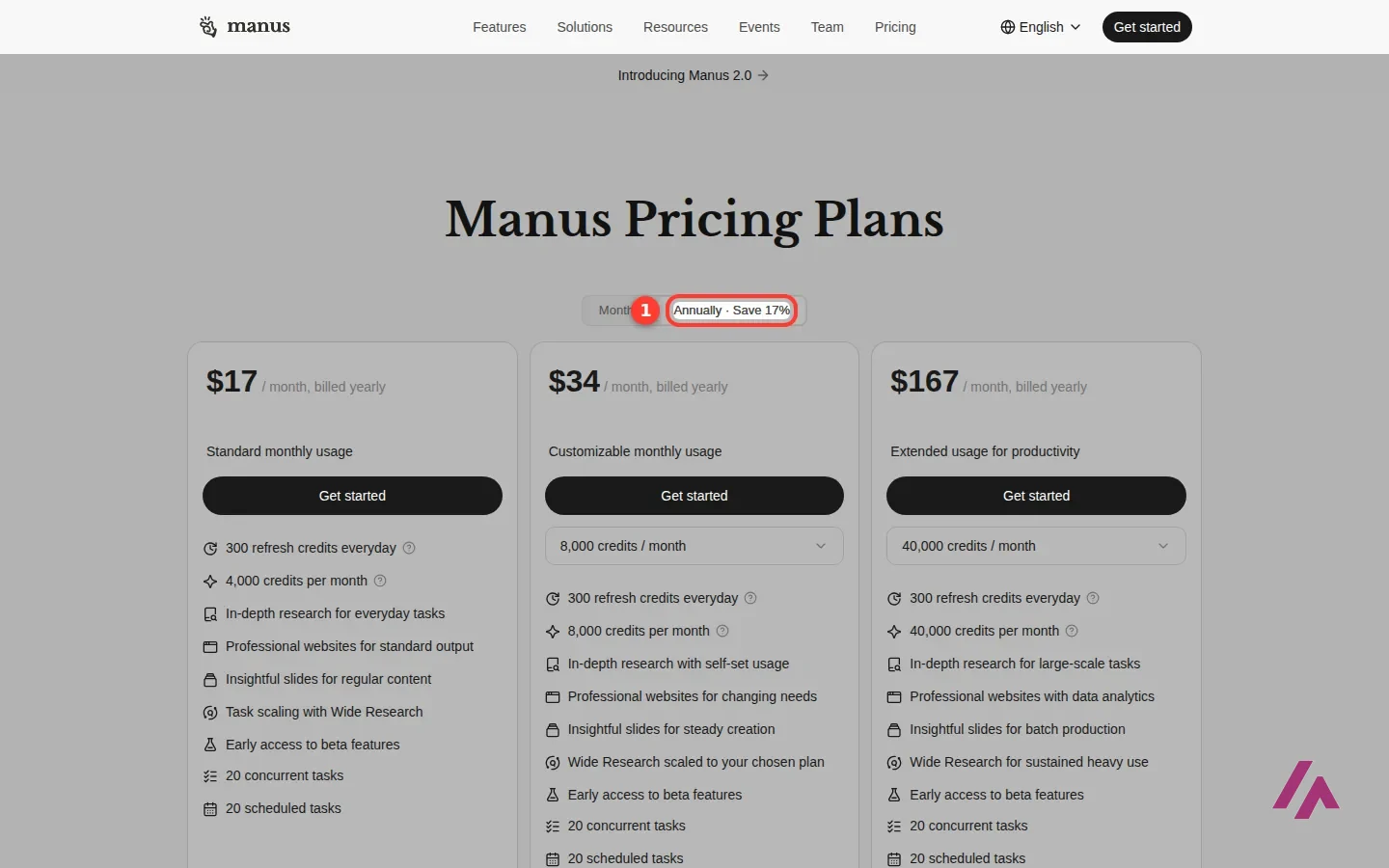
Every plan also includes 300 refresh credits a day, early access to beta features, 20 tasks running at the same time and 20 scheduled tasks. The page labels yearly billing "Save 17%".
The middle plan is the interesting one. At $40 you get 8,000 credits, but a menu on the card lets you raise that to 12,000, 16,000 or 20,000 credits a month. The $40 price is for the 8,000 option, so check the price the card shows once you pick a bigger one. It's the most flexible way to pay for exactly what you use.
The top plan at $200 is for people who run Manus all day. It's also the only one that mentions websites with data analytics. For almost everyone else, it's a big jump for credits you may never spend.
Climb one step at a time (Tip)
Running out on the $20 plan? Try the $40 plan's credit menu before you even look at the $200 one, and keep paying monthly until you know how many credits your usual tasks eat.
There are separate plans for teams and businesses too, "from startups to enterprise", and the pricing page mentions SOC 2 Type II and ISO 27001 certifications, which matters if you're buying it for a company.
Is Manus AI free?
Not in the way most people hope. The pricing page shows three paid plans and no free tier, so the cheapest way in is $20 a month, or $17 a month billed yearly. You can create an account from the Sign up button on the home page, and the site's offers can change, so it's worth checking what a new account comes with the day you join. But if you plan to use Manus for real work, budget for a paid plan from day one.
Which plan is worth it
For most people, the $20 plan. It has nearly every feature the other plans have, including 20 tasks running at once, and 4,000 credits plus the daily refresh credits is enough to find out whether Manus fits the way you work. Pay monthly for the first month or two. Once you know how many credits your usual tasks eat, you'll know whether you need more.
If you run out every month, move to the $40 plan and pick the credit level that matches your real use. That's better than jumping straight to $200. Only go for the top plan if Manus has become part of your daily work and you're burning through 20,000 credits a month without trying.
Who it's for, and who should skip it
It's a good fit if you spend hours on research, reports, slide decks or simple websites, and you're happy to review and fix a finished draft rather than build it step by step. Scheduled tasks help too if you want something done on a regular basis, like a weekly roundup.
It's also worth a look if you already use a chatbot and keep hitting the same wall: it tells you how to do the job, and you still have to do it.
Skip it if what you mostly do is ask questions, write emails or brainstorm. A regular AI assistant does that for less money and with no credits to watch. Skip it too if you're a developer who wants full control over the code: an agent that builds the whole website for you isn't the same as a tool that helps you write it.
Manus or something else?
If most of your day is questions and writing, ChatGPT covers more ground for less. If you work with long documents and want the AI to think a problem through with you, I'd compare Manus against Claude. If your "task" is really a question that needs sources, Perplexity gets you a cited answer without an agent run. And if the website or app is the whole point and you want to keep coding it yourself, Replit is built for exactly that.
Manus's own launch video for Manus 2.0. Its description calls it a rebuild from the ground up and lists what's new, from a workspace called Manus Studio and a video editor to automations and a new app. It's the maker's showcase, so watch it for the idea and judge the results on your own tasks.
Who is it for? For people who spend hours on research, reports, slide decks or simple websites and would rather review a finished draft than build it step by step. If you mostly want quick answers or a writing partner, a regular chatbot is cheaper and simpler. If you write code for a living, a coding tool will give you more control.
What I like and what I don’t
What I like
- It's designed to do the work instead of explaining it: research, websites, slides and more, started from one box that says "Assign a task or ask anything".
- Every plan gets nearly the same features, including 20 tasks running at once and 20 scheduled tasks. Mostly, you pay more for more credits.
- Yearly billing brings the $20 plan down to $17 a month, and the middle plan lets you choose how many credits you get each month.
What I don’t
- No free plan on the pricing page. The cheapest way in is $20 a month.
- Credits are hard to predict: the pricing page doesn't say how many credits a typical task costs, and a big job will likely spend far more than a small one.
- The jump from $40 to $200 is steep, and the plans don't even have names, which makes comparing them a little clumsy.
Have you used Manus? Tell me how it went
What worked for you and what didn’t. Your experience helps the next person who lands here unsure more than any review page. I read every one before publishing.
Write my review
Manus pricing
Prices checked on the official site on · before tax
- Cheapest paid plan
Standard
$20/mo
4,000 credits a month plus 300 refresh credits every day, 20 concurrent tasks; $17 a month billed yearly
-
Customizable
from $40/mo
From 8,000 credits a month (up to 20,000) plus 300 refresh credits every day; $34 a month billed yearly
-
Extended
$200/mo
40,000 credits a month plus 300 refresh credits every day, websites with data analytics; $167 a month billed yearly
$20 a month for 4,000 credits, $40 a month for 8,000 (you can raise it to 20,000), or $200 a month for 40,000. Every plan also adds 300 refresh credits a day. Paying yearly brings them down to $17, $34 and $167 a month. My advice: start on the $20 plan, pay monthly, and see how many credits your usual tasks eat before you commit to more.
Alternatives to Manus
-

ChatGPT
Free with limits · from $8/mo
When to pick it: If most of what you do is ask, write and brainstorm, with the odd file or image along the way, ChatGPT covers more ground for everyday use.
See details → -

Claude
Free with limits · from $20/mo
When to pick it: If you care most about long documents, careful writing and working through a problem with the AI, Claude is the one I'd compare Manus against.
See details → -
Perplexity AI
Free with limits · from $20/mo
When to pick it: If your "task" is really a question that needs sources, Perplexity gives you a cited answer without spending credits on a full agent run.
See details → -

Replit
Free with limits · from $20/mo
When to pick it: If the website or app is the whole point and you want to keep working on the code yourself, Replit is built for that.
See details →
How I tested it
On September 28, 2026 I went through manus.im in English without an account: the home page with its task box and shortcuts, and the pricing page with both monthly and yearly billing, including the credit options on the middle plan. Prices are in US dollars. Running tasks and spending credits takes an account, so I describe that part from Manus's own plan page, and you can try it yourself once you sign up. The screenshots in this review are from that session.
A review built around one project instead of a feature tour: an app idea taken through market research, building the app and its branding, finding creators to promote it, and Browser Operator shopping on Amazon with an approval step before checkout. It's from July 2026, before Manus 2.0, so the app may look different today; check current plans on Manus's pricing page. Its description carries a Manus referral link for free credits.

A tutorial built on the idea at the heart of Manus: give it an outcome, not step-by-step instructions. Chris connects a GitHub repository, asks Manus to prepare an iOS app for its App Store launch and reviews what comes back, with a look at chat mode versus agent mode along the way. It's from before Manus 2.0, so the app may look different today. There's a sponsored segment for Zapier.


Written by Miguel Ángel, with the help of an LLM to fact-check. In IT since 2002 (systems, engineering, web development and SEO), doing business with AI since February 2023, when ChatGPT could first be bought in Spain. I build, write and maintain this site myself.

Got a question? Ask me
About Manus, its plans or whether it fits what you need. I’m Miguel Ángel, and I’ll answer you myself, right here.