Kimi AI: Is It Free, What K3.1 Pro Is and What Each Plan Costs
Moonshot AI · also called Kimi AI · 11 min read
- Free with limits
- Personal assistant
- Web
- Free $0 1 agent task at a time · 2 projects
- Plus $19/mo Priority queue · Kimi Code
Checked on · before tax
Open Kimi
My verdict
In IT since 2002: systems, engineering, web development and SEO. I have been doing business with AI since February 2023, when ChatGPT could first be bought in Spain.
Kimi is Moonshot AI's assistant: a chatbot that also runs agents to build slides, documents, spreadsheets, websites and 3D models, now powered by K3.1 Pro. It's free with a Google account and asked me for nothing else, but on the free plan K3.1 Pro answered every one of my questions with a "too many people are chatting" box. Instant, the fast model, did answer, and got a date calculation right. If you want the priority access to K3.1 Pro that Kimi's own box offers, Plus is $19 a month and Pro $39.
What is Kimi
- Company
- Moonshot AI
- Type
- Personal assistant
- Platforms
- Web
- Free plan
- Free with limits
- Also called
- Kimi AI
- Updated on
- Oct 27, 2026
Kimi is the AI assistant made by Moonshot AI: a chatbot that can also run agents to build slides, documents, spreadsheets, websites and 3D models, now on its K3.1 Pro model. Is Kimi free? Yes, with an account: mine signs in with Google, and Kimi never asked me for anything else. But "free" comes with a catch I hit every time: on the free plan, K3.1 Pro answered with a box saying too many people were chatting and a subscription would get me priority. The fast Instant model did answer. Paying starts at $19 a month for Plus, then $39 for Pro, $99 for Max and $199 for Ultra, a bit less on yearly billing.
Is Kimi free? The short version (Tip)
$0 gets you Instant, which answered my questions quickly, plus one agent task at a time. $19 a month (Plus) is the step to take if you want priority when K3.1 Pro is busy and access to Kimi Code. $39 a month (Pro) adds K3.1 Pro Highspeed and Goal mode. Max and Ultra are for heavy use: more credits, 4 tasks at a time and 1-million-token chats. Developers can skip the plans and pay per token through the API.
What Kimi is right now
Kimi runs on the web at kimi.ai, in English, and has apps for iPhone, Android and HarmonyOS plus a desktop app called Kimi Work for Windows and Apple silicon Macs. Behind it is Moonshot AI, and what sets it apart is the model family: Moonshot releases open weights. K3 came out that way this summer, and Moonshot says K3.1 Pro's full weights will follow.
The current flagship is K3.1 Pro, announced on October 23, 2026. Moonshot describes it as "the first model in our new K3.1 series" and its "most capable 3T-class open-weight model to date," with a 1-million-token context window, and says the full weights "will be released by Nov 4." There's also K3.1 Pro Highspeed, which Moonshot says runs 2 to 3 times faster.
When you open the model picker, you get three choices and a "More models" submenu:
- K3.1 Pro: "Complex tasks and professional work, all-around flagship." It's the default, even on the free plan.
- K2.8: marked "Preview," described as "well-rounded and efficient for everyday tasks."
- Instant: "Fast chat, quick replies."
- More models: this is where you'll find K3, the summer model.
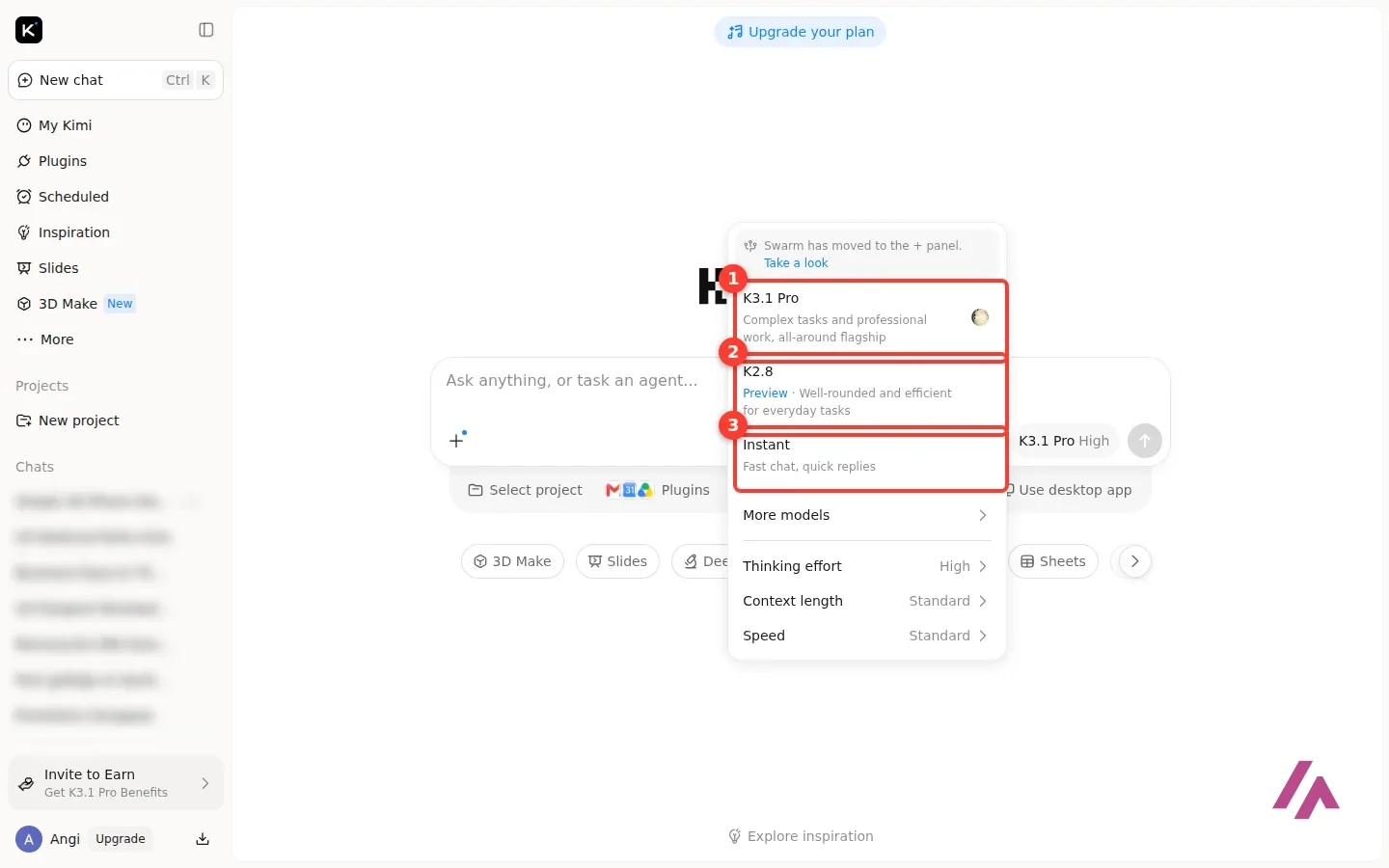
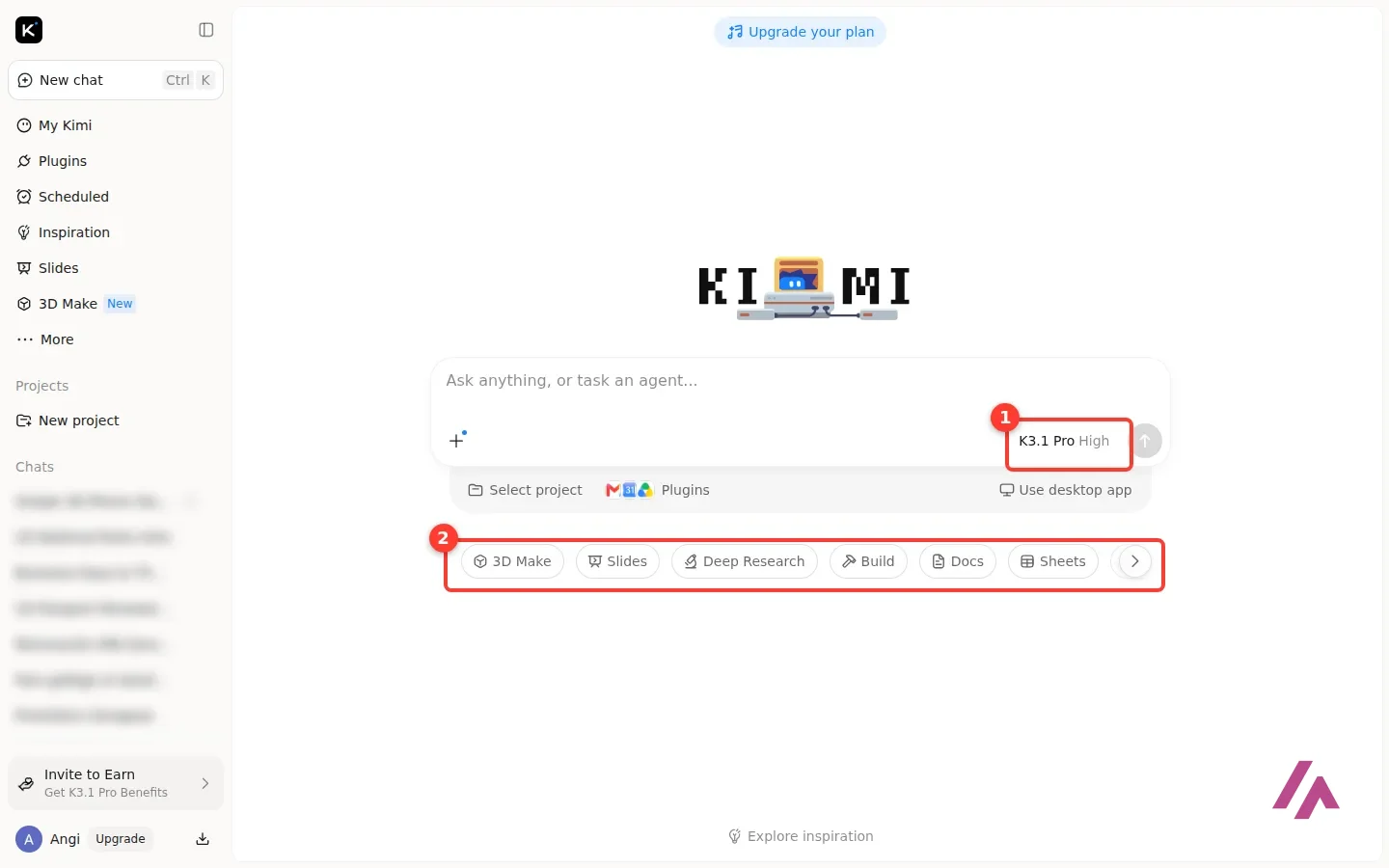
Below those sit three settings: thinking effort, context length and speed. Under the prompt box, the home screen lines up the agents: 3D Make, Slides, Deep Research, Build, Docs and Sheets, plus a Plugins button with Gmail, Google Calendar and Google Drive icons next to it.
Is Kimi free? What happened when I tried
My free account is signed in with Google, and at no point did Kimi ask me for a birthday, a phone number or a card. The free account goes straight to K3.1 Pro with high thinking effort.
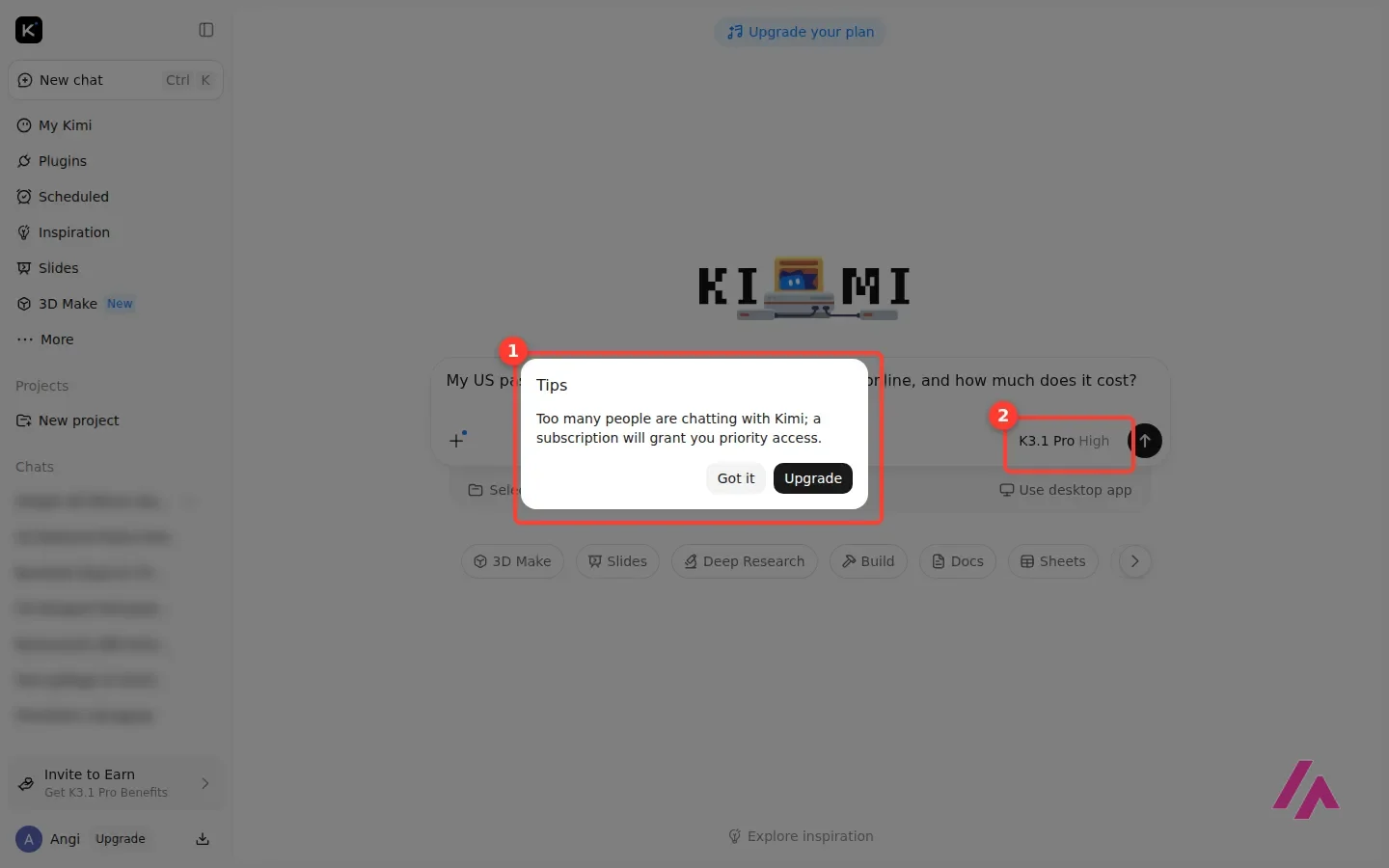
Then I asked a real question: "My US passport expires in March 2027. Can I renew it online, and how much does it cost?" The question never went out. Instead, Kimi showed a box: "Too many people are chatting with Kimi; a subscription will grant you priority access," with an Upgrade button next to Got it. I switched to K2.8 and got the same box. I tried K3.1 Pro again with another question, and from Slides and 3D Make, and it never let me through on the free plan.
Free, but not on the default model (Heads-up)
Kimi's free plan defaults to K3.1 Pro, but every time I tried it, and K2.8 too, I got the "too many people are chatting" box instead of an answer. If you're signing up to try the model Kimi puts first, expect to switch to Instant or pay for Plus.
So I switched to Instant, and it answered in seconds. On the passport question it showed one tool step, pointed me to the State Department's official renewal site, listed the conditions for renewing online, gave the fees, and added a warning I liked: it said that once you submit an online renewal, your current passport is canceled for international travel, so don't do it right before a trip. Passport fees change, so confirm them on the official site before you pay.
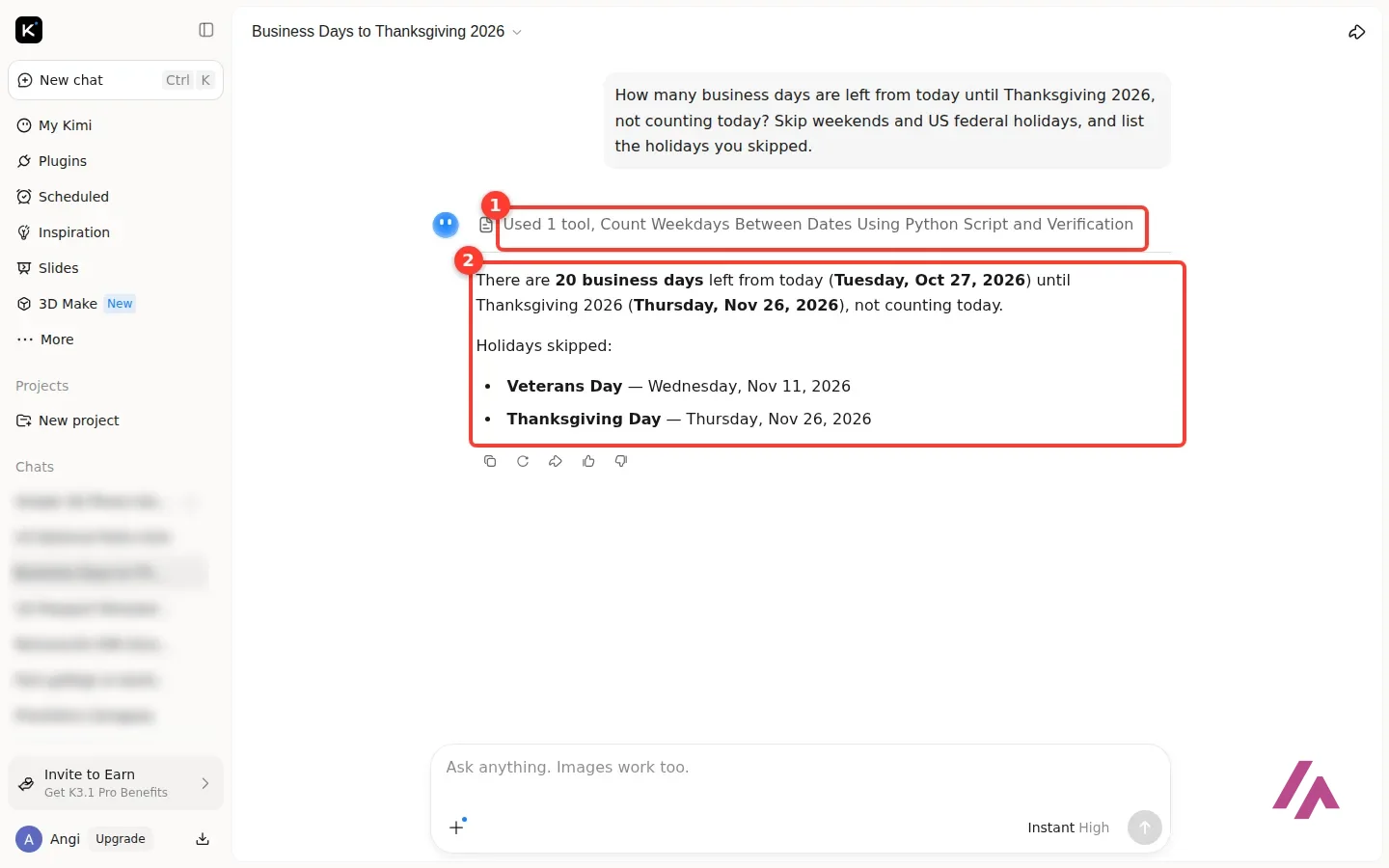
The second question had an answer I could check: "How many business days are left from today until Thanksgiving 2026, not counting today? Skip weekends and US federal holidays, and list the holidays you skipped." Instant wrote a little Python script to count, said 20 and listed Veterans Day. I counted myself and got 20 too. It also listed Thanksgiving itself as "skipped," which is a bit odd but doesn't change the number.
Kimi pricing: Free, Plus, Pro, Max and Ultra
These are the prices on kimi.ai as of October 27, 2026, the day I tested it, in US dollars. The page doesn't say whether tax is added. It opens on yearly billing by default; flip it to Monthly to see month-to-month prices.
| Plan | Monthly | Billed yearly | What changes |
|---|---|---|---|
| Free | $0 | — | 1 agent task at a time, 2 scheduled tasks, 2 projects, 500 MB |
| Plus | $19 | $15 a month ($180 a year) | More agent credits, priority queue, 2 tasks at a time, 20 projects, 20 GB, Kimi Code |
| Pro | $39 | $31 a month ($372 a year) | 2x agent credits, K3.1 Pro Highspeed, Goal mode |
| Max | $99 | $79 a month ($948 a year) | 5x agent credits, chats of up to 1 million tokens, 4 tasks at a time, 100 projects, 50 GB |
| Ultra | $199 | $159 a month ($1,908 a year) | 10x agent credits, 4 tasks at a time, 25 scheduled tasks |
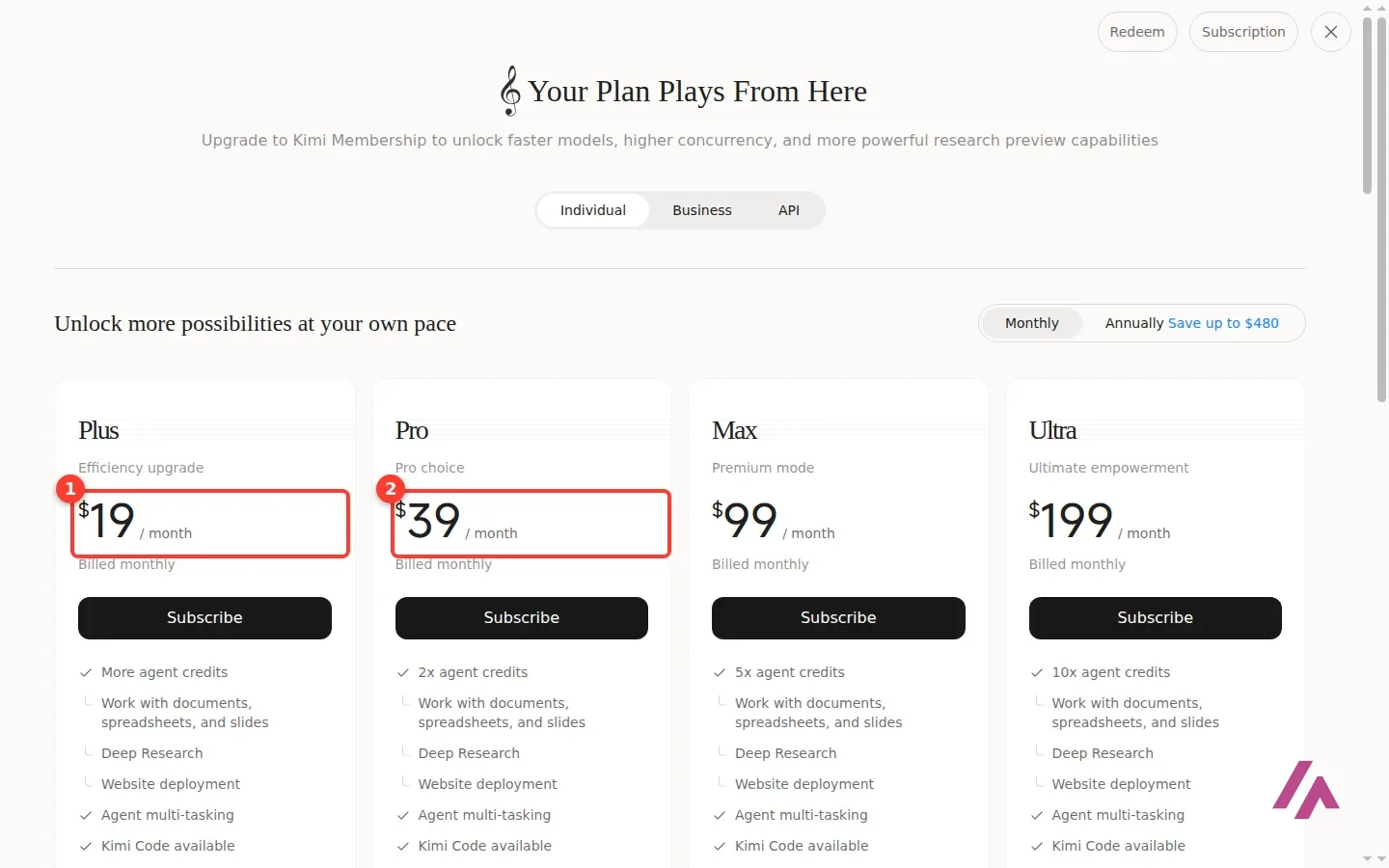
"Agent credits" is the currency of the paid plans: Plus gets "more," and each tier above multiplies it. If you run out, subscribers can switch on Extra Usage in their subscription settings and keep going on a top-up. Upgrades are prorated, and Kimi's FAQ asks you to upgrade through the same channel you used to subscribe (iOS, Android or web), so if you subscribed on iOS, you upgrade on iOS.
For teams there's a Business tab: Premium costs $600 per seat a year, billed yearly only, with a minimum of 2 seats, up to 1 million tokens of context and "no model training on your business data by default." For 150 seats or more, it's a sales call.
Slides, 3D Make and Kimi Code on the free plan
This is where the free plan felt thinnest. Slides opens with a gallery of templates you can filter by Work, Finance, Academic, Consulting and more, and a box for your topic. I asked for "a 5-slide introduction to US national parks for a middle-school class," and with K3.1 Pro I got the same busy box. Switching to Instant inside Slides dropped me into a regular chat, where Kimi built a basic PowerPoint file with code: five slides from "America's National Parks" to "Why Parks Matter & How You Can Help," ready to preview and download. Useful, but it's a plain deck, not the template-driven Slides agent.
3D Make is the shiny new one, with templates and three uses: 3D printing, 3D modeling and 3D web. I asked for "a simple phone stand I can 3D print, with a slot for a charging cable." K3.1 Pro: busy box. Instant: again a regular chat, which announced it had no 3D libraries and would write the STL file by hand, then spent more than 20 minutes arguing with its own geometry, at one point literally typing "AAARGH," without producing a file while I watched. If 3D Make is why you're here, the free plan won't get you there.
Kimi Code is the coding side: a desktop app, a command-line tool and editor plugins, all running on K3.1 Pro. Its page lists it in every paid plan, Plus through Ultra, and the pricing table marks it "Available" from Plus up, so it isn't part of the free plan.
Kimi API pricing
If you're a developer, you don't need a membership at all: the Kimi API is pay as you go, per million tokens, and its price list says taxes are extra.
| Model | Input | Output | Cached input |
|---|---|---|---|
| K3.1 Pro | $2.00 | $10.00 | $0.20 |
| K3.1 Pro Highspeed | $4.00 | $20.00 | $0.20 |
| K3 | $3.00 | $15.00 | $0.30 |
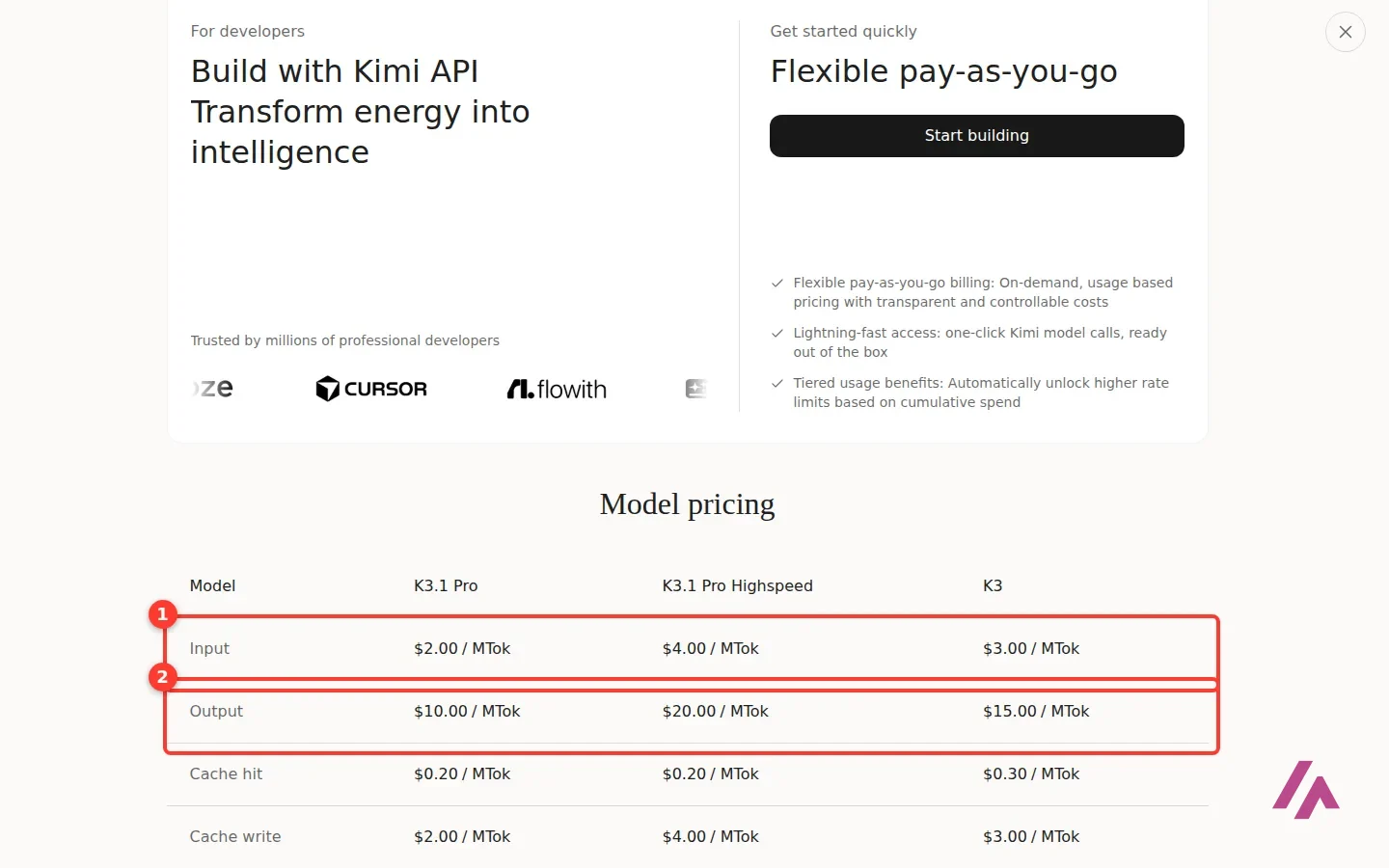
Cache writes are billed separately, at $2.00 per million tokens for 5 minutes on K3.1 Pro and $4.00 for an hour. Moonshot also says that from October 31, 2026, the K2 models will no longer be available to newly registered API users, and that it plans to retire the whole K2 series by the end of December 2026. If you're building something new, start on K3.1 Pro. API customers can also ask for Zero Data Retention.
Your data
Sorry, this part is less fun, but it matters with any chatbot. Kimi's privacy policy names NOVASCENT PRIVATE LIMITED ("Moonshot AI") as the company behind the service, and says that what you type, upload or generate is used to provide and improve the service, "including training and optimizing our artificial intelligence ('AI') models," with your consent or on the basis of legitimate interest depending on where you live. Your data may be stored on servers outside your country, deleting your account is permanent, and privacy questions go to membership@moonshot.ai. My advice: don't paste anything into the free plan you wouldn't want reused, and if you're a company, the Business plan is the one that promises no training by default.
Who Kimi is for, and who should skip it
Kimi makes sense if you're curious about the K3 family, happy to live on Instant for everyday questions, and willing to pay $19 for the priority access to K3.1 Pro that Kimi's own box offers. It's also an easy pick for developers who'd rather pay per token: K3.1 Pro on the API costs $2 per million input tokens and $10 per million output tokens.
Skip the free plan if what you want is the flagship model right now, or if you need Kimi Code or reliable 3D output without paying.
Kimi or something else?
If you want a free chat with no upgrade box, DeepSeek has a free chat with no paid plan in sight, and its own pay-as-you-go API in dollars. ChatGPT gives unlimited text chats on GPT-6 Luna for free, and Plus is $20 a month. For writing and code, Claude Pro, also $20, adds Opus and Claude Code. And if Kimi's main draw for you is coding, OpenCode is a free open source agent whose Go plan, at $10 a month, includes Kimi models.
Written by Miguel Ángel, with help from an LLM to verify facts.
Moonshot's own launch clip for K3.1 Pro, a minute and a half long. Its description sums up the pitch: full-project coding, parametric 3D modeling and finance work, live on Kimi.ai, Kimi Work, Kimi Code and the API.

Who is it for? For people curious about Moonshot's open-weight models who don't mind starting on the fast model, and for developers who want K3.1 Pro through Kimi Code or the API. If you need the top model on demand without paying, the free plan won't give you that.
What I like and what I don’t
What I like
- Sign-up with a Google account in one step: no age check, phone number or card.
- The free Instant model answered fast, ran a tool when it needed to, and got my business-day count right.
- One account covers chat, Slides, 3D Make, Deep Research and agents; the API is a separate pay-as-you-go service for developers.
What I don’t
- On the free plan, K3.1 Pro and K2.8 sent me a "too many people are chatting" box instead of an answer, every time I tried.
- Your prompts and files can be used to train Moonshot's models, according to its privacy policy; among the plans, only Business says no by default.
- Kimi Code, Highspeed and Goal mode are paid features, and higher agent limits start at Plus.
Have you used Kimi? Tell me how it went
What worked for you and what didn’t. Your experience helps the next person who lands here unsure more than any review page. I read every one before publishing.
Write my review
Kimi pricing
Prices checked on the official site on · before tax
-
Free
Free
1 agent task at a time, 2 scheduled tasks, 2 projects and 500 MB of storage
- Cheapest paid plan
Plus
$19/mo
More agent credits, priority queue, 2 tasks at a time, 20 projects, 20 GB and Kimi Code; $15 a month billed yearly ($180)
-
Pro
$39/mo
2x agent credits, Goal mode and K3.1 Pro Highspeed; $31 a month billed yearly ($372)
-
Max
$99/mo
5x agent credits, conversations of up to 1M tokens, 4 tasks at a time, 100 projects and 50 GB; $79 a month billed yearly
-
Ultra
$199/mo
10x agent credits, 4 tasks at a time and 25 scheduled tasks; $159 a month billed yearly
Free costs $0. Plus is $19 a month ($15 a month billed yearly), Pro $39 ($31), Max $99 ($79) and Ultra $199 ($159). The pricing page doesn't mention tax. Business is $600 per seat a year, with a 2-seat minimum.
Alternatives to Kimi
-
DeepSeek
Free
When to pick it: If you want another open-weight model with a free chat that doesn't ask you to upgrade, plus a pay-as-you-go API in dollars.
See details → -

ChatGPT
Free with limits · from $8/mo
When to pick it: If you want an assistant whose free plan gives unlimited text chats on GPT-6 Luna, with Plus at $20 a month.
See details → -

Claude
Free with limits · from $20/mo
When to pick it: If you write a lot or code: Pro at $20 a month adds the Opus model and Claude Code.
See details → -
OpenCode
Free · from $10/mo
When to pick it: If you mostly want Kimi for coding: OpenCode is a free, open source agent, and its Go plan at $10 a month includes Kimi models.
See details →
How I tested it
On October 27, 2026, I used kimi.ai in English with a free account signed in through Google. I asked the same real questions with K3.1 Pro and Instant (and the first one with K2.8), checked Instant's business-day count against my own calculation, tried Slides and 3D Make on the free plan, and read the pricing page (plans, Business and API tabs), the API price list on platform.kimi.ai, the K3.1 Pro announcement and the privacy policy. I didn't pay for anything. The screenshots are mine.
A short official tutorial on making a slide deck with Kimi Work, Kimi's desktop app. Its title says it uses K3, from before K3.1 Pro arrived.


Written by Miguel Ángel, with the help of an LLM to fact-check. In IT since 2002 (systems, engineering, web development and SEO), doing business with AI since February 2023, when ChatGPT could first be bought in Spain. I build, write and maintain this site myself.

Got a question? Ask me
About Kimi, its plans or whether it fits what you need. I’m Miguel Ángel, and I’ll answer you myself, right here.