Cursor: Is It Free, What Each Plan Costs and My Real Test
Anysphere · also called Cursor AI, Cursor IDE, Cursor IA · 11 min read
- Free with limits
- Coding
- Web · Windows · Mac · Linux
- Free $0 Limited agent requests
- Plus $8/mo Grok models only · shared pool
Checked on
Open Cursor
My verdict
In IT since 2002: systems, engineering, web development and SEO. I have been doing business with AI since February 2023, when ChatGPT could first be bought in Spain.
Cursor is a well-known AI coding tool, and it's no longer just an editor: it's an agent you can run on your desktop, in a terminal or in the cloud. Yes, there's a free plan, and I used it to get a working US business-day calculator in a couple of minutes, with one honest mistake I had to point out. The big change is how you pay: Cursor is now sold as part of The X Subscription, so every paid plan shares one weekly usage pool with Grok. Plus at $8 only gives you Grok models and Cursor's own Composer. If you want Claude, GPT or Gemini inside Cursor, you need Premium at $30, and those models are billed on top at API prices.
What is Cursor
- Company
- Anysphere
- Type
- Coding
- Platforms
- Web · Windows · Mac · Linux
- Free plan
- Free with limits
- Also called
- Cursor AI, Cursor IDE, Cursor IA
- Updated on
- Oct 20, 2026
Cursor is an AI coding agent made by Anysphere: you describe a change, and it reads your project, edits the files and runs commands, in its desktop editor for Mac, Windows and Linux, in any terminal, or in the cloud from your browser. Is Cursor free? Yes. The Free plan costs $0 and gives you a limited number of agent and Chat requests, and I ran two real coding jobs on it without paying. Paid plans start at $8 a month, but the one most people will want, Premium, is $30, because it's the first that lets you use Claude, GPT or Gemini.
What Cursor is in 2026
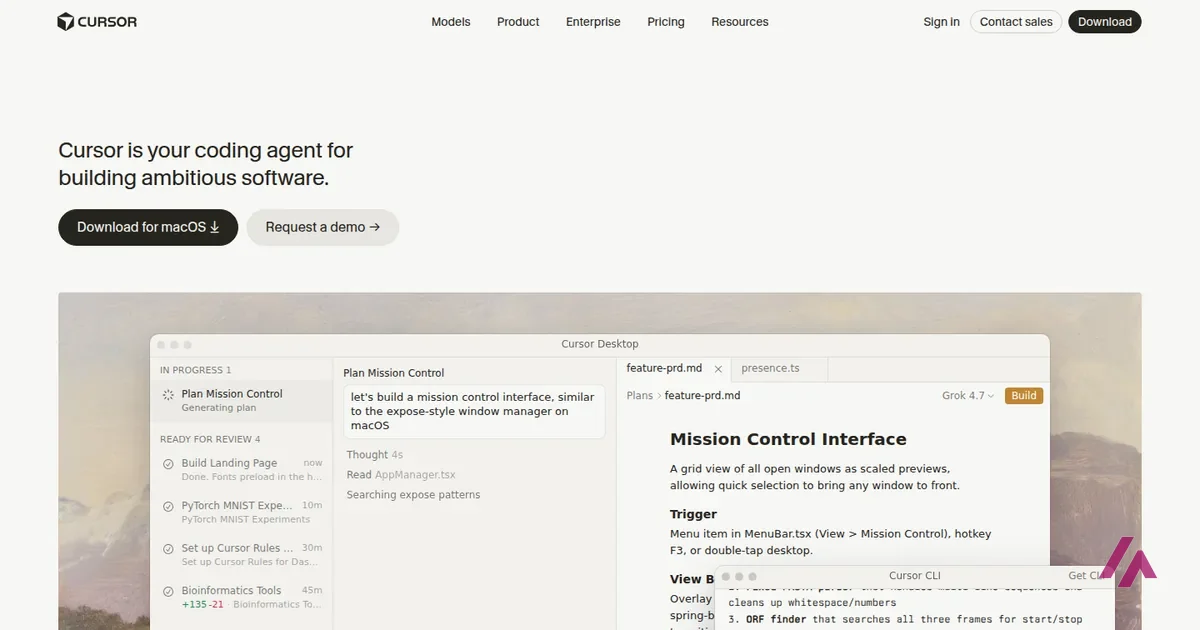
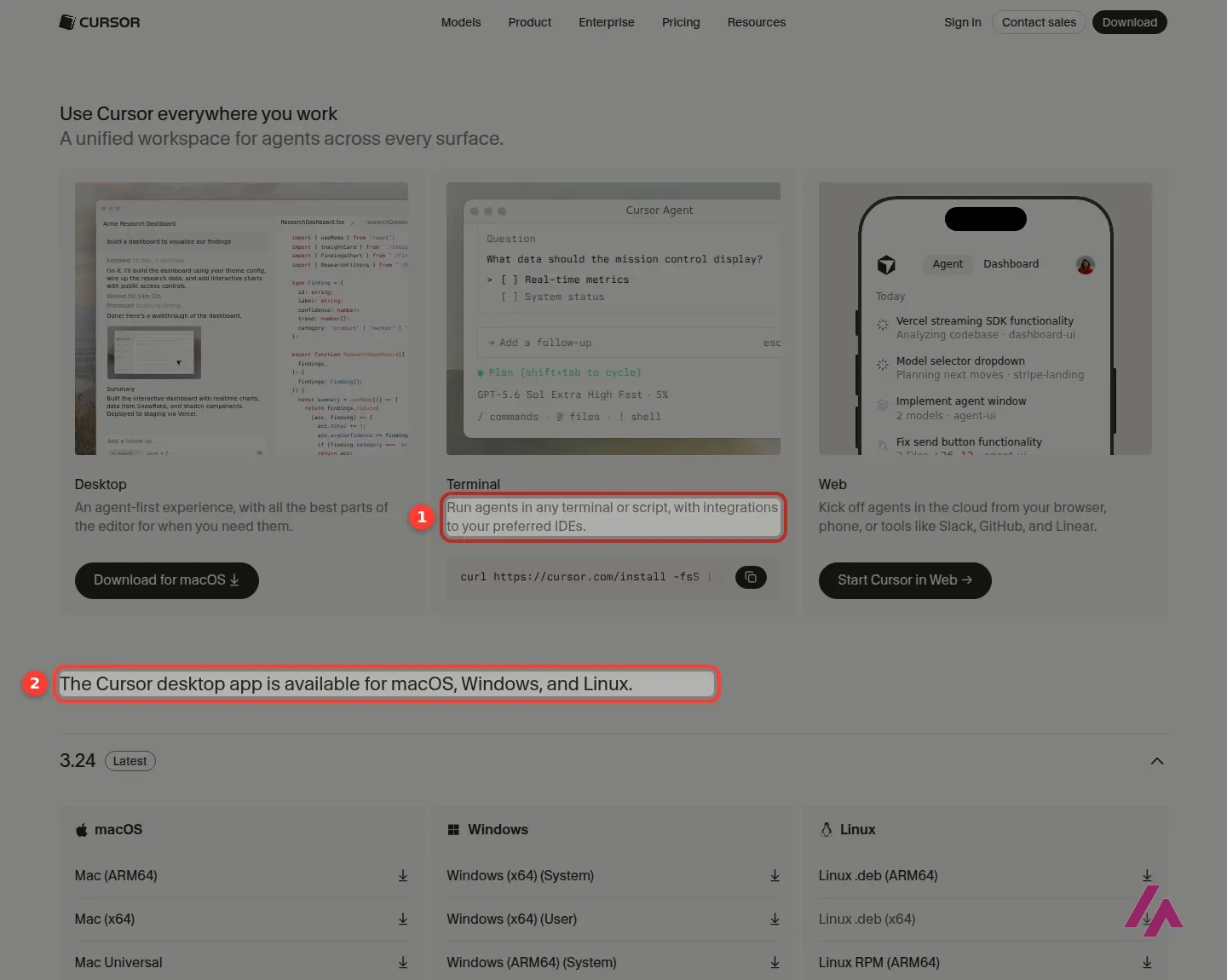
If you remember Cursor as VS Code with an AI sidekick, it has moved on. The front page now calls it "your coding agent for building ambitious software," and the download page splits it into three ways in: Desktop, "an agent-first experience, with all the best parts of the editor for when you need them"; Terminal, to "run agents in any terminal or script"; and Web, to kick off agents in the cloud from your browser, your phone, or tools like Slack, GitHub and Linear.
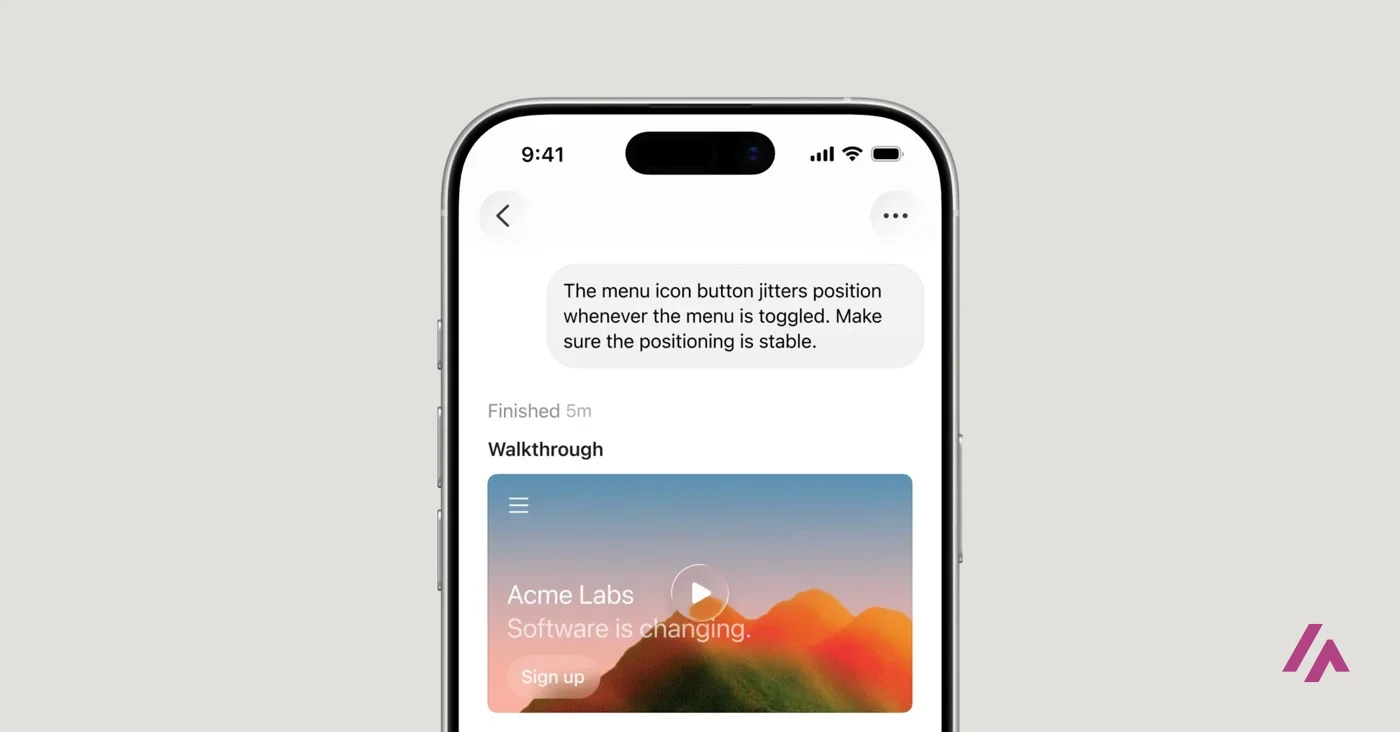
There's also an iPhone app, for paid plans. Cursor launched it as a public beta in June 2026, and the idea is that you start an agent in the cloud, or keep steering one that's running on your computer, from your phone, then review the result from your phone or back at your desk.
The other big change isn't in the product but in the checkout. Cursor is now sold as part of The X Subscription, "one subscription for Grok, Cursor, and X," and its FAQ says subscriptions "are only sold directly through X Subscription Corp." So whatever plan you pick also comes with Grok and X perks, whether you wanted them or not.
Is Cursor free?
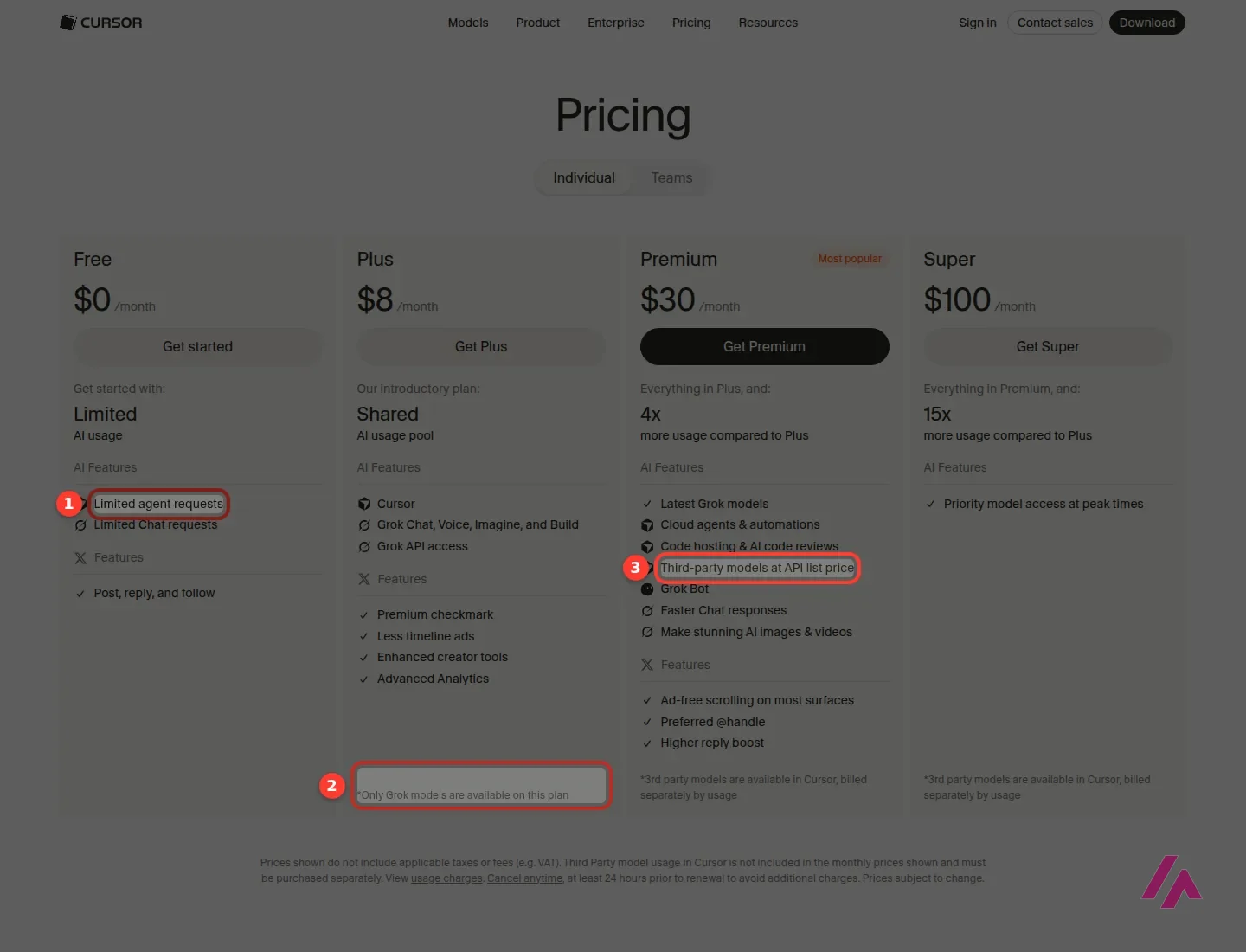
Yes, and it's a real free plan, not a trial. The pricing page lists Free at $0 a month with "Limited AI usage": limited agent requests and limited Chat requests. Cursor doesn't publish a number for those limits, so you find out where the ceiling is by using it.
The account I tested with was opened before the plan change, and Cursor's command-line agent reported its subscription tier as Free, with the model set to Auto. I left it that way for both jobs, and nothing asked me for a card along the way.
What Free and Plus leave out (Heads-up)
Neither Free nor Plus includes third-party models, so no Claude, GPT or Gemini inside Cursor. Plus gives you Cursor's own models (Grok and Composer) at fixed settings, without Auto, cloud agents, automations, Bugbot code reviews or your own API keys. If those are why you want Cursor, Premium is the real starting point.
Cursor pricing
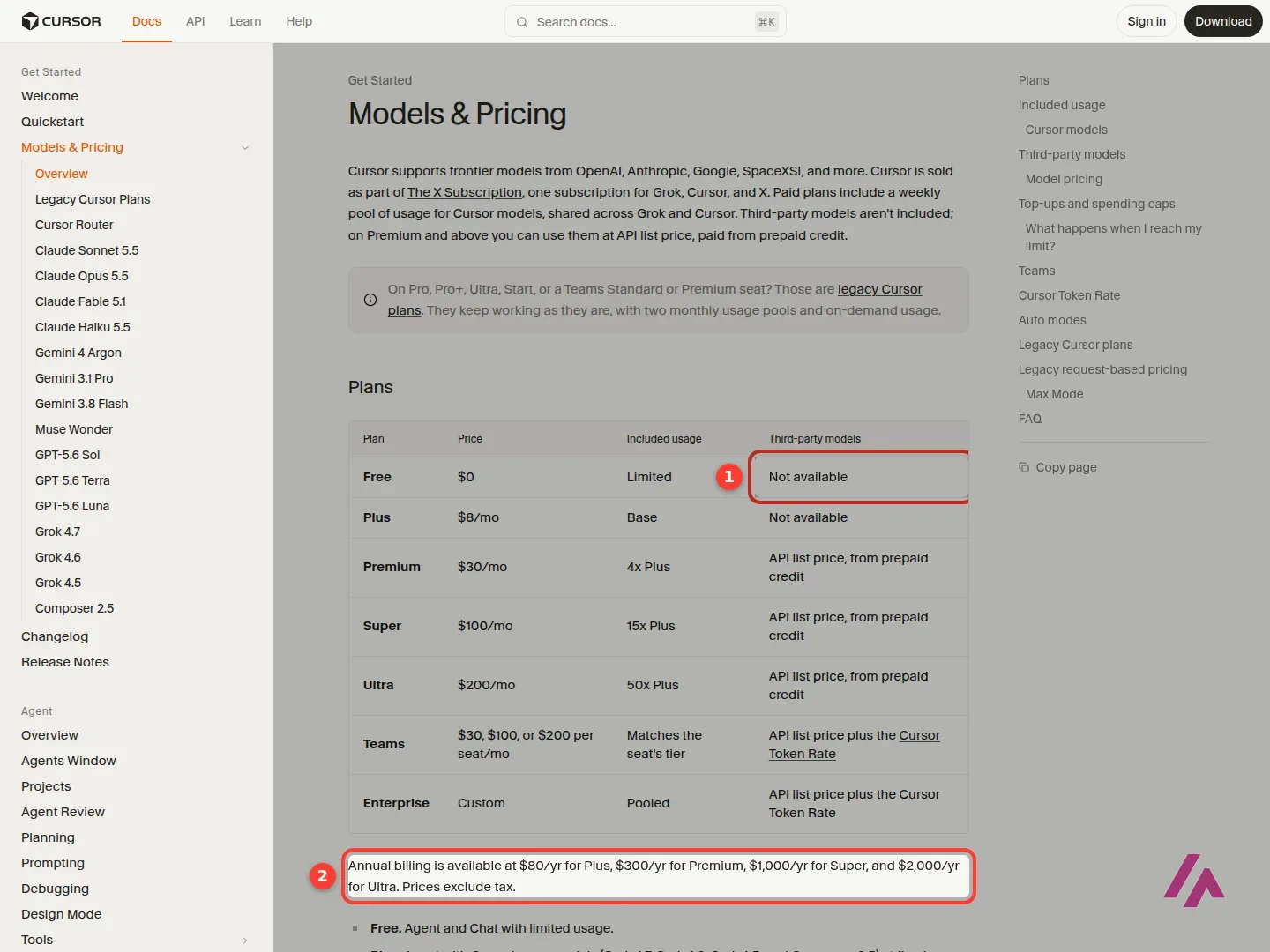
These are the prices on Cursor's pricing page and in its docs, in US dollars. Tax is added on top, and you can cancel anytime, but do it at least 24 hours before renewal to avoid another charge.
| Plan | Monthly | Billed yearly | What you get |
|---|---|---|---|
| Free | $0 | $0 | Limited agent and Chat requests, no third-party models |
| Plus | $8 a month | $80 a year | A weekly pool shared with Grok, Grok models and Composer only, X perks like the Premium checkmark |
| Premium | $30 a month | $300 a year | 4x the usage of Plus, cloud agents and automations, Bugbot code reviews, third-party models at API list price |
| Super | $100 a month | $1,000 a year | 15x the usage of Plus, priority model access at peak times |
| Ultra | $200 a month | $2,000 a year | 50x the usage of Plus, earliest access to new products and models |
| Teams | $30, $100 or $200 per seat a month | Not listed | Premium, Super or Ultra seats you can mix, centralized billing, usage analytics, SAML/OIDC SSO |
Above Teams sits Enterprise, at a custom price, with pooled usage, invoicing, SCIM and audit logs. One detail that's easy to miss: the yearly prices aren't on the pricing page itself. They're in Cursor's docs, and they work out to two months free on every individual plan.
If you're still on one of the old plans (Hobby, Pro, Pro+, the old Ultra and a few others), Cursor says they "continue for existing customers," with two monthly usage pools instead of the new weekly one. Nobody's forcing you to switch.
Which plan I'd pick (Tip)
Start on Free and give it a real job from your own project. If you hit the limit and you're happy with Grok and Composer, Plus at $8 is a cheap way to keep going. If you want Claude or GPT inside Cursor, skip Plus and go straight to Premium, set a monthly limit for additional usage, and pay yearly only once you know you'll stay.
How the usage pool works (and what Grok has to do with it)
Sorry, this part gets a bit technical, but it's what decides whether $30 is enough. Every paid plan includes one pool of usage for Cursor's own models, and that pool is shared across everything on your subscription: the agent in the editor, the command line, cloud agents, Grok Bot and the Grok apps. It refreshes weekly, so, in Cursor's words, "one heavy day never wipes out your whole month." It also means an afternoon making images in Grok comes out of the same allowance as your code.
Different models drain the pool at different speeds, and third-party models don't touch it at all: on Premium and up, Claude, GPT and Gemini are paid from prepaid credit at their API list price, from the very first request. When the pool runs out, you can wait for the weekly reset, keep going with that same prepaid credit, or move up a plan. Cursor says requests are "never downgraded in quality or speed," and each top-up currently stays valid for 365 days. You can see what's left in the editor's settings and on your Grok dashboard.
How I tested it: a US business-day calculator
I wanted something useful with an answer I could check, so I asked Cursor's command-line agent, on the free plan and in an empty project, for a Python script that counts the business days in a month in the United States: weekdays minus the 11 federal holidays, with Saturday holidays observed on the Friday before and Sunday ones on the Monday after, no external libraries, a table in the terminal, and "test it yourself before you finish."
It took under a minute. Cursor wrote one file, ran it, and answered that July 2026 has 22 business days, because July 4 falls on a Saturday and Independence Day is observed on Friday, July 3.
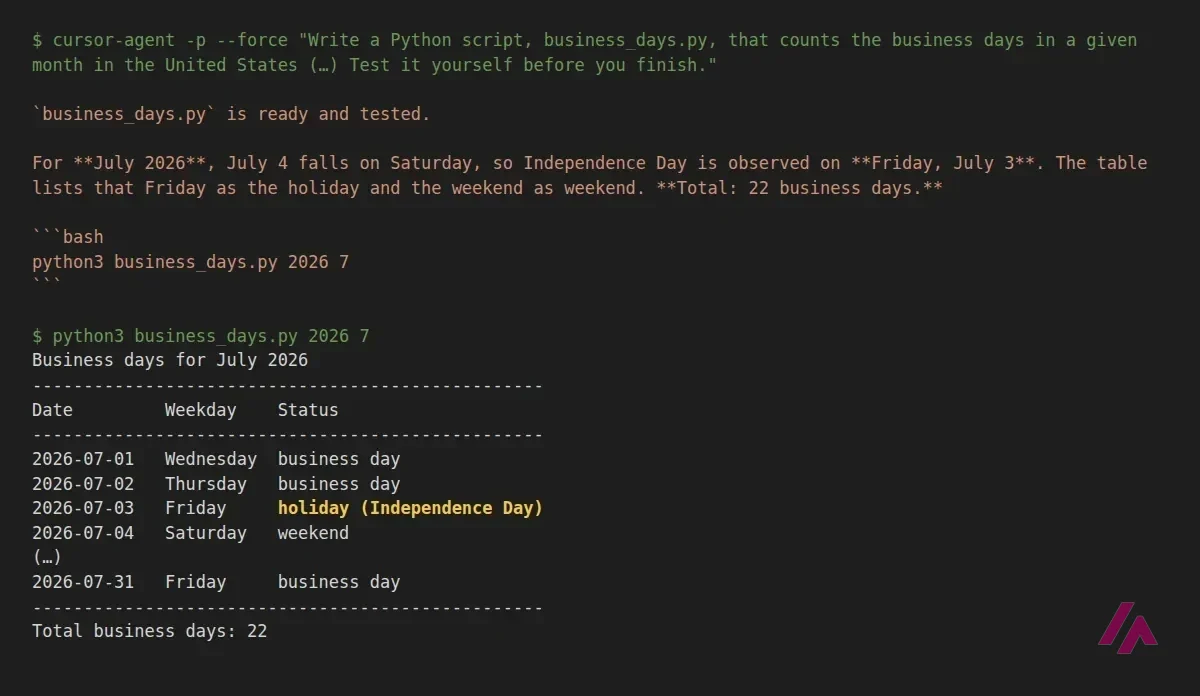
Then I checked it against my own calculation, with the holidays typed in by hand from the federal government's official holiday tables. Eight months, eight matches, including the two nasty ones at the end of 2027: Christmas observed on Friday, December 24, and New Year's Day 2028, which lands on a Saturday and is therefore observed on Friday, December 31, 2027. I didn't mention that last case, and Cursor handled it anyway. Nice.
It did slip once. Juneteenth has only been a federal holiday since 2021, but the script counted it in every year, so June 2020 came out one business day short. To be fair, my request never mentioned older years. I told it, and in the same message asked for a new option: the date that falls N business days after a given date, for things like payment due dates, with real tests around Thanksgiving and Christmas.
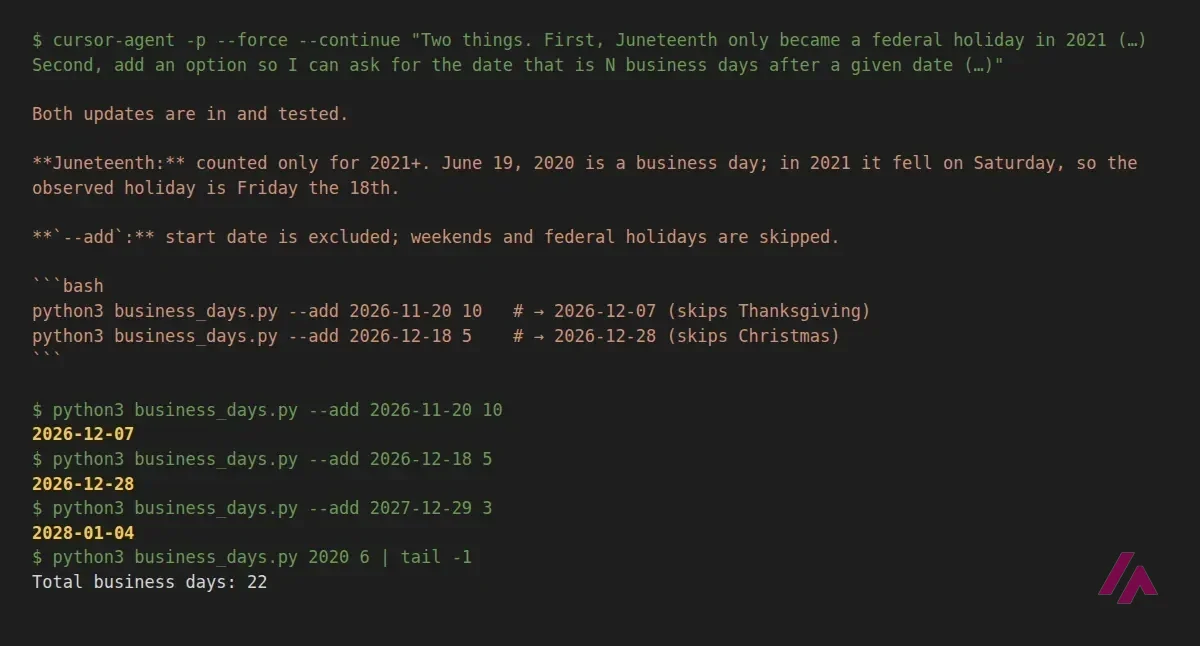
About a minute later, both changes were in, and the edit was small and tidy. I ran six dates through my own check, from July 2026 to the last days of 2027, and all six matched. One thing worth knowing if you reuse the idea: it counts federal holidays only, so the Friday after Thanksgiving is a business day, which is right for the federal calendar but maybe not for your office.
My takeaway: on a small, well-defined job, the free plan is enough to see what Cursor's agent is like, and it's good. It reads the brief, tests its own work and fixes things fast. It still did exactly what I asked and nothing more on Juneteenth, so check its output the way you'd check a new colleague's.
Who Cursor is for, and who should skip it
Cursor makes sense if you write code, or at least read it, and want an agent that works on your actual project, on your machine or in the cloud. The desktop app is where most people will live, and the terminal agent is great for quick jobs and scripts.
Skip it, or stay on Free, if you mainly want Claude: on Premium you'd pay $30 a month plus Claude's API prices, while Claude's own Pro plan at $20 already includes Claude Code. And if you don't code at all, an app builder will get you further with less friction.
Cursor or something else?
If Claude is the model you'd pick anyway, go straight to Claude: there's a free plan, and Pro at $20 a month includes Claude Code. GitHub Copilot is the obvious rival inside your existing editor, with a free plan, Pro at $10 a month, and agent mode in VS Code, Visual Studio, JetBrains, Eclipse and Xcode. If you'd rather not touch code, Replit builds the whole app with hosting included (Starter is free, Core $20 a month), Lovable gives you 5 free build credits a day and Pro at $25 a month, and v0 gives new accounts a one-time $5 credit, with Plus at $30 per user a month.
Cursor's own short launch video for its iPhone app: start agents in the cloud, or steer the ones running on your computer, from your phone.

Who is it for? For developers and technical people who want an agent that edits real files in a real project, from a desktop app or the command line. If you can't code and just want an app built for you, an app builder is a gentler start, and if you mostly want Claude, its own subscription is simpler.
What I like and what I don’t
What I like
- A real free plan: my account ran two coding jobs on it, and the agent wrote, ran and tested the script itself.
- The same agent runs in the desktop editor, in your terminal and, Cursor says, in the cloud from your browser, with downloads for macOS, Windows and Linux.
- Paying yearly saves about two months on every individual plan, from $80 a year for Plus to $2,000 for Ultra.
What I don’t
- Plus at $8 is Grok models and Composer only, with no Auto, no cloud agents and no third-party models.
- Even on Premium, Claude, GPT and Gemini aren't included: they're billed at API list price from prepaid credit you top up.
- Your weekly pool is shared with Grok's chat, images and voice, so a busy week in the Grok apps leaves less for coding.
Have you used Cursor? Tell me how it went
What worked for you and what didn’t. Your experience helps the next person who lands here unsure more than any review page. I read every one before publishing.
Write my review
Cursor pricing
Prices checked on the official site on
-
Free
Free
Limited agent and Chat requests; no third-party models
- Cheapest paid plan
Plus
$8/mo
A usage pool shared with Grok, refreshed weekly; Grok models and Composer only (no Auto, no third-party models); X perks like the Premium checkmark; $80/year billed annually
-
Premium
$30/mo
4x the usage of Plus; cloud agents and automations, Bugbot code reviews; third-party models (Claude, GPT, Gemini) at API list price from prepaid credit; $300/year billed annually
-
Super
$100/mo
15x the usage of Plus and priority model access at peak times; $1,000/year billed annually
-
Ultra
$200/mo
50x the usage of Plus and earliest access to new products and models; $2,000/year billed annually
-
Teams
from $30/mo
Per seat, $30, $100 or $200 a month (Premium, Super or Ultra seats, mixable); centralized billing, usage analytics, team-wide privacy, SAML/OIDC SSO
Free costs $0 with limited agent and Chat requests and no third-party models. Plus is $8 a month, Premium $30, Super $100 and Ultra $200, or $80, $300, $1,000 and $2,000 a year if you pay annually. Teams seats are $30, $100 or $200 per user a month, and Enterprise is custom. Prices are in US dollars and exclude tax. Third-party models like Claude, GPT and Gemini (Premium and up) are paid separately at API list price, and subscriptions are sold only through X Subscription Corp.
Alternatives to Cursor
-

Claude
Free with limits · from $20/mo
When to pick it: If Claude is the model you'd use anyway: it has a free plan, and Pro at $20 a month includes Claude Code, its own coding agent for the terminal.
See details → -

Replit
Free with limits · from $20/mo
When to pick it: If you want hosting and a database built in: Replit's Agent builds the whole app in your browser, with a free Starter plan and Core at $20 a month.
See details → -

Lovable
Free with limits · from $25/mo
When to pick it: If you can't code and want a web app from a chat: Lovable's free plan gives 5 build credits a day, and Pro is $25 a month.
See details → -

v0
Free with limits · from $30/mo
When to pick it: If your app will live on Vercel: v0 gives new accounts a one-time $5 credit, and Plus is $30 per user a month.
See details → -

Claude Code
-

GitHub Copilot
-

Devin AI
Free with limits · from $20/mo
How I tested it
On October 20, 2026, the day I checked Cursor's prices, I gave Cursor's command-line agent two real jobs on the free plan, in an empty project, and checked its results against my own calculation and the official federal holiday tables. I also went through cursor.com, its pricing page, its download page and its docs on plans and usage limits in a browser set to US English. The screenshots are mine, except the iPhone image, which comes from Cursor.
An hour-long workshop from Cursor's team on what tokens are, what burns them and how to pick a model. It was recorded before the new plans, but the model you pick still affects how fast your pool runs out.

My test was in the terminal, so here's the desktop editor from the inside: a beginner course that goes from the download to shipping real code. It predates the current plans, so check prices on this page.


Written by Miguel Ángel, with the help of an LLM to fact-check. In IT since 2002 (systems, engineering, web development and SEO), doing business with AI since February 2023, when ChatGPT could first be bought in Spain. I build, write and maintain this site myself.

Got a question? Ask me
About Cursor, its plans or whether it fits what you need. I’m Miguel Ángel, and I’ll answer you myself, right here.