
Gemini
Google · 14 min read
- Free with limits
- Personal assistant
- Web · Android · iOS · Windows · Mac
- Free $0 Flash-Lite · images · 15 GB
- Google AI Plus $4.99/mo 2x usage · 400 GB
Checked on
Open Gemini
My verdict
In IT since 2002: systems, engineering, web development and SEO. I have been doing business with AI since February 2023, when ChatGPT could first be bought in Spain.
Gemini is Google's everyday AI assistant, and you can use it for $0. You don't even need an account to ask a question, although without one you only get the fastest, lightest model. Sign in with a free Google Account and more opens up: image generation and editing, Deep Research, Gemini Live and 15 GB of storage. The paid plans are really Google bundles: Plus at $4.99 a month doubles your usage and comes with 400 GB of storage, Pro at $19.99 quadruples it, throws in 5 TB and, since October 13, adds Gemini 4 Argon; Ultra, from $99.99, is for people who use it all day. The one thing to watch: Gemini is wired into Gmail, and it can reach for it when all you wanted was text.
What is Gemini
- Company
- Type
- Personal assistant
- Platforms
- Web · Android · iOS · Windows · Mac
- Free plan
- Free with limits
- Updated on
- Oct 20, 2026
Gemini is Google's AI assistant: you ask it questions, have it write or summarize for you, generate images and dig into a topic with its research tools. Is Gemini free? Yes. You can even ask it something without an account, though you only get the lightest model that way, and a free Google Account gets you the rest of the free plan. Paying means a Google AI plan: Plus at $4.99 a month, Pro at $19.99, or Ultra at $99.99 or $199.99. And Gemini 4 Argon is now in the app, but only on Pro and Ultra.
That's the short answer. Here's what Gemini did when I used it without signing in, what each plan adds, and what Google has actually said about Gemini 4.
What Gemini is, and what you get without an account
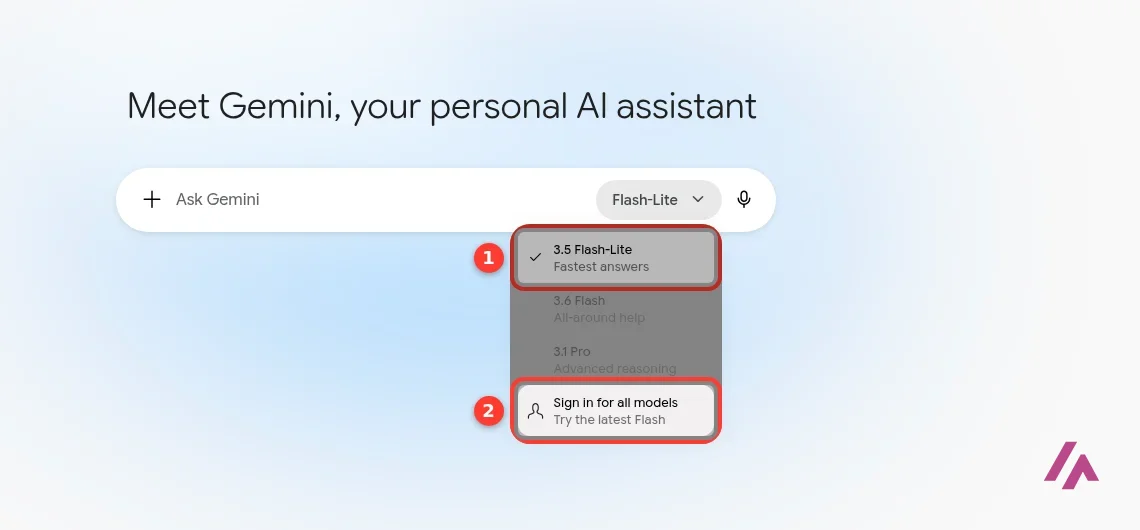
Gemini lives at gemini.google.com and in the mobile app, and it's the same assistant Google is building into Gmail, Docs and the rest of its apps. The home page is about as plain as it gets: "Meet Gemini, your personal AI assistant" and a box that says "Ask Gemini."
What surprised me is that you can type into that box without signing in. The catch is the model menu. Flash-Lite, labeled "Fastest answers," is checked and is the only one you can choose; Flash ("All-around help") and Pro ("Advanced reasoning") are grayed out, with a "Sign in for all models" line underneath. After my first answer, a banner showed up too: "Sign in to connect to Google apps, create images, and more." So without an account you get a quick text assistant, with image creation and saved history waiting behind the sign-in.
My test: four questions, no account
I kept the questions ordinary on purpose, the kind of thing people really ask an assistant.
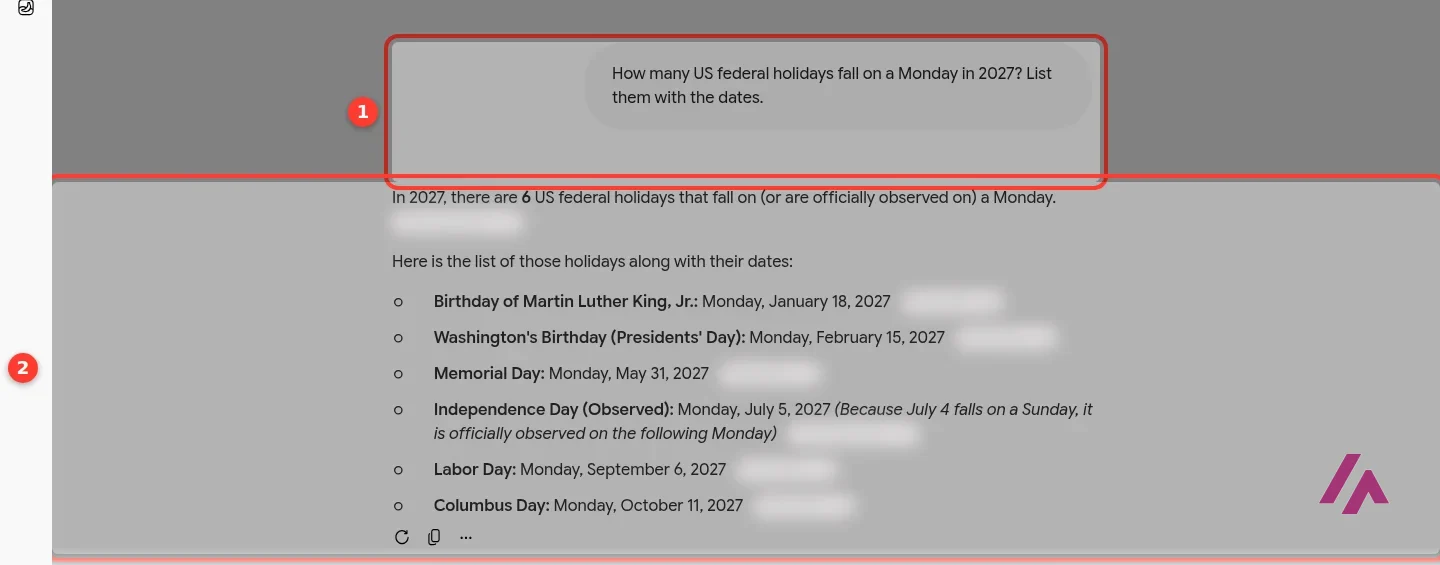
A calendar question with a trap. I asked how many US federal holidays fall on a Monday in 2027. Gemini said six and listed them with dates, including the tricky one: Independence Day falls on a Sunday in 2027, so it's observed on Monday, July 5. Each line came with a source link next to it. I checked every date against a calendar, and all six were right.
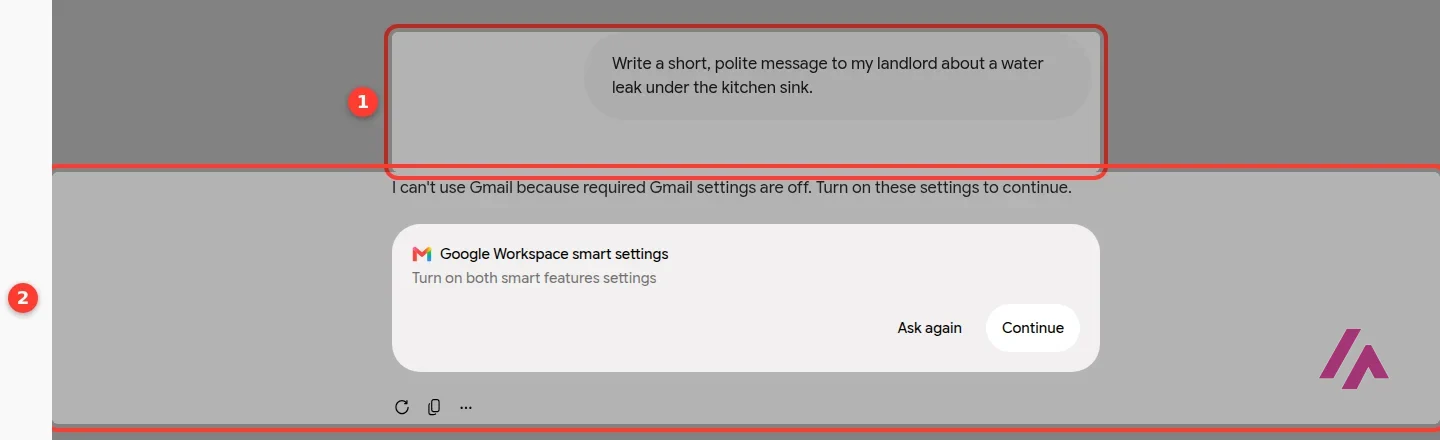
A message to my landlord. I asked for "a short, polite message to my landlord about a water leak under the kitchen sink." Gemini didn't write it. It answered "I can't use Gmail because required Gmail settings are off" and offered a card to turn on Google Workspace smart settings. It seems to have read "message" as "send an email for me." (There's no leak and no landlord, by the way. I made both up for the test.)
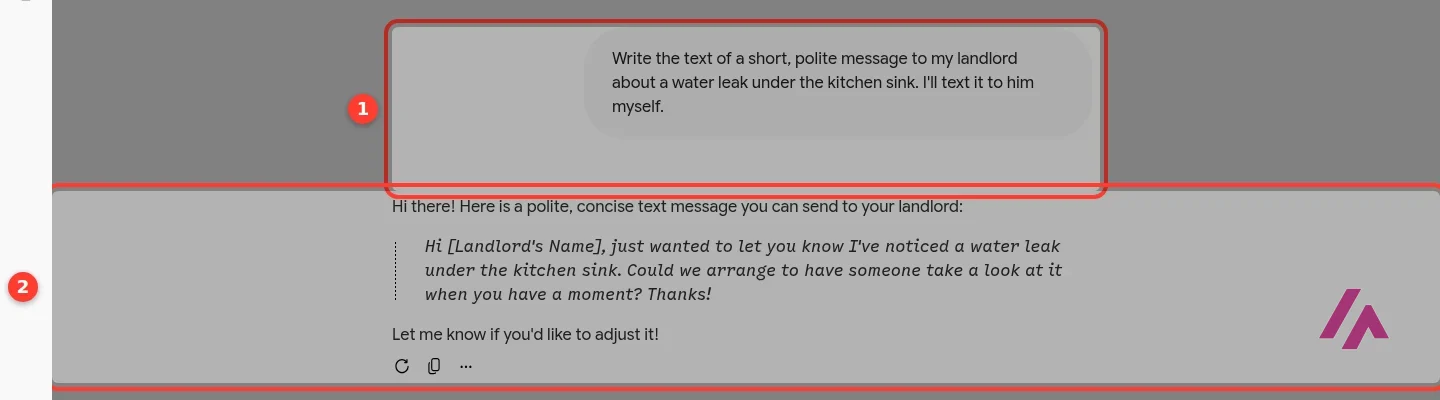
So I reworded it: "Write the text of a short, polite message… I'll text it to him myself." This time it wrote exactly what I wanted, a short, natural text with a placeholder for the landlord's name, asking to "arrange to have someone take a look at it when you have a moment."
Ask for the text, not the message (Tip)
Gemini is connected to Google's apps, and a request that sounds like an action can be treated as one. If you only want words to copy, say so: "write the text of…" or "I'll send it myself." A few extra words are what made my second attempt work.
A grammar question. I asked for the difference between affect and effect, with one example of each, and got a short, correct answer: affect is usually a verb, effect is usually a noun, with one clean example of each. It didn't mention the less common uses, which is fine for a quick answer.
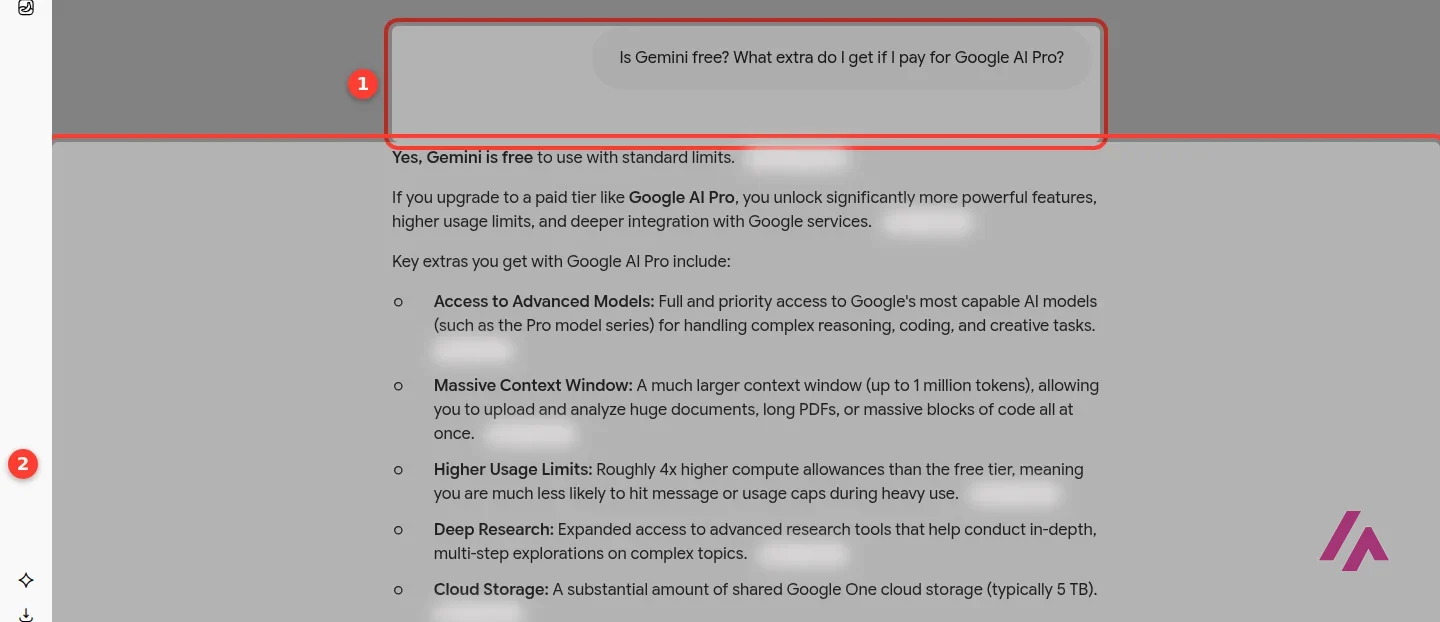
Is Gemini free, according to Gemini? Its answer started with "Yes, Gemini is free to use with standard limits" and listed what Google AI Pro adds: more access to the Pro models, roughly four times the usage, Deep Research, 5 TB of storage. That's mostly in line with Google's plans page. What it never told me was the price, which is the one thing I'd want to know before paying. That's what the next section is for.
Gemini pricing in the US, plan by plan
There's no separate Gemini subscription: you pay for a Google AI plan, which covers Gemini plus extras across Google's other products. These are the prices Google's plans page shows in the US.
| Plan | Price | Gemini usage | Storage | What stands out |
|---|---|---|---|---|
| Free | $0 | Base level | 15 GB | The Flash-Lite model, image generation and editing, Deep Research, Gemini Live, a research and writing assistant |
| Google AI Plus | $4.99 a month | 2x the free plan | 400 GB | The Flash model, video generation, Gemini in Gmail, 200 Google Flow credits a month, family sharing with up to five others |
| Google AI Pro | $19.99 a month | 4x the free plan | 5 TB | Gemini 4 Argon, Tasks (Gemini's agent), Gemini in Gmail, Docs and Sheets, 1,000 Flow credits a month, YouTube Premium Lite, higher limits in Google's coding tools |
| Google AI Ultra 5x | $99.99 a month | 5x the Pro plan | 20 TB | Gemini 4 Argon, also in Antigravity, Gemini Agent (US only, English only), YouTube Premium, 10,000 Flow credits a month |
| Google AI Ultra 20x | $199.99 a month | 20x the Pro plan | 30 TB | Everything in Ultra with the highest limits and 25,000 Flow credits a month |
If you remember a plan called Google AI Premium, Google says it's now Google AI Plus, with the same Gemini, Gemini Notebook and 400 GB benefits. Two more conditions from the same page: only personal Google Accounts can sign up, and Gemini in the paid plans is for ages 18 and up. If you're a student, Google offers eligible US college students 18 and up a year of Google AI Pro for free if they claim it by December 31, 2026; after that year it renews at $19.99 a month unless you cancel.
You're buying a Google bundle, not just Gemini (Important)
From Pro up, a lot of the price is storage and perks: 5 TB, YouTube Premium Lite and Google Home Premium on Pro; YouTube Premium and 20 or 30 TB on Ultra. If you'd pay for some of that anyway, Google AI Pro costs you much less than $19.99 in practice. If you wouldn't, compare it with a plan built only around the assistant.
Is Gemini free?
Yes, at two levels. Without an account, you get Flash-Lite and plain text answers, which is enough to see whether you like how it writes. With a free Google Account, Google's plans page lists Flash-Lite as its model, plus image generation and editing, Deep Research, Gemini Live, Canvas, access to its creative studio, a research and writing assistant and 15 GB of storage. The same page lists the Flash model from Plus, and Pro and Gemini 4 Argon from Pro.
Judge it signed in, not signed out (Heads-up)
The no-account version is plain text with the lightest model, and creating images asks you to sign in. Before you decide Gemini isn't for you, sign in with a free Google Account and try what the free plan adds: images, Deep Research and Gemini Live.
Which plan is worth it
For most people, the honest answer is the free plan for a week, signed in. If you keep running into limits, Plus at $4.99 is a low-risk next step: twice the usage, the Flash model, video generation and 400 GB of storage.
Pro at $19.99 is the plan to get if you'd use what's bundled with it: Gemini inside Docs and Sheets, 5 TB of storage, YouTube Premium Lite, and 1,000 monthly credits in Google Flow, Google's AI video and image studio. Ultra is another story. At $99.99 or $199.99 a month, it's for people who hit Pro's limits every day. Ultra's old selling point, the Deep Think reasoning mode, is being replaced by Gemini 4 Argon, according to Google. And if Gemini 4 is your reason for looking at Ultra, read the next section first: Pro already includes it.
Gemini 4 (Argon): which plans get it
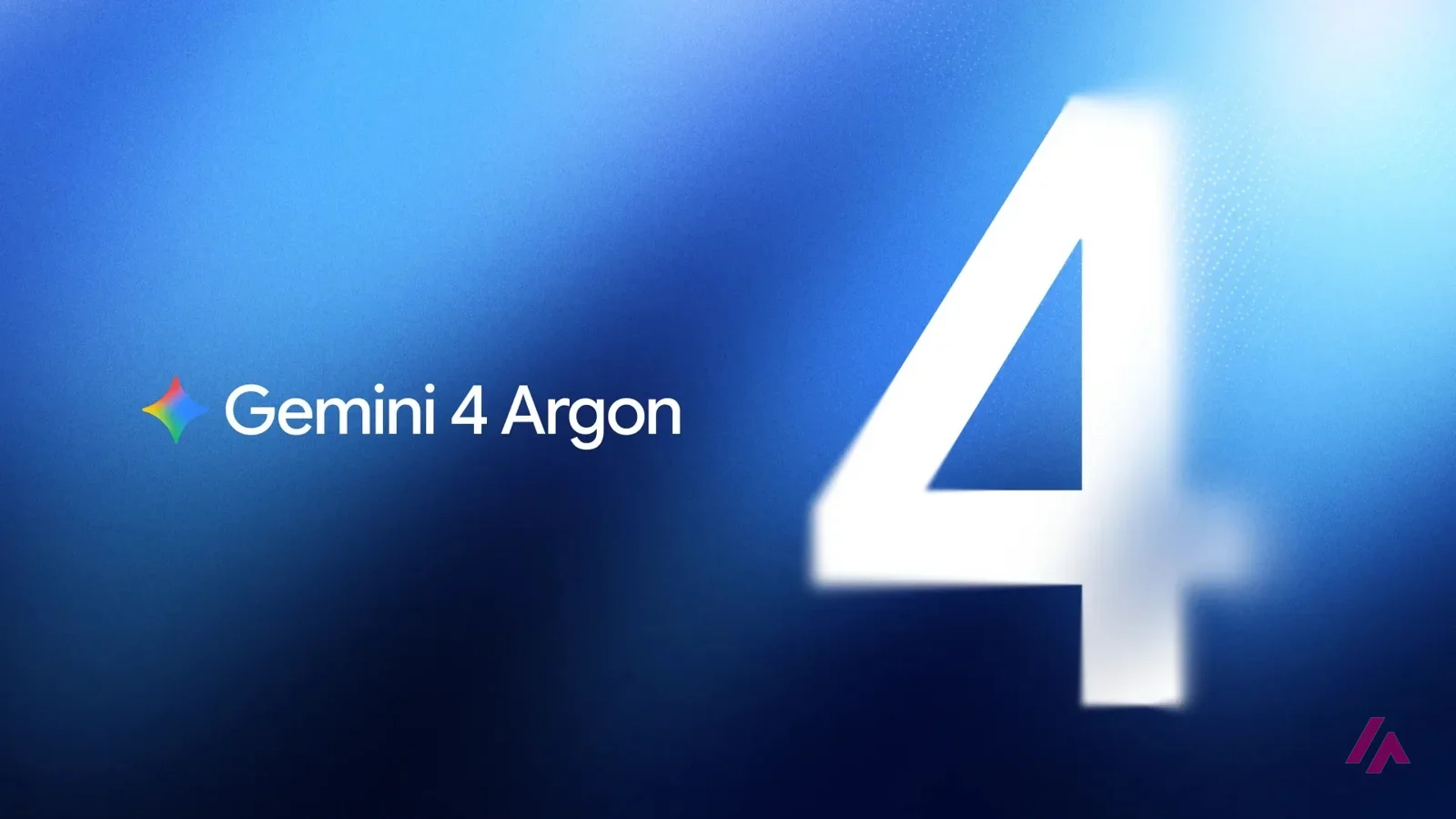
Google announced Gemini 4 Argon on September 30, 2026, calling it its "new frontier model," and at first it only went to a group of cyber defenders through a program Google calls Fairwind. That changed on October 13: Google opened it to everyday users in the Gemini app and in AI Mode in Search, but only for Google AI Pro and Ultra subscribers. On the free plan and on Plus you keep the models you had. When I tried Gemini without an account, before that date, the model menu offered Flash-Lite, Flash and Pro.
According to Google, Argon is aimed at long, complex work: real-world software engineering, legal and financial tasks and cybersecurity defense, and Google says it raises the output limit (how much the model can write in one go) to 1 million tokens in the API, up from 64,000. Developers get it through the paid tier of the Gemini API in AI Studio, and Ultra subscribers can also try it in Antigravity, Google's agent-first development platform. The API launch price is $2 per million input tokens and $10 per million output tokens until November 30, 2026; after that, Google lists $4 and $20.
So if Gemini 4 is what you're after, Pro at $19.99 is the cheapest plan that includes it. You don't need Ultra just for that, unless you want it in Antigravity.
Gemini Agent and Gemini Spark: which plan you need
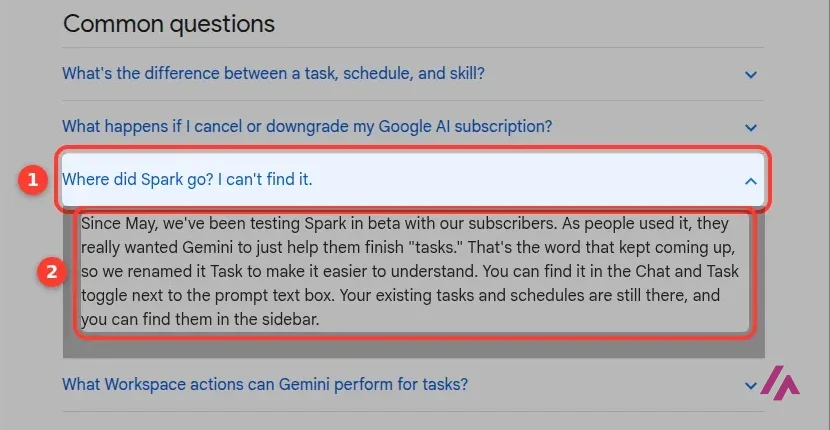
In short, Gemini Spark, the agent Google pitched as working for you 24/7, isn't called Spark anymore. In the Gemini app it's now Tasks, and it needs Google AI Pro at $19.99 a month or Ultra, from $99.99. Gemini Agent is two different things: a line in the Ultra plan ("US only, English only") and, since October 8, 2026, the name of Google Cloud's agent for companies, sold through Gemini Enterprise and separate from your personal plan.
| Plan | Tasks (formerly Spark) | Gemini Agent |
|---|---|---|
| Free and Google AI Plus | No | No |
| Google AI Pro | Yes | No |
| Google AI Ultra | Yes | Yes, US only, English only |
| Gemini Enterprise (work accounts, from $21 per seat per month) | No, it has its own agent | The "Gemini agent" for work |
What Tasks does. You flip the Chat/Task switch next to the prompt box and give Gemini a goal instead of a question. According to Google, it plans the steps, works across Gmail, Calendar, Drive, Docs and Sheets, browses websites with your own Chrome or with a remote browser in the cloud, and keeps going in the background, on a schedule (every morning at 8, say) or when something happens (your flight gets delayed). Google's own examples: clearing out newsletters, watching flight and hotel prices for a drop, and turning research into a PDF or a spreadsheet. Google also says that when a site asks you to sign in and "Sign in with Google" isn't an option, it hands control back to you.
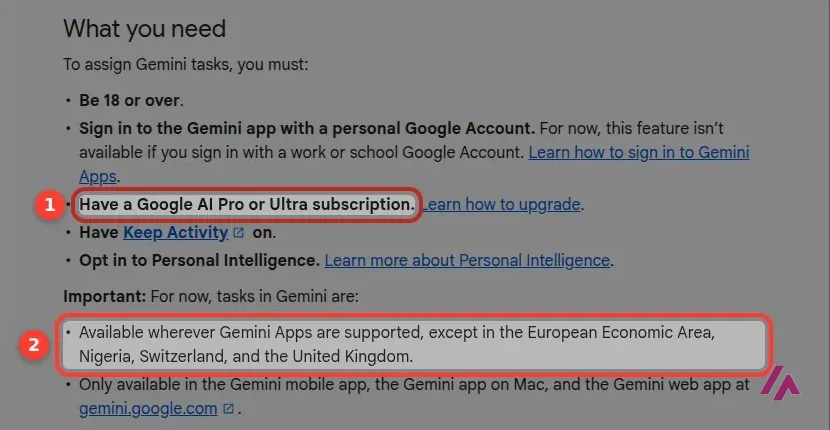
To use it, according to Google's help page, you need a personal Google Account (work and school accounts can't use it yet), you must be 18 or older, and Keep Activity and Personal Intelligence must be on. It works on the web, in the mobile app and in the Mac app. On Pro, it's available in the US in English; it isn't offered in the European Economic Area, the UK, Switzerland or Nigeria.
Start it on something boring (Heads-up)
Google's help page is blunt about this: if a schedule runs while you're offline, you may not be able to stop an action you didn't intend, and you shouldn't type passwords or payment details into a task. I'd start with a daily news digest or a price alert before letting it anywhere near your inbox or your card.
Gemini Agent, the consumer one, came first. Google put it on the web on November 18, 2025, as an experimental feature for Ultra subscribers in the US: multi-step jobs using Gmail, Calendar, Deep Research and live browsing, designed, Google said, to ask before sending an email or buying anything. Today it shows up as one line on the Ultra plan, and its old page now sends you to Gemini's home page. If you're on Pro, Tasks is the agent you'll actually use.
The Gemini agent for work is a Google Cloud product. Google announced it on October 8, 2026, as "a single, universal agent for work," built to connect to a company's own systems, work inside Gmail and Docs, and even act as a "coworker agent" with its own email address. Google sells it through Gemini Enterprise, whose plans start at $21 per seat per month, and says some of its abilities are still in early access. Google AI plans are for personal accounts only, so a Pro subscription won't get you this one.
Who it's for, and who should skip it
Gemini fits best if you already live in Google's world: an Android phone, Gmail, Docs, Drive. Even without an account it handled my everyday questions, and signing in for free adds image tools, Deep Research and 15 GB of storage. It's also easy to try: no account, no card, just a question.
Skip it, or at least try something else alongside it, if you'd rather keep your assistant away from your inbox, or if you want search-first answers built around their sources. That's where the alternatives come in.
Gemini or something else?

Gemini's strength is the Google account around it. If your days are mostly writing, long documents or code, Claude is Anthropic's assistant built for that kind of work. If you'd rather search than chat, Perplexity answers with its sources on the page. And for a second opinion from another company's models, there's OpenAI's ChatGPT.
The Gemini part of Google's I/O 2026 keynote: the app's redesign, Gemini Live, video editing with Gemini Omni, and agents like Gemini Spark.
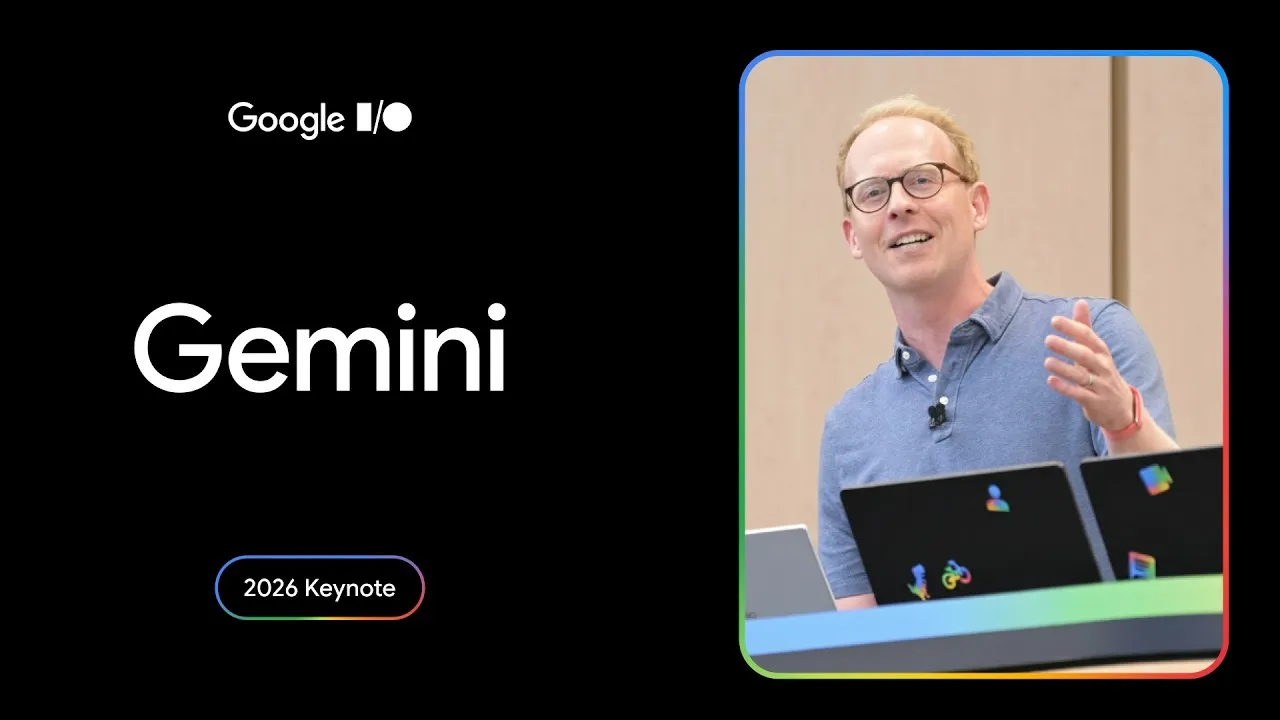
Google's I/O 2026 demo of Gemini Spark, the agent now called Tasks in the app: an email pulled together from scattered content, a neighborhood event planned for you, and a look back at finished tasks. At launch it was for Ultra subscribers only; Pro subscribers have it now too.
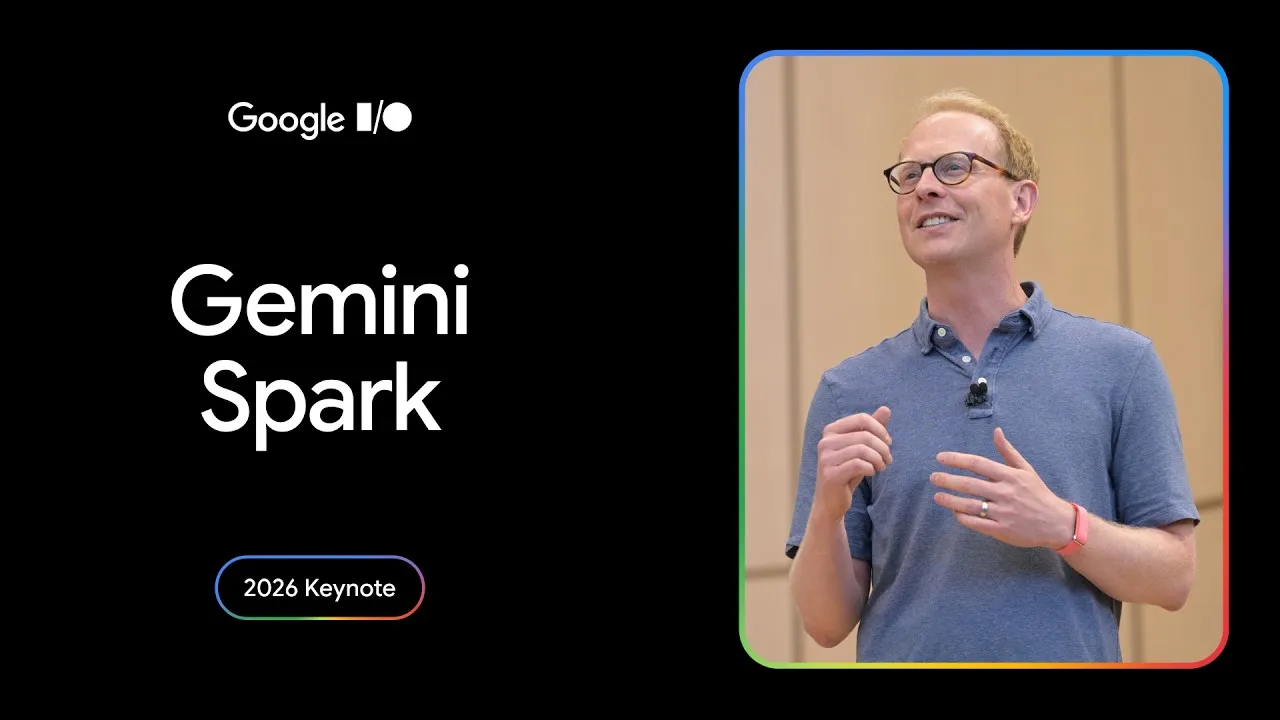
Who is it for? For anyone who already uses Gmail, Docs and Drive every day, people who want a capable free assistant without handing over a credit card, and families who would pay for Google storage anyway. If you want an AI search engine built around its sources, or you'd rather keep your assistant away from your inbox, look at the alternatives below.
What I like and what I don’t
What I like
- It answers without an account: open the site, type, and you get a real answer from the Flash-Lite model, no sign-up wall.
- The free plan with a Google Account is broad: image generation and editing, Deep Research, Gemini Live, Canvas, a research and writing assistant and 15 GB of storage.
- Plus costs $4.99 a month, a quarter of Pro, for twice the free usage and 400 GB of storage.
What I don’t
- Without signing in you're stuck on Flash-Lite: the other models in the menu are grayed out, and creating images or saving your history needs an account.
- Ask it to "write a message" and it may reach for Gmail instead, then stop to ask you to turn on Workspace settings.
- Gemini 4 Argon and Tasks (the agent formerly called Gemini Spark) both need Pro at $19.99 a month or more: the free plan and Plus don't get them.
Have you used Gemini? Tell me how it went
What worked for you and what didn’t. Your experience helps the next person who lands here unsure more than any review page. I read every one before publishing.
Write my review
Gemini pricing
Prices checked on the official site on
-
Free
Free
With a Google Account, the Flash-Lite model, image generation and editing, Deep Research, Gemini Live, 15 GB of storage
- Cheapest paid plan
Google AI Plus
$4.99/mo
2x the free usage, the Flash model, video generation, Gemini in Gmail, 200 Google Flow credits a month, 400 GB
-
Google AI Pro
$19.99/mo
4x the free usage, Gemini 4 Argon, Tasks in Gemini (formerly Spark), Gemini in Gmail, Docs and Sheets, 1,000 Flow credits a month, YouTube Premium Lite, 5 TB
-
Google AI Ultra 5x
$99.99/mo
5x the Pro plan's usage, Gemini 4 Argon (also in Antigravity), Gemini Agent (US only, English only), YouTube Premium, 10,000 Flow credits a month, 20 TB
-
Google AI Ultra 20x
$199.99/mo
20x the Pro plan's usage, 25,000 Flow credits a month, 30 TB
Gemini is free with a Google Account. Google AI Plus is $4.99 a month for twice the free usage and 400 GB of storage. Google AI Pro is $19.99 a month for four times the free usage, Gemini 4 Argon, 5 TB and YouTube Premium Lite. Google AI Ultra is $99.99 a month (Ultra 5x) or $199.99 (Ultra 20x). My advice: sign in and use the free plan for a week; if you hit the limits, start with Plus.
What’s new
-
Google announces Gemini 4 Argon, its new frontier model, and starts with a group of cyber defenders. Update: since October 13 it's in the Gemini app and in AI Mode in Search for Google AI Pro and Ultra subscribers; the free plan and Plus don't get it.
Alternatives to Gemini
-

Claude
Free with limits · from $20/mo
When to pick it: If most of your work is writing, long documents and code, Claude is built around exactly that, and its Pro plan at $20 a month includes Claude Code.
See details → -
Perplexity AI
Free with limits · from $20/mo
When to pick it: If what you want is an AI search engine that puts its sources next to every answer, Perplexity is built for that.
See details → -

ChatGPT
Free with limits · from $8/mo
When to pick it: If you'd rather use OpenAI's assistant, or you simply want a second opinion from a different company's models, ChatGPT is the obvious place to start.
See details →
Guides about Gemini
-

Business applications
Discover artificial intelligence agents and their functioning in the new digital era
Artificial intelligence is changing rapidly, and it is no longer just about chatbots that answer questions. Since the arrival of ChatGPT at the end of…
-

Business applications
Discover the 10 examples of AI agents that will transform your life in 2025
Artificial intelligence is advancing by leaps and bounds, leaving behind old chatbots and giving way to action-oriented AI agents. These not only…
-

Essentials
Discover how to create your own custom AI applications for specific tasks
Tired of writing bibles in ChatGPT just to get it to understand what you want? Well, there’s good news: creating your own AI app is easier than you…
-

Business applications
What is Google AI Studio and how is it useful for me?
Have you ever wanted to tinker with artificial intelligence without having to be a genius in math or programming? Google AI Studio is basically that…
-
Business applications
Gemini 2.0 revolutionizes AI image generation and editing with its new native feature.
For over a year, the term natively multimodal has resonated in the world of artificial intelligence, but few have managed to fully leverage these…


How I tested it
On October 5, 2026, I used Gemini in English from a fresh browser with no Google Account signed in: I checked which models the menu offers, asked it four questions (a calendar question, a message to a landlord, a grammar question and whether Gemini itself is free), and reworded the one it didn't answer. For what happens once you sign in or pay, I'm relying on Google's own plan pages and help center, which I reread on October 20, 2026, both for the prices US visitors see and for the section on Tasks and Gemini Agent; you can check the free side yourself in a minute. The Gemini screenshots are from my October 5 session; the help-center ones are from October 20.

Written by Miguel Ángel, with the help of an LLM to fact-check. In IT since 2002 (systems, engineering, web development and SEO), doing business with AI since February 2023, when ChatGPT could first be bought in Spain. I build, write and maintain this site myself.

Got a question? Ask me
About Gemini, its plans or whether it fits what you need. I’m Miguel Ángel, and I’ll answer you myself, right here.