Flux
13 min read
- FLUX.2 [pro] from $0.03 Per image · quality and speed
Checked on · before tax
Open Flux
My verdict
In IT since 2002: systems, engineering, web development and SEO. I have been doing business with AI since February 2023, when ChatGPT could first be bought in Spain.
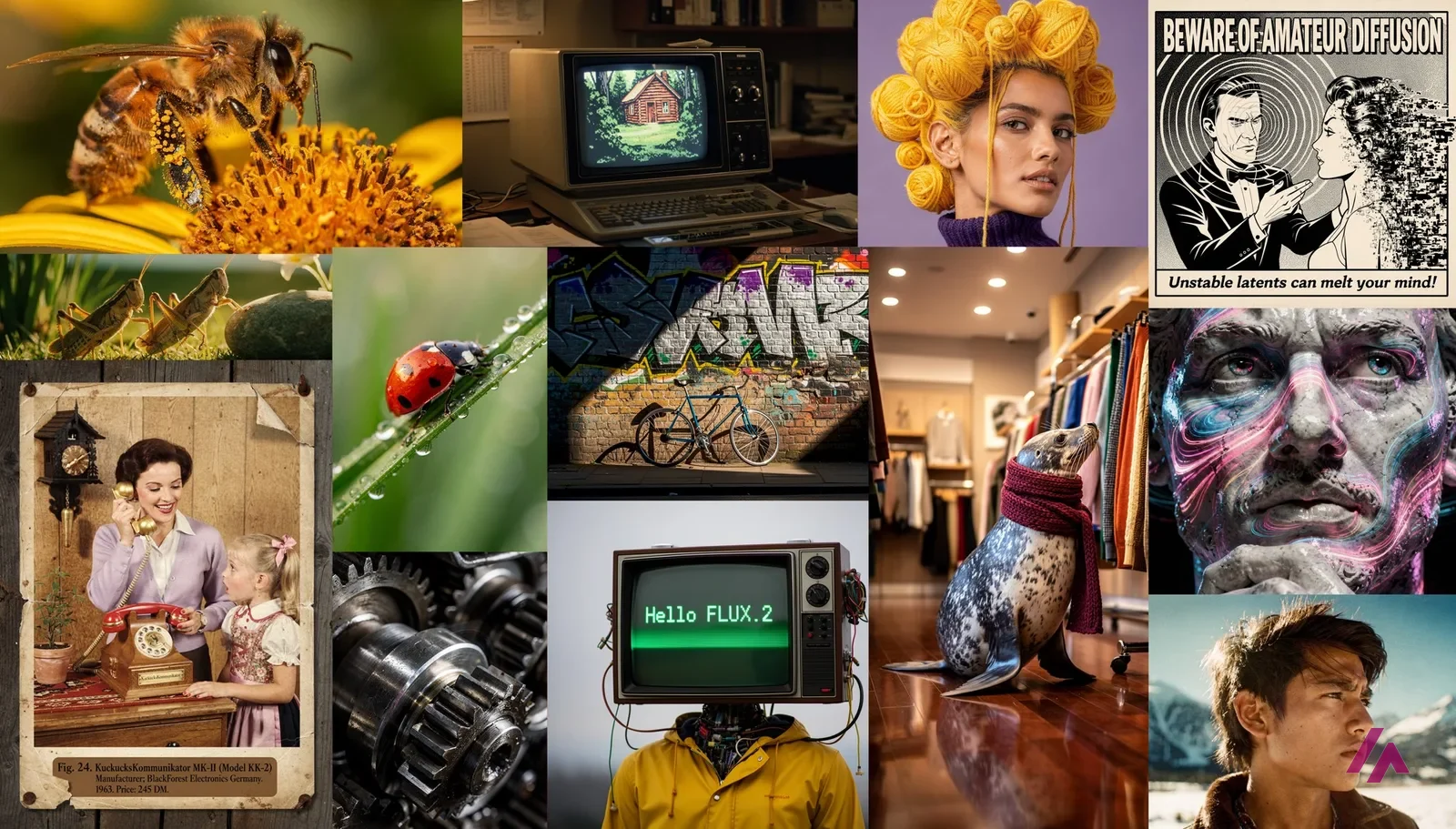
Flux is a family of AI image models from Black Forest Labs, not a single app, and FLUX.2 is still the version most people should start with. You can try it for free, with no account, in the official FLUX.2 [klein] 4B demo on Hugging Face, and if you need it for real work you pay per image on Black Forest Labs' own API and Playground: from $0.014 for the smallest model to $0.07 for the best one, with no subscription. It's a great pick if you want photorealistic images and don't mind a bit of setup. If you want a friendly app with a monthly plan, a finished product like Midjourney or Leonardo.Ai will feel easier.
What is Flux
- Type
- Image
- Updated on
- Oct 9, 2026
Flux is a family of AI image models made by Black Forest Labs, and the one to use today is FLUX.2. Is Flux AI free? You can try it for free, with no account, in the official FLUX.2 [klein] 4B demo on Hugging Face. For regular use, you pay per image, with no subscription: from $0.014 per image with the smallest FLUX.2 model to $0.07 with the best one, on Black Forest Labs' API or its Playground. It's worth it if you want photorealistic images and don't mind a bit of setup; if you want a friendly app with a monthly plan, a finished product will suit you better.
What Flux is today
The first thing to know is that "Flux" isn't one app you download. It's a set of models, and Black Forest Labs, the lab behind them, offers them in three ways: an API for developers, a Playground in the browser, and open weights you can run on your own hardware.
The versions have moved fast. The first generation, FLUX.1, is now listed as "legacy" in the docs. The current image family is FLUX.2, in six flavors (five on the API, plus [dev] for running yourself):
- FLUX.2 [max], the top of the range, which Black Forest Labs pitches as its highest visual fidelity.
- FLUX.2 [pro], the balance between quality and speed, meant for everyday production work.
- FLUX.2 [flex], with more fine-grained control and a focus on typography.
- FLUX.2 [klein] 9B and FLUX.2 [klein] 4B, the small, fast ones. "Klein" is German for small, which is about as much German as you need here.
- FLUX.2 [dev], the big open-weights model for people who want to run it themselves.
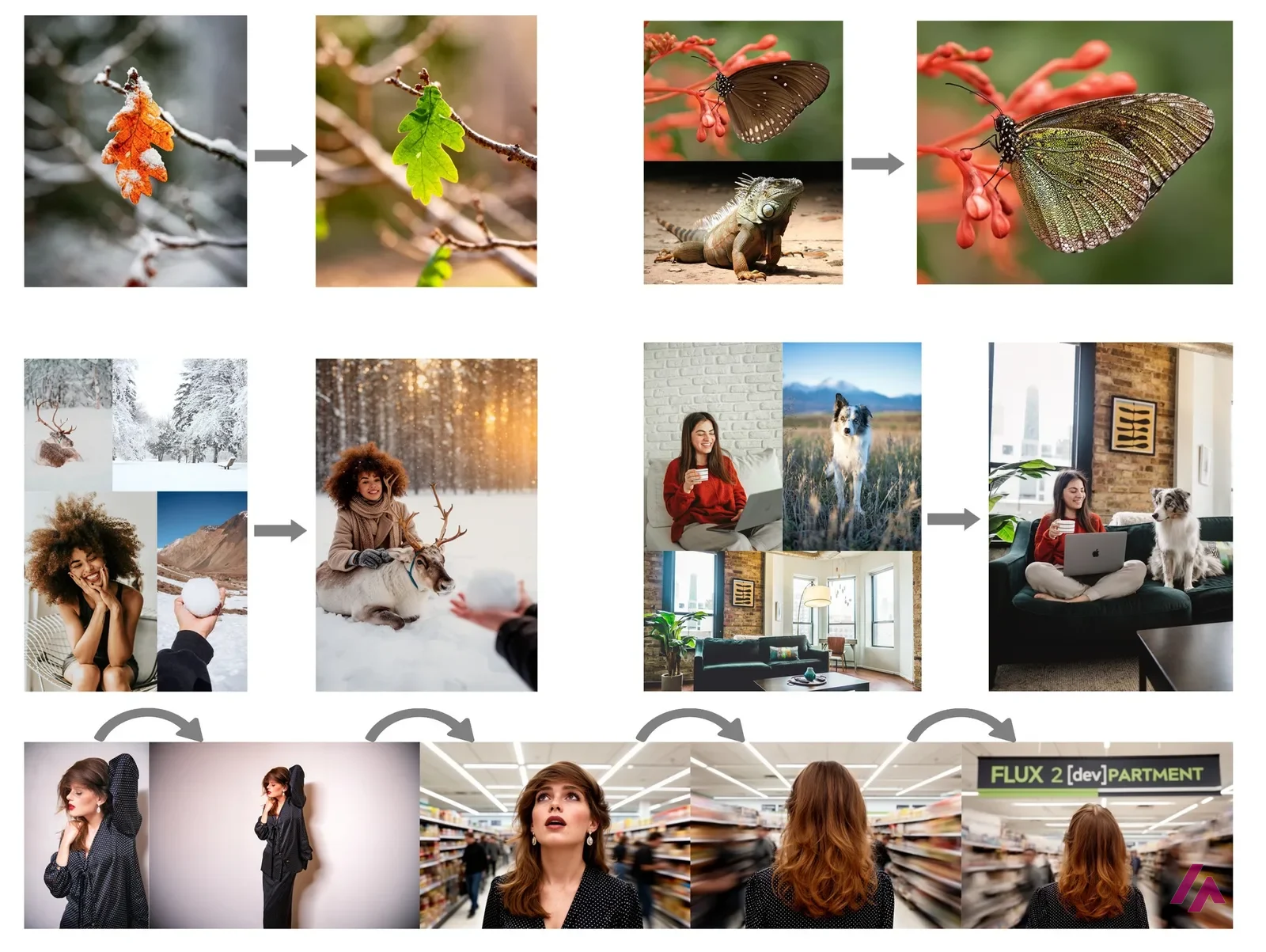
All of them do both jobs: create an image from text and edit an image you give them, including combining several reference images.
And then there's FLUX 3, which is what the home page is shouting about. Black Forest Labs presents it as "one multimodal model" for image, video, audio and robot actions. At first the only part you could pay for was video, but the API now sells FLUX 3 Image too, at $0.048 for an image of about 1 megapixel. FLUX.2 is still where the free demos, the open weights and the cheapest prices are, so for most people it's the Flux to start with; FLUX 3 Image is the newer option to compare once you're paying anyway.
How to use Flux for free
The official Playground is the obvious place to start, but it sends you straight to a sign-in page, and it runs on paid credits, the same ones as the API.
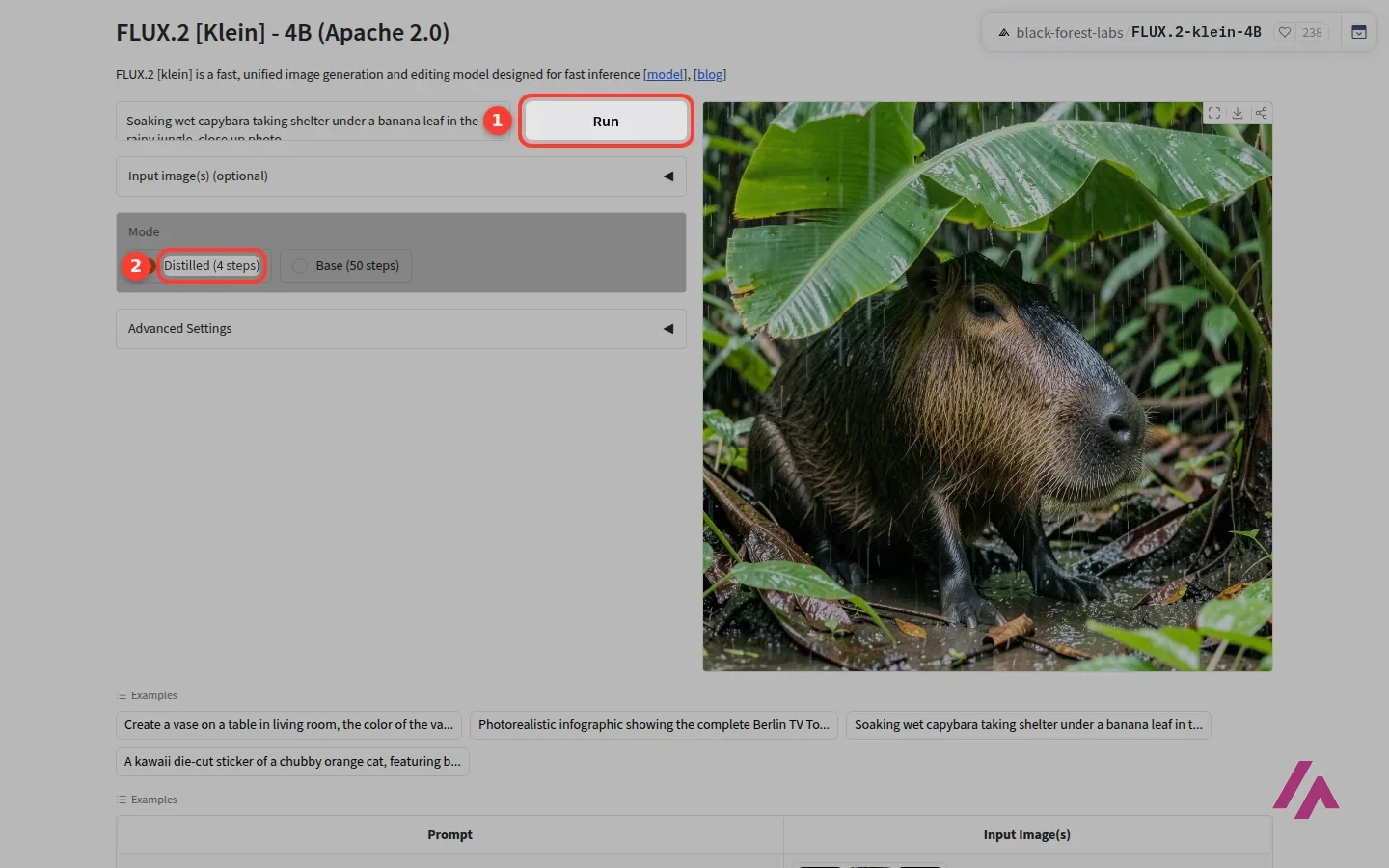
The free way in is Hugging Face. Black Forest Labs has its own verified page there, with free demos (Hugging Face calls them Spaces) for several models: FLUX.2 [dev], both [klein] models, FLUX.1 Kontext for editing and more. I opened the FLUX.2 [klein] 4B demo, which needs no account. It's a plain page: a prompt box, a Run button, an optional box to upload images you want to edit, and a choice between a fast "distilled" mode and a slower "base" one. There are a few example prompts to click if your mind goes blank.
I picked the example of a soaking wet capybara under a banana leaf, pressed Run, and after a short wait for the shared GPU to wake up, I had a brand new, photorealistic image a few seconds later. I ran it again and got another one just as fast. Then the demo stopped cooperating: my next run came back with "Error" instead of an image. Free demos run on shared hardware, so treat them as a taste, not a place to work.
Taste it free, then start small (Tip)
The FLUX.2 [klein] 4B demo on Hugging Face needs no account, but it's shared, so expect an error now and then. Once you know you like the results, buy a small amount of credits and start with [pro], at $0.03 for a 1-megapixel image.
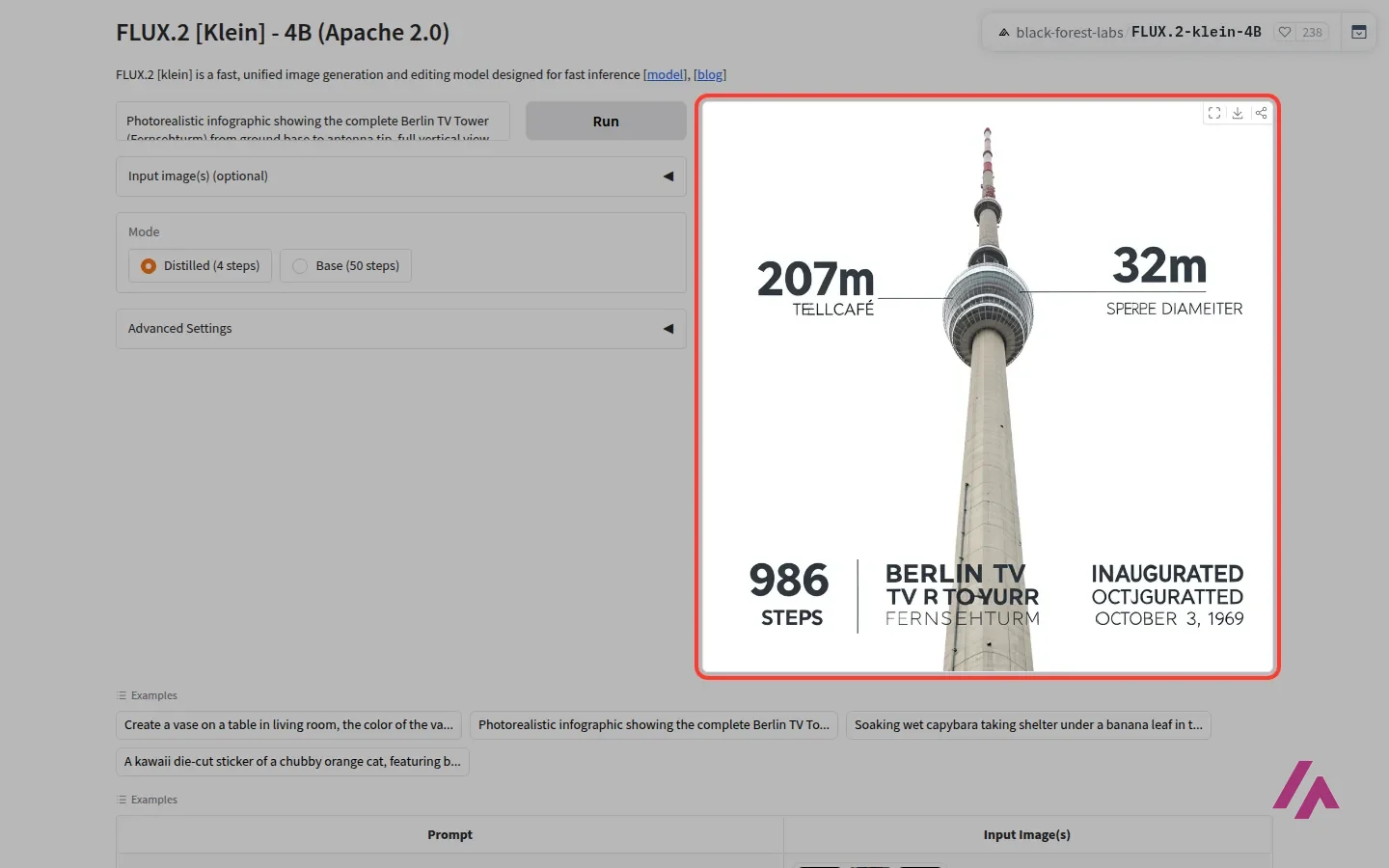
One more thing the demo taught me. Its own infographic example, a poster of the Berlin TV Tower with measurements and labels, shows a very believable tower, but several words come out misspelled. The fast mode of the 4B model is built for speed, not spelling. If your image needs a lot of readable text, reach for [flex] or [max], which Black Forest Labs pitches for typography.
Flux pricing, model by model
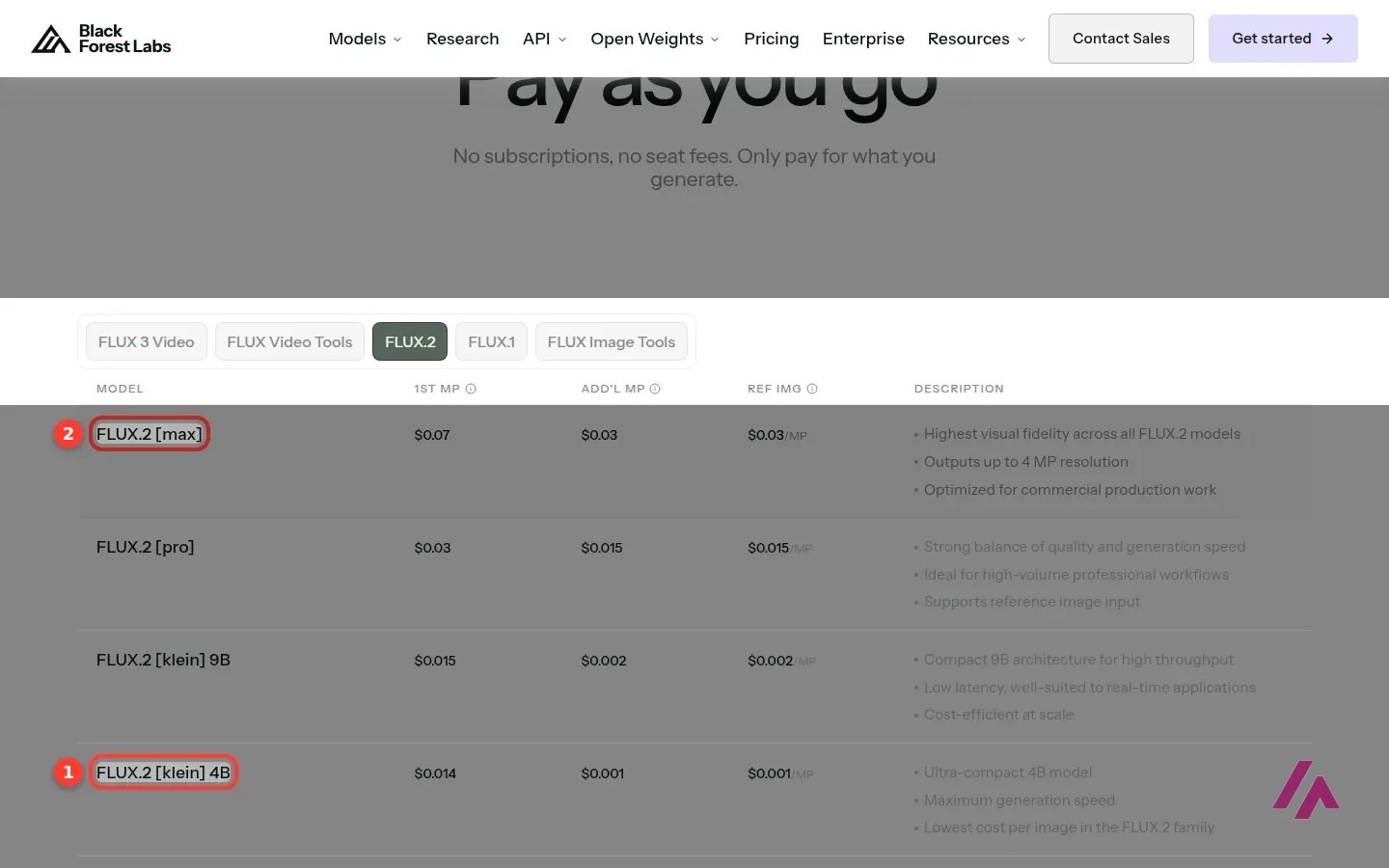
Black Forest Labs doesn't sell a monthly plan. You buy credits (1 credit = $0.01), and each image uses some. The price depends on the model and the size of the image: the first megapixel (a 1024 × 1024 image) has one price, and each extra megapixel or reference image adds to the price (a little on most models, the full $0.05 again on [flex]). The docs say the Playground charges the same as the API.
| Model | 1-megapixel image | Each extra megapixel | What it's for |
|---|---|---|---|
| FLUX.2 [klein] 4B | $0.014 | $0.001 | The cheapest and fastest; open weights under Apache 2.0 |
| FLUX.2 [klein] 9B | $0.015 | $0.002 | Fast and cheap, a step up in size |
| FLUX.2 [pro] | $0.03 | $0.015 | Quality and speed for everyday work |
| FLUX.2 [flex] | $0.05 | $0.05 | More control, strong on typography |
| FLUX.2 [max] | $0.07 | $0.03 | The best quality, pitched for commercial production |
FLUX 3 Image has fixed prices by size: $0.041 for 768 × 768, $0.048 for about 1 megapixel, $0.10 for about 4 and $0.607 for about 16.
To put that in perspective: $10 of credits buys you around 330 standard images with [pro], or more than 700 with [klein] 4B. The older FLUX.1 models are still on sale too, from $0.025 to $0.08 per image, and there are extra tools billed the same way, like outpainting, object removal, deblurring and a virtual try-on for clothes. Big companies can ask for custom pricing.
If you've got an AI assistant like Claude in your workflow, the docs also explain how to connect Flux through MCP, so the assistant can generate and edit images for you. Sorry for the jargon: MCP is just a standard way to plug a tool into an AI assistant.
Is Flux free for commercial use?
This is where people get tripped up, because the answer depends on which Flux you mean.
- FLUX.2 [klein] 4B is the truly open one: its weights are under the Apache 2.0 license, which allows commercial use. Black Forest Labs says it runs on consumer graphics cards like an RTX 3090 or 4070. The older FLUX.1 [schnell] is also Apache 2.0.
- FLUX.2 [dev] and FLUX.2 [klein] 9B use the FLUX Non-Commercial License. You can download them (after accepting the conditions on Hugging Face) and experiment, and the [dev] page says the images you generate can be used commercially, as long as you follow the license's rules (content filters or a manual review, and no training a rival model on them). What you can't do is use the model itself in a commercial product without a paid license.
- Commercial weight licenses start with a Builder tier for small teams and go up to Enterprise, but the licensing page shows no prices, just Purchase and Contact Sales buttons.
My rule of thumb: if you want to run Flux yourself in a business, [klein] 4B is the safe choice. For anything else, the API is the simplest way to stay on the right side of the license.
Downloadable doesn't mean the model is free for business (Heads-up)
You can download FLUX.2 [dev] and FLUX.2 [klein] 9B, but as models they're non-commercial. Building them into a commercial product takes a paid license, and the licensing page doesn't list a price. Among the FLUX.2 models, only [klein] 4B has Apache 2.0 weights.
Who Flux is for, and who should skip it
It's a good fit if you want a first-class image model without a subscription, you generate images in batches from your own tools, or you like the idea of running a model on your own computer. It's also the right call if you just want to see what a top image model can do, without paying: the free demo takes a minute.
Skip it if you want a finished app with a gallery, presets and a monthly price you can forget about. Flux is closer to an engine than a car: great if you know where you're going, a bit bare if you just want a ride. And if you mostly need long text inside your images, test the model you pick on exactly that before you commit.
Flux API vs other image APIs
If you're choosing an image API rather than an app, here's how the price of a standard image (about 1 megapixel, or 1024 × 1024) compares across the big makers, all from their own pricing pages, in US dollars:
| API | Price per standard image | What moves the price |
|---|---|---|
| Flux (Black Forest Labs) | $0.014 to $0.07 with FLUX.2; $0.048 with FLUX 3 Image | The model and the size; no subscription |
| GPT Image 2 (OpenAI) | $0.006 at low quality, $0.053 at medium and $0.211 at high | Quality and size; the newer GPT Image 2.5 is billed by image tokens, with no per-image table |
| Nano Banana (Gemini API) | About $0.034 with Nano Banana 2.1, $0.067 with Nano Banana 2 and $0.134 with Nano Banana Pro | Resolution; the batch mode costs half |
| Ideogram 4.0 | $0.03 (Turbo) to $0.10 (Quality) | The speed and quality level you pick |
| Recraft V4.1 | $0.035 for a raster image; $0.08 for a vector one | Vector output and higher resolutions cost more |
| Stability AI (Stable Diffusion) | $0.03 with Stable Image Core; $0.08 with Ultra | The model; also billed in credits of $0.01 |
My take: on price alone, Flux sits at the cheap end, and in this table only OpenAI's low-quality setting comes in under [klein] 4B. Apart from Stability AI, none of the others give you the open-weights option: if you might want to run the model yourself one day, starting on Flux keeps that door open. If your images are mostly text, posters or logos, Ideogram and Recraft are pitched at exactly that, so they're worth a test with your own prompts before you commit.
Flux or something else?
If you want gorgeous, stylized images from a polished app and don't care what's under the hood, compare it with Midjourney. If you'd like a studio in the browser with styles and presets, Leonardo.Ai is more comfortable. If running models on your own machine is the point, Stable Diffusion is the other big name. And if the image is just part of a post or a slide, Canva AI makes it right inside your design. And if you'd rather not pay per image while you're still experimenting, Google Flow gives a Google Account 50 free credits a day for Google's own models, Nano Banana for images included.
Written by Miguel Ángel, with help from an LLM to verify facts.
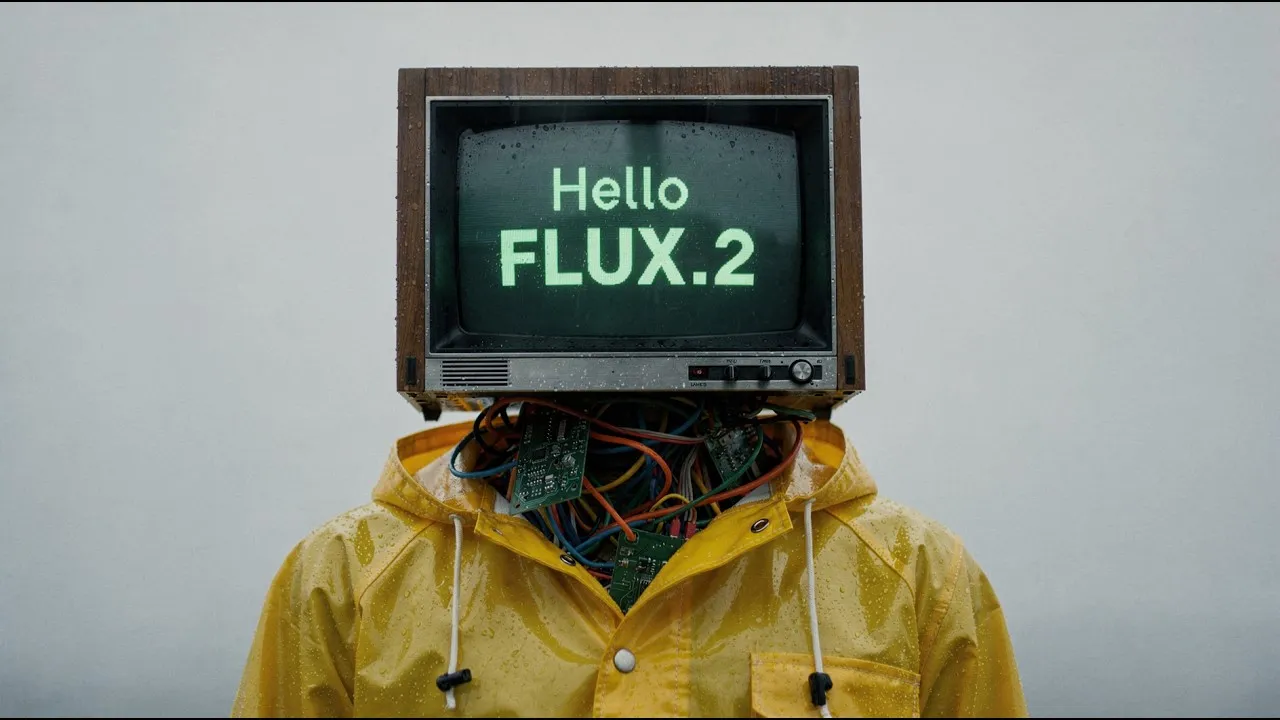
Black Forest Labs' own short video for FLUX.2: photorealistic images, edits you ask for in plain words and several reference images combined into one. It's the maker's pitch, so watch it as a preview and judge the model on the free demo.
Who is it for? For developers, designers and tinkerers who want a top image model they can call from their own tools, pay by the image, or even run on their own computer. It's also a good fit for anyone who wants to try a strong image generator for free before paying for anything. If you just want to type a prompt into a polished app and keep a gallery of your images, a subscription tool will be more comfortable.
What I like and what I don’t
What I like
- You can try it for free, with no account, in the official Hugging Face demos, and the smallest model gave me a new image in a few seconds.
- No subscription: you pay per image, from $0.014 with FLUX.2 [klein] 4B up to $0.07 with FLUX.2 [max], at the same price on the API and the Playground.
- FLUX.2 [klein] 4B has open weights under the Apache 2.0 license, so you can run it on your own machine and use it in commercial projects.
What I don’t
- The free demos are shared: after a few runs, mine returned an error instead of an image.
- Licenses vary by model. FLUX.2 [dev] and FLUX.2 [klein] 9B are non-commercial as models, and the commercial weight licenses don't show a price.
- In its fast mode, the smallest model struggles with long text inside an image: the infographic example in its own demo comes out with misspelled labels.
Have you used Flux? Tell me how it went
What worked for you and what didn’t. Your experience helps the next person who lands here unsure more than any review page. I read every one before publishing.
Write my review
Flux pricing
Prices checked on the official site on · before tax
- Cheapest paid plan
FLUX.2 [pro]
from $0.03
Per 1-megapixel image via the API or the Playground, no subscription; each extra megapixel adds $0.015
-
FLUX.2 [flex]
from $0.05
Per 1-megapixel image via the API or the Playground; more control and strong on typography
-
FLUX.2 [max]
from $0.07
Per 1-megapixel image via the API or the Playground; the best FLUX.2 quality, pitched for commercial production
There's no monthly plan: Black Forest Labs sells credits (1 credit = $0.01) and charges per image. A standard 1-megapixel image costs $0.014 with FLUX.2 [klein] 4B, $0.015 with [klein] 9B, $0.03 with [pro], $0.05 with [flex] and $0.07 with [max]; bigger images and reference images cost extra (on [flex], the full $0.05 per extra megapixel). The Playground in the browser charges the same as the API. My advice: try it free on Hugging Face first, then buy a small amount of credits and start with [pro].
Alternatives to Flux
-
Midjourney
Paid · from $10/mo
When to pick it: If you want striking, stylized images from a subscription app and don't need to plug the model into anything else, Midjourney is the obvious comparison.
See details → -
Leonardo.Ai
Free with limits · from $12/mo
When to pick it: If you want an image studio in the browser with presets, styles and a gallery, and you'd rather not deal with API credits, Leonardo.Ai is more comfortable.
See details → -

Stable Diffusion
When to pick it: If running models on your own computer is the whole point, Stable Diffusion is the other big name with a huge ecosystem of add-ons.
See details → -
Canva AI
from $18/mo
When to pick it: If the image is just one piece of a social post, flyer or slide, Canva AI generates it right inside the design you're already making.
See details →
How I tested it
On September 29, 2026 I went through Black Forest Labs' site in English without an account: the home page, the models page, the pricing page with every tab, the licensing page and the developer docs on credits. The Playground asks you to sign in, so I tried the model in the official FLUX.2 [klein] 4B demo on Hugging Face instead, which runs with no account, and read the license on each model's Hugging Face page. Prices are in US dollars, as Black Forest Labs charges them. The screenshots in this review are from that session. On October 9, 2026 I went back to the pricing docs to check for changes (FLUX 3 had started selling images) and read the official API price pages of the other big image makers for the comparison.

Written by Miguel Ángel, with the help of an LLM to fact-check. In IT since 2002 (systems, engineering, web development and SEO), doing business with AI since February 2023, when ChatGPT could first be bought in Spain. I build, write and maintain this site myself.

Got a question? Ask me
About Flux, its plans or whether it fits what you need. I’m Miguel Ángel, and I’ll answer you myself, right here.