
Kling AI
13 min read
- Free with limits
- Video
- Web · Windows · Mac · API
- Free $0 66 credits/mo · watermark
- Standard $8.80/mo 660 credits/mo · no watermark
Checked on
Open Kling AI
My verdict
In IT since 2002: systems, engineering, web development and SEO. I have been doing business with AI since February 2023, when ChatGPT could first be bought in Spain.
Kling AI is an AI video generator, and yes, you can try it for free: the free plan gave my account 66 credits for the month. On Kling 4.0, the new default model, the button asked for 50 of them for a 5-second 720p clip, so that's one clip at most; on Kling 3.0 without sound it's 30, so two. My Kling 3.0 test clip looked great, with everything I'd described in the scene, but the camera move I asked for never happened. To publish anything, you'll want a paid plan: Standard costs $6.99 the first month and $8.80 a month after that, removes the watermark and unlocks 1080p and 4K.
What is Kling AI
- Type
- Video
- Platforms
- Web · Windows · Mac · API
- Free plan
- Free with limits
- Updated on
- Oct 21, 2026
Kling AI is a video generator: you describe a scene, or give it an image, and it turns that into a short clip. Is Kling AI free? Yes, with limits. The free plan gave my account 66 credits for the month, and what that buys depends on the model. On Kling 4.0, the newest one and now the default, a 5-second clip at 720p costs 50 credits, so you get one. On Kling 3.0 without sound it costs 30, so you get two. Paid plans start with Standard: $6.99 for the first month, then $8.80 a month. It removes the watermark and unlocks 1080p and 4K.
That's the short answer. Here's what happened when I spent my free credits on one clip, what each plan costs, what a clip really costs on each model in dollars, and where Kling 4.0 fits in.
What Kling AI is
Kling AI is a web app (there are also desktop apps for Windows and Mac, and a paid API) built around video generation. The workspace has Image Generation, Video Generation, Motion Control and Avatar, plus Canvas and an Agent. For this review I stuck to the core of it: typing a prompt and getting a video back.
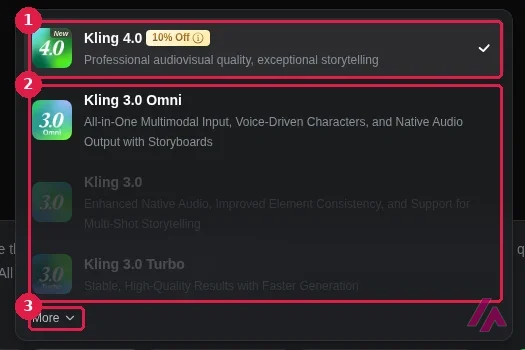
Kling has a whole family of video models. The menu now opens on Kling 4.0, which Kling rolled out on October 15, 2026, and describes as "Professional audiovisual quality, exceptional storytelling." Below it are Kling 3.0 Omni, Kling 3.0 and Kling 3.0 Turbo, and a "More" link hides the older ones: Kling O1, 2.6, 2.5 Turbo, 2.1, 2.1 Master and 1.6. When I ran my test, Kling 4.0 wasn't in the menu yet, and the default was Kling 3.0 (labeled VIDEO 3.0 back then), which Kling sums up as "Enhanced Native Audio, Improved Element Consistency, and Support for Multi-Shot Storytelling."
My test: one prompt, 30 credits
My free account had 36 of its 66 monthly credits left, enough for one 5-second 720p clip without audio. Out of the box, Kling set me up for 1080p, 5 seconds, 16:9, one output, with Native Audio on. On the free plan, 1080p showed "3 trials left," and 4K plus extra outputs were marked VIP. With my prompt typed in, the Generate button said 45 credits at 720p with audio. I switched the audio off and it dropped to 30.
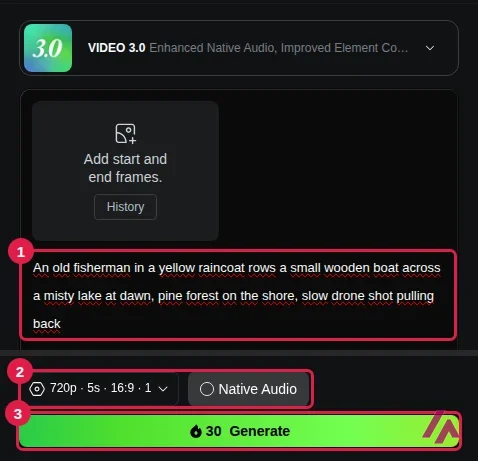
The prompt: "An old fisherman in a yellow raincoat rows a small wooden boat across a misty lake at dawn, pine forest on the shore, slow drone shot pulling back." Free users wait in line. The first message said "You are in the queue, estimated wait: 3 minutes," next to a "Subscribe for faster generation" nudge, and then it switched to an estimated 30 seconds. The clip was ready about two minutes after I hit Generate.
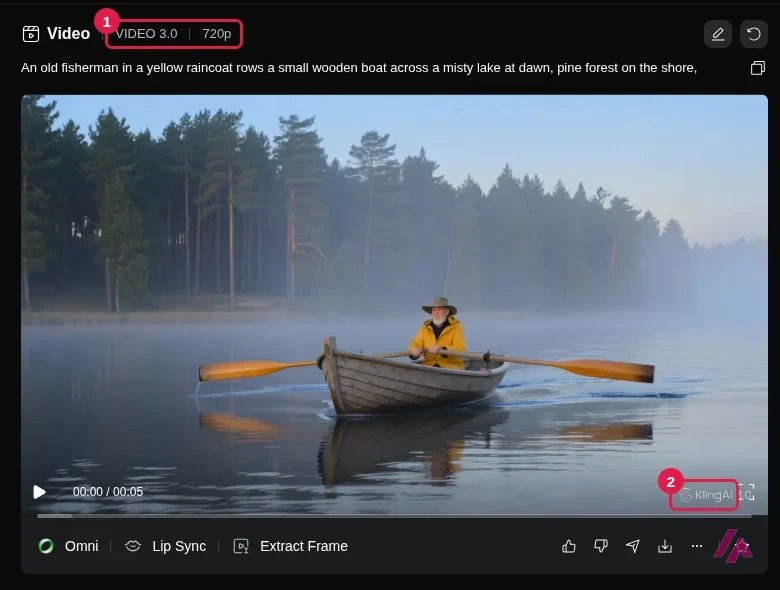
The picture itself is lovely. The fisherman, the yellow raincoat, the wooden boat, the mist, the pines and the cold morning light are all there, and nothing warps or melts. The motion is another story. I asked for a drone shot pulling back. When I compared frames from the start, middle and end, the framing barely changed and the oars hardly moved. The mist drifts and the water ripples, but it plays more like a living photo than a drone shot.
Spend free credits at 720p (Tip)
At 30 credits for a 5-second 720p clip on Kling 3.0 without audio, the free plan gives you two tries a month, so use them on the scene and leave 1080p and audio for later. And if the camera move matters, check it first when the clip is ready: in mine, it was the one thing Kling skipped.
The free clip has a small KlingAI logo in the bottom-right corner, not a pattern across the frame. Under the player are three more tools: Omni, Lip Sync and Extract Frame. My balance went from 36 to 6, which isn't enough for another clip until next month's credits arrive.
Kling AI pricing, plan by plan
Kling sells monthly and yearly plans, and every paid plan has a discounted first month. The lineup changed in October: Premier now comes in four sizes, from 8,000 to 38,000 credits a month, and the top plan is Ultra+, with 57,000. The old Ultra plan is no longer available to new subscribers. These are the prices on Kling's membership page when I rechecked it on October 21, 2026, in dollars. The page doesn't say whether tax is added.
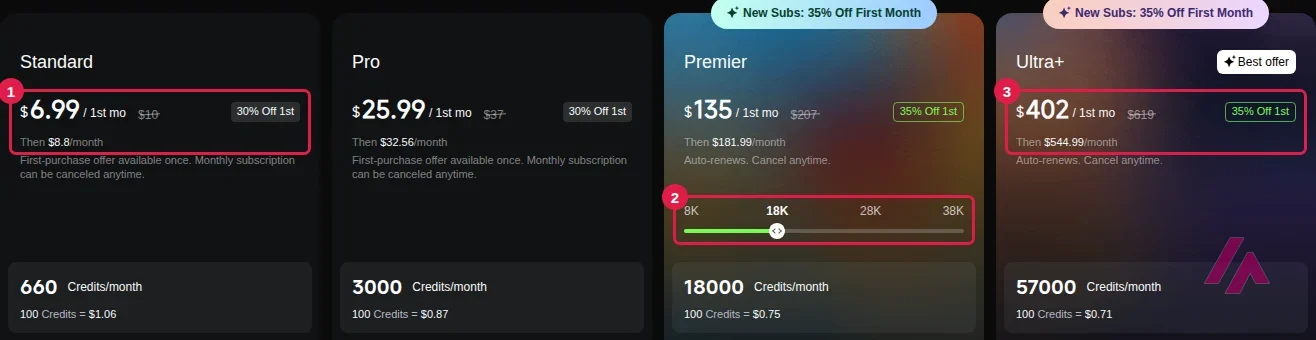
| Plan | First month | Then, monthly | Billed yearly | Credits a month |
|---|---|---|---|---|
| Free | $0 | $0 | — | 66 |
| Standard | $6.99 | $8.80 | $79.20 a year | 660 |
| Pro | $25.99 | $32.56 | $293.04 a year | 3,000 |
| Premier, 8,000 credits | $64.99 | $80.96 | $728.64 a year | 8,000 |
| Premier, 18,000 credits | $135 | $181.99 | $1,490 the first year, then $1,639.99 | 18,000 |
| Premier, 28,000 credits | $209 | $283.99 | $2,318 the first year, then $2,550.99 | 28,000 |
| Premier, 38,000 credits | $278 | $376.99 | $3,082 the first year, then $3,389.99 | 38,000 |
| Ultra+ | $402 | $544.99 | $4,457 the first year, then $4,902.99 | 57,000 |
Every paid plan includes 1080p and 4K video (4K isn't on Kling 4.0 yet), no watermark, an unlimited queue, faster generation, daily bonus credits and up to 4 videos per generation. Pro and above add priority access to new features and, for a limited time, 10% off Kling 4.0, so Kling 4.0 clips cost fewer credits on those plans. Ultra+ may include beta invites. Each paid plan also lists "Generated content is for commercial use."
Credits also expire. Monthly credits last 31 days, daily bonus credits disappear at midnight, and credits you buy separately are valid for 2 years. Per credit, though, the small packs cost more than any plan: $5 gets you 330 credits, half of what Standard's $6.99 first month includes.
The first month is a discount, not the price (Important)
Every first-month price is a one-time offer. Standard renews at $8.80 a month, Pro at $32.56, Premier at anywhere from $80.96 to $376.99 depending on the size, and Ultra+ at $544.99. If you're only going to use it for a project or two, a single cheap month of Standard may be all you need.
What a Kling clip really costs
Credits don't mean much until you turn them into clips, so I did the math. The price of a clip depends on the model, the resolution, the length and, on Kling 3.0 and 2.6, whether it has sound. Kling shows the cost on the Generate button before you spend anything, so I typed my prompt on my free account and read the button for the main models. Then I turned credits into dollars at each plan's regular monthly price, after the first-month discount.
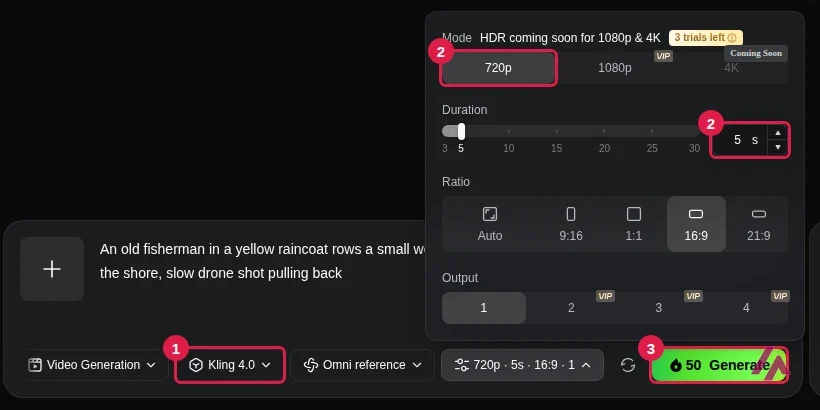
| A 5-second clip | Credits | On Standard | On Pro | On Ultra+ |
|---|---|---|---|---|
| Kling 4.0, 720p | 50 | $0.67 | $0.54 | $0.48 |
| Kling 4.0, 1080p | 75 | $1.00 | $0.81 | $0.72 |
| Kling 3.0, 1080p with sound | 60 | $0.80 | $0.65 | $0.57 |
| Kling 3.0, 720p without sound | 30 | $0.40 | $0.33 | $0.29 |
| Kling 3.0 Turbo, 1080p | 50 | $0.67 | $0.54 | $0.48 |
| Kling 2.6 without sound, or 2.5 Turbo, 720p | 15 | $0.20 | $0.16 | $0.14 |
Kling 3.0 Omni costs the same as Kling 3.0. Ten seconds costs exactly twice as much as five on every model I priced, and Kling 4.0 goes up to 30 seconds in a single clip. Two things make these numbers a bit lower in practice: the first month is cheaper, and on Pro and above, the limited-time discount trims Kling 4.0's credit price.
For the free plan, the same table reads like this: 66 credits are one Kling 4.0 clip at 720p, two Kling 3.0 clips without sound, or four from Kling 2.6 without sound or 2.5 Turbo. My free account listed all of those models with their prices, but the FAQ on Kling's video generator page warns that "some models, higher resolutions, and advanced features require a membership or additional credits," so treat that as the best case for the free plan.
Price it by the second (Tip)
Kling 4.0 opens on a 10-second clip, so the first price you see is double what 5 seconds costs. Per second, Kling 4.0 takes 10 credits at 720p and 15 at 1080p. Kling 3.0 takes 6 and 8 without sound, or 9 and 12 with it. Set the length before you read the price.
Is Kling AI free?
Yes, but think of the free plan as a sample, not a way to work. My account got 66 credits for the month when I logged in, valid for 31 days, and as the table above shows, that's one Kling 4.0 clip or two Kling 3.0 clips at 720p. Add sound on Kling 3.0 and a clip costs 45, so you'd get just one. Free clips carry the watermark, and 1080p comes with only 3 trials. Before you rely on a free clip for a client or a channel, read Kling's terms: only the paid plans list commercial use.
Free credits don't pile up (Heads-up)
Each month's free credits expire 31 days after you claim them, and my leftover 6 weren't enough for another clip on any model I priced (the cheapest was 15). If you want to test Kling seriously, plan your clips before you start.
What about Kling 4.0?
It's here, and it's now the model the generator opens on. Kling says it brings steadier motion, stereo sound, up to 15 references per clip (images, videos, saved elements or voices) and clips of up to 30 seconds in one go. In the settings I saw, 720p and 1080p were ready to pick, while 4K and HDR were marked as coming soon.
It's also the priciest of the models I priced at 1080p: 50 credits for 5 seconds at 720p and 75 at 1080p, compared with 30 and 40 for Kling 3.0 without sound. Which plan do you need for it? Kling's plans page lists Kling 4.0 as a benefit on Pro and up, but only as that 10% discount, and neither the plans page nor Kling's user guide for the model says a plan is required. Kling says it "became available to everyone on October 15," and on my free account the Generate button priced it like any other model.
Kling 4.0 Flash, which Kling pitches as faster and cheaper to run, is another story. It wasn't in the menu, and the plans page offers early access to it only with Ultra+ on yearly billing, which is $4,457 for the first year. That's a lot of money for early access, so unless you'd buy Ultra+ anyway, I'd wait.
Who it's for, and who should skip it
Kling makes sense if you need short, good-looking shots for social posts, ads or edits: a mood shot, a product moment, a transition. Apart from the camera move, the scene in my clip was what I described, and Standard's first month is cheap enough to see whether it fits how you work.
Skip it, or pair it with something else, if you need precise camera moves every time, since that's where my clip fell short. The same goes if one or two free clips aren't enough for you to decide before paying. And if what you really need is to turn long recordings into short captioned clips for social media, that's a different job: ByteCap AI is built to cut long videos into vertical clips.
Kling AI or something else?
If you like Kling 3.0 but want other models too, Higgsfield runs Kling 3.0 alongside Seedance, Sora and Veo, all paid for with the same credits. If you want to generate and edit in one app, Runway puts its own Gen-4.5 next to models like Kling 3.0. And if you'd rather have free credits every day, Google Flow gives you 50 a day with a Google Account.
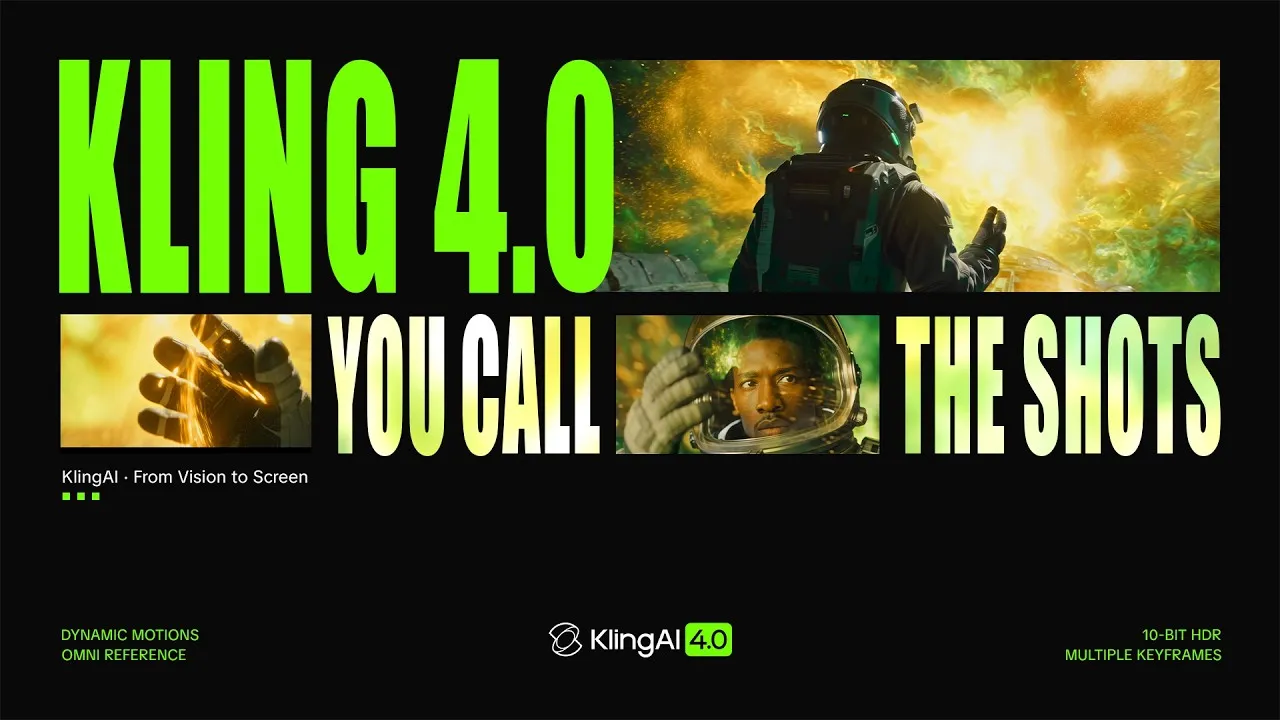
Kling's own trailer for Kling 4.0, the model that's now first in the menu. Two minutes of the shots Kling says it's built for, with stereo sound, up to 15 references and 30-second scenes. It's a showcase, not a tutorial.
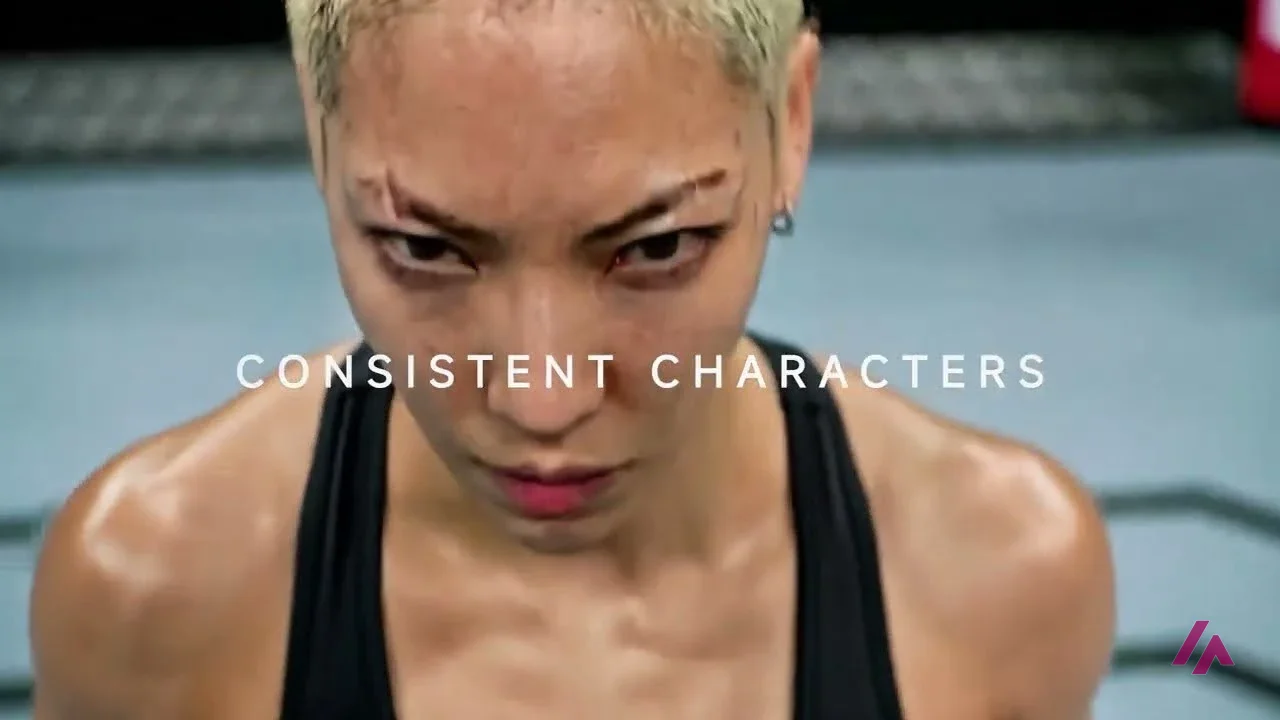
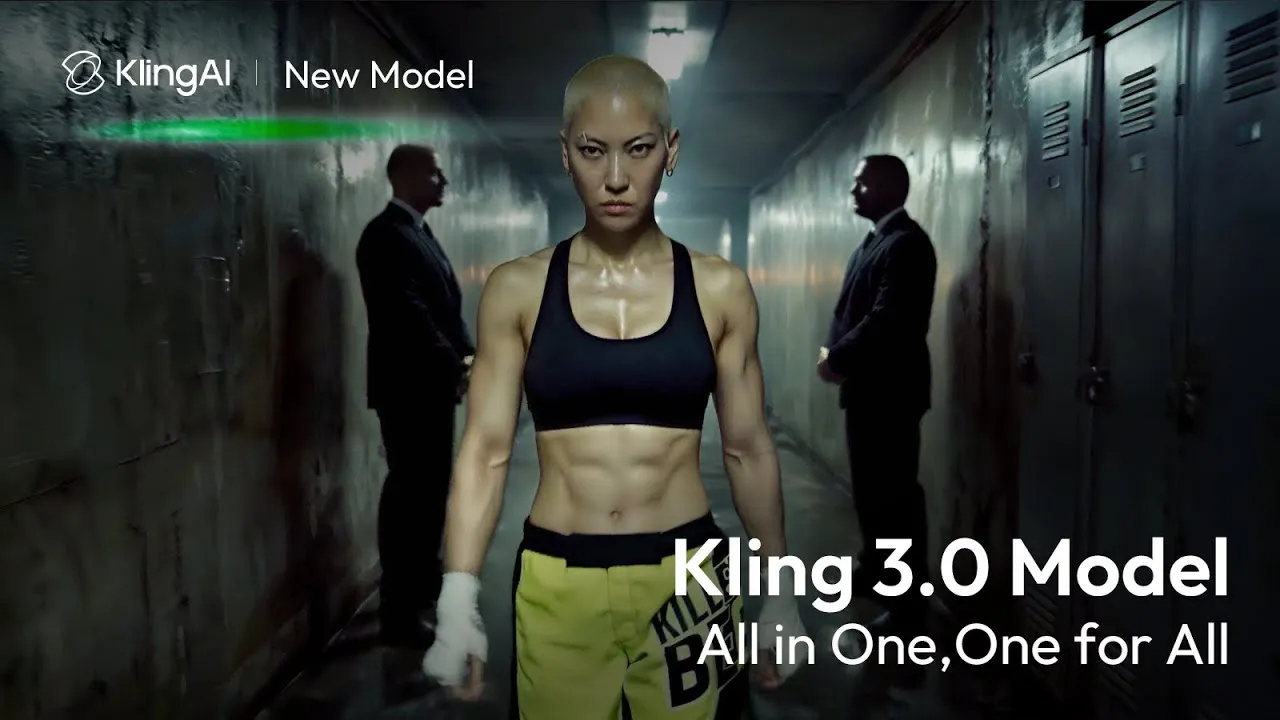
Kling's launch trailer for Kling 3.0, the model behind my test. It isn't a tutorial: it's two minutes of the kind of shots Kling says the model is built for, from consistent characters to multi-shot scenes.
Who is it for? For creators, editors and small marketing teams who need short, polished shots (a mood, a product, a transition) without a camera crew. If you'd rather have one subscription that runs several video models, or you want free credits every day instead of every month, look at the alternatives below.
What I like and what I don’t
What I like
- My test scene came out as described: the fisherman, the yellow raincoat, the mist, the pines and the morning light were all there.
- The cost shows on the Generate button before you spend anything, and it updated when I switched the audio off, from 45 credits to 30.
- The free watermark is small: a little KlingAI logo in the bottom-right corner, not a pattern across the whole frame.
What I don’t
- 66 free credits a month buys one 5-second Kling 4.0 clip at 720p, or two from Kling 3.0 without sound, and 1080p comes with only 3 free trials.
- The camera move I asked for didn't happen: the clip came out almost static, more of a living photo than a drone shot.
- The first-month prices are discounts. Standard goes from $6.99 to $8.80 a month, and the top plan, Ultra+, from $402 to $544.99.
Have you used Kling AI? Tell me how it went
What worked for you and what didn’t. Your experience helps the next person who lands here unsure more than any review page. I read every one before publishing.
Write my review
Kling AI pricing
Prices checked on the official site on
-
Free
Free
66 credits a month (one 5-second 720p clip on Kling 4.0, or two on Kling 3.0 without audio), 1080p limited to 3 free trials, small watermark
- Cheapest paid plan
Standard
$8.80/mo
660 credits a month, 1080p and 4K, no watermark, commercial use; $6.99 the first month; $79.20 a year billed yearly
-
Pro
$32.56/mo
3,000 credits a month, 1080p and 4K, no watermark, commercial use, priority access to new features, limited-time 10% off Kling 4.0; $25.99 the first month; $293.04 a year billed yearly
-
Premier
$80.96/mo
8,000 credits a month with everything in Pro; $64.99 the first month; $728.64 a year billed yearly. Bigger sizes up to 38,000 credits for $376.99 a month
-
Ultra+
$544.99/mo
57,000 credits a month, everything in Pro, beta invites if applicable; $402 the first month; $4,457 the first year billed yearly, then $4,902.99 a year; yearly billing includes early access to Kling 4.0 Flash
The free plan gave my account 66 credits for the month, valid for 31 days. A 5-second 720p clip costs 50 credits on Kling 4.0 and 30 on Kling 3.0 without audio. Standard is $6.99 the first month, then $8.80 a month for 660 credits, or $79.20 billed yearly. Pro is $32.56 a month for 3,000 credits. Premier now comes in four sizes, from 8,000 credits for $80.96 a month to 38,000 for $376.99, and Ultra+ is $544.99 for 57,000. My advice: spend the free credits at 720p first, then try Standard's cheap first month before you commit to anything bigger.
Alternatives to Kling AI
-
Google Flow
Free with limits · from $4.99/mo
When to pick it: If you already have a Google Account and want free credits every day, plus a studio built around a whole project: an agent to plan with and editing by description.
See details → -
Higgsfield
Free with limits · from $19/mo
When to pick it: If you want Kling 3.0 and other video models like Seedance, Sora and Veo under one subscription and one pool of credits.
See details → -
Runway
Free with limits · from $15/mo
When to pick it: If you want to generate and edit in the same place: Runway's own Gen-4.5 sits next to models like Kling 3.0, with plugins for Premiere Pro and After Effects.
See details →
How I tested it
On October 6, 2026, I signed in to Kling AI's free plan with a Google account, in a browser set to US English. I opened the video model menu, set up a 5-second 720p clip without audio from a prompt I wrote in English, waited in the free queue, and compared frames from the start, middle and end of the result. Then I went through the monthly and yearly plans on Kling's membership page. Two weeks later, after Kling 4.0 came out, I signed in again to recheck every plan and to read the credit price of a clip on the main models off the Generate button. My screenshots in this review are from those two sessions.
A full Kling 3.0 tutorial from February 2026, built around not wasting credits: prompting, Multi-Shot, text to video, reference to video and image to video, then a section on whether it's worth the hype and its limitations. His description links to Kling 3.0 on OpenArt with a referral link and promotes his own community. Prices may have changed since February; today's are in the table in this review.

Written by Miguel Ángel, with the help of an LLM to fact-check. In IT since 2002 (systems, engineering, web development and SEO), doing business with AI since February 2023, when ChatGPT could first be bought in Spain. I build, write and maintain this site myself.

Got a question? Ask me
About Kling AI, its plans or whether it fits what you need. I’m Miguel Ángel, and I’ll answer you myself, right here.