
Notion AI: Is It Free, What It Costs and How the New Credits Work
Notion Labs · also called Notion Agent · 11 min read
- Free trial
- Personal assistant
- Web · Windows · Mac · iOS · Android · API
- Free $0 Notion AI as a trial only
- Plus $12/mo Notion AI still a trial
Checked on · before tax
Open Notion AI
My verdict
In IT since 2002: systems, engineering, web development and SEO. I have been doing business with AI since February 2023, when ChatGPT could first be bought in Spain.
Notion AI is the assistant built into Notion: an agent that can write, edit, build databases, search your connected apps and take meeting notes, right inside your workspace. Free and Plus only get a short trial, and on my free account it was used up and stayed that way: the send button just stayed gray. Notion's own upgrade screen sends you to Business, at $24 a seat a month or $20 a month billed yearly, which comes with a monthly allowance of AI credits per member under Notion's new credit system. Worth it if your team already lives in Notion; if you just want a chatbot, there are free ones.
What is Notion AI
- Company
- Notion Labs
- Type
- Personal assistant
- Platforms
- Web · Windows · Mac · iOS · Android · API
- Free plan
- Free trial
- Also called
- Notion Agent
- Updated on
- Oct 27, 2026
Notion AI is the assistant built into Notion, the docs-and-databases app: an agent that writes, edits, builds pages and databases, searches your connected apps and takes meeting notes, all inside your workspace. Is Notion AI free? Only as a short trial. The Free and Plus plans get "a limited number of complimentary AI responses," and on my free account that trial was used up and stayed used up. The full Notion AI comes with the Business plan, at $24 per seat a month, or $20 a month if you pay for the year.
Is Notion AI free? The short version (Tip)
$0 (Free) and $12 a seat (Plus) both get only a trial of Notion AI. $24 a seat a month, or $20 a month billed yearly, is Business: the Notion Agent, Custom Agents, AI Meeting Notes, Enterprise Search, and 1,500 Standard plus 500 Select credits per member each month. Enterprise is custom pricing. Need more AI than your credits cover? Admins can buy Notion credits: $10 per 1,000 a month on monthly plans, or $13 per 1,000 as a yearly pool on annual plans.
What Notion AI is right now
Notion AI still edits text inline, but Notion now sells its AI as a team of agents. The main one is the Notion Agent: you chat with it, and Notion says it can do anything you'd do in Notion yourself, from drafting a report to building a whole task database. Earlier in October, on this same account, it turned a study plan into a database with real checkboxes, and the trial ran out halfway through tidying up.

Notion's comparison table ticks the Notion Agent and meeting notes on Free and Plus too, but there they run on the limited trial. The full versions, and these extras, come with Business:
- Custom Agents: agents you set up once to handle a repetitive job for the team, like answering questions or triaging requests.
- AI Meeting Notes: transcripts and summaries of your meetings, no bot joining the call.
- Enterprise Search (in beta): answers drawn from your connected apps, such as Slack, Google Drive and GitHub, not just from Notion.
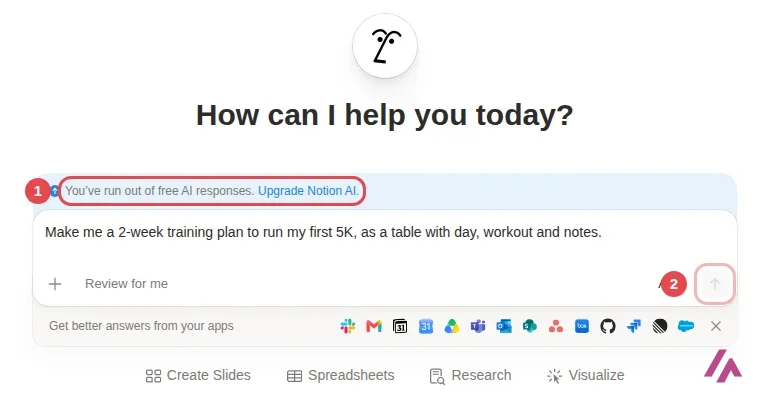
When you open Notion AI on the web, the home screen asks "How can I help you today?" and offers shortcuts for slides, spreadsheets, research and visuals, plus a row of app icons (Slack, Gmail, Google Drive, GitHub, Salesforce and more) under "Get better answers from your apps." Next to the send button there's a model picker set to Auto: Notion calls its AI "model agnostic," and Auto chooses the model for each task. That picker matters more than it looks, because it decides which credits you spend. More on that below.
On your data, Notion's pricing page says Notion AI "will not use your data to train our models" unless you opt in, and its product page says its AI providers are contractually barred from training on customer data. Notion says non-Enterprise plans have 30-day data retention with the AI providers; Enterprise gets zero data retention.
Is Notion AI free? What I found on my free account
My test account is on the Free plan and signs in with Google. The free AI trial on this account was already used up earlier in October: it covered three requests, and the third one stopped halfway. So the question for today was simple: does the trial come back after a few weeks?
It doesn't. When I opened the Notion AI chat, a light-blue banner sat above the prompt box: "You've run out of free AI responses. Upgrade Notion AI." I typed a real request anyway, "Make me a 2-week training plan to run my first 5K, as a table with day, workout and notes," and pressed Enter. Nothing happened. The send arrow stayed gray.
Once the trial is gone, Notion asks you to upgrade (Heads-up)
Notion's help calls it trial usage: once it's used up, you need Business or Enterprise to keep using the AI features. On my free account, it was still used up 23 days later, and Notion wouldn't send another request. If you plan to rely on Notion AI, test it on things that matter to you before the trial runs out.
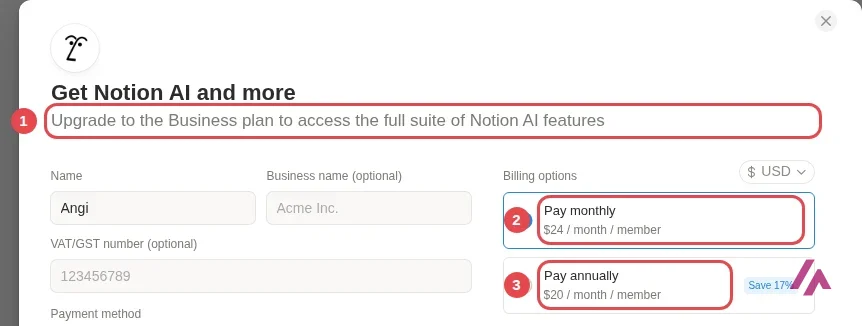
Then I clicked "Upgrade Notion AI" to see what Notion would offer me. The answer is telling: not Plus, but Business. The screen says "Upgrade to the Business plan to access the full suite of Notion AI features," with $24 per member a month or $20 a month billed yearly.
Notion AI pricing: Free, Plus, Business and Enterprise
These are the prices on Notion's pricing page as of October 27, 2026, the day I tested it, in US dollars per seat (member) and month. Notion adds tax at checkout. It advertises up to 20% off for paying yearly; on Plus and Business it works out to about 17%. Guests are free, but they only see the pages they're invited to.
| Plan | Monthly | Billed yearly | Notion AI |
|---|---|---|---|
| Free | $0 | $0 | Trial only |
| Plus | $12 | $10 a month ($120 a year) | Trial only |
| Business | $24 | $20 a month ($240 a year) | Notion Agent, Custom Agents, Meeting Notes, Enterprise Search; 1,500 Standard + 500 Select credits a month |
| Enterprise | Custom pricing | Custom pricing | Everything in Business, custom credit amounts, zero data retention with AI providers |
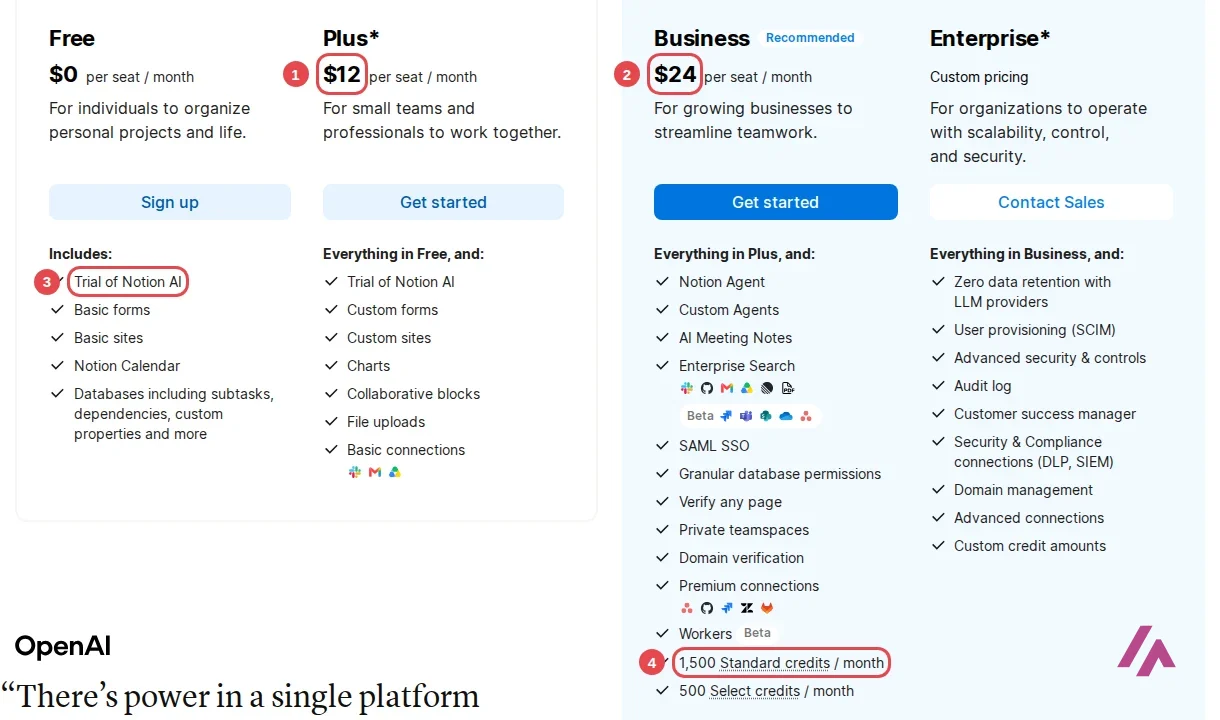
Worth knowing: there's no separate AI add-on on the pricing page. Plus at $12 gives you more Notion (custom forms and sites, charts, bigger file uploads, longer page history), but its Notion AI line is the same trial as Free. If the AI is what you're paying for, Plus is the wrong plan.
If you're a student or a teacher, the Plus plan (limited to one member) is free with your school email address. Just know that it comes with the same AI trial, not the full Notion AI.
How Notion AI credits work, and what changes in November
Fair warning: this part gets a little technical, but it decides what Business actually gets you. Notion is moving to a new credit system: new Business and Enterprise workspaces got it from October 19, 2026, and existing workspaces switch on November 2, 2026. There are three kinds of credits:
| Credit | What it pays for | How much |
|---|---|---|
| Standard | Work where Notion picks the model: the Notion Agent on Auto, writing and translation, AI blocks and formulas | 1,500 per member a month, no rollover |
| Select | Work where you pick the model yourself, and Custom Agents you set up for your own use | 500 per member a month, no rollover |
| Notion credits | Usage past your Standard or Select credits, the most expensive models, and Custom Agents funded by the workspace | Bought by admins: $10 per 1,000 a month, or $13 per 1,000 on a yearly pool |
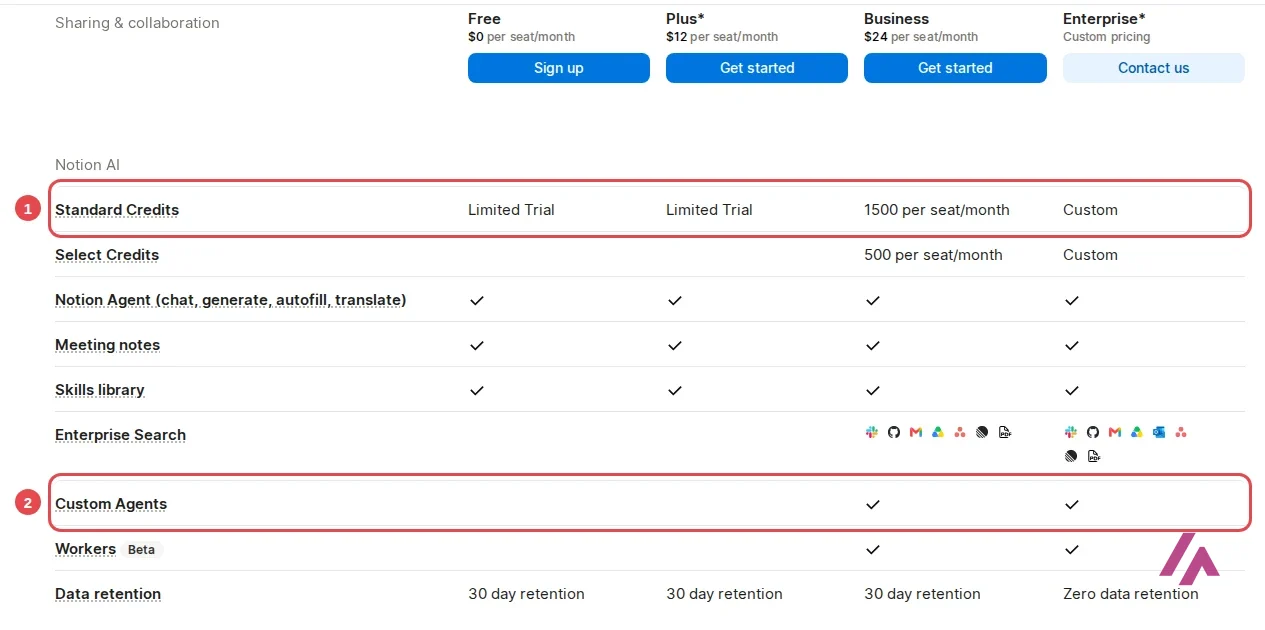
Standard and Select credits are separate: you can't combine them, swap one for the other or pass them to a colleague. When one kind runs out, the features that use it pause until your next monthly reset, unless your admin lets you keep going on Notion credits. Some top models always use Notion credits; Notion's help gives Fable and Astra as examples.
Here's the useful part: Notion's own estimates show how much cheaper Auto is. A simple task, like polishing an email, costs about 5 credits on Auto and 50 if you pick Opus 5.5 (from Claude's maker, Anthropic) yourself. A medium one, like writing a work report, is about 10 versus 85, and a complex one, like setting up a database, about 25 versus 150. My advice: leave the picker on Auto unless a task really needs a specific model. AI Meeting Notes runs on Auto and starts using Standard credits on December 1, 2026, at roughly 10 credits for a one-hour meeting. Everyday reading and writing through the Notion API or Notion MCP doesn't use credits, though running an agent through them does.
Custom Agents: the part that can cost extra
Custom Agents are where Notion is clearly heading. The pricing page sums them up as agents that "handle repetitive tasks autonomously," free to try and then $10 per 1,000 monthly Notion credits. By default, a Custom Agent spends its owner's Select credits, even when the whole team uses it; an admin can instead give an agent its own monthly budget of Notion credits.
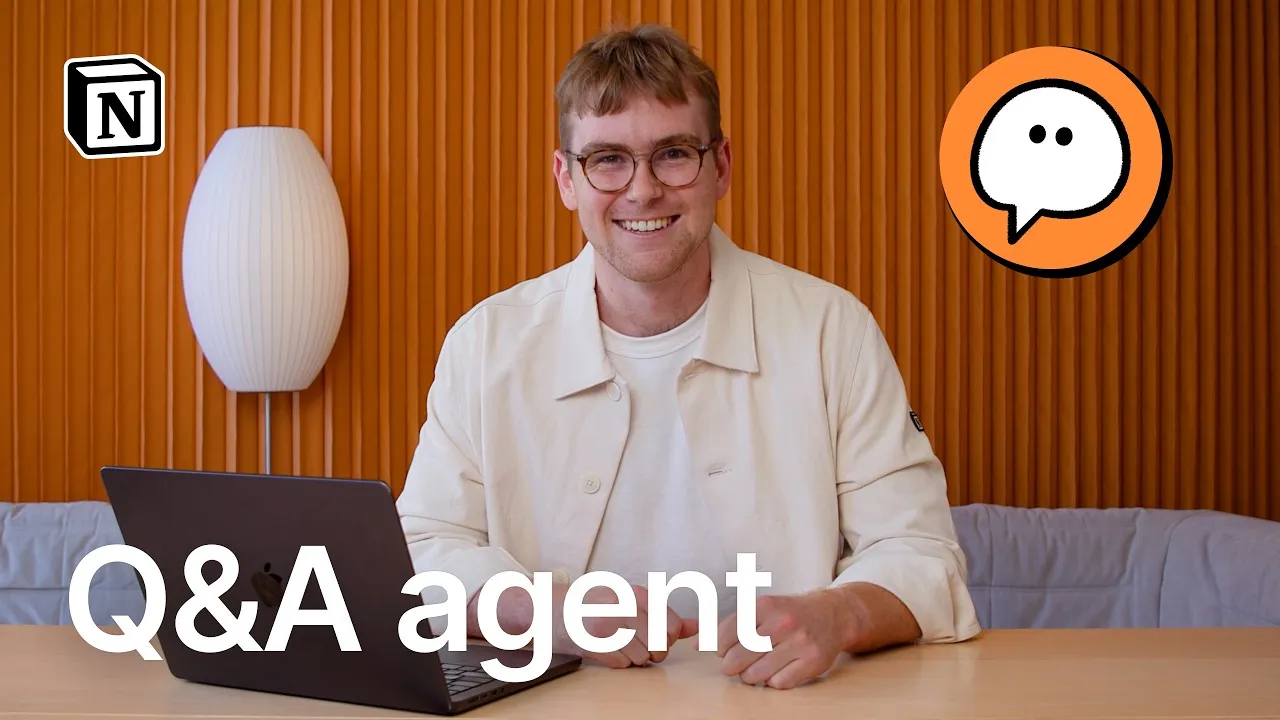
Notion's own 40-second demo shows the idea: an agent that answers your team's questions in Slack and fixes the source page in Notion when someone corrects it in the thread. If your team asks the same questions every week, that's the kind of job worth handing over.
Who should pay for Notion AI, and who shouldn't
Notion AI makes sense if your team already keeps its docs, projects and meeting notes in Notion. The agent's big advantage over a separate chatbot is that it works on your pages and databases, so it can build or update them instead of handing you text to paste. That's what Business pays for: $20 a seat a month, billed yearly.
It makes much less sense if you're one person on the free plan hoping for free AI. The trial gives you a taste, and then it's Business (or Enterprise) or nothing. Plus won't get you there.
Notion AI or something else?
If you just want a capable assistant and don't need it inside Notion, a free plan elsewhere goes a lot further.

ChatGPT gives you unlimited text chats on GPT-6 Luna for free, and Plus is $20 a month. Claude has a generous free plan and is my pick for long documents; Pro is also $20. If what you want is to ask questions about your own notes and files, NotebookLM, now called Gemini Notebook, answers only from the sources you add and is free with a Google Account. And if your day runs on Gmail, Docs and Drive rather than Notion, Gemini is Google's assistant built around them, free with a Google Account too, with paid Google AI plans from $4.99 a month.
Written by Miguel Ángel, with help from an LLM to verify facts.
A hands-on session from Notion, hosted by one of its customer success managers: setting up a workspace, working with the Notion Agent (asking questions, generating reports, permissions and personalization) and building a first page and database.
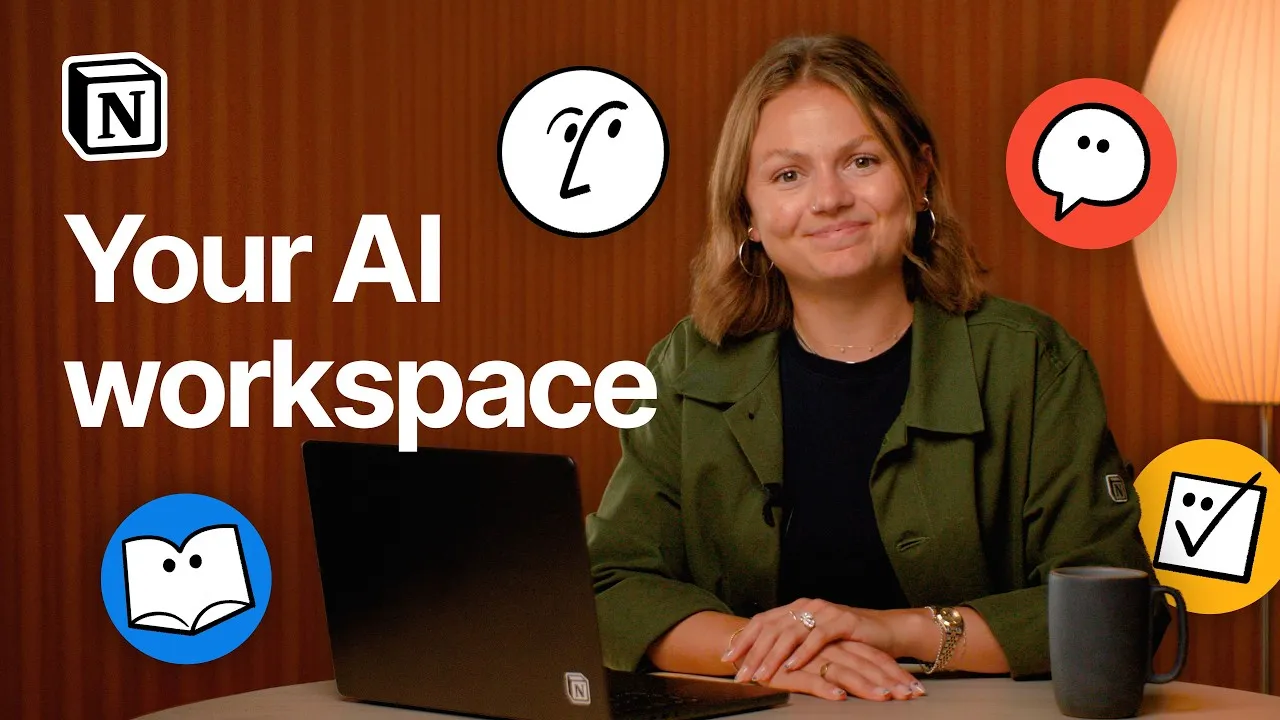
Who is it for? For teams that already keep their docs, tasks and meeting notes in Notion and want an agent that works on that content. If you're a solo user on the free plan hoping for free AI, you'll get a taste, not a tool.
What I like and what I don’t
What I like
- The agent works on your own pages and databases, so it can build or edit them instead of just answering in a chat window.
- Business includes 1,500 Standard and 500 Select credits per member each month, on top of meeting notes, Enterprise Search and Custom Agents.
- Notion says it doesn't train its models on your data unless you opt in, and its AI providers are contractually barred from it.
What I don’t
- Free and Plus only get a short trial; on my free account it ran out and still hadn't come back three weeks later.
- Plus at $12 a seat a month doesn't add any AI: the upgrade screen for Notion AI points straight to Business.
- The credit system is new and has three kinds of credits, plus extra costs for Custom Agents and the priciest models.
Have you used Notion AI? Tell me how it went
What worked for you and what didn’t. Your experience helps the next person who lands here unsure more than any review page. I read every one before publishing.
Write my review
Notion AI pricing
Prices checked on the official site on · before tax
-
Free
Free
Notion for personal use with a limited trial of Notion AI
- Cheapest paid plan
Plus
$12/mo
Per seat; $10 a month billed yearly. More Notion features, but Notion AI is still a limited trial
-
Business
$24/mo
Per seat; $20 a month billed yearly. Notion Agent, Custom Agents, AI Meeting Notes, Enterprise Search and 1,500 Standard + 500 Select AI credits per member a month
Free is $0 and Plus is $12 a seat a month ($10 a month billed yearly), both with only a trial of Notion AI. Business, where the AI really starts, is $24 a seat a month or $20 a month billed yearly, plus tax. Enterprise is custom pricing. Extra Notion credits cost $10 per 1,000 a month on monthly plans, or $13 per 1,000 as a yearly pool on annual plans.
Alternatives to Notion AI
-

ChatGPT
Free with limits · from $8/mo
When to pick it: If you want an all-round assistant with a real free plan: unlimited text chats on GPT-6 Luna, and Plus at $20 a month.
See details → -

Claude
Free with limits · from $20/mo
When to pick it: If you write a lot or work with long documents: the free plan is generous and Pro is $20 a month.
See details → -

NotebookLM
Free with limits · from $4.99/mo
When to pick it: If what you want is to ask questions about your own notes and files: NotebookLM, now called Gemini Notebook, answers only from the sources you add, and it's free with a Google Account.
See details → -

Gemini
Free with limits · from $4.99/mo
When to pick it: If your day runs on Gmail, Docs and Drive rather than Notion: Gemini is Google's assistant built around them, free with a Google Account, with paid Google AI plans from $4.99 a month.
See details → -

Copilot IA
Free with limits
How I tested it
On October 27, 2026, I opened Notion AI in English with the free account I keep for testing (it signs in with Google), tried to send it a request and followed the "Upgrade Notion AI" link to see what it offered. I read the pricing page in US dollars, the product page and Notion's help articles on Notion AI and the new credit system. I didn't pay for anything. The screenshots are mine.
A 40-second demo from Notion of a Custom Agent that answers your team's questions in Slack and, when someone corrects an answer in the thread, fixes the source document in Notion.

Written by Miguel Ángel, with the help of an LLM to fact-check. In IT since 2002 (systems, engineering, web development and SEO), doing business with AI since February 2023, when ChatGPT could first be bought in Spain. I build, write and maintain this site myself.

Got a question? Ask me
About Notion AI, its plans or whether it fits what you need. I’m Miguel Ángel, and I’ll answer you myself, right here.