
NotebookLM
Google · also called Gemini Notebook · 11 min read
- Free with limits
- Text
- Web · Android · iOS
- Free $0 100 notebooks · 50 sources each
- Google AI Plus $4.99/mo 2× limits · 100 sources each
Checked on · before tax
Open NotebookLM
My verdict
In IT since 2002: systems, engineering, web development and SEO. I have been doing business with AI since February 2023, when ChatGPT could first be bought in Spain.
NotebookLM, renamed Gemini Notebook in July 2026, is the AI tool I'd hand anyone who has to get through a pile of reading. You add your own sources (PDFs, web pages, YouTube videos, Drive files) and it answers from those, with a numbered citation on every claim. When I asked it something my source didn't cover, it said so instead of making something up. It's free with a Google Account, and the Audio Overview, the podcast-style recap that made it famous, is included. Paying just gets you a Google AI plan with higher limits, from $4.99 a month.
What is NotebookLM
- Company
- Type
- Text
- Platforms
- Web · Android · iOS
- Free plan
- Free with limits
- Also called
- Gemini Notebook
- Updated on
- Oct 13, 2026
NotebookLM is Google's AI research notebook, and since July 2026 it's called Gemini Notebook. You give it your own sources (PDFs, web pages, YouTube videos, Google Drive files, pasted text) and it answers questions from those sources only, with a citation on every claim. It also turns them into an Audio Overview, the podcast-style conversation it became famous for, plus flashcards, quizzes, mind maps and reports. Is NotebookLM free? Yes: a Google Account gets you 100 notebooks with up to 50 sources each. There's no separate NotebookLM subscription; higher limits come with Google AI plans, from $4.99 a month in the US.
I tested it with a single source to see the thing that matters most: whether it sticks to what you gave it.
NotebookLM is now Gemini Notebook
On July 16, 2026, Google renamed NotebookLM to Gemini Notebook. Google calls it the same standalone product, and the old notebooklm.google.com address redirects to notebook.google.com. If you still search for "NotebookLM," you're in the right place: it's the same tool with a longer name.
What changed is where it shows up. Google says your notebooks are also available inside the Gemini app, and the paid Google AI plans now list Gemini Notebook as one of their benefits.
My test: one source, two questions
I signed in with a Google Account on the free plan and clicked New notebook. Gemini Notebook opened a three-column workspace (Sources on the left, the chat in the middle, the Studio on the right) and put the "add sources" window right in front of me. You can search the web for sources from there, upload files, add websites or YouTube links, import books from Google Play Books, pick files from Drive or paste text.
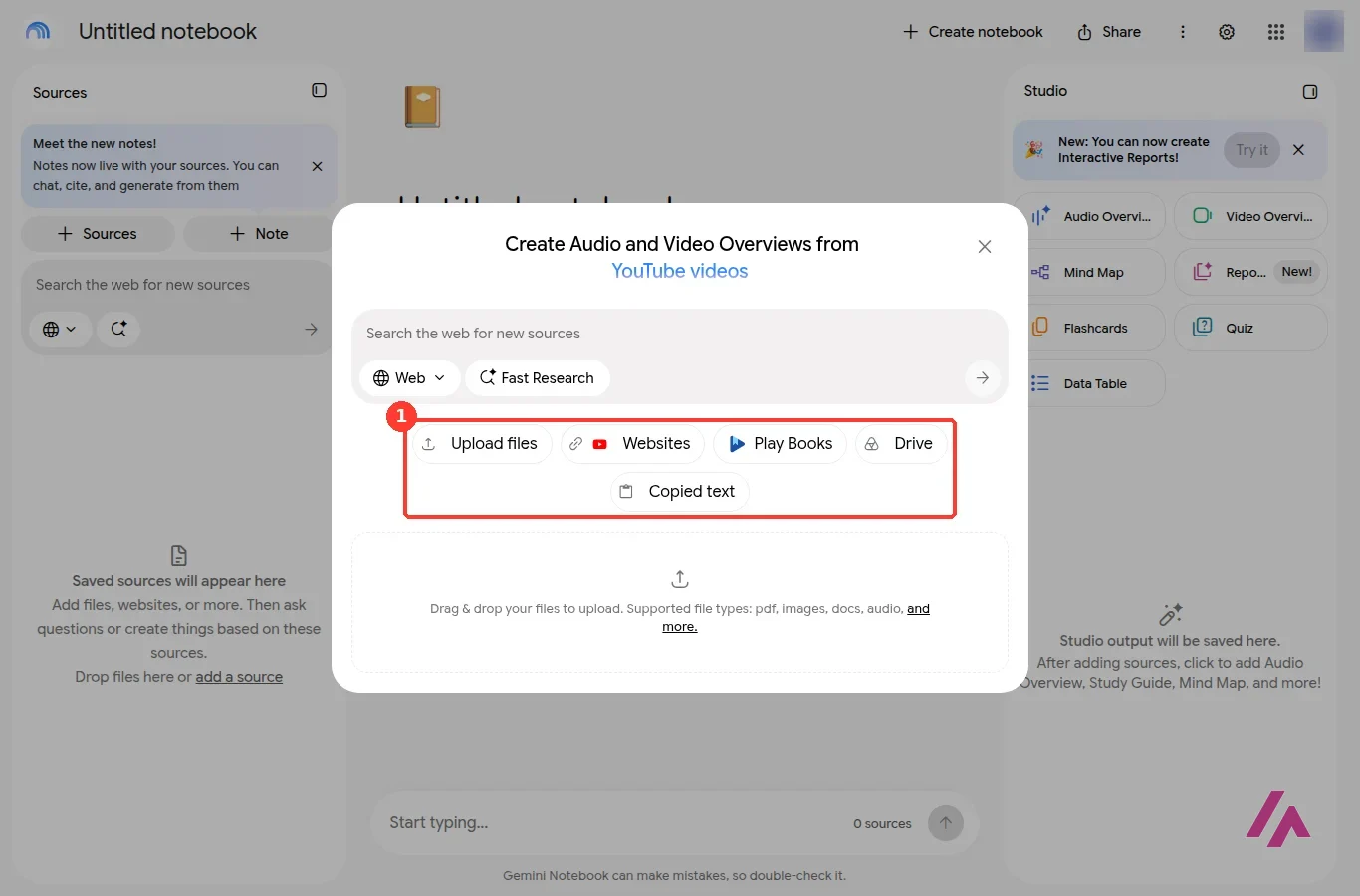
I chose Websites and pasted the address of the Wikipedia article on the Golden Gate Bridge. The window warns you about the limits of web sources: only the visible text of a page is imported, paywalled articles aren't supported, and for YouTube it takes only the transcript of public videos. Once I clicked Insert, the notebook had named itself "Golden Gate Bridge History and Design," written a one-paragraph summary of the source and suggested three questions to start with.
Answers that only come from your sources
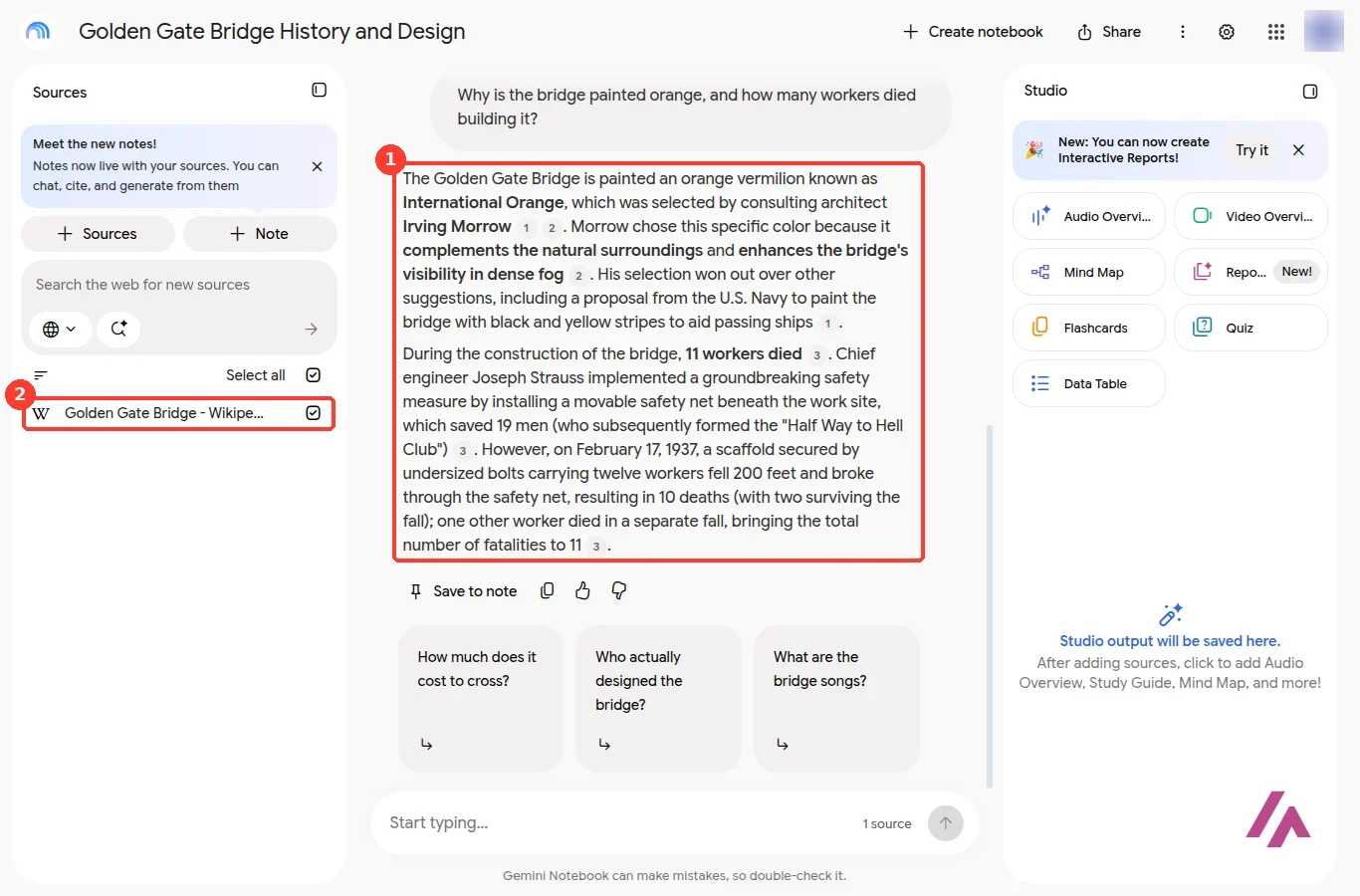
My first question had two parts: why is the bridge painted orange, and how many workers died building it? The answer was right on both counts according to the article: the color is International Orange, chosen by consulting architect Irving Morrow because it fits the surroundings and stands out in fog (it even mentioned that the US Navy had suggested black and yellow stripes), and 11 workers died, ten of them on February 17, 1937, when a scaffold broke through the safety net.
What makes it different from a regular chatbot is the little numbers after each sentence. Each one ties the sentence to the passage in your source it came from, so checking an answer doesn't mean another search.
Ask it something your sources don't cover (Tip)
It's the quickest way to see how a notebook behaves. A tool that admits a gap is a tool you can trust with your own documents.
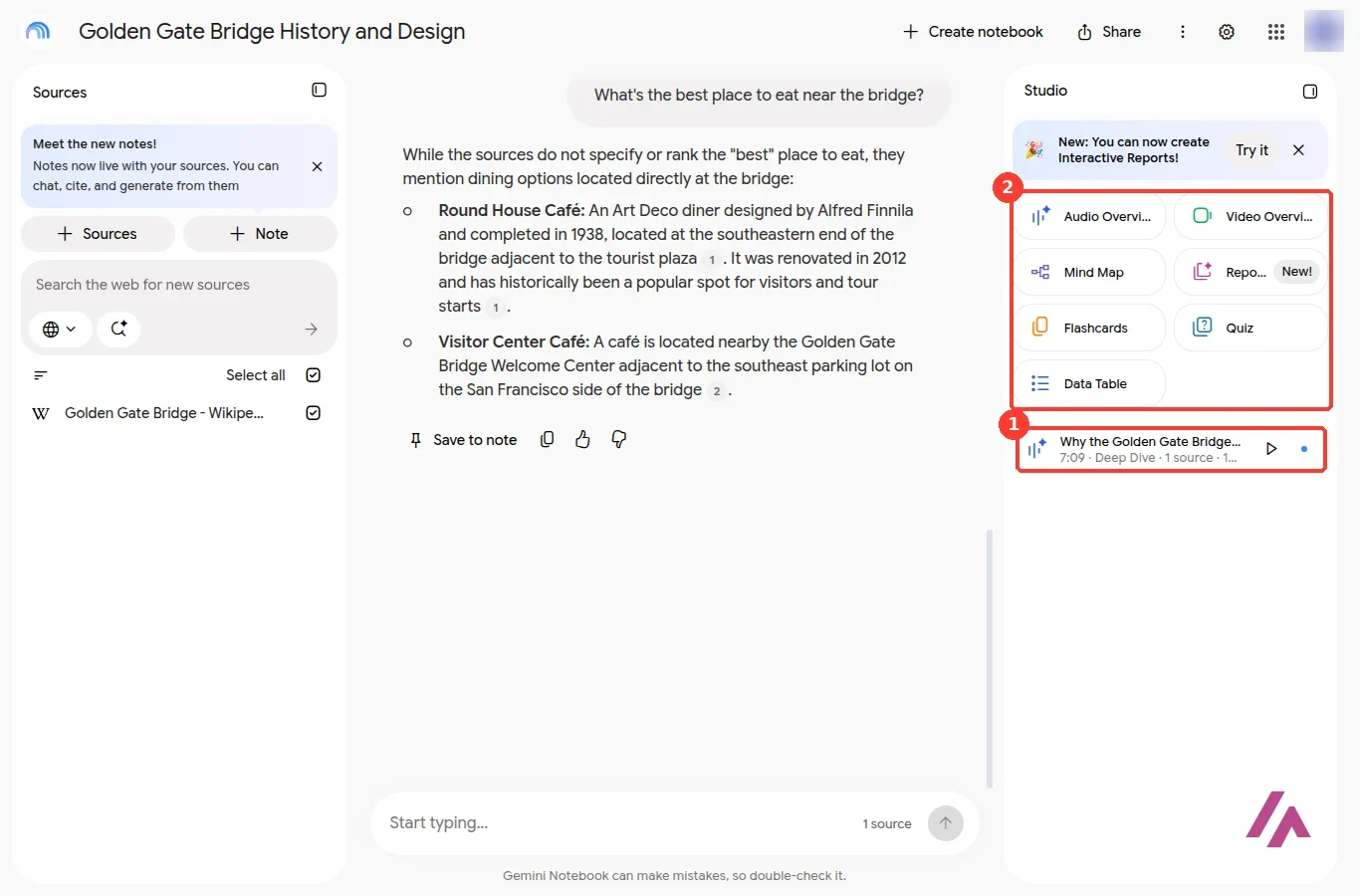
So I did exactly that: "What's the best place to eat near the bridge?" Wikipedia doesn't rank restaurants, and Gemini Notebook said so: "the sources do not specify or rank the 'best' place to eat." Then it listed the two places the article does mention, the Round House Café and a café by the Welcome Center, each with its citation. No invented favorite, no review from somewhere else. That's the behavior you want when the sources are your contracts, your class notes or your company's reports.
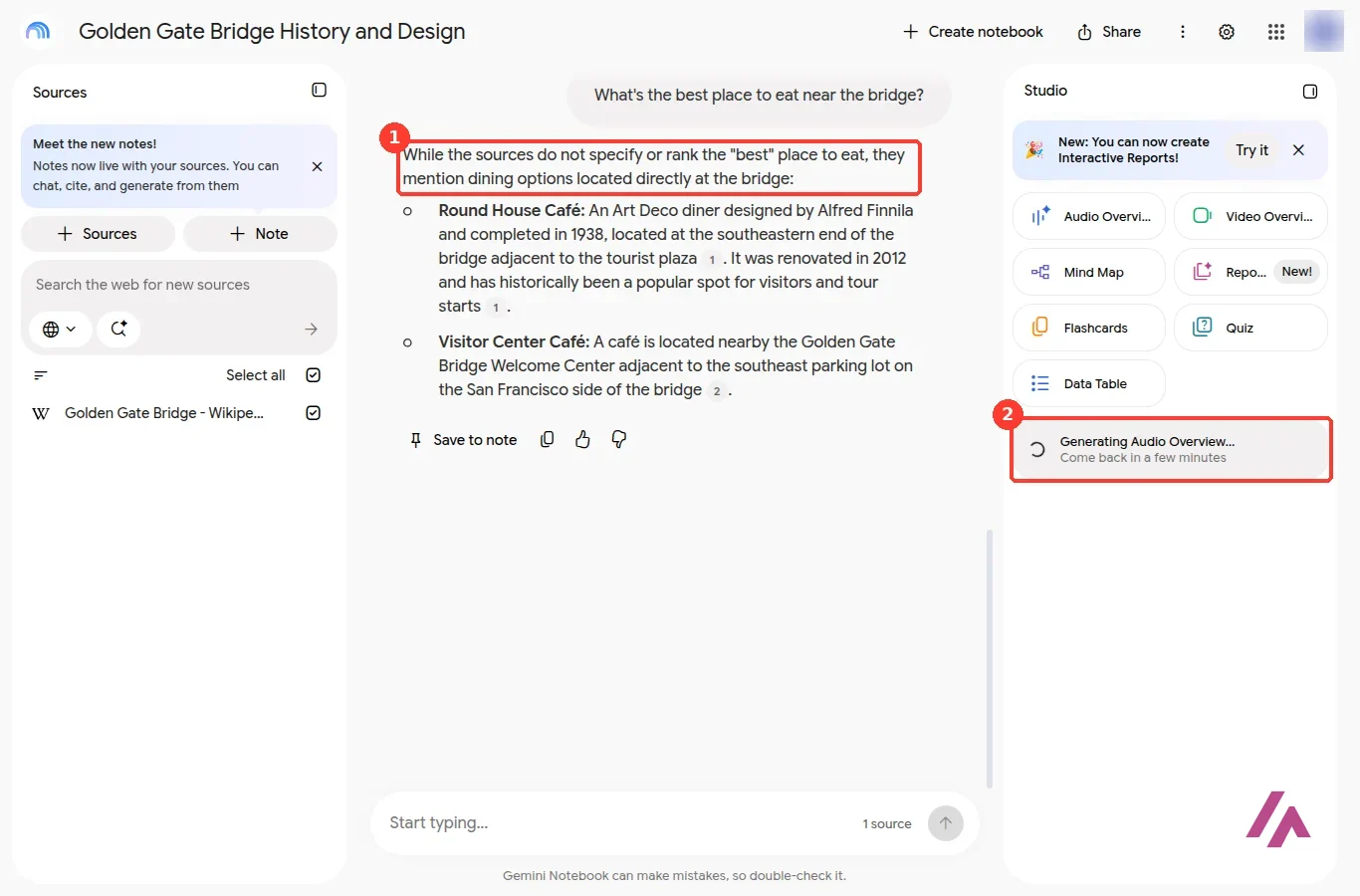
Under the chat box there's a permanent reminder: "Gemini Notebook can make mistakes, so double-check it." With the citations, at least double-checking is easy.
Audio Overviews: the podcast feature
This is the feature most people come for. In the Studio panel, Audio Overview opens a window where you pick a format: Deep Dive (two hosts in a lively conversation, the default), Brief (one speaker, a quick overview that Google's help center says runs under two minutes), Critique (an expert review of your material) and Debate (two hosts with different views). You can also choose the language (Google says there are more than 80), the length (Short, Default or Long) and type what the hosts should focus on, with ready-made suggestions like "Engineering Marvels" for my bridge.
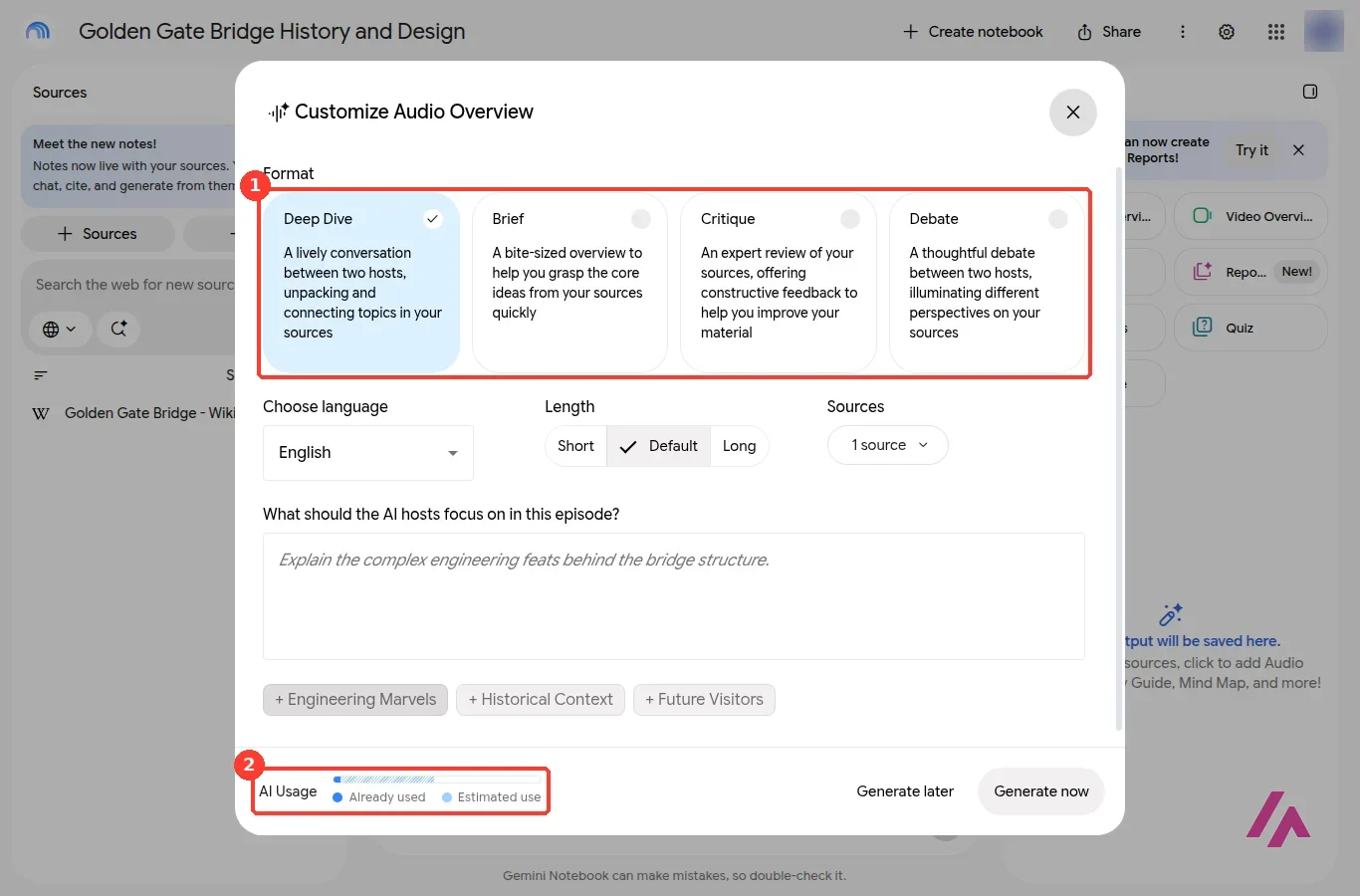
At the bottom there's an AI Usage bar showing what you've already used and what this generation will cost. It's a handy gauge, since Google doesn't publish the free limits as a number. If you're out of allowance, Generate later queues the job instead; Google says it may take a couple of hours, and it's web only.
I kept the default Deep Dive, set the length to Short and clicked Generate now. The Studio said "Generating Audio Overview… Come back in a few minutes," and it meant it: about five minutes later the episode was ready, under a title the tool picked for itself, "Why the Golden Gate Bridge Hums." Short, it turns out, is relative: my Deep Dive came out at just over seven minutes. You can play it right there in the Studio.
If you want something you can listen to between two meetings, try Brief instead. And if the hosts drift into parts you don't care about, the focus box is where you steer them.
Everything else in the Studio
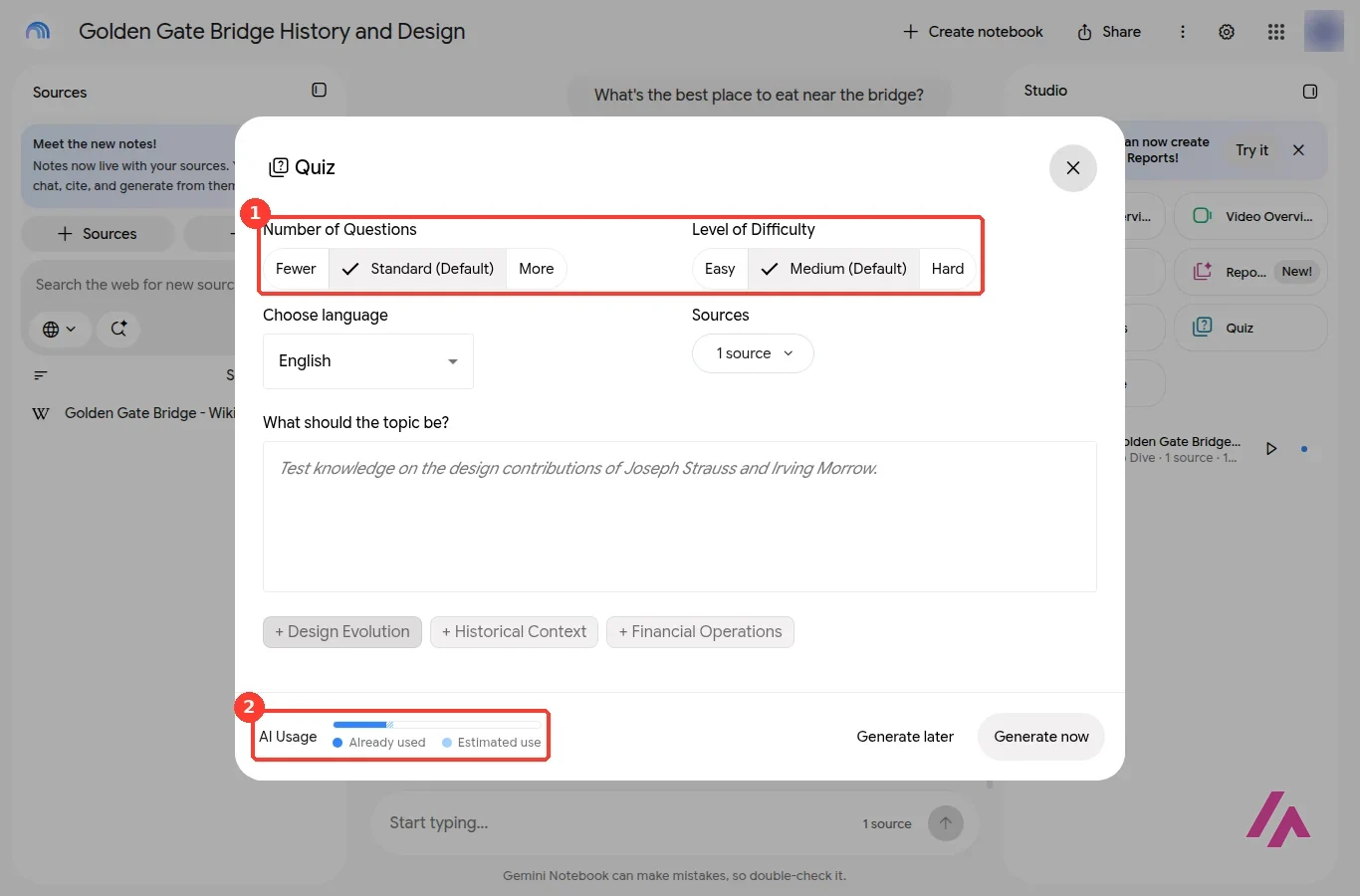
The Studio panel turns the same sources into other formats: Video Overview, Mind Map, Reports (interactive reports were the "New!" item the day I tried it), Flashcards, Quiz and Data Table. I opened the Quiz options to see how much control you get: the number of questions (Fewer, Standard or More), the difficulty (Easy, Medium or Hard), the language, which sources to use and a box for the topic. The same AI Usage bar sits at the bottom, and it's a good reality check: after my two questions, the "already used" part of the bar was a sliver; after one Audio Overview, it was roughly a quarter.
On the home page, besides your own notebooks, there's a row of "Featured notebooks," public notebooks built around full books and topics, and Collections to group your notebooks.
One more thing for anything visual you make here: according to Google's help center, images and videos generated in Gemini Notebook with Veo, Omni or Nano Banana carry an invisible SynthID watermark, and a visible watermark is added too unless you're on Pro or Ultra and switch it off.
Is NotebookLM free?
Yes. With a Google Account you get 100 notebooks, up to 50 sources per notebook, and every Studio tool, Audio Overviews included. What's limited is how much you use it. Google's help center says the limits are compute-based: the complexity of your prompt, the features you use and the length of your chat all count. Your quota refreshes every 5 hours until you hit a weekly limit, and when you get close, a message under the chat tells you when it resets.
There's no number to plan around (Heads-up)
Google doesn't publish how many questions or Audio Overviews the free plan includes, only that paid plans multiply it. If you're relying on it for a deadline, don't leave the Audio Overviews and quizzes for the last evening.
NotebookLM pricing in the US
There's no standalone NotebookLM subscription. Higher limits come with Google's AI plans, which also include Gemini, storage and other perks. These are the prices on Google's US plans page:
| Plan | Price (USD) | Notebooks | Sources per notebook | Usage limits |
|---|---|---|---|---|
| Free (Google Account) | $0 | 100 | 50 | Standard |
| Google AI Plus | $4.99 a month | 200 | 100 | 2x standard |
| Google AI Pro | $19.99 a month | 500 | 300 | 4x standard |
| Google AI Ultra 5x | $99.99 a month | 500 | 500 | 5x Pro |
| Google AI Ultra 20x | $199.99 a month | 500 | 600 | 20x Pro |
Both Ultra plans are billed monthly only, and Google's help center says these limits may change. Pro also lets you turn off the visible watermark on generated images and videos, and gets priority access to new features (Plus gets early access).
You're paying for a Google bundle (Important)
Plus comes with 400 GB of storage and Pro with 5 TB, plus the paid side of Gemini. If you'd use those anyway, the upgrade is cheap. If all you want is more Audio Overviews, start with Plus and see whether twice the limit is enough.
As for your data: Google says what you upload isn't used to train Gemini Notebook unless you send feedback, in which case it may review the whole interaction.
Who it's for, and who should skip it
Gemini Notebook is for people who start from their own material: a syllabus, a stack of PDFs, a contract, a set of interviews, a long report. It reads only what you give it, shows where every sentence came from and turns the same sources into something you can listen to on a walk. If that's how you work, the free plan will take you a long way.
Skip it if you want an assistant that already knows things, or one that searches the web for you as it answers. That's a different job, and a general assistant does it better.
NotebookLM or something else?

For everyday questions without sources, Google's own Gemini is the obvious partner, and the same Google AI plans cover both. If your sources are still out on the web, Perplexity searches it for you and lists its citations. For long back-and-forth writing on a document, Claude is built for that. If your notes already live in Notion, Notion AI can answer from your own workspace, though beyond a short trial it comes with Notion's Business plan. And if what you really want is a podcast from your documents, I compared what's left now that Copilot Podcasts is gone in NotebookLM vs VibeVoice vs Copilot Podcasts.
Written by Miguel Ángel, with help from an LLM to verify facts.
Who is it for? For students, researchers, writers and anyone who reads for work and wants answers they can trace back to a page. If you want a general chatbot that knows a bit of everything, or answers from the open web, it isn't built for that: look at the alternatives below.
What I like and what I don’t
What I like
- Answers come only from your sources, and every sentence carries a number that takes you to the passage it came from.
- It admits gaps: asked about something my source didn't cover, it said the sources didn't say and showed me only what they did.
- The free plan is generous: 100 notebooks, 50 sources each, plus Audio Overviews, flashcards, quizzes and the rest of the Studio.
What I don’t
- The limits are vague: they're based on compute, refresh every 5 hours and stop at a weekly cap, and Google doesn't say how many questions or Audio Overviews that means.
- There's no NotebookLM-only plan. To raise the limits you buy a Google AI bundle, which makes sense only if you'd use the storage and the rest.
- On the free plan and Plus, generated images and videos get a visible watermark; only Pro and Ultra can turn it off.
Have you used NotebookLM? Tell me how it went
What worked for you and what didn’t. Your experience helps the next person who lands here unsure more than any review page. I read every one before publishing.
Write my review
NotebookLM pricing
Prices checked on the official site on · before tax
-
Free
Free
With a Google Account, 100 notebooks, 50 sources per notebook, standard usage limits that refresh every 5 hours up to a weekly limit
- Cheapest paid plan
Google AI Plus
$4.99/mo
200 notebooks, 100 sources per notebook, twice the standard usage limits, plus 400 GB of Google storage
-
Google AI Pro
$19.99/mo
500 notebooks, 300 sources per notebook, four times the standard usage limits, a toggle to turn off the visible watermark on generated images and videos, 5 TB of storage
-
Google AI Ultra
from $99.99/mo
Ultra 5x $99.99 or Ultra 20x $199.99 a month (billed monthly only), 500 sources per notebook on Ultra 5x and 600 on Ultra 20x, and 5x or 20x Pro's usage limits
NotebookLM (Gemini Notebook) is free with a Google Account: 100 notebooks and 50 sources per notebook. Higher limits come with Google AI plans: Plus at $4.99 a month (twice the usage, 100 sources per notebook), Pro at $19.99 (four times, 300 sources) and Ultra at $99.99 or $199.99 a month, billed monthly only. My advice: stay free until the "limit reached" message becomes a weekly thing.
Alternatives to NotebookLM
-

Gemini
Free with limits · from $4.99/mo
When to pick it: If you want Google's general assistant for everyday questions, writing and images, without first collecting sources. The same Google AI plans cover both.
See details → -
Perplexity AI
Free with limits · from $20/mo
When to pick it: If the sources you need are still out on the web, Perplexity searches for you, and every plan lists citations in every answer.
See details → -

Claude
Free with limits · from $20/mo
When to pick it: If you want to discuss and rewrite long documents in a conversation, Claude is built around long documents, writing and code.
See details → -

ChatGPT
Free with limits · from $8/mo
OpenAI's AI assistant. Free with unlimited text chats on GPT-6 Luna, and you can start without an account. Go is $8 a month, Plus $20 with GPT-6 Sol, Pro from $100.
See details →
Guides about NotebookLM
-
Business applications
NotebookLM vs VibeVoice vs Copilot Podcasts: What Still Works
Three ways to turn text into a podcast-style conversation, and only one of them is still a product you can just open and use. Here's where Google's…

How I tested it
On October 13, 2026, I signed in to notebook.google.com with a Google Account, in US English and on the free plan. I created a new notebook, added one source (the Wikipedia article on the Golden Gate Bridge), asked it two questions, one it could answer from the source and one it couldn't, and generated a short Audio Overview. Plans and limits are the ones on Google's US plans page and Gemini Notebook help center that day. The screenshots in this review are from that session.
A walkthrough recorded after the rename: creating a notebook, Collections, Audio Overviews, slide decks, Video Overviews, mind maps, reports, flashcards, quizzes, infographics and data tables. The description has affiliate links to other tools.
Google for Education's own short video on turning class material into an Audio Overview and customizing the hosts. It was made before the rename, and Google says the tools it shows work the same in Gemini Notebook.

Written by Miguel Ángel, with the help of an LLM to fact-check. In IT since 2002 (systems, engineering, web development and SEO), doing business with AI since February 2023, when ChatGPT could first be bought in Spain. I build, write and maintain this site myself.

Got a question? Ask me
About NotebookLM, its plans or whether it fits what you need. I’m Miguel Ángel, and I’ll answer you myself, right here.