
Grok: Is It Free, What Each Plan Costs and What Happened to SuperGrok
11 min read
- Free with limits
- Personal assistant
- Web · iOS · Android
- Free $0 Limited use · account required
- Plus $8/mo Chat, Voice, Imagine, Build · X perks
Checked on · before tax
Open Grok AI
My verdict
In IT since 2002: systems, engineering, web development and SEO. I have been doing business with AI since February 2023, when ChatGPT could first be bought in Spain.
Grok is an all-round chatbot with one trick of its own: it searches X live, on top of the web. It's free, but only once you create an account. Without one, my first question got a sign-up box instead of an answer. The paid side changed in October 2026: SuperGrok is now the old name, and Grok is sold as The X Subscription, with Cursor and X perks bundled in. Plus at $8 covers chat, voice and images, but video and Grok Bot only start at Premium, $30 a month. If you don't care about X or Cursor, you're paying for extras you won't use.
What is Grok AI
- Type
- Personal assistant
- Platforms
- Web · iOS · Android
- Free plan
- Free with limits
- Updated on
- Oct 21, 2026
Grok is the AI chatbot from xAI (its website now says SpaceXAI): you chat with it on grok.com, in its iPhone and Android apps or inside X, and it can search the web and X live, make images and videos, and talk with you by voice. Is Grok free? Yes, but only with an account: the Free plan costs $0 and gives you limited chat, while without an account Grok won't answer a single question. Paid plans start at $8 a month with Plus, but video and Grok Bot start at Premium, $30. And if you're looking for SuperGrok, that's the old name: since October 12, 2026, Grok is sold as The X Subscription, together with Cursor and X Premium perks.
What Grok is in 2026
Grok is a full assistant these days: chat with different modes (Fast, Auto, Expert and Heavy, the last two running on Grok 4.7), live search across the web and X with citations, file uploads, connectors to Gmail, Google Drive or Outlook, Grok Imagine for images and video, and voice conversations. xAI says it speaks more than 30 languages.

The bit that sets it apart is X. xAI says Grok follows posts as they happen, which pitches it as the assistant to ask about something that broke an hour ago. Plenty of chatbots search the web; live search on X is Grok's own trick.
Is Grok free?
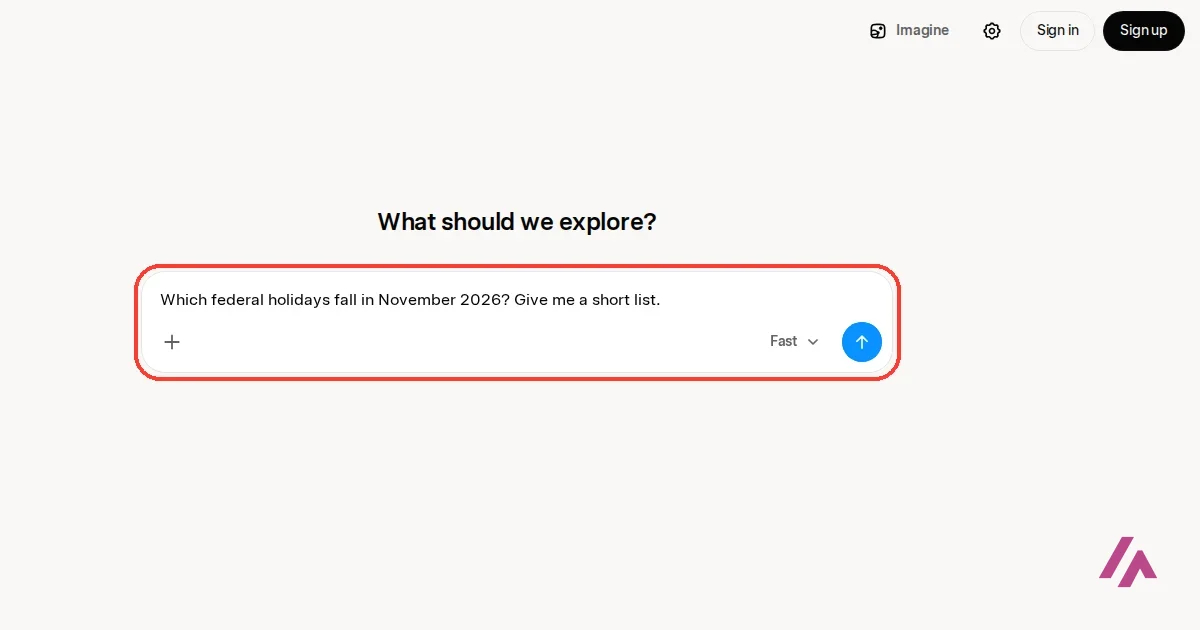
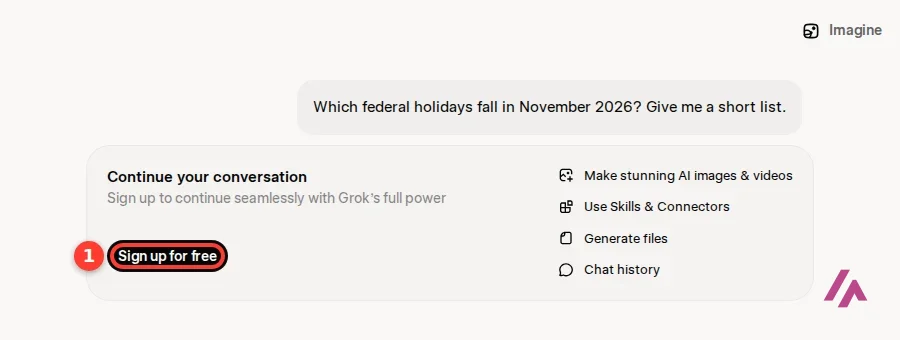
Yes, as long as you sign up. I opened grok.com without an account, typed a simple question about the federal holidays in November 2026 and hit Enter. Instead of an answer, I got a box saying "Continue your conversation" and a button to sign up for free.
The sign-up page lets you use an X, Apple, Google or GitHub account, or plain email. You have to be at least 13, and between 13 and 17 you need a parent's or guardian's permission, according to xAI's terms; the iPhone app is rated 16+.
Once you're in, the Free plan gives you "Limited AI usage": limited chat, limited image generation in Imagine and limited Build, the mode that builds apps, games and websites from a description. xAI doesn't publish a number for those limits. What Free doesn't include at all, according to the pricing page, is video generation, Grok Bot or API access.
Free means free with an account (Heads-up)
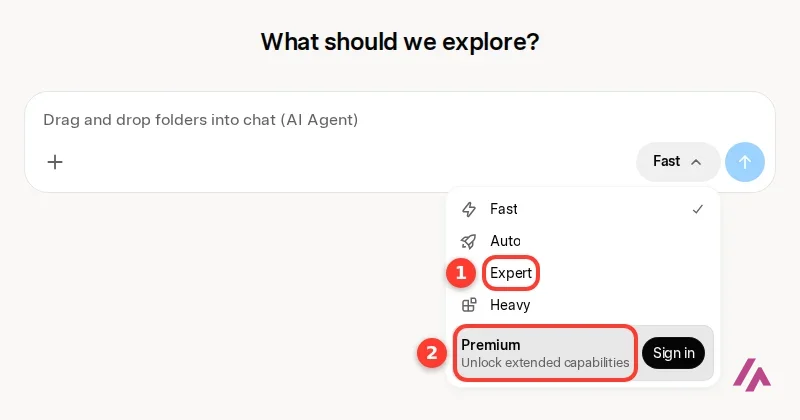
Grok's free plan only exists once you've signed up. Without an account, grok.com lets you type but won't answer, and Grok Imagine opens a sign-up window as soon as you try to generate something. Auto, Expert and Heavy also need you to sign in; without an account, only Fast is available.
What happened to SuperGrok?
Until October 12, Grok's paid plans were SuperGrok Lite ($10), SuperGrok ($30), SuperGrok Plus ($100) and SuperGrok Heavy ($300). On October 12, 2026, xAI introduced The X Subscription, which is what new customers now get instead: one plan for Grok, Grok Bot, Cursor and X Premium, with tiers called Plus, Premium, Super and Ultra.
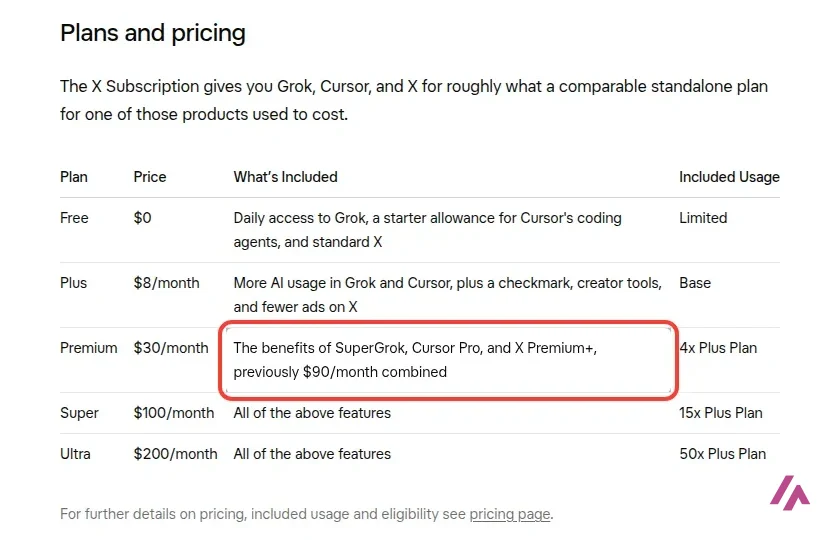
The announcement puts it plainly: Premium at $30 a month gets you "the benefits of SuperGrok, Cursor Pro, and X Premium+, previously $90/month combined." So if you were paying $30 for SuperGrok, the same money now buys a bigger bundle. Whether you need a coding agent and a checkmark on X with your chatbot is another question.
If you already have SuperGrok, nothing happens unless you choose to switch: xAI says old SuperGrok, Cursor and X Premium plans continue, and if you switch, they're cancelled with a prorated refund. Two things to know first. The switch is permanent, and support can't undo it. And if you pay for Cursor through Apple's App Store, switching doesn't cancel it: you have to cancel it yourself in your iPhone or iPad settings.
The old name hasn't fully gone away, either. When I checked, xAI's Grok page still had a "Get SuperGrok" button, and the iPhone app in the US App Store still listed SuperGrok Lite, SuperGrok, SuperGrok Plus and SuperGrok Heavy as in-app purchases. On grok.com itself, the upgrade spot in the mode menu now says Premium.
Grok pricing
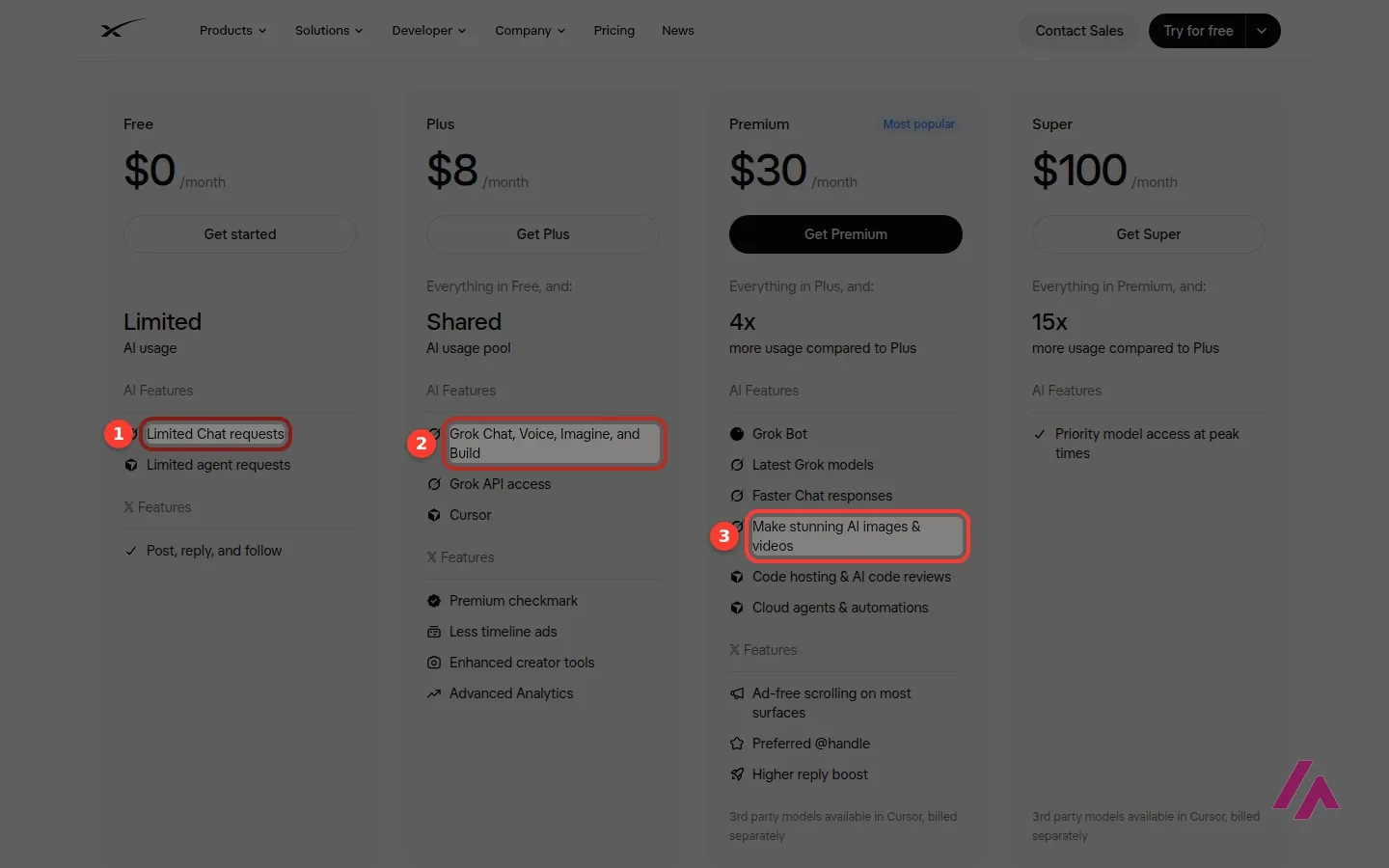
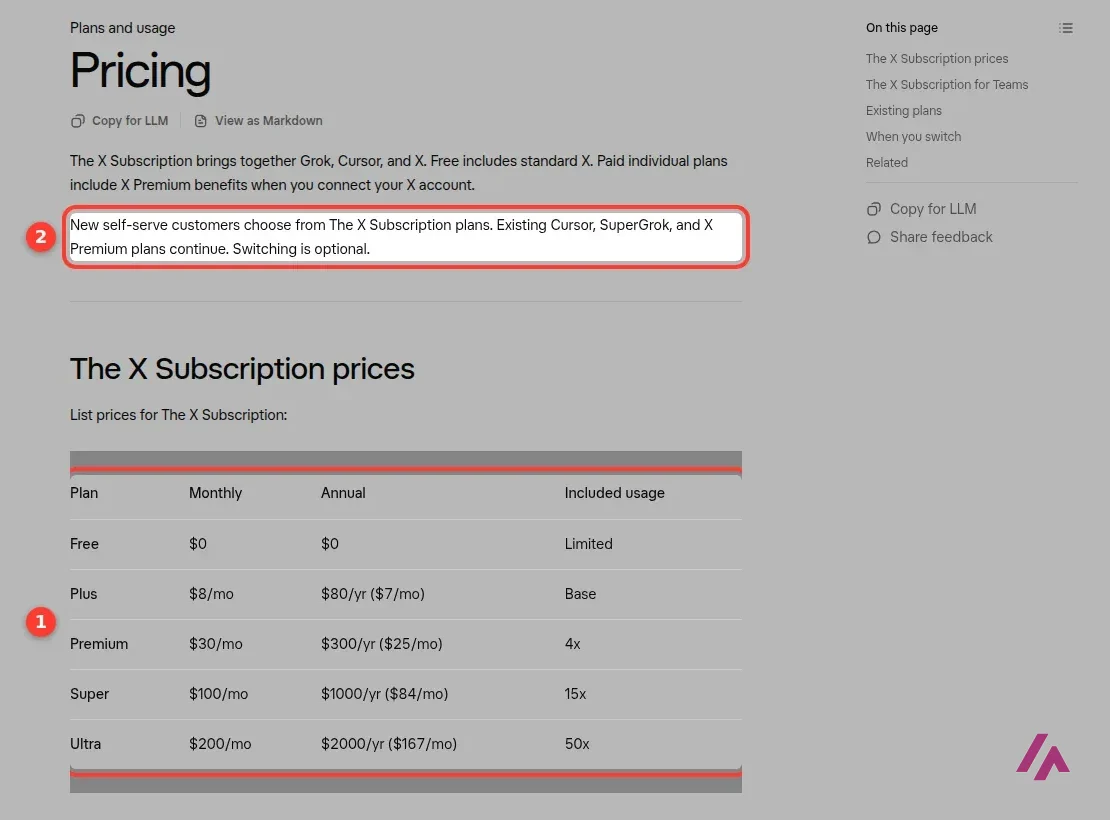
These are the prices on x.ai/pricing and in xAI's docs, in US dollars. Prices don't include tax, and you can cancel anytime; do it at least 24 hours before renewal to avoid the next charge.
| Plan | Monthly | Billed yearly | What you get |
|---|---|---|---|
| Free | $0 | $0 | Limited chat, limited images in Imagine, limited Build; no video, no Grok Bot |
| Plus | $8 a month | $80 a year | A shared usage pool for Grok Chat, Voice, Imagine images and Build, API access, Cursor, X checkmark and fewer ads |
| Premium | $30 a month | $300 a year | 4x the usage of Plus, AI video, Grok Bot, cloud agents, X Premium+ perks |
| Super | $100 a month | $1,000 a year | 15x the usage of Plus, 1080p video, priority access at peak times |
| Ultra | $200 a month | $2,000 a year | 50x the usage of Plus, the most powerful chat models, earliest access to new products and models |
| Teams | $30, $100 or $200 per seat a month | Not listed | Premium, Super or Ultra seats you can mix, centralized billing, SSO |
Above that sits Enterprise, at a custom price. The yearly prices aren't on the main pricing page; they're in the docs and on grok.com's plans page, and they work out to about two months free. When I loaded that plans page as seen from the US, there was also an offer of 50% off the first month of Premium, Super or Ultra, so Premium started at $15. Offers like that come and go.
Which plan I'd pick (Tip)
Start on Free and use it for a week. If you mostly chat and make an image now and then, Plus at $8 is cheap. If you want video, Grok Bot or Claude and GPT inside Cursor (billed on top), skip Plus and go to Premium: it's the plan xAI itself recommends for new users. Pay yearly only once you know you'll stay.
How the weekly usage pool works
Sorry, this part gets a little technical, but it decides how far your plan goes. Every paid plan comes with one weekly pool, shared by everything: chat, voice, Imagine, Grok Bot, the Grok tab on X and the coding agent in Cursor. A chat message uses little; a high-quality video or a long coding job uses far more. You can see what's left, broken down by product, in Settings, under Usage.
According to xAI's Grok FAQ, when the pool runs out, paid features pause until the weekly reset, but you keep Grok's free limits for chat and voice. If you can't wait, you can buy Extra Usage Credits from $5, for now only on the web. They last a year and cost more per action than what's included in your plan, so if you keep running out, moving up a plan is better value.
Developers pay separately: the API isn't part of the pool. Grok 4.7, xAI's top model, costs $2 per million input tokens and $6 per million output tokens.
Grok Imagine: images and video
Grok Imagine lives at grok.com/imagine and in the apps. You pick image or video, describe what you want, and choose between Speed and Quality for images. There's also a long row of templates: text edit, product photos, headshots, background removal, icons, emoji and more.
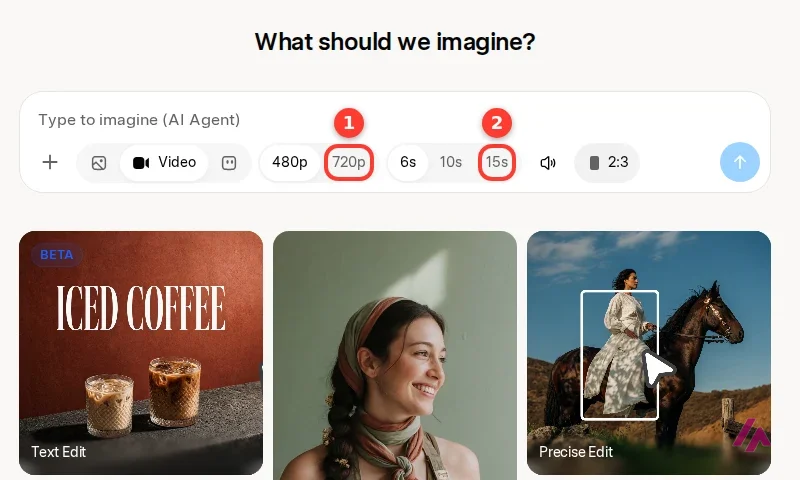
In video mode, the controls offer 480p or 720p, 6, 10 or 15 seconds, and a sound toggle. On Super and Ultra, you can make 1080p videos. When I tried to generate a short clip of a bike against a brick wall without an account, Imagine opened a sign-up window. And remember where the plans draw the line: images are in Free (limited) and Plus, but video starts at Premium.
Two details xAI's help pages spell out: everything you make carries a "grok" watermark that you can't turn off, and once you hit your plan's 720p cap, videos drop to 480p.
Grok Voice
Voice mode is how you talk to Grok out loud, and xAI promises replies in under a second. Voice is limited on Free and on every paid plan, and along with chat, it's one of the two things that keep running on the free limits once your paid pool is used up, according to xAI's FAQ.
If you've seen headlines about Grok Voice 3.0, that's the speech-to-speech model xAI announced for developers on October 14, 2026. It costs $0.08 a minute in the API, and xAI says it powers Grok Bot's voice mode and millions of conversations a day in Tesla cars. xAI's posts don't say which model the voice mode in the Grok app runs on.
Who Grok is for, and who should skip it
Grok makes sense if you spend time on X and want an assistant built to keep up with what's being posted there, or if you'll use the bundle: Premium at $30 with Grok, video, Grok Bot, Cursor and X Premium+ perks is good value if you'd otherwise pay for two of those.
Skip it if you don't want to create an account just to ask a question, or if the X perks mean nothing to you. You'd be paying for a checkmark you'll never show anyone.
Grok or something else?

If you want the most polished all-rounder, ChatGPT is free, lets you start without an account, and Plus is $20 a month. Claude is my pick for long writing and code, with a free plan and Pro at $20 a month including Claude Code. If your life runs on Gmail and Google Docs, Gemini is free with a Google Account, and Google AI Pro is $19.99 a month. And if you just want a capable chatbot without any monthly bill, DeepSeek's chat is free on the web and in its apps.
A short walk-through of the five plans of The X Subscription in US dollars, who each one fits and how to switch from SuperGrok, recorded on launch day from the official pages.
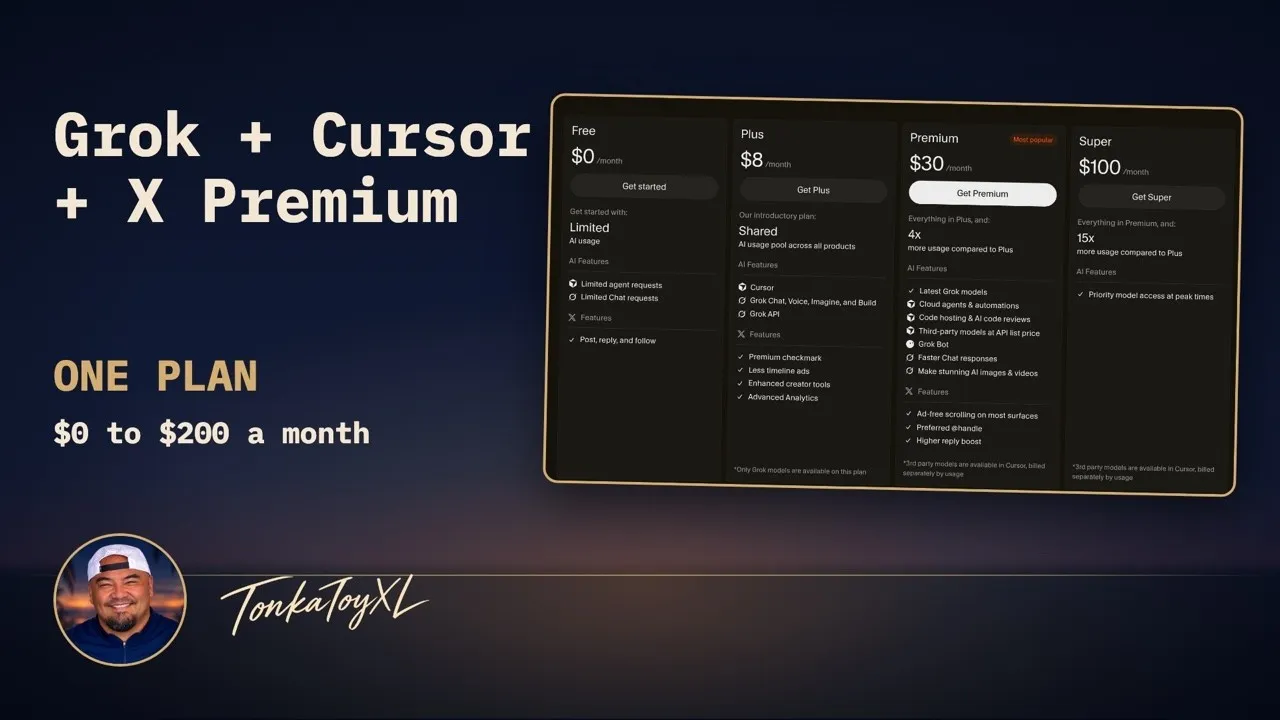
Who is it for? For people who spend time on X and want an assistant built to keep up with what's being posted there, and for anyone who'd actually use the bundle: Grok, Cursor for coding and X Premium perks on one bill. If you just want a general chatbot, ChatGPT's free plan is easier to start with, since it doesn't even ask for an account, and Gemini only needs the Google Account you probably already have.
What I like and what I don’t
What I like
- xAI says it searches the web and X live, so it can answer about what's being posted right now, not just what was in its training data.
- One weekly usage pool shared by chat, voice, images and video, so you can spend it all on whatever you need that week.
- Paid plans also include Cursor and X perks, and paying yearly gets you about two months free ($80 a year for Plus).
What I don’t
- No account, no answers: grok.com asks you to sign up before it replies to anything.
- Video generation and Grok Bot aren't in Free or Plus; they start at Premium, $30 a month.
- The SuperGrok name still shows up in the iPhone app's App Store listing and on some of xAI's own pages, which can be confusing when you go to buy.
Have you used Grok AI? Tell me how it went
What worked for you and what didn’t. Your experience helps the next person who lands here unsure more than any review page. I read every one before publishing.
Write my review
Grok AI pricing
Prices checked on the official site on · before tax
-
Free
Free
Limited chat and agent requests; account required
- Cheapest paid plan
Plus
$8/mo
Grok Chat, Voice, Imagine and Build from a shared usage pool, plus X perks (fewer ads, Premium checkmark)
-
Premium
$30/mo
4x Plus usage, Grok Bot, AI images and videos, cloud agents and mostly ad-free X
-
Super
$100/mo
15x Plus usage and priority model access at peak times
-
Ultra
$200/mo
50x Plus usage
Free is $0, with limited chat, limited image generation and limited Build. Plus is $8 a month, Premium $30, Super $100 and Ultra $200, or $80, $300, $1,000 and $2,000 a year if you pay annually. Teams seats are $30, $100 or $200 per user a month, and Enterprise is custom. Prices are in US dollars and exclude tax. The plans are sold as The X Subscription, only through X Subscription Corp., and old SuperGrok plans keep running until you switch.
Alternatives to Grok AI
-

ChatGPT
Free with limits · from $8/mo
When to pick it: If you want the most polished all-rounder: ChatGPT is free, you can start without an account, Go is $8 a month and Plus $20.
See details → -

Claude
Free with limits · from $20/mo
When to pick it: If you write long texts or code: Claude has a free plan, and Pro at $20 a month includes Claude Code.
See details → -

Gemini
Free with limits · from $4.99/mo
When to pick it: If you live in Google's apps: Gemini is free with a Google Account, Google AI Plus is $4.99 a month and Google AI Pro $19.99.
See details → -
DeepSeek
Free
When to pick it: If you want a capable chatbot with no monthly bill at all: DeepSeek's chat is free on the web and in its apps.
See details →
How I tested it
On October 21, 2026, the day I checked Grok's prices, I went through grok.com and Grok Imagine without an account, in a browser set to US English: I asked Grok a question, opened the mode menu, set up a video in Imagine and tried to generate it. I also read x.ai's pricing page, the plans page as seen from the US, the docs on The X Subscription and usage limits, the terms and the App Store listing. The screenshots are mine, except the X Subscription image, which comes from SpaceXAI.
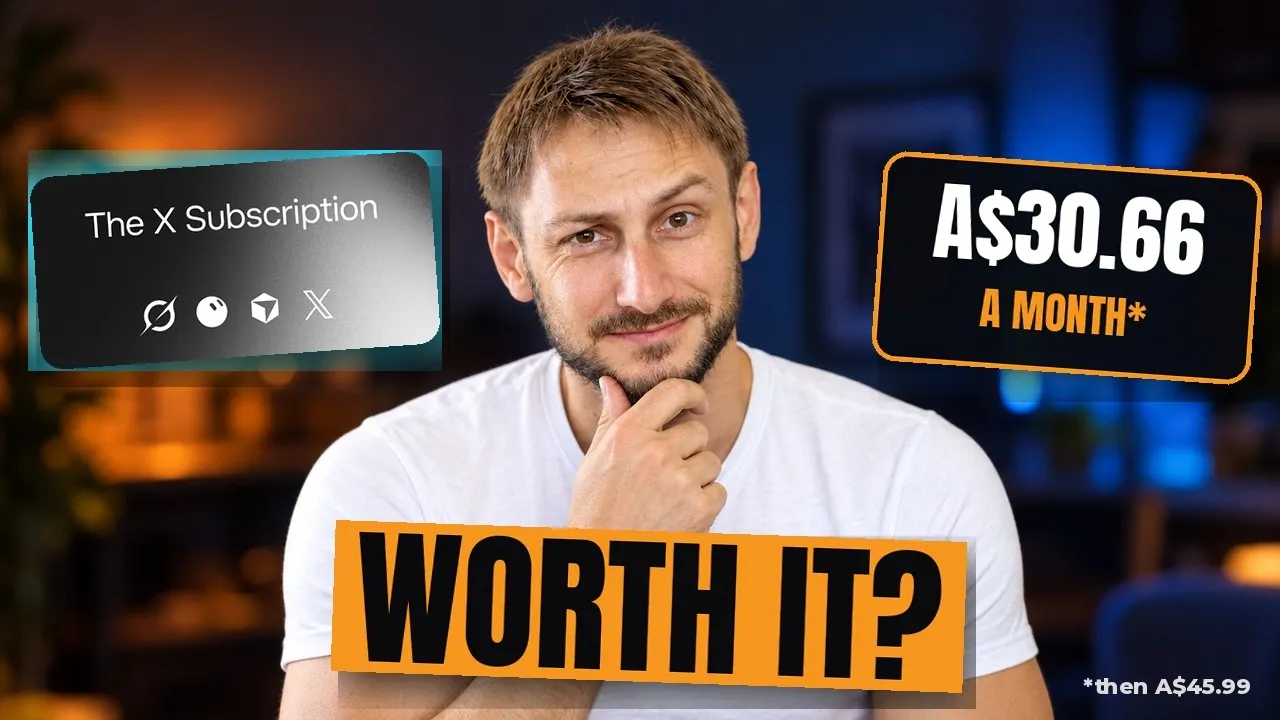
If you already pay for SuperGrok, this is what switching looks like: Carl moves his three subscriptions over on camera. He's in Australia, so the prices on his screen are in Australian dollars.
Grok Imagine from the inside, since generating anything needs an account: how to start, how to get more realistic images and short videos, and how not to waste usage. It was recorded before the new plans.

Written by Miguel Ángel, with the help of an LLM to fact-check. In IT since 2002 (systems, engineering, web development and SEO), doing business with AI since February 2023, when ChatGPT could first be bought in Spain. I build, write and maintain this site myself.

Got a question? Ask me
About Grok AI, its plans or whether it fits what you need. I’m Miguel Ángel, and I’ll answer you myself, right here.