
Krea AI Review: Is It Free, What It Costs and How Krea 3 Handled My Shop Signs
12 min read
- Free with limits
- Image
- Web · iOS · API
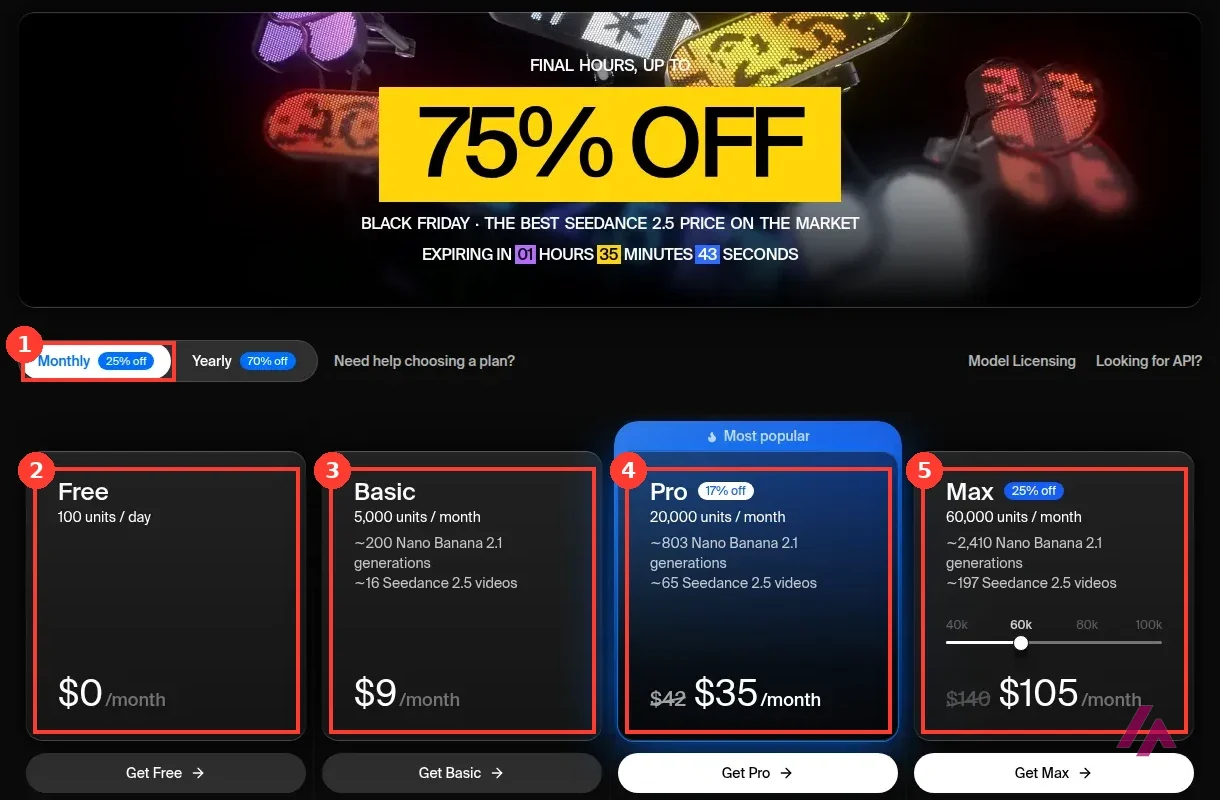
- Free $0 100 units/day · no commercial license
- Basic $9/mo 5,000 units/month · commercial license
Checked on
Open Krea AI
My verdict
In IT since 2002: systems, engineering, web development and SEO. I have been doing business with AI since February 2023, when ChatGPT could first be bought in Spain.
Krea AI is a well-stocked toolbox: its own models, plenty of others, an upscaler, an image editor and a live canvas, all in one app that opens in your browser. The free plan is a real test drive with no card, and Krea 3 spelled shop-sign names with accents correctly. The catches: 100 daily units buy only two Krea 3 images, the editor didn't fix a misspelled word when I asked it to, and the sign-up screens push discounts hard.
What is Krea AI
- Type
- Image
- Platforms
- Web · iOS · API
- Free plan
- Free with limits
- Updated on
- Nov 24, 2026
Krea AI is a web app that puts a whole shelf of AI creative tools in one place: image generation with its own Krea 3 and Krea 2 models plus others such as Nano Banana and Flux, video models, an upscaler, an image editor, 3D objects, voiceovers and a canvas that renders as you draw. Is Krea AI free? Yes: the free plan gives you 100 compute units a day, with no card, although it doesn't include a commercial license. How much does it cost after that? Paid plans start at $9 a month (Basic), and Pro, the most popular, is $35.
I've used it on a free account several times since October. Here's what my units bought, where Krea 3 got it right and where it tripped.
What is Krea AI?
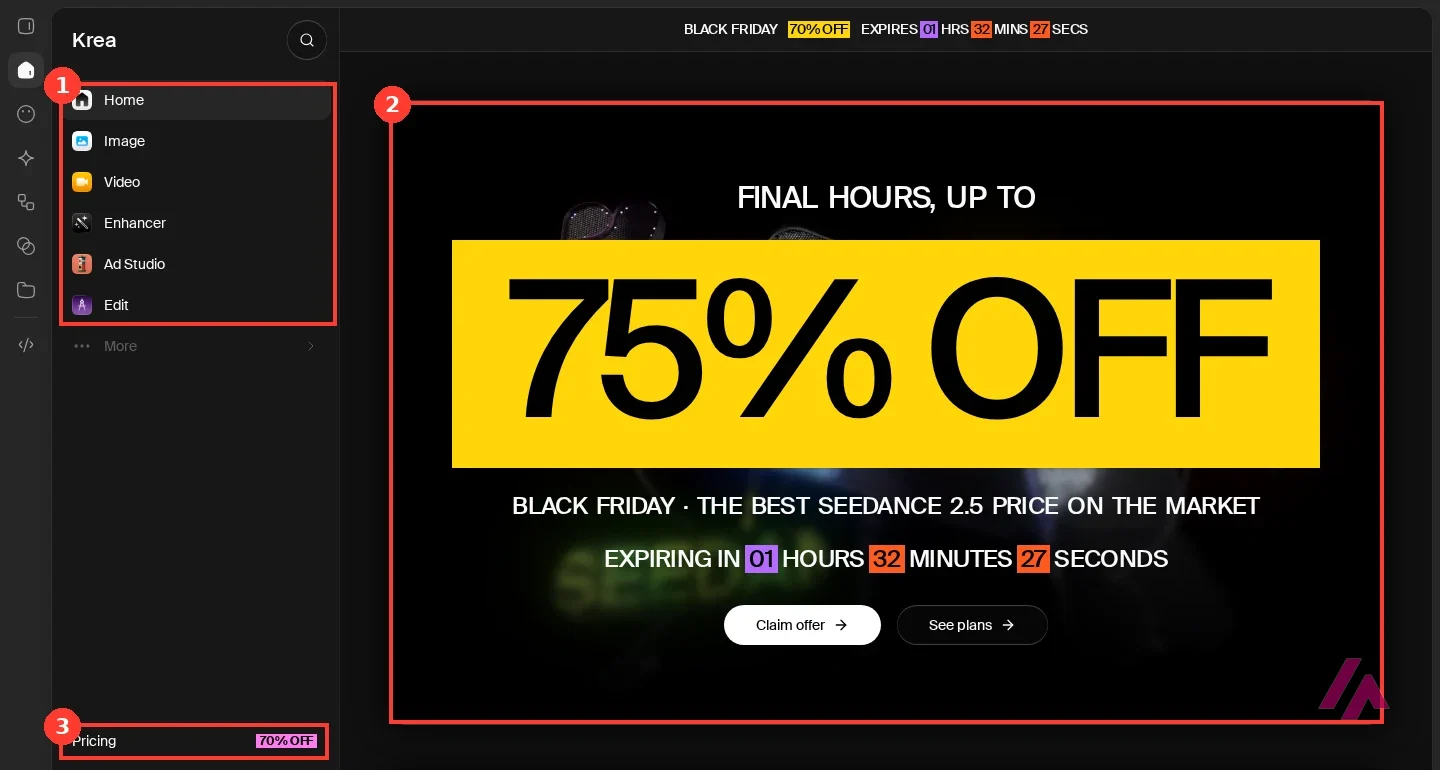
Krea is a one-stop app. The sidebar lists Image, Video, Enhancer, Ad Studio and Edit, and the menus add Realtime, 3D Objects, AI Voice, Lipsync, Motion Transfer, LoRA training (teaching it your own style), Nodes for chaining models into workflows, and community-made mini apps. There's also Krea Agent, which, according to Krea, turns an idea into images and videos, planning them with you.
Its house models are Krea 3, which Krea pitches as its most advanced image model, and Krea 2. Next to them sit models from other companies: Nano Banana, GPT Image, Ideogram, Flux and Seedream for images, and Seedance, Kling and Veo for video. Every generation costs compute units, and the price depends on the model: in the model picker, Krea 2 Turbo cost 2 units per image and Krea 3 about 35.
Krea works in the browser, with an iOS app, an API and plugins for Photoshop, After Effects, Premiere Pro, DaVinci Resolve and Blender. You can also connect it to ChatGPT and Claude to generate from there.
Signing up: free, but brace for the offers
I signed up with a Google account: no captcha, no phone number, no card. Then came a six-step onboarding: a few questions (what you'll use it for, your level, your field) that are worth answering, because Krea adds 100 welcome credits when you do.
The last step is a sales pitch with a countdown: 40% off Pro for the first year. When I skipped it, a second offer showed up at 50% off, and then a "final chance" screen. I turned them all down and paid nothing, but expect three offers in a row.
Finish the questionnaire, skip the offers (Tip)
The questions are quick and earn you 100 extra credits on top of the daily ones. The discount screens at the end can wait: you can always upgrade later if the free plan falls short.
My first test: a green armchair in watercolor for 4 units
I started with the model on Auto and a short prompt in French: a green velvet armchair in a bright living room, watercolor style. Auto picked Krea 2 Turbo and returned two vertical images in seconds.
The watercolor was real watercolor: color bleeding at the edges, loose patches, white paper showing through. The first image had the armchair, the windows, curtains, plants and pictures on the wall; the second put the chair by a big window with sheer curtains. Two small misses: the books on the shelf were dark blobs, and a sofa on the left was cut off. The cost was 4 units, 2 per image.
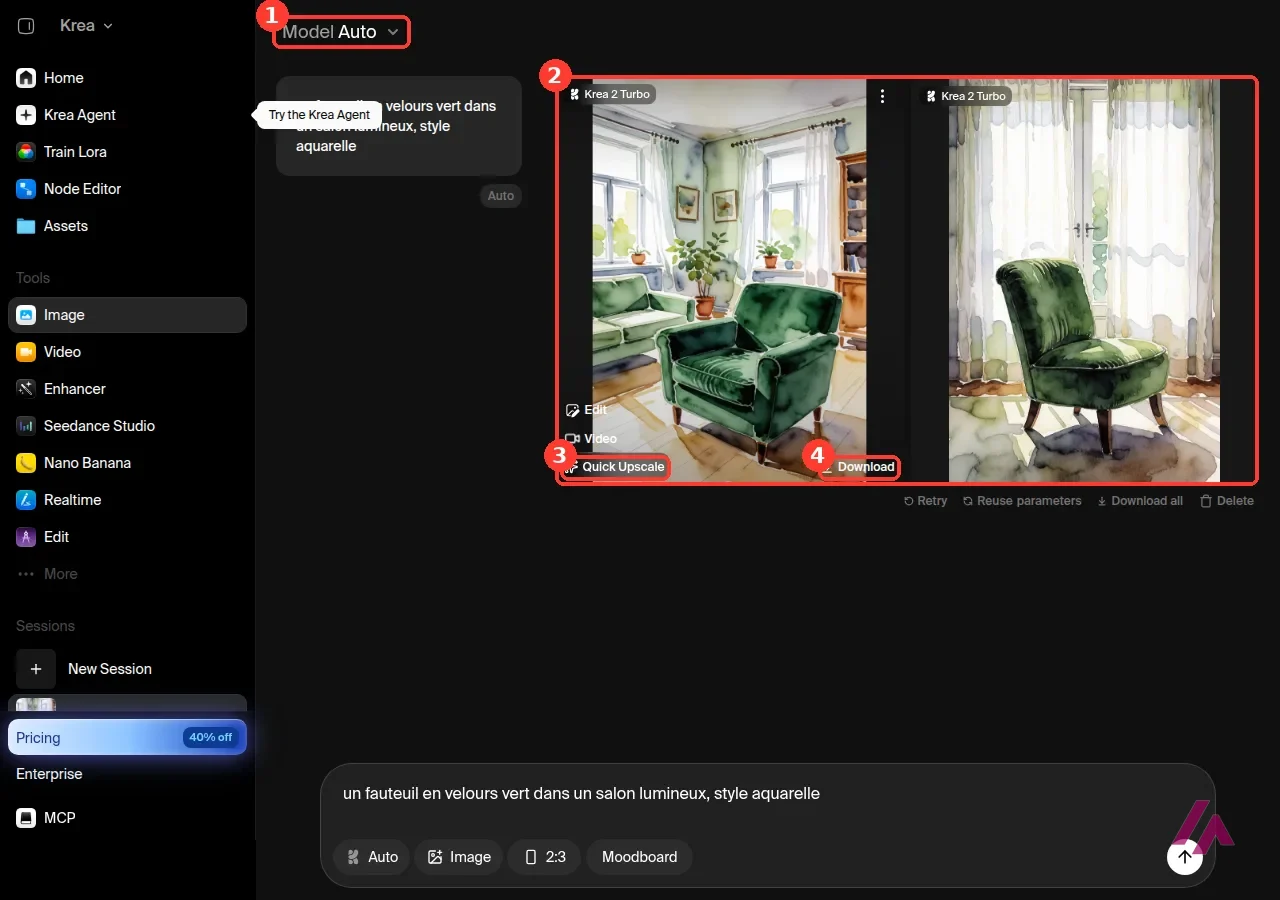
I then ran Quick Upscale on the first one. It came back larger and sharper, the same picture, for 14 units. Neither the original nor the upscaled file had a watermark.
Krea 3 and the shop signs: one perfect, one with a typo
Text inside images is where image models usually stumble, so I gave Krea 3 two shop fronts with names full of accents. Two images cost about 72 units each time.
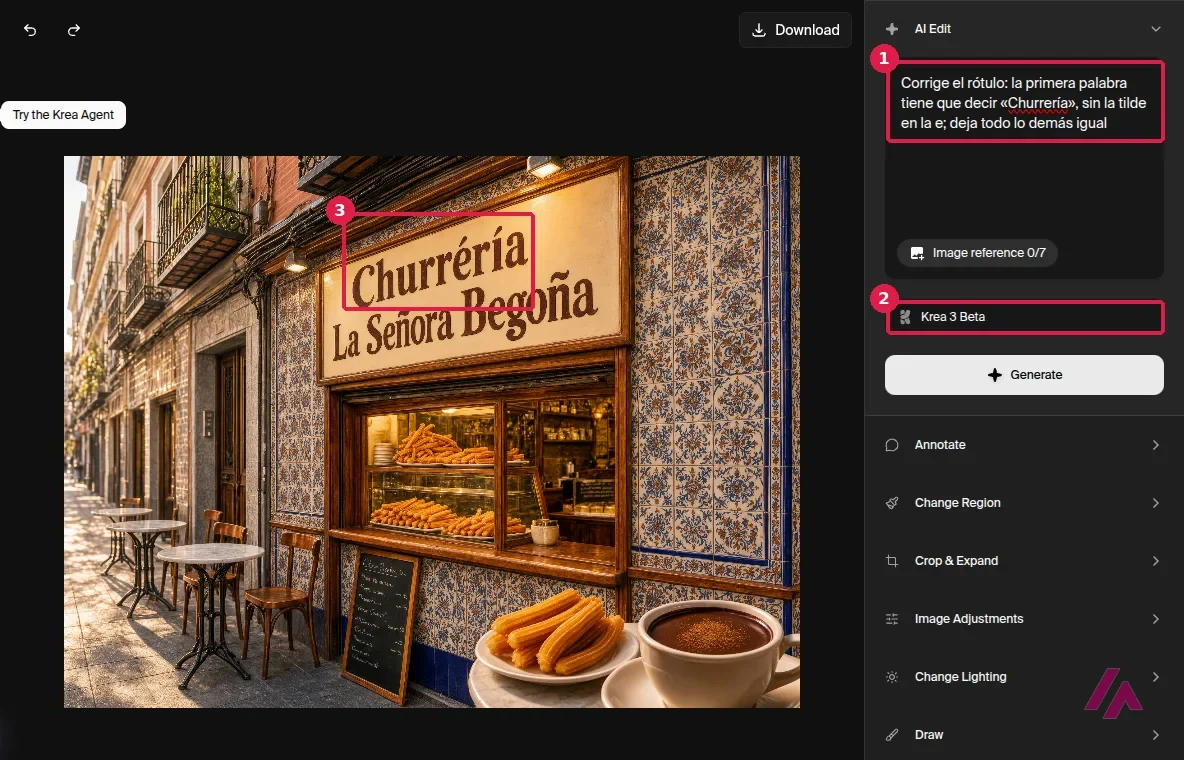
In Spanish, I asked for a neighborhood churro shop in Madrid with a hand-painted sign reading "Churrería La Señora Begoña", tiles, sidewalk tables and a cup of hot chocolate with churros. Back then the model was still labeled Beta, and Krea warned me that Krea 3 is designed for editing images and that generating from text alone was experimental. I went ahead anyway. The photos looked very realistic: blue-and-white tiles, marble tables, morning light. "La Señora Begoña" came out perfect, with both ñ's. But "Churrería" had an extra accent on the e in both images, the menu chalkboard was gibberish, and one image had a yellow taxi in the background, when Madrid's taxis are white.
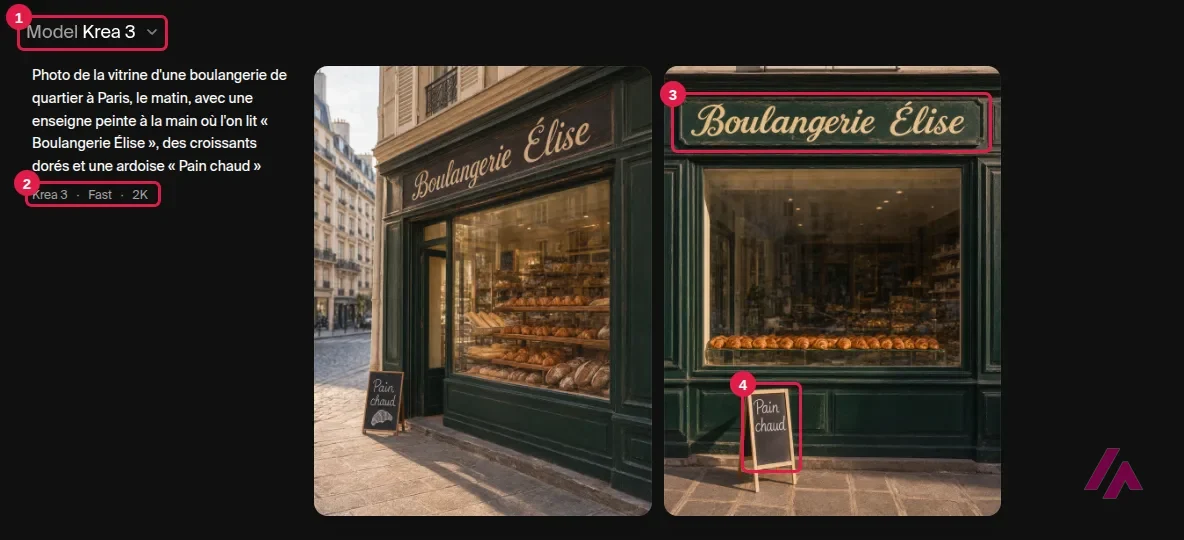
A month later, in French, I asked for a Paris bakery window in the morning, with a hand-painted sign reading "Boulangerie Élise", golden croissants and a chalkboard saying "Pain chaud" (hot bread). By then Krea 3 had dropped the Beta label and the warning was gone. This time it was flawless: the É in Élise, "Pain chaud" in chalk, rows of croissants, Haussmann-style buildings and cobblestones, and no made-up letters anywhere. The image was labeled 2K, and the download had no watermark.
The AI editor didn't fix the typo
Back to the churro shop: I opened the first image in Edit and asked, in Spanish, to correct the first word of the sign and leave everything else alone. The request sat in a queue for a few minutes, and the result was the same image with the same misspelled sign. That attempt cost 77 units, used up the rest of my daily allowance and started eating into the welcome credits.
I also ran the same churro prompt through Krea 2 Turbo for 4 units: decent photos with less detail, and the same extra accent. So if your image has text in it, read every letter before you use it.
Check the spelling yourself (Heads-up)
Krea 3 handled proper names with accents beautifully, but it can still misspell an ordinary word, and asking the editor to fix it didn't work for me. For a sign, a poster or a menu, zoom in on the text before you publish, and expect to fix a stubborn word in a regular image editor.
Realtime: a render that follows your prompt as you type
Realtime is also on the free plan. On the left you have a canvas, and on the right the render, which updates as you change the drawing or the text. I took Krea's sample of a black car on a gray background and typed, in Spanish, "the car buried in a pile of Valencia oranges, same background". Moments later the car was sunk in oranges with orange trees behind it. It ignored the "same background" part, though: the gray backdrop turned into an orchard.
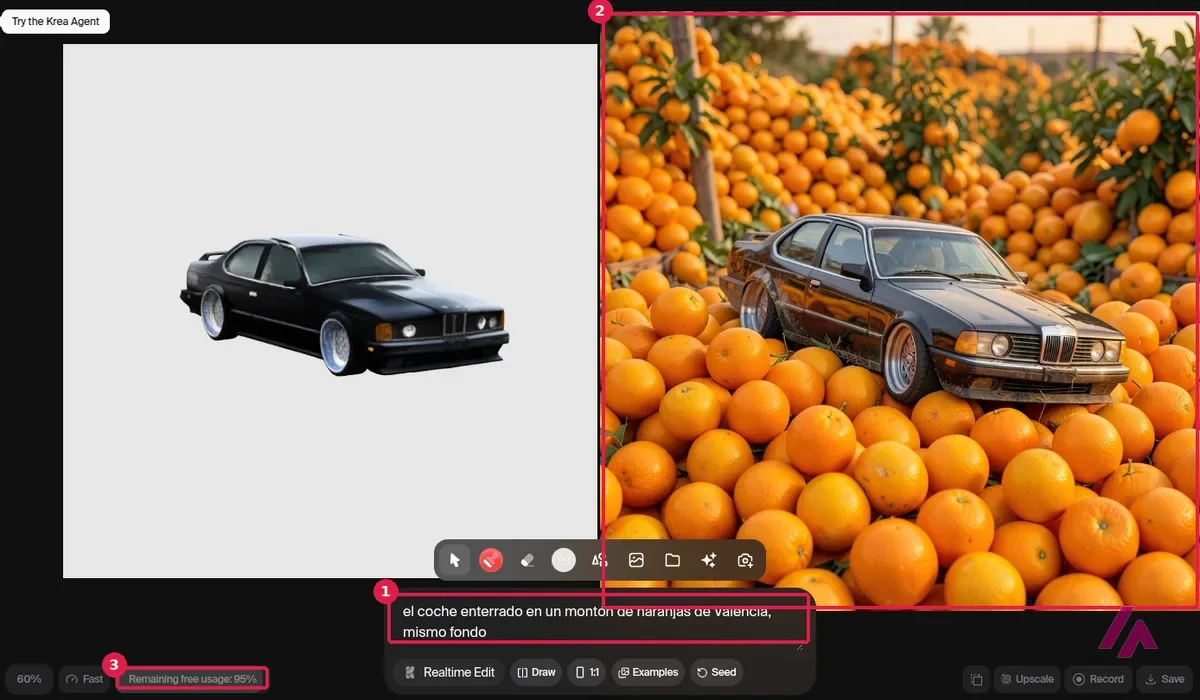
Realtime has its own meter, separate from your units: that change took it from 100% to 95%.
How far 100 free units go
The free plan refills 100 units every day, and Krea spends those before touching any credit packs or welcome credits. What that buys depends entirely on the model: with Krea 2 Turbo, around 50 images a day; with Krea 3, two images and change. My boulangerie pair left me with 28 of the 100 daily units.
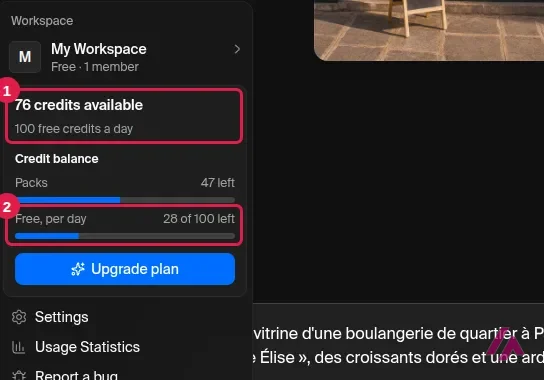
Two limits matter more than the count. The free plan has no commercial license, and it doesn't include every model: all the image models start with Basic, and all the video models with Pro.
How to use Krea AI, step by step
- Go to krea.ai and sign up with Google, Apple, single sign-on or an email address; no card needed.
- Answer the onboarding questions to get the 100 welcome credits, and decline the offers if you're not ready to pay.
- Click Image in the sidebar and type your prompt; French and Spanish worked fine for me.
- Pick a model: Krea 3 for detailed, photo-like images with text, or a fast model such as Krea 2 Turbo when you're exploring.
- Look at the unit cost on the generate button before you click.
- Use the buttons on each result to Download, Upscale, Edit or turn it into a Video.
- Check your balance in the workspace menu at the top of the sidebar.
How much does Krea AI cost?
Krea lists its prices in US dollars, and the pricing page doesn't mention tax. Each plan is mostly a bucket of compute units: Basic adds every image model, upscaling up to 22K and the commercial license; Pro adds all the video models; Max adds unlimited "relaxed" generations, which the pricing page describes as a way to keep generating with Krea's own image models after your units run out. These are the prices I saw on November 24, 2026, in the middle of a Black Friday sale advertising up to 70% off yearly plans.
| Plan | Monthly billing | Billed yearly (per month) | What you get |
|---|---|---|---|
| Free | $0 | $0 | 100 units a day, Krea 3, Krea Agent and real-time models; no commercial license |
| Basic | $9 | $5 | 5,000 units a month, all image models, selected video models, upscaling up to 22K, commercial license |
| Pro | $35 | $21 | 20,000 units a month, all video models, App Builder, discounts on unit packs |
| Max | $105 (60,000 units) | $42 with the Black Friday offer | Unlimited relaxed generations and LoRA training; 40,000 to 100,000 units a month |
| Business | $200 (80,000 units) | $96 with the Black Friday offer | Up to 50 seats, business terms of service, admin controls |
| Enterprise | Custom pricing | Custom pricing | Single sign-on, a service-level agreement and indemnification |
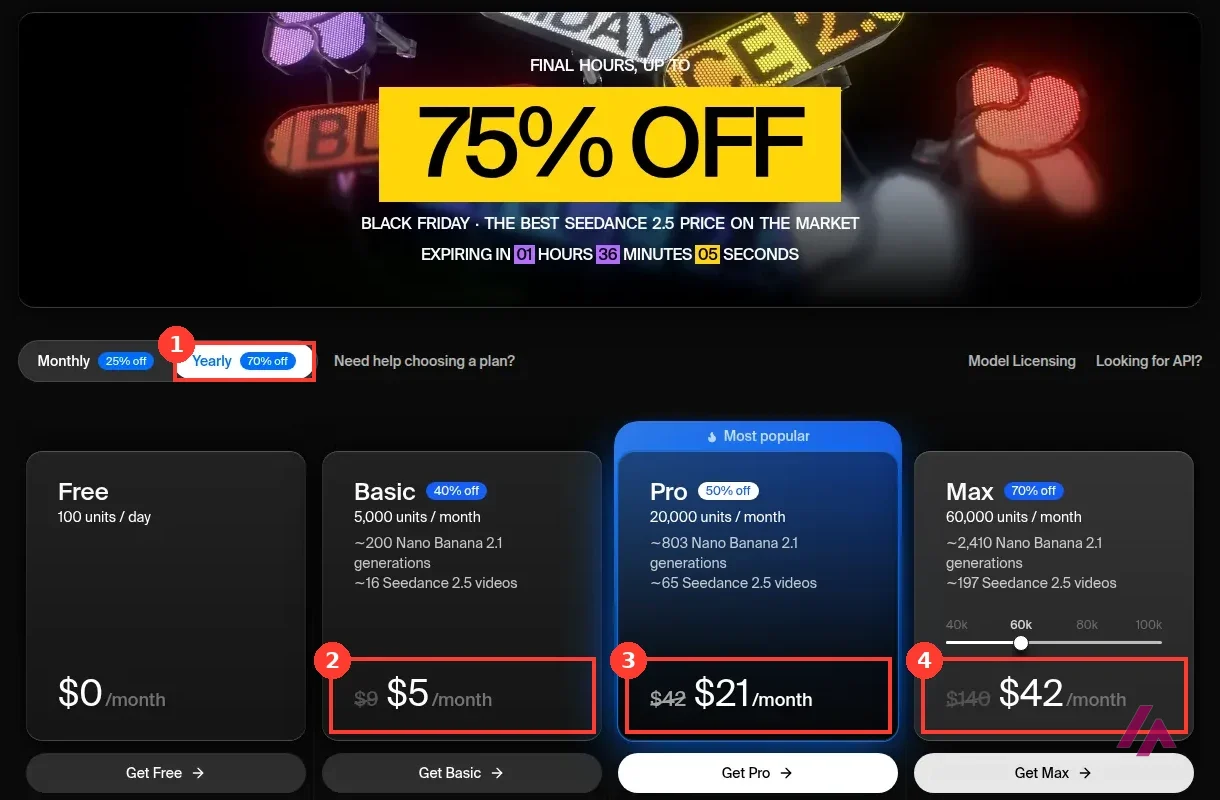
If you run out of units, you can buy one-time packs, which expire after 90 days. On the pricing page they ranged from $4.99 for 2,000 units to $176.99 for 100,000, the bigger ones shown at a discount. On Basic, Pro and Max, unused monthly units don't carry over to the next month.
The yearly discounts are a sale, not the list price (Important)
The Max and Business yearly prices in the table came from a Black Friday offer with a countdown on the page. Monthly prices were the same as in October. If the sale is over when you read this, look at the yearly prices again before you pay for a full year upfront.
Krea AI, Midjourney, Leonardo AI or Flux?
Krea's selling point is variety: many models, one bill. Depending on what you need, I'd also look at these three.
Midjourney is one model with a very distinctive look. There's no free trial on its website or in Discord, and plans run from $10 to $120 a month.
Leonardo AI is the closest in spirit: another image and video studio with its own models and other companies' models. Its free plan gives you 150 tokens a day, but everything you make on it is public; paid plans start at $12 a month.
And if you'd rather not subscribe at all, Flux from Black Forest Labs charges per image through its API, from $0.014 an image.
My take: Krea AI is the place to try a lot of models without opening a lot of accounts 🎨. The free plan is generous with the fast models and stingy with Krea 3, which is the one you'll want for anything with text in it. If two good images a day aren't enough, or you need the commercial license, Basic at $9 is a sensible first step; go to Pro only once you know you'll use the video models.
Tested and written by Miguel Ángel, with help from an LLM to verify the facts.
Krea's own short lesson on its Krea 2 image model: start with a vague prompt, change a few words and watch the style shift.
Who is it for? For designers, marketers and curious people who want to try many image and video models without paying for each one separately, and for anyone who likes to sketch and see a render update live. If you just want one great image model and a community feed, a dedicated generator is simpler.
What I like and what I don’t
What I like
- Krea 3 got the hard part right: names with accents on shop signs came out spelled perfectly, including an É and two ñ's.
- The fast model is genuinely cheap: two watercolor images cost me 4 units of the 100 I get every day.
- Downloads on the free plan came without a watermark, and the live canvas works on the free plan too, with its own allowance.
What I don’t
- Krea 3 eats the free allowance: two images used 72 of my 100 daily units.
- In one test it put an extra accent on a common word, and the AI editor left the mistake exactly where it was, at a cost of 77 more units.
- Sign-up ends with three discount offers in a row, the first one on a countdown timer.
Have you used Krea AI? Tell me how it went
What worked for you and what didn’t. Your experience helps the next person who lands here unsure more than any review page. I read every one before publishing.
Write my review
Krea AI pricing
Prices checked on the official site on
-
Free
Free
100 compute units a day with no card; Krea 3, Krea Agent and the real-time models; no commercial license
- Cheapest paid plan
Basic
$9/mo
5,000 units a month, all image models, selected video models, upscaling up to 22K and a commercial license; $5 a month billed yearly
-
Pro
$35/mo
20,000 units a month, all image and video models, App Builder and a commercial license; $21 a month billed yearly
-
Max
$105/mo
60,000 units a month, unlimited relaxed generations and LoRA training; $42 a month billed yearly with the November 2026 Black Friday offer
-
Business
$200/mo
80,000 units a month, up to 50 seats and business terms; $96 a month billed yearly with the November 2026 Black Friday offer
The free plan is $0 with 100 units a day, no card and no commercial license. Paying month to month, Basic is $9, Pro $35, Max $105 (with 60,000 units) and Business $200, listed in dollars with no mention of tax. Yearly billing is cheaper: Basic works out to $5 a month and Pro to $21, and when I checked, a Black Friday sale had Max at $42 and Business at $96 a month billed yearly.
Alternatives to Krea AI
-
Midjourney
Paid · from $10/mo
When to pick it: If you want one image model with a very recognizable look and don't mind paying from day one.
See details → -
Leonardo.Ai
Free with limits · from $12/mo
When to pick it: If you want another all-in-one studio with a daily free allowance and don't mind that free creations are public.
See details → -
Flux
from $0.03
When to pick it: If you'd rather pay per image through an API than take out a monthly subscription.
See details →
How I tested it
I signed up for Krea with a Google account on the free plan, with no card, on October 10, 2026, and used it again on October 15 and November 15. I generated images with Krea 2 Turbo and Krea 3, enlarged one with Quick Upscale, tried to fix one with the AI editor and played with the live canvas. My prompts were in French and Spanish; Krea's interface stayed in English. On November 24 I re-read the home page and the pricing page in US English.
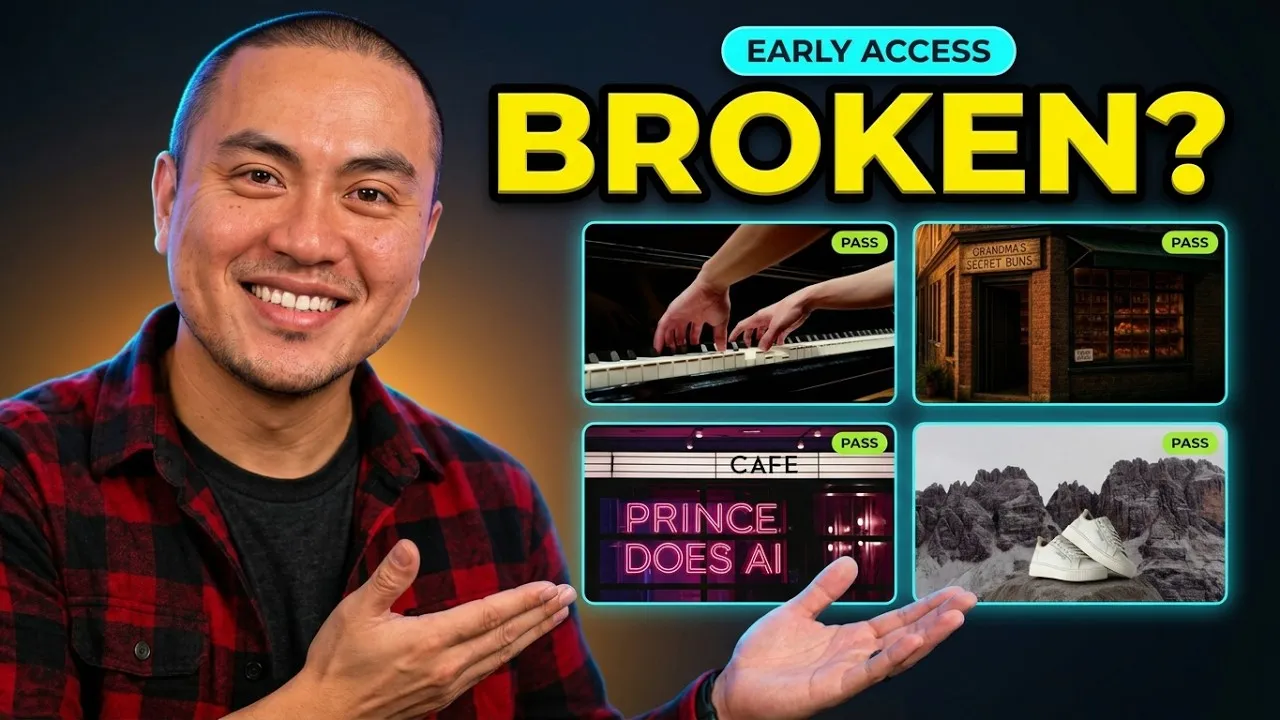
A 15-minute test in English made with early access to Krea 3: 18 images from text (hands, a clock, a chessboard, signs and menus) and 12 edits of real photos, each one judged on the first try.

Written by Miguel Ángel, with the help of an LLM to fact-check. In IT since 2002 (systems, engineering, web development and SEO), doing business with AI since February 2023, when ChatGPT could first be bought in Spain. I build, write and maintain this site myself.

Got a question? Ask me
About Krea AI, its plans or whether it fits what you need. I’m Miguel Ángel, and I’ll answer you myself, right here.